Price Breakdown & Availability
Here's how current offers compare across retailers.

You Might Also Like
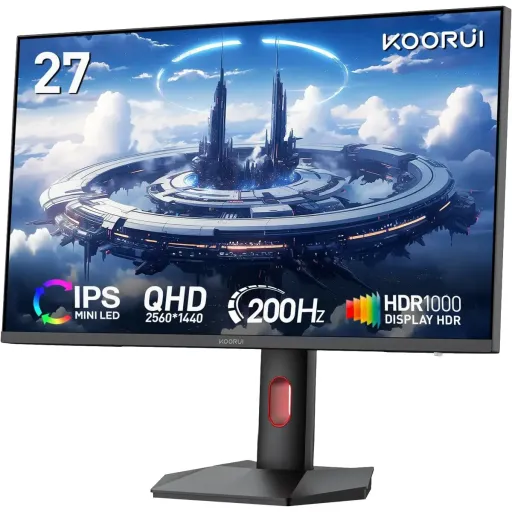
The KOORUI S2721PM is designed for people who want a crisp 27 inch QHD screen, rozana kaam bhi smooth aur games bhi sharp, without jumping to oversized panels. The Mini LED backlight paired with an IPS/QD‑Mini LED panel structure targets higher contrast and cleaner highlights, jahan dark scenes mein detail zyada clear rehti hai, so content feels more layered. The flat 16:9 format keeps everyday layouts familiar, is liye spreadsheets, browsing, aur editing timelines sab natural feel hotay hain, and the 27 inch size lands in a practical desk friendly zone. The overall feature stack leans toward high refresh gaming plus color rich media, matlab ek hi monitor se work to play transition asaani se ho jata hai, with fewer compromises. The model branding stays simple and easy to reference, so when you are shopping arms, cables, or mounts, S2721PM naming confusion kam hoti hai for accessories and compatibility checks
The 2560 x 1440 QHD resolution gives a noticeably sharper canvas than standard 1080p, jis se text edges clean lagtay hain, and UI elements look more refined. The 27 inch screen size keeps scaling comfortable for most desks, rozana emails aur documents par zooming ki zarurat kam hoti hai, while still feeling immersive for games and streaming. The 16:9 aspect ratio fits modern apps and video content naturally, so black bars and awkward cropping stay minimal in most workflows. The wide 178 degree viewing angles help maintain consistent readability from the side, jab aap chair adjust karte ho ya desk par thora lean back hota hai, and it keeps colors from shifting too aggressively. The flat panel geometry avoids the curve learning phase, is liye straight lines, grids, aur CAD style layouts zyada predictable lagtay hain, especially if you multitask with windows snapped across the screen. The QHD pixel density on 27 inches hits a widely liked balance, so games look detailed without forcing extreme GPU load the way 4K can in high refresh use
The IPS/QD‑Mini LED panel approach aims for vivid color with stable viewing behavior, jahan group viewing ya dual monitor angles par bhi image consistent rehti hai, which helps both play and productivity. The monitor is advertised with 10 bit color depth and 1.07 billion colors, so gradients in skies, shadows, and game fog look smoother with less banding in supported pipelines. The listed color coverage includes 99% sRGB, 99% Adobe RGB, and about 97% DCI‑P3, jis se web work aur wide‑gamut creative previews dono mein confidence barhta hai, especially when you are switching between standards. The global KOORUI specification page also highlights up to 98% DCI‑P3 and 100% sRGB, so the intent clearly leans toward a wide gamut experience rather than basic office only color. The quantum dot concept is commonly used to expand LCD color gamut, kyun ke QD layer backlight ko richer wavelengths mein convert karti hai, which helps colors stay saturated without looking neon. The practical payoff is easier color separation in games and cleaner tone steps in photos, so scenes feel more lifelike when your content actually contains wide gamut information
The KOORUI S2721PM is marketed with HDR 1000 support and local dimming, jis ka simple benefit yeh hota hai ke bright highlights punchy aur blacks comparatively deeper feel hotay hain, when HDR content is mastered well. The Mini LED backlight method is widely associated with improved contrast control, kyun ke smaller LEDs allow finer local dimming behavior, which can preserve shadow detail better than basic edge lit designs. The HDR1000 label is often discussed in the context of VESA DisplayHDR 1000 performance tiers, jahan 8% window peak brightness minimum 1000 cd/m2 hota hai, which explains why HDR1000 capable displays tend to look more “sparkly” in highlights. The HDR tiers are also commonly summarized by monitor testing resources, so buyers can understand that higher tiers generally require higher peak luminance and stronger HDR handling. The local dimming feature is especially helpful in night scenes, kyun ke dark backgrounds par bright UI elements zyada clean appear hotay hain, and the image gains depth without raising the whole screen brightness. The end result can feel more cinematic for HDR games and movies, while SDR still benefits from the panel’s strong color and QHD sharpness when you keep settings balanced
The 200Hz refresh rate is built for fast motion clarity, jis se camera pans aur quick flicks mein motion zyada smooth lagta hai, and it can make aiming feel more connected to your hand movement. The product positioning emphasizes a 1ms response tuning, so ghosting and trailing can be reduced when overdrive is configured sensibly for your game and FPS range. The KOORUI spec sheet references multiple overdrive levels (listed as 5/3/1 in the OSD overdrive modes), is liye aap apni preference ke hisaab se balance set kar sakte ho, between sharpness and overshoot. The gaming UI features like crosshair and timer tools are included in the on screen feature set, jo competitive sessions mein quick utility provide kartay hain, without requiring extra overlays. The QHD resolution keeps detail strong at this speed class, so you are not forced to choose between clarity and smoothness in the way some lower resolution esports panels can feel. The practical gaming benefit is steadier tracking in shooters and cleaner scrolling in strategy titles, aur rozana desktop par bhi cursor movement more “buttery” feel hota hai, especially on a capable GPU
The monitor lists Adaptive Sync plus FreeSync and G‑Sync compatibility features, jis ka direct faida yeh hota hai ke screen tearing aur random stutter kam feel hota hai, when your FPS fluctuates during heavy scenes. The KOORUI global product page specifically calls out AMD FreeSync Premium, so the intent is clearly aligned with high refresh VRR gaming rather than basic fixed refresh use. The FreeSync Premium tier has been discussed by tech outlets as requiring very high refresh capability on 1440p class panels, jahan
The connection layout includes DisplayPort 1.4 plus two HDMI 2.0 ports and an audio out jack, is liye PC, console, aur laptop switching asaani se ho jati hai, without living on adapters. The KOORUI US spec listing also mentions HDMI 2.0 and DP 1.4 in the included accessories, so setup can feel more plug and play when you unbox and start running QHD at high refresh. The DisplayPort option is especially popular for PC gaming, kyun ke DP historically supports gaming centric features like VRR broadly, and it tends to be the go to for higher refresh desktop configurations. The HDMI ports keep compatibility wide for everyday devices, so streaming boxes, secondary machines, or work laptops can join your setup without fuss. The audio out port is practical when you use external speakers or headphones, kyun ke monitor mein built in speakers listed nahi hain, and you can keep cable routing cleaner on a desk. The result is a monitor that behaves like a hub for multiple inputs, aur jab aap work aur gaming ke beech jump karte ho, the switching experience stays straightforward
The included ergonomic stand supports height adjustment and full positioning control, jis se posture better hota hai aur neck strain kam hota hai, when you spend long hours in front of the screen. The KOORUI US specs list a 110mm height lift stroke plus swivel ( 30 to 30), tilt ( 5 to 20), and pivot rotation ( 90 to 90), so portrait mode reading and vertical timelines become a practical daily option. The VESA mounting support is listed as 100 x 100mm, is liye monitor arms ke sath clean floating setup ban jata hai, and you can reclaim desk space for keyboard movement. The physical sizing is clearly stated for planning, so you can measure clearances around speakers, wall shelves, or dual monitor alignment before you commit. The monitor weight is listed around 6.25 kg with the stand, which helps you choose an arm with the right load rating and keep the setup stable. The practical comfort gain shows up in real use, kyun ke screen ko eye level par set karke you can game and work longer without constantly shifting your chair
The power design uses an external supply with a 19V/4.74A requirement, jis se desk ke neeche heat management aur cable planning aasan ho sakti hai, depending on how you route adapters. The KOORUI global listing notes normal operation power up to 90W and standby power up to 0.5W, so everyday idle behavior stays lightweight when the monitor is not actively pushing HDR highlights. The brightness specifications differ across official pages, with KOORUI US listing 350 cd/m2 while KOORUI’s global page lists 550 cd/m2, is liye practical expectation yeh rakhein ke SDR brightness environment aur mode par depend karega, and HDR performance will hinge on the HDR/local dimming implementation. The core buying logic stays clear for this model, kyun ke 27 inch QHD, Mini LED local dimming, HDR1000 support, and 200Hz motion are bundled into one focused package. The monitor fits best for high refresh QHD PC gamers and color aware users, jinko wide gamut chahiye but they still want IPS viewing stability for daily work. The final decision becomes simpler when you match your use case, so if you want smooth competitive motion plus HDR friendly contrast, S2721PM checks the right boxes without turning setup into a science project
Here's how current offers compare across retailers.
Review current prices and specifications side by side.
 Current
Koorui
KOORUI S2721PMRs. 81,899
Local price
Lowest current price5 offers
Updated 2 hours ago