Price Breakdown & Availability
Here's how current offers compare across retailers.
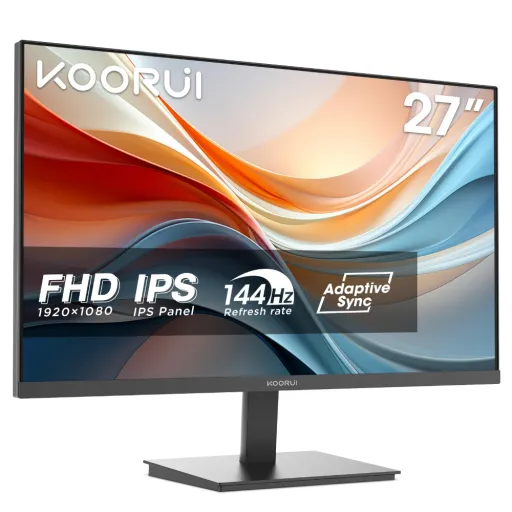

KOORUI E2711K


You Might Also Like
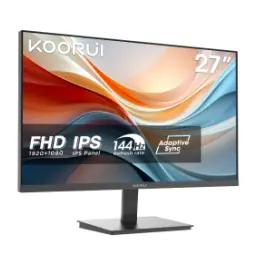
A 27 inch screen immediately feels more open, aur desktop par cheezein saaf nazar aati hain without constantly zooming. The KOORUI E2711K is built around a flat IPS panel, so the look stays modern and the viewing experience remains consistent across the screen. A Full HD 1920×1080 resolution gives you clean text for documents, while keeping setup simple for laptops, PCs, and older office systems. A 144Hz refresh rate makes motion feel noticeably smoother, jis se scrolling aur window dragging zyada refined lagti hai even in regular work. The three side ultra thin bezel design helps the screen feel larger, aur multi monitor setup mein gaps kam nazar aate hain for a cleaner desk vibe. The monitor positions itself as a business friendly display, lekin yeh daily entertainment aur casual gaming ke liye bhi naturally fit ho jata hai. A wide 178° viewing angle means you can lean back, side pe baith kar bhi colors shift kam hotay hain, which keeps collaboration easy. The overall spec balance is the main appeal, kyun ke itna size aur smoothness ek practical footprint mein mil jati hai for everyday users
An IPS panel is chosen for consistency, is liye aapko side angles par bhi picture stable milti hai during meetings or shared viewing. The KOORUI E2711K lists 99% sRGB coverage, which helps everyday colors look closer to what creators intend, especially for web graphics and product images. The 16.7M color support adds smoother gradients, toh skies, shadows, aur UI backgrounds banding ke baghair zyada clean feel hotay hain. A wide 178° viewing angle keeps contrast and color shifts under control, jisse screen ko thora tilt karke bhi readable aur pleasant rehne ka chance barhta hai. The result is a display that feels reliable for daily visuals, kyun ke emails se le kar YouTube tak sab kuch balanced aur comfortable lagta hai in normal lighting. Color coverage like 99% sRGB also helps when you do light editing, jaise thumbnails, Shopify images, ya social posts, because hues don’t look randomly off. The panel choice supports long term satisfaction, kyun ke aapko bar bar setting changes ki zarurat kam hoti hai across different content. Even if you are not a designer, yeh natural looking color profile daily use ko premium feel de deta hai without complexity
Full HD resolution keeps setup straightforward, aur 1920×1080 output almost every device se easily drive ho jata hai without compatibility drama. The 27 inch size gives you a wider canvas, jis se split screen kaam asaan hota hai for Word + browser, Excel + email, or lecture notes + slides. A 16:9 aspect ratio matches most video content, toh Netflix, courses, and recorded meetings black bars ke baghair familiar framing mein play hotay hain. The monitor’s typical brightness is listed at 250 cd/m², which supports everyday indoor viewing without having to crank settings aggressively. A flat screen shape keeps lines predictable, is liye spreadsheets aur timelines par straight edges natural feel karti hain. A three side ultra thin bezel helps you focus on content, aur desk par overall look thora more minimal aur clean lagta hai. The big advantage of this format is comfort, kyun ke rozana ke tasks mein aapko zyada scroll nahi karna parta and your layout stays organized. When you pair it with a laptop, yeh second screen workflow ko instantly upgrade kar deta hai without needing fancy calibration tools
A 144Hz refresh rate makes motion feel more continuous, jis se cursor movement aur page scrolling bilkul smooth nazar aati hai in daily use. The benefit shows up instantly in fast UI interactions, kyun ke windows drag karna, timelines scrub karna, aur long feeds scroll karna zyada refined feel deta hai. Adaptive Sync support helps reduce tearing, aur AMD FreeSync Premium listing indicates the monitor is aimed at stable, tear reduced gameplay across supported systems. The KOORUI store also highlights 144Hz with Adaptive Sync as a key feature, which is useful when your frame rate fluctuates in esports titles or casual shooters. A 27 inch panel at FHD keeps GPU load reasonable, toh mid range PCs and laptops can often hit higher frame rates without constantly dropping settings. Smooth refresh also improves perceived responsiveness, is liye aim tracking aur camera panning zyada controlled lagti hai rather than jittery. The monitor is positioned for business but includes gaming centric elements, jese gaming UI mentions and sync support, which makes it a versatile desk screen. When work ends, yeh same screen entertainment aur gaming ke liye instantly switch ho jata hai with the same smoothness. The biggest win is consistency, kyun ke 144Hz aapke routine ko bhi zyada premium feel de deta hai beyond just games
A 5ms GtG response time is listed for E2711K, jo casual gaming aur everyday motion ke liye ghosting ko practical level par control karta hai. The Back to the Office spec sheet also notes 5ms response time with GtG measurement, which helps set realistic expectations for motion transitions. The KOORUI US product specs mention response time as overdrive steps “OD (10,8,5),” so you can choose a mode that balances blur reduction and potential overshoot, asaani se. The practical approach is to start with a middle OD level, kyun ke harsh overdrive kabhi kabhi halos introduce kar sakta hai depending on content. A 144Hz panel benefits more when transitions keep up, is liye response time + refresh combination overall motion ko cleaner banata hai for fast camera pans. The IPS panel also maintains color stability during movement, toh fast scenes mein bhi picture washed out nahi lagti compared to older TN era displays. For office users, yeh same response behavior quick UI animations aur video playback ko smoother feel deta hai without looking smeary. When you treat overdrive as a control dial, aap apne taste ke mutabiq clarity set kar sakte ho and keep it comfortable for long sessions
Flicker free support matters for long workdays, kyun ke continuous screen time mein subtle flicker fatigue ko increase kar sakta hai for sensitive users. The KOORUI E2711K listings call out flicker free and low blue light technology, which helps you keep brightness usable without feeling harsh at night. The KOORUI parameter page specifically notes hardware low blue light, which is useful when you want comfort features without overly distorting colors. The Back to the Office spec sheet also shows Low Blue Light and Flicker free as present, making it easier to trust that these are core experience features. For students and remote workers, yeh combo late night reading, research tabs, aur coding sessions ko zyada manageable bana deta hai with less “screen thakan” feel. A 27 inch size lets you increase text size slightly, phir bhi plenty of space rehta hai, which can reduce squinting during long docs. The 250 cd/m² brightness rating supports normal indoor rooms, is liye you can avoid running max brightness all the time and stay comfortable. When eye comfort is built in, aap apni routine ko longer stretches tak sustain kar sakte ho without constantly taking forced breaks. The overall comfort tuning feels practical, kyun ke it targets daily usability rather than flashy gimmicks
The port selection stays refreshingly practical, kyun ke HDMI plus VGA dono mil kar new aur older devices ko connect karna easy bana dete hain. The KOORUI parameter sheet lists HDMI 1.4 + VGA + audio out, so you can plug in a PC, laptop, or even legacy office hardware without adapters everywhere. A headphone output helps late night use, jab aap office calls ya videos quietly consume karna chahte ho without disturbing others. The monitor supports 100×100 VESA mounting, which is a big win when you want a clean arm setup, desk space zyada free, and posture more adjustable. The included accessory list mentions an HDMI cable in the box, which reduces the “extra purchase” friction during setup. External power is listed at 12V/2.5A, so cable management can stay tidy if you route the adapter neatly under the desk. A tilt adjust range is listed as 5° to 15°, which helps you quickly fix viewing angle, bas thora sa adjust and you’re comfortable. When connectivity stays straightforward, aap zyada time kaam par dete ho and less time troubleshooting cables. The setup approach feels plug and play, kyun ke ports aur mounting options daily practicality ko prioritize karte hain
Power draw stays in a sensible range, kyun ke the parameter page lists normal operation at ≤30W and standby at ≤0.5W for everyday efficiency. The Back to the Office listing also shows typical power around 30W and standby 0.5W, which is helpful if your monitor runs many hours a day. An external power supply design can simplify heat management, aur desk ke neeche adapter mount karke setup aur clean lag sakta hai. The screen remains slim enough for normal desks, and the three side ultra thin bezel look keeps the front view minimal, jis se workspace visually zyada calm feel hota hai. A 27 inch flat panel also suits multi purpose rooms, kyun ke it doesn’t dominate the desk but still feels like a proper upgrade from 24 inch class screens. The official dimensions and weights are provided across listings, which helps you plan a monitor arm or shelf placement without guesswork. The VESA 100×100 support keeps future flexibility open, toh agar aap later ergonomic upgrade karna chaho, monitor replace karne ki zarurat nahi hoti. When a monitor is efficient and desk friendly, aapka daily setup stable rehta hai and it quietly supports your routine. The overall build philosophy feels practical, kyun ke it focuses on the stuff you notice every day: comfort, smoothness, and clean integration
A good all round monitor should avoid extremes, aur KOORUI E2711K ka balance isi liye strong lagta hai for mixed users. The 27 inch IPS panel gives you space and stable viewing angles, so presentations, homework, and family viewing sab mein consistent experience milti hai. The FHD 1920×1080 resolution keeps performance light on most systems, which helps older PCs feel more responsive while still looking sharp for daily text and video. The 144Hz refresh rate adds the “premium smooth” feeling, jis se aapko sirf gaming nahi, balkay normal scrolling aur navigation bhi zyada polished lagti hai. The 5ms GtG response time keeps motion reasonably clean, so esports titles and fast camera pans stay enjoyable without requiring heavy tweaking. The Adaptive Sync and AMD FreeSync Premium positioning helps reduce tearing, especially when frame rates fluctuate, which keeps gameplay calmer. The flicker free and low blue light features support long sessions, toh office work, study marathons, aur late night browsing all feel easier on the eyes. The HDMI + VGA + audio out ports keep it flexible, so it can slot into a modern laptop setup or a legacy office PC equally well. The VESA 100×100 mount option future proofs your ergonomics, kyun ke monitor arm par shift karna later simple ho jata hai. The overall result is a monitor that feels like a sensible upgrade, jis ka daily impact smoothness, comfort, and screen real estate mein clearly nazar aata hai without overcomplication
Here's how current offers compare across retailers.
Review current prices and specifications side by side.
Koorui
KOORUI E2411KRs. 30,799
Local price
Lowest current price2 offers
Updated 1 day ago