Price Breakdown & Availability
Here's how current offers compare across retailers.
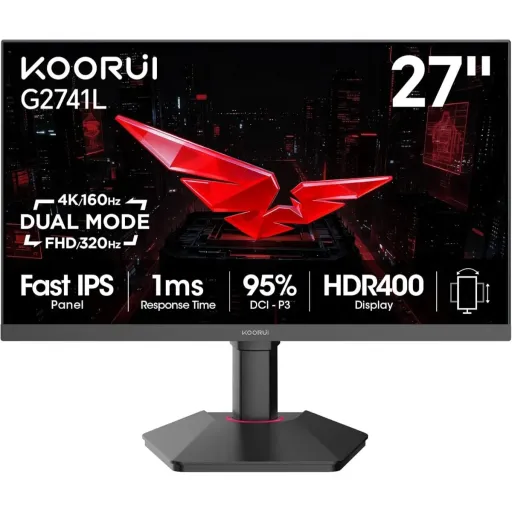

KOORUI G2741L


You Might Also Like
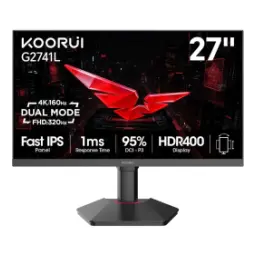
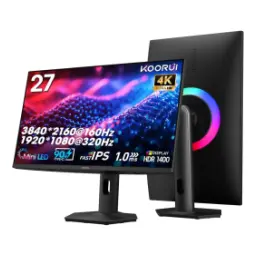
This KOORUI G2741L is built for mixed routines. Instead of choosing one compromise, aap apni priority change kar sakte ho within seconds. The headline advantage is a dual mode design for gamers. It lets you switch between 4K UHD at 160Hz and 1080p at 320Hz, so story games stay crisp and competitive titles stay lightning fast. The same 27 inch canvas keeps your desk clean and consistent. That size feels balanced for both immersion and daily productivity, rozana ka setup bilkul manageable rehta hai. The product positioning focuses on hybrid users who play and work. KOORUI also presents this model as a “One Monitor, Two Modes” solution, which fits the real world problem of wanting clarity and speed in one screen. The overall identity is simple and practical: keep one monitor, choose the mode that matches the moment. Yeh approach aapko time bhi bachata hai and it keeps your setup flexible
This 27 inch screen size hits a sweet spot. The panel delivers 3840x2160 4K UHD resolution for dense detail, so UI elements, maps, and textures look defined at normal desk distance. The big win is how 4K helps clarity driven use. When spreadsheets, coding windows, ya editing timelines open hotay hain, the extra pixels keep lines and text more readable. The 160Hz ceiling in 4K mode supports smoother scrolling. That means fast page movement feels more continuous, aur aankhon par strain comparatively kam hota hai. KOORUI also lists this model as a 27 inch UHD monitor. That reinforces the intent: a desktop friendly size with UHD sharpness rather than a TV like footprint. The 16:9 layout stays familiar for games and work. You get a clean, standard workspace without awkward scaling issues, which keeps daily usage predictable. Yeh monitor un logon ke liye meaningful hai who want crisp 4K but still care about speed
This dual mode feature changes how you shop. Instead of buying a separate high Hz esports screen, aap yahin par 1920x1080 Full HD mode select karke 320Hz refresh unlock kar lete ho. The practical benefit is match specific tuning. When you play tactical shooters or fast arena games, higher refresh helps motion updates feel tighter and tracking more confident, especially on flick heavy fights. The 4K 160Hz mode still covers cinematic games well. You get high fidelity for open world exploration, aur phir competitive time par speed mode par jump ho jata hai. KOORUI’s own listing frames it as UHD 160Hz or FHD 320Hz switching. That wording highlights the user control: clarity first or speed first, depending on what you load up. The experience also stays consistent across one panel. Your viewing angles, color character, and ergonomics remain familiar, so muscle memory and comfort don’t reset between modes. Yeh dual approach ek refined solution lagti hai for mixed gaming libraries
This monitor uses an IPS type panel for stability. IPS viewing behavior helps keep colors and brightness more consistent across the screen, jis se side angle par bhi image zyada stable lagti hai. The screen is also described as Fast IPS in launch communications. That matters because it implies a gaming tuned IPS approach, aiming for quicker pixel transitions while keeping IPS like color and angles. Color coverage claims add useful context for creators. KOORUI’s specs mention wide gamut coverage figures like 95% DCI P3 and full sRGB coverage depending on the listing, which supports richer game palettes and more confident casual content work. The benefit is not just “more color.” Skin tones can look less washed, aur game environments mein gradients smoother feel hotay hain, especially in modern HDR like art styles. The IPS base also suits long sessions. When you sit for study, work, or ranked grind, the viewing comfort and consistency help keep the experience dependable. Yeh everyday reliability hi is monitor ko versatile banati hai
This dual refresh stack targets real gameplay motion. At 160Hz in 4K mode, camera pans and fast scrolls appear more fluid than standard 60Hz, aur movement zyada natural lagta hai without that choppy feel. At 320Hz in FHD mode, the focus shifts to reaction. The rapid frame updates can make crosshair tracking feel more connected to hand movement, especially in high FPS esports titles where timing margins are tiny. The important part is how choice affects comfort. When you want cinematic sharpness, aap 4K par reh kar smoothness bhi maintain karte ho, and when you want peak speed you trade pixels for tempo. KOORUI also calls out the UHD 160Hz and FHD 320Hz pairing in its official specs. That confirms the design is intentional rather than an overclock rumor. High refresh works best with stable frame delivery. If your PC can push high FPS or you tune settings smartly, yeh monitor motion clarity ko genuinely upgrade kar deta hai. The result is a display that adapts to both chill and competitive sessions
This model is marketed around a 1ms response mode. KOORUI lists response time behavior with overdrive steps, including a 1ms OD/accelerated option, which is meant to reduce visible trailing in fast motion. The real benefit shows up during quick camera snaps. When enemies strafe or you swing the view, heat of the moment clarity feels cleaner, aur blur like smear kam nazar aata hai compared to slower panels. The monitor is also positioned with gaming features like Adaptive Sync. That helps smooth out tearing and stutter when FPS fluctuates, making motion feel more consistent during heavy fights. KOORUI’s official spec page reinforces the IPS panel type and the response time headline. That consistency matters because it ties performance messaging back to the published parameters. Overdrive always benefits from user tuning. If aapko halos ya overshoot feel ho, you can dial the setting to a balanced level and keep the picture clean. The goal stays the same: sharper motion cues without turning the screen into an artifact mess
This monitor includes an ergonomic stand for flexibility. KOORUI lists height adjustment, tilt range, and pivot rotation support, which helps you align the screen with eye level and reduce neck strain. The comfort benefit becomes obvious over time. When work calls, lectures, ya late night gaming stretch long, proper height and angle keep posture more neutral. VESA mounting support is also specified for cleaner setups. KOORUI mentions a 75x75mm VESA pattern on its G2741L spec listing, which suits monitor arms and wall mounts. A good stand also supports mode switching habits. When you jump from 4K immersion to 320Hz competitive play, a stable, adjustable base keeps your viewing position consistent. The design stays desk friendly at 27 inches. That means you can sit closer for esports focus or sit back for media, aur dono cases mein alignment easy rehti hai. Small ergonomic details often feel boring on day one. They become the reason a monitor feels “right” months later, which is exactly what daily users need
This monitor is designed for multi device setups. KOORUI’s spec sheet lists DisplayPort 1.4 alongside HDMI inputs and an audio out, which covers common PC and console connection patterns. The practical advantage is quick switching. When a laptop, desktop, ya console share the same desk, you can keep everything wired and change sources without unplug drama. KOORUI also notes a DP cable in the included accessories. That reduces setup friction for PC users who want high refresh support through DisplayPort. The dual mode story also depends on bandwidth. While port versions can vary by listing, the official product page consistently frames the monitor around its UHD 160Hz and FHD 320Hz capability, which suggests the input package is chosen to support those targets. Audio out remains useful for simple routing. If you use external speakers or a capture chain, yeh small port cable management ko easier bana deta hai. The result is a setup that feels modern without being complicated. You connect once, then you focus on your games and work instead of cable swapping
This monitor solves a common upgrade dilemma. Many people want 4K sharpness for visuals but also chase high refresh for esports, aur usually two different monitors consider karne padte hain. The G2741L’s dual mode concept directly targets that gap. It is presented as a switchable 4K 160Hz and 1080p 320Hz display, which can simplify both budgeting decisions and desk space planning. The user experience benefit is fewer compromises. You keep one familiar panel for daily life, then choose the mode that fits the game, bilkul practical approach for mixed libraries. KOORUI also backs the retail offer with support messaging. The product listing highlights a 30 day risk free trial and a 3 year warranty, which adds reassurance for a monitor meant to be a long term centerpiece. The closing takeaway stays straightforward. If you want an IPS 27 inch dual mode screen with 4K clarity and a 320Hz option, yeh model ek clean shortlist choice banta hai. The monitor’s identity remains consistent: one desk, one display, two distinct performance personalities
Here's how current offers compare across retailers.
Review current prices and specifications side by side.
Koorui
KOORUI G2721PRs. 54,400
Local price
Lowest current price8 offers
Updated 28 minutes ago