Price Breakdown & Availability
Here's how current offers compare across retailers.

Koorui S3241XO


You Might Also Like
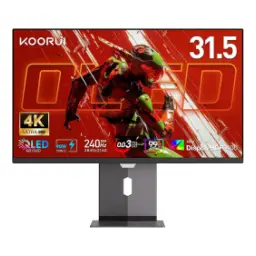
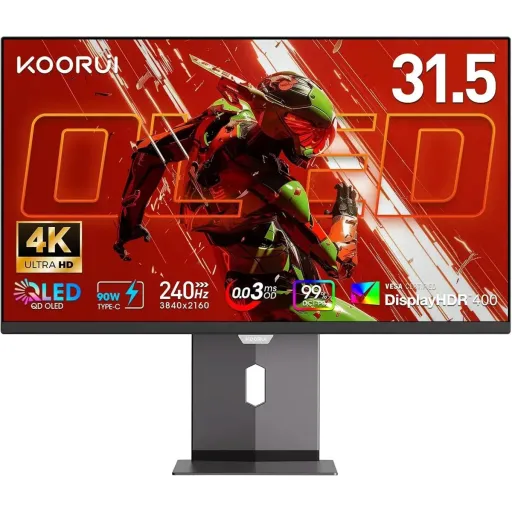
The KOORUI S3241XO is designed for flagship level desktop immersion, aap ko 32 inch class screen par game aur content dono ka real depth feel hota hai. The display size is listed as 31.5 inches in specs, lekin marketing mein 32 inch category bola jata hai for that bigger canvas vibe. The native 4K UHD resolution runs at 3840 x 2160, so text looks cleaner and scenes feel more layered at normal desk distance. The headline speed pairing is a 240Hz refresh rate plus 0.03ms GtG response time, jahan fast camera turns mein smear aur trailing ka chance bohat kam ho jata hai. The panel is commonly listed as QD OLED by retailers, aur isi wajah se colors aur contrast ka character OLED se bhi zyada premium feel kar sakta hai. The official product pages describe it as an OLED display, which still signals self emissive pixels and true black behavior for cinema style contrast. The overall identity fits players and creators who want one screen for everything, rozana browsing se le kar late night HDR scenes tak, without switching between “fast” and “sharp” monitors
This QD OLED class approach targets both realism and pop, kyun ke self lit pixels dark scenes ko properly ink black bana dete hain. Samsung Display describes QD OLED as combining self luminous pixels with Quantum Dots for strong color reproducibility, which is the core reason QD OLED looks so “alive” in HDR games. The same explanation highlights uniform luminance and color across viewing angles, so side se dekhne par bhi colors washed out nahin lagte in typical desk setups. A clear technical breakdown notes QD OLED uses blue OLED light with quantum dots to create color, aur filter losses kam hone se color purity better maintain hoti hai versus some other OLED structures. The S3241XO itself is listed as a QD OLED panel in multiple product listings, so buyers are shopping specifically for that QD OLED look and the premium contrast style. This matters in real play when shadows carry detail, aur bright UI elements clean edges ke saath pop karte hain without gray haze. The OLED style pixel control also helps movies feel cinematic, especially when the room lighting is controlled for night viewing. The net effect is a screen that can feel premium even on routine tasks, rozana ke use mein bhi contrast ka “depth” nazar aata hai
This 3840 x 2160 resolution gives true 4K workspace, jahan aap timelines, spreadsheets, ya maps ko asaani se wide view mein rakh sakte hain. KOORUI lists the panel as 4K UHD (3840x2160), so the sharpness advantage is part of the product’s core positioning for both gaming and editing. A 32 inch 4K screen typically lands around 138 PPI, which is a practical sweet spot for crisp text without forcing extreme scaling on Windows. That pixel density also helps games look more detailed at native resolution, aur distant objects zyada defined feel hotay hain in open world scenes. The screen is listed as anti glare in some specs, which can make daylight desk setups more manageable when reflections become annoying. This kind of clarity is especially useful for creators who do light grading, UI design, or photo selection, kyun ke edges aur fine texture properly separate nazar aati hai. The 16:9 4K canvas also stays friendly for consoles and streaming content, so letterboxing kam hoti hai and composition feels familiar. The bigger panel size helps readability at a normal viewing distance, rozana ke tasks mein squinting ki need kam hoti hai while keeping the image dense
This 240Hz refresh rate is built for speed, jahan fast FPS tracking aur quick strafes mein motion zyada readable rehta hai. KOORUI markets the monitor around 240Hz plus a 0.03ms response time, aiming to reduce motion blur and visible ghosting during competitive play. The same 240Hz and 0.03ms GtG figures are repeated in major listings, which helps buyers treat these as the defining performance specs. The user manual also states a 240Hz maximum refresh rate and a 0.03ms response time, so the speed story appears consistently across documentation. In real sessions this means mouse movement feels more immediate, aur camera turns mein objects ka outline zyada stable rehta hai. High refresh can also make simple desktop actions feel smoother, like timeline scrubbing, window dragging, and quick scrolling in long pages. The response behavior matters most in dark to bright transitions, jahan slower panels usually smear or create a trailing shadow. OLED type panels are known for very fast pixel transitions, which supports the “clean motion” goal behind a 240Hz esports class monitor. The practical win is confidence during fast moments, kyun ke visual information late nahin hoti and reactions stay more consistent
This monitor is positioned with AdaptiveSync for gameplay stability, jab FPS fluctuate kare to screen tearing wali distraction kam ho jati hai. KOORUI explicitly mentions AdaptiveSync as a feature to reduce tearing and stuttering, which is a meaningful quality of life benefit for mixed GPU loads. The KOORUI product info page lists AMD FreeSync Premium, so Radeon users can target VRR behavior that keeps motion smooth at varying frame rates. AMD explains FreeSync as reducing tearing and stuttering using variable refresh protocols, which matches the “tear free” benefit buyers expect from a high refresh monitor. Some retailer specs also label the monitor as FreeSync Premium and G Sync Compatible, which can help multi GPU households plan a simpler setup. NVIDIA’s own explanations highlight tearing as a common artifact when frame delivery and refresh do not align, aur isi issue ko VRR technologies practical level par address karte hain. This matters most in demanding 4K scenes where FPS can move around, so VRR keeps animation looking consistent without forcing heavy compromises. The end result is smoother aim tracking and steadier camera panning, gameplay mein woh “micro judder” wali tension kam hoti hai
This display is marketed with wide gamut color coverage, jahan DCI P3 range movies aur modern games ko richer tone mapping deta hai. KOORUI lists 99% DCI P3 alongside 4K UHD resolution, which is a strong signal for creators and HDR first gamers. Other official product info lists 98% DCI P3 and HDR True Black 400, so the intent stays consistent even when exact coverage numbers vary by listing. The user manual also mentions DCI P3 99% plus HDR True Black 400, which supports the “color first” positioning beyond gaming only use. The same documentation lists 1.07B display colors, which is commonly associated with 10 bit class output for smoother gradients in skies, shadows, and HDR rolls. VESA describes DisplayHDR True Black as optimized for emissive displays, with very low permissible black levels to preserve shadow detail and dynamic range. The DisplayHDR performance criteria tables show True Black tiers targeting extremely low black luminance, so dark scenes can stay detailed instead of turning into gray blocks. This combination helps content feel more dimensional, aur highlights zyada controlled nazar aate hain while keeping deep blacks clean
This monitor is built to connect across ecosystems, aap PC, console, aur laptop ko ek hi desk par easily manage kar sakte hain. The official listing highlights DisplayPort, HDMI, and USB Type C as connectivity options, which supports both gaming rigs and work devices without constant cable swapping. The user manual specifies 2x HDMI 2.1, 1x DisplayPort 1.4, and a Type C port rated at 90W, so single cable laptop charging plus video becomes a realistic desk workflow. Newegg listings also show the same port mix along with USB ports, which can be handy for a cleaner setup when peripherals need a nearby hub. The official page also positions the monitor for devices like PS5 and Xbox Series X, so HDMI 2.1 presence gives peace of mind for modern console connectivity. This flexibility matters when one screen handles work by day, aur raat ko high refresh gaming by simply switching inputs. The practical benefit is less clutter and fewer adapters, kaam aur play dono ke liye workflow smooth rehta hai. The result feels like a single “main display” solution, not a monitor that only shines in one narrow use case
This stand design supports a proper viewing posture, especially jab sessions long hon and neck strain starts creeping in. KOORUI lists tilt, pivot, swivel, and height adjustment as built in ergonomics, so the screen can be aligned with eye level rather than forcing you to adapt. Newegg also documents height adjustment plus tilt, swivel, and vertical rotation, which helps both gaming and productivity users dial in a comfortable angle. The 16:9 flat screen format stays familiar for daily apps, aur portrait pivot can make coding, reading, and chat workflows more natural on a tall layout. Adjustability also helps manage OLED viewing comfort, kyun ke slight angle changes can reduce perceived reflections depending on lighting. The ergonomic range becomes more valuable on a 31.5 inch panel, because micro misalignment feels bigger when the screen is large. This is the kind of feature you appreciate daily, rozana ke Zoom calls, editing sessions, aur late night gaming all benefit from a better posture. The monitor feels easier to “live with,” and that comfort adds up over weeks and months
This OLED class panel rewards smart day to day habits, kyun ke long static UI elements se shadowing ka risk generally increase hota hai. The user manual specifically advises avoiding static pictures for a long time and suggests using dynamic background images, which is a simple routine that supports long term panel health. The same manual mentions using OD acceleration when seeing shadow or ghosting, so motion tuning can be part of a quick troubleshooting flow. KOORUI’s product page frames the 240Hz and 0.03ms pairing as a way to reduce blur and improve fast gameplay readability, which pairs nicely with keeping VRR enabled and settings balanced. The official listing also references support coverage details, so buyers can check the stated monitor and accessory warranty terms before purchase for peace of mind. This is a monitor that works best when configured thoughtfully, aap HDR modes, refresh settings, aur cable choices ko apni devices ke hisaab se set karte ho. The overall value comes from doing everything on one premium screen, from crisp 4K productivity to smooth 240Hz gaming without constant compromises
Here's how current offers compare across retailers.
Review current prices and specifications side by side.
Koorui
KOORUI G2721PRs. 54,400
Local price
Lowest current price8 offers
Updated 2 hours ago