Price Breakdown & Availability
Here's how current offers compare across retailers.
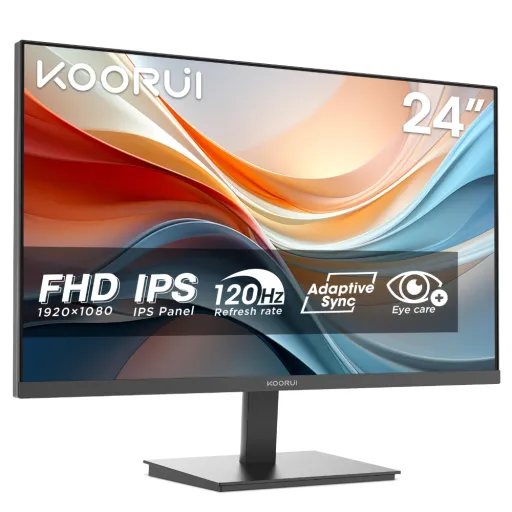

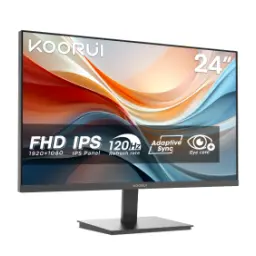
KOORUI E2411K


You Might Also Like
The KOORUI E2411K is built for a clean, fast desk upgrade with a 24 inch Full HD display and a 144Hz refresh rate. The IPS panel keeps colors steady and viewing angles wide, so office docs, YouTube, aur late night gaming sab ek jaisa comfortable lagta hai. The 1920×1080 (FHD) resolution stays easy on most PCs, is liye daily productivity smooth rehti hai aur casual gaming mein FPS headroom milta hai. The 144Hz ceiling makes scrolling and camera pans feel noticeably cleaner, bilkul woh “smooth desktop” wali feeling jo 60Hz se aati hi nahi. The monitor is described as FreeSync compatible for tear free motion when frames fluctuate, so fast scenes mein screen tearing kam hoti hai. The color coverage is listed at 99% sRGB (and 72% NTSC), which supports natural web colors and everyday media work without odd tint shifts. The screen surface is specified as matte, so reflections kam hoti hain and focus stays on content. The overall identity feels “work first, game ready,” jab aapko ek hi monitor se multiple roles handle karne hon
The IPS panel choice matters most in daily viewing, because it preserves color and contrast better off center than older LCD types. The KOORUI E2411K is listed as IPS and rated for 178° viewing angles, so team sharing, side seating, aur multi monitor corner glances mein colors wash out nahi hotay. The listed color gamut includes 99% sRGB coverage, which is especially practical for web content, product photos, aur everyday editing where sRGB is the common target. The 24 inch class size keeps UI elements comfortably readable, so spreadsheets and dashboards feel balanced without forcing heavy scaling. The flat screen design avoids edge distortion, is liye straight lines and text alignment clean feel deti hai. The monitor supports 16.7 million colors in its spec listing, which helps gradients look smoother in wallpapers and video scenes. The result is a display profile that feels stable rather than flashy, aur yahi stability long work sessions mein “comfortable eyes” wala difference banati hai. The practical benefit is simpler decision making, because colors look consistent from morning emails to evening matches
The 144Hz refresh rate is the core reason this monitor feels fast, because more refresh cycles reduce perceived choppiness in motion. The KOORUI E2411K specifically lists a 144Hz maximum refresh rate, so the panel can display high FPS output when your GPU delivers it. The high refresh experience helps beyond gaming too, asaani se notice hota hai jab aap long documents scroll karte hain ya timeline scrub karte hain. The monitor is described as FreeSync compatible, which means variable refresh can synchronize the display to the GPU frame rate to reduce tearing and stutter. The FreeSync goal is “no tearing and no stuttering,” so rapid camera swings in shooters and racing titles look more coherent. The manual guidance highlights enabling FreeSync for smoother output, which is helpful when FPS dips under load, bilkul wahi moment jab tearing sab se zyada annoy karti hai. The practical tuning tip is to pair 144Hz with sensible in game settings, so frame pacing stays stable rather than spiky. The overall motion profile lands in a competitive sweet spot, delivering responsiveness without forcing a high end GPU for basic smoothness
The KOORUI E2411K is advertised with a 1ms response time in its comparison specs, which signals a motion focused tuning target. The same spec page also lists overdrive response settings as OD (10, 7, 5), so motion tuning is handled through adjustable overdrive levels rather than a single fixed behavior. The overdrive concept works by pushing pixels harder to change faster, ghosting kam hoti hai and moving edges look more defined at high refresh. The trade off is that aggressive overdrive can create inverse ghosting (coronas/overshoot), is liye “fastest mode” hamesha best nahi hota. The response time definition itself is pixel transition speed, and slow transitions show up as smearing during fast motion. The best real world approach is to pick the OD level that keeps trails minimal without bright halos, so gameplay stays clean and text scrolling stays readable. The monitor also pairs overdrive with adaptive sync in its gaming features, which matters because VRR behavior can change the feel of motion tuning in different frame ranges. The benefit is confident motion control rather than a marketing number, bilkul practical use mein jo stable feel deta hai
The 1920×1080 Full HD resolution is a smart match for a 24 inch monitor, because it keeps UI sharp while staying easy to drive at high FPS. The KOORUI E2411K is explicitly listed as FHD 1080p, so native content looks clean without scaling surprises, rozana ke apps mein bilkul seedha output milta hai. The 16:9 aspect ratio aligns with most games, videos, and meeting platforms, so black bars and weird cropping tend to stay minimal. The combination of FHD and 144Hz often feels more responsive than pushing higher resolutions at lower refresh, especially when hardware is mid range and heat kam rakhna ho. The IPS base helps text and icons maintain consistent color across the panel, so long reading sessions and editing tasks feel less distracting. The monitor’s matte surface also supports clarity in brighter rooms, kyun ke glare ki wajah se contrast lose nahi hota. The net benefit is a resolution refresh balance that fits both productivity and esports style play without overcomplicating setup
The KOORUI E2411K includes flicker free and low blue light modes, which are designed to reduce strain during extended viewing. The product listing highlights eye comfort for long sessions, so office shifts, study blocks, aur late night browsing mein fatigue ka pressure comparatively kam feel hota hai. The manual also references built in eye care technologies, reinforcing that comfort features are part of the intended daily experience. The practical win is consistency: when brightness is tuned right and blue light is managed, users often stay focused longer without constantly adjusting posture or squinting. The IPS viewing stability also supports comfort, because colors shift less when you move slightly, is liye aapko “sweet spot” chase nahi karna padta. The screen surface is listed as matte, which helps reduce sharp reflections from lamps and windows. The best experience comes from pairing these modes with sane brightness settings, taake clarity bhi rahe aur harshness bhi na ho. The end result is a monitor that supports longer work and play blocks without feeling visually “aggressive.”
The KOORUI E2411K keeps connectivity straightforward with HDMI, VGA, and an audio out port for headphones or external speakers. The manual’s port diagram labels VGA, HDMI (1.4), and Audio Out, so old office PCs and newer laptops dono asaani se connect ho jatay hain. The product listing also repeats HDMI, VGA, and audio out as key connectivity points, which supports multi device switching without extra adapters. The monitor is described as FreeSync compatible, and the manual specifically notes enabling FreeSync when connected via HDMI for smoother output. The broader FreeSync ecosystem is designed to deliver tear free visuals over common connectors like HDMI and DisplayPort, so compatibility expectations stay realistic across many GPUs and consoles. The 144Hz refresh spec is also called out in the manual, making it clear that high refresh use is part of the intended setup rather than a hidden capability. The practical takeaway is quick installation with fewer “why isn’t it showing” moments, bilkul plug in, input select, and start using
The KOORUI E2411K supports a tilt range from 5° to 15°, which helps dial in a comfortable viewing angle on different desk heights. The monitor is listed with 100×100mm VESA support, so mounting on an arm becomes a clean path to better posture and more desk space. The EU spec page also confirms VESA 100×100mm and even notes M4×8mm screw sizing, which makes planning a mount setup easier, tension free installation ke liye. The product presentation emphasizes an ultra slim frame aesthetic, which helps in dual monitor layouts where bezels can feel visually heavy. The listed screen size is 23.8 inches in the detailed specs, which fits well on compact desks while still giving enough workspace for side by side windows. The monitor is specified as having no integrated speaker in the EU listing, so pairing it with audio out speakers or a headset is the cleanest route. The overall ergonomics story is simple: adjust the angle, mount if needed, aur long sessions mein neck aur shoulders ko unnecessary stress se bacha lo
The KOORUI E2411K fits buyers who want a balanced monitor for esports style responsiveness and everyday clarity, without jumping into heavier resolution demands. The combination of 144Hz refresh and IPS panel targets the two things most people actually feel daily, yani smooth motion and stable colors across viewing angles. The panel is listed with 1920×1080 resolution and a 24 inch size class, which keeps game performance accessible and workspace layout comfortable. The color coverage is stated as 99% sRGB (and 72% NTSC), making it a sensible pick for creators in training who want colors that look “right” on the web, bilkul everyday editing ke liye. The adaptive sync support is positioned around FreeSync compatibility, which helps reduce tearing and stutter when frame rates fluctuate in real play. The EU specs list a 1000:1 contrast ratio and 250 cd/㎡ brightness, which supports typical indoor use with a predictable, non dramatic image profile. The practical decision rule is simple: if smoothness, comfort features, aur a tidy setup matter more than ultra high resolution, this model lines up cleanly with those priorities
Here's how current offers compare across retailers.
Review current prices and specifications side by side.
Koorui
Koorui E2411H 24Rs. 29,790
Local price
Lowest current price4 offers
Updated 5 minutes ago