Price Breakdown & Availability
Here's how current offers compare across retailers.

You Might Also Like
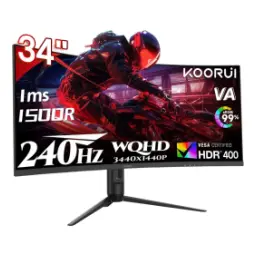
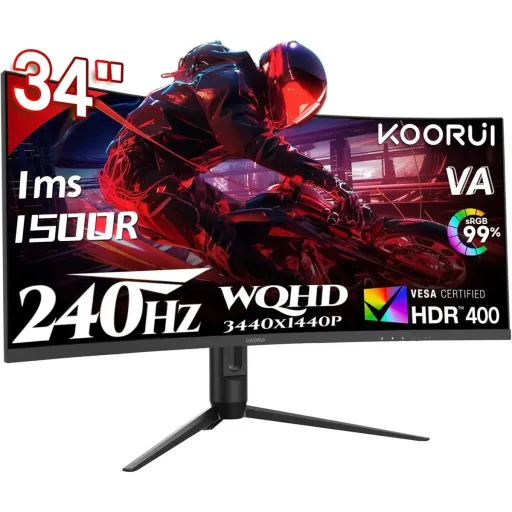
The KOORUI G3441XC is tuned for ultrawide speed, jahan aapko ek hi screen par zyada game world milta hai. The 34 inch curved panel creates a more immersive field of view, aur side vision mein bhi details clear rehti hain for competitive focus. The UWQHD 3440×1440 resolution keeps text and HUD elements crisp, is liye mini map aur enemy outlines zyada easy nazar aate hain. The 240Hz refresh rate is the headline advantage, kyun ke fast flicks aur tracking mein motion zyada natural feel hoti hai. The VA panel choice leans into deeper contrast, raat ke scenes aur darker rooms mein blacks zyada solid lagte hain. The 1ms MPRT rating targets motion clarity, jis se fast movement mein blur ka impression kam hota hai. The 1500R curvature keeps edges closer to your eyes, to aapki nazar ko corners par jump karna kam padta hai during long sessions. The spec blend feels purpose built for esports tempo, lekin rozana work aur entertainment ke liye bhi space bohat practical banti hai. The overall promise is simple and measurable, aapko wide canvas + high refresh ka real world payoff milta hai every time you sit down
The 21:9 ultrawide format expands your workspace instantly, jahan do apps side by side rakhna bilkul natural lagta hai. The 3440×1440 canvas gives you extra horizontal room, is se spreadsheets, timelines, aur browser tabs ek flow mein manage hotay hain. The 34 inch size keeps that width usable at normal desk distance, warna ultrawide sirf “wide” hota hai, practical nahi. The curved design helps the edges feel more reachable, to aankhon ka strain comparatively kam ho sakta hai in long editing or gaming sessions. The pixel density and layout make it great for multitasking, especially jab aap Discord, stream, aur game ko ek saath balance kar rahe hon. The monitor’s native aspect ratio supports cinematic content beautifully, aur black bars ki feel bhi often kam noticeable hoti hai than on a standard 16:9 panel. The wide layout also improves peripheral awareness in supported games, kyun ke minimap aur ability cooldowns zyada comfortably visible rehte hain. The result is fewer alt tabs and fewer compromises, aapka desk setup zyada clean aur workflow zyada fast ho jata hai. The UWQHD format hits a sweet spot for clarity, jahan 1440p level sharpness aur ultrawide immersion dono ek hi time par milte hain
The 240Hz refresh rate keeps motion updates frequent, is liye quick turns aur fast strafing mein image zyada stable lagti hai. The biggest win shows up in aim tracking, kyun ke aapko target movement ka path zyada clearly read hota hai while staying locked in. The high refresh also improves perceived responsiveness, jab aap mouse movement ko screen par almost immediate translate hota dekhte hain in high FPS titles. The ultrawide plus 240Hz combo feels especially strong in racing and shooters, jahan peripheral motion bohat tez hoti hai and smoothness matters. The VA panel can absolutely live in this refresh class, aur industry coverage bhi confirm karti hai ke top VA panels 240Hz tak ja sakte hain. The refresh headroom also helps in everyday scrolling, jahan web pages aur documents “smooth scrolling” wali feel dete hain without that choppy vibe. The key is pairing it with a capable GPU, warna aapko settings adjust karni padti hain taake FPS steady rahe. The monitor’s UWQHD resolution demands real rendering power, is liye balanced presets often best feel deti hain for consistent frame pacing. The experience stays clean when motion stays clear, aur yahi woh difference hai jo 240Hz ko sirf number nahi rehne deta. The end benefit is simple to feel, aapko fast gameplay mein clarity and control ka direct uplift milta hai
The 1ms MPRT spec signals a focus on motion clarity, jahan moving objects ka trail kam noticeable hota hai in practice. The MPRT method is commonly associated with blur reduction techniques, aur technical explainers batate hain ke MPRT ka aim motion blur aur ghosting ko reduce karna hota hai. The concept matters for gamers who hate smearing, kyun ke fast crosshair swings mein edges cleaner dikhte hain when motion handling is better. The “response time” label can be measured differently, is liye MPRT aur GtG terms ko samajhna helpful hota hai before expecting miracles. The perceived blur also ties to refresh behavior, aur broader monitor guides explain karti hain ke MPRT perceived motion blur ka ek practical lens hai. The good takeaway is comfort during long sessions, jab camera turns rapid hon aur aapko visual clarity maintain rakhni ho. The smarter way to use it is tuning your settings, kyun ke blur reduction modes kabhi kabhi brightness ya VRR behavior ko affect kar sakte hain on many displays. The monitor’s 240Hz cadence supports sharper motion perception, to aapko fast gameplay mein “smooth” feel zyada easily milti hai with the right FPS. The practical benefit shows in readability, jahan moving HUD text aur fast panning scenes zyada legible rehte hain. The end goal stays consistent across games, aapko motion ke waqt zyada control aur less visual fatigue milta hai
The VA panel brings stronger contrast into daily viewing, is liye dark scenes mein blacks zyada deep aur shadows zyada layered lagti hain. The monitor lists a 3000:1 static contrast ratio, jo typical IPS class ke muqable mein zyada depth provide karta hai in dim rooms. The contrast advantage is a known VA strength, aur panel comparisons note karti hain ke VA often 2000:1 to 3000:1 range hit kar leta hai for richer blacks. The benefit shows up in games with night lighting, jahan enemy silhouettes aur environment detail zyada distinguishable feel hoti hai without washing out. The curved 1500R profile supports immersion too, kyun ke peripheral areas bhi “attached” feel hoti hain instead of sitting far away. The fast refresh positioning makes this VA setup feel modern, warna high contrast alone aaj ke standards mein enough nahi hota for competitive play. The panel choice also suits binge watching, jahan letterbox content aur dark cinematography zyada premium feel deti hai with higher native contrast. The key is balanced calibration, kyun ke aap black equalization or gamma tuning se visibility ko apne taste ke mutabiq set kar sakte hain. The result is a “cleaner dark” look, jo rozana use mein immediately noticeable hota hai if you play darker titles or work late. The overall vibe stays refined, aapko punchy contrast + ultrawide space ka satisfying combo milta hai for both play and chill
The HDR story starts with DisplayHDR 400 support, jahan highlights ko thoda zyada punch aur depth mil sakti hai in compatible content. The monitor also lists HDR 400 directly in its specs, to aapko HDR playback aur HDR capable games mein better contrast mapping ka chance milta hai. The DisplayHDR 400 tier is a VESA certification level, aur VESA criteria summaries show minimum luminance targets that define the “400” class. The real world difference looks best in bright UI elements, jahan sun glints, neon signs, aur specular highlights zyada “alive” feel karte hain without crushing everything else. The color coverage is also positioned for vibrancy, kyun ke the panel is listed at 90% DCI P3 for richer gamut content. The same listing also highlights wide gamut alongside HDR, to movie scenes aur stylized games mein colors zyada saturated yet controlled lag sakte hain. The best approach is using HDR selectively, kyun ke SDR desktop work sometimes better looks with your preferred brightness and tone curve. The ultrawide resolution helps HDR movies feel cinematic, jahan wide shots aur landscape scenes zyada natural composition mein nazar aate hain. The key benefit is not “instant OLED,” balkay a more dynamic look that adds excitement when the content supports it. The overall experience stays balanced, aapko color + contrast ka uplift milta hai while keeping UWQHD sharpness intact
The monitor supports AMD FreeSync Premium for tear free gameplay, jahan frame delivery zyada smooth feel hoti hai when FPS fluctuates. The FreeSync Premium class is designed around higher performance displays, aur requirement updates discuss karti hain ke ultrawide 3440px width panels qualify at 120Hz+ for Premium tier context. The practical win is calmer motion during heavy scenes, kyun ke tearing lines aur stutter ka tension kam ho jata hai in many setups. The 240Hz ceiling gives you extra headroom, to aap high FPS par bhi smoothness maintain kar sakte hain when your system can push it. The product listing also mentions gaming friendly utilities, jahan AI crosshair aur AI bluelight jaisi features daily use ko aasan bana sakti hain. The same page highlights PIP/PBP support for productivity, to aap ek hi screen par do sources ko side by side manage kar sakte hain without extra monitor clutter. The ultrawide format helps streaming workflows too, kyun ke chat, OBS panels, aur game view ek comfortable layout mein fit ho jate hain. The best feeling comes with good frame pacing, is liye in game settings aur driver sync options ko sensible rakhna smart rehta hai. The overall experience becomes more predictable, jahan aap “lag nahi” wali feel chase karte hue time waste nahi karte. The final payoff is confidence in motion, jo competitive games mein reaction timing ko support karta hai
The connection suite keeps things straightforward for gaming rigs, jahan DisplayPort 1.4 aur HDMI options modern PCs aur consoles ke saath easily match ho jate hain. The KOORUI spec page lists two HDMI 2.0 ports and one DisplayPort 1.4, to aap multiple devices ko plug in rakh kar quick switching kar sakte hain. The VESA 75×75 mount support enables clean arm setups, jahan desk space free hoti hai aur posture maintain karna easy ho jata hai. The adjustable stand adds daily comfort, kyun ke height tuning se eye line naturally center pe set ho sakti hai without books or risers. The curved 1500R profile needs proper distance, is liye arm ya stand alignment se aap edges ko evenly “wrap” feel karwa sakte hain. The included positioning flexibility helps multitaskers, kyun ke ultrawide par correct height and tilt se neck turning ka load reduce ho sakta hai. The port layout also supports tidy cable runs, jahan aap DP for high refresh aur HDMI for secondary devices use kar sakte hain as needed. The setup becomes especially clean with a monitor arm, kyun ke 34 inch width ko floating look milta hai and your desk feels bigger. The everyday outcome is less friction, jahan aap kaam, play, aur switching ko asaani se manage karte hain. The whole station feels more intentional, aur yahi choti choti ergonomic wins long sessions ko comfortable banati hain
The KOORUI G3441XC targets gamers who want speed plus space, jahan 240Hz smoothness aur ultrawide immersion ek saath milti hai. The UWQHD 3440×1440 resolution is a practical middle ground, kyun ke itni clarity milti hai without the extreme GPU load of 4K ultrawide. The 34 inch curved form feels natural for racing and shooters, aur 1500R curvature peripheral awareness ko zyada “connected” banati hai at a typical desk distance. The VA panel and 3000:1 static contrast add depth, is liye movies aur dark maps mein blacks washed out nahi lagte. The 1ms MPRT focus supports clearer motion perception, aur MPRT explainers batate hain ke yeh approach moving blur ko reduce karne ke liye use hota hai. The DisplayHDR 400 and wide gamut positioning add extra pop, jahan compatible HDR content mein highlights zyada defined feel karte hain. The FreeSync Premium support reduces tearing pressure, to aapko variable FPS scenes mein bhi gameplay zyada composed milta hai. The monitor also fits hybrid routines nicely, kyun ke PIP/PBP support mentioned in listings helps work and play coexist on one screen. The smartest buyer profile is simple, aapko ultrawide productivity chahiye plus high refresh gaming ka real advantage chahiye. The final takeaway stays practical, yeh display speed, contrast, aur space ko ek competitive package mein combine karta hai for everyday performance
Here's how current offers compare across retailers.
Review current prices and specifications side by side.
Koorui
KOORUI G2721PRs. 54,400
Local price
Lowest current price8 offers
Updated 1 day ago