Price Breakdown & Availability
Here's how current offers compare across retailers.

You Might Also Like
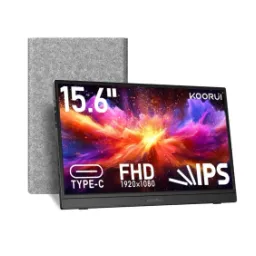
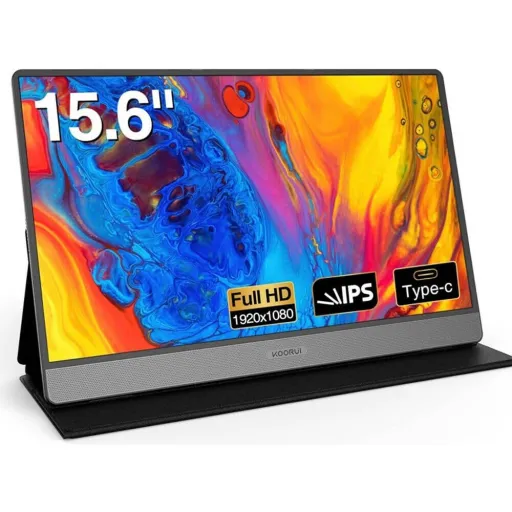
A portable second screen instantly changes how you work. The KOORUI E1511A uses a 15.6 inch IPS LED panel at 1920 x 1080, so spreadsheets, slides, and streaming look sharp without carrying a full desktop display. Everyday flexibility matters most when you are moving around, aur yeh size bag mein asaani se fit ho jata hai for remote work, classes, or hotel setups. The 16:9 aspect ratio keeps apps and videos natural. A consistent 60 Hz refresh rate feels familiar for office tasks, browsing, and casual entertainment. Built in dual speakers add convenience for quick calls, short videos, and basic sound needs, bilkul jab aap headphones carry nahi karna chahte. The included protective flip cover doubles as a stand, so you can set it up fast without hunting for extra accessories. Simple plug and go positioning makes the monitor feel like a daily tool, na ke ek occasional gadget
Full HD resolution makes small text easier to read. With 1920 x 1080 on a 15.6 inch screen, emails and documents stay crisp, aur zoom bar bar karne ki zarurat kam ho jati hai in daily work. IPS viewing helps when you shift posture or share the screen. The E1511A is listed with a 178 degree viewing angle, which keeps colors and contrast more consistent from the sides. Balanced color support matters for media and creative previews. KOORUI lists 16.7 million colors, so gradients and UI elements look smoother for normal productivity use. Contrast also shapes perceived sharpness in real rooms. The monitor manual notes a 1000:1 contrast ratio, which helps separate dark and light tones when you are working at night. A typical brightness figure around 200 cd/m2 is commonly listed for this model, meaning it suits indoor desks and cafe work better than harsh outdoor sun. The overall result feels more controlled, colors natural rehte hain, and long reading sessions stay comfortable in normal lighting
A stable refresh rate keeps daily motion predictable. The KOORUI E1511A is specified at 60 Hz, which matches most laptops and prevents odd judder in typical desktop use. Responsive behavior matters when you multitask fast. The manual lists a 5 ms response time, helping cursor movement and scrolling feel cleaner, rozana ke use mein yeh cheez noticeable hoti hai. The IPS panel choice supports a calmer image while you work. Wide angle stability means you can tilt the screen and still keep the picture usable, without harsh color shifting. Smoothness also depends on your device output settings. The manual even suggests setting refresh to 60 Hz if you see flicker, so everything stays aligned with the monitor’s native timing. Casual gaming and console sessions feel straightforward at 1080p. KOORUI states compatibility with consoles like PS4/PS5 and Nintendo Switch, so you can treat it as a small travel display when you want a bigger view. This is not a high Hz esports panel, lekin everyday smooth scrolling, videos, and office movement stay stable and easy on the eyes
A portable monitor is only as useful as its ports. The E1511A manual lists two full function USB C ports plus an HDMI input, giving you flexible ways to connect laptops, tablets, and more. Single cable USB C setups feel the cleanest. When your device supports DisplayPort Alt Mode or Thunderbolt, one USB C cable can carry video, audio, and power, aur desk par cables ka mess kam ho jata hai. HDMI remains important for older laptops and consoles. The manual notes that HDMI use requires external power via USB C, so you can plan your setup with a wall adapter, laptop USB A, or power bank. Smartphone support can be a real bonus on trips. KOORUI describes mirroring or extending compatible phones using a full function USB C connection, which makes maps, media, and mobile work far more usable. The packaging is built around real world usage. The manual lists a USB C to USB C cable, a mini HDMI to HDMI cable, and a USB A to USB C power cable, so basic connectivity is covered out of the box. This connectivity approach keeps switching devices simple, bas plug karo, input select karo, and you are ready
Built in audio removes friction in quick setups. The KOORUI E1511A includes dual 1W speakers, which are convenient for video calls, tutorials, or background playback, jab aap light use kar rahe hon. A headphone option matters for privacy and better clarity. The manual confirms a 3.5mm audio jack, so you can plug in headphones or external speakers when you need fuller sound. HDMI and USB C both support audio routing. KOORUI notes audio output behavior through the monitor, and it also explains that plugging headphones into the jack routes audio there. Speaker convenience is especially useful while traveling. Many product listings highlight dual stereo speakers for entertainment and calls, which fits the idea of a lightweight second screen for remote work. Volume control stays practical on the road. The monitor’s OSD controls include navigation buttons that let you adjust settings without hunting through your laptop menus, asaani se quick tweaks ho jate hain. The result is a more complete mini workstation, where sound and screen both show up reliably
Long sessions feel better when the screen is tuned. The E1511A manual mentions an Eye Protection Mode and Flicker Free technology, which helps reduce strain during extended reading, coding, or study blocks. Better comfort translates into better focus. When you are doing rozana ka kaam like writing, browsing, or spreadsheets, small comfort gains keep fatigue lower across the day. On screen controls should be simple and reachable. KOORUI describes an OSD menu where you can adjust brightness, contrast, color temperature, and input source using the built in buttons. Quick input switching matters for multi device users. You can move from a laptop to a console and back, aur settings ko bar bar reset karne ki tension kam ho jati hai with direct OSD access. Flicker guidance can prevent common setup issues. The manual suggests ensuring sufficient power and matching refresh settings, which helps keep the image stable in portable power situations. This is the kind of practical comfort stack that supports real use, not just showroom viewing
Portability depends on real measurements, not vibes. The E1511A manual lists dimensions around 353.8 mm by 221.81 mm by 11 mm, which keeps it slim enough for most laptop bags. Light weight makes daily carry realistic. KOORUI lists the weight around 0.7 kg (1.54 lbs), so it feels manageable for commutes, travel, and campus days, bilkul jab aap already charger aur laptop carry kar rahe hon. A cover that becomes a stand saves space. The included protective flip cover doubles as a stand, allowing fast setup without a separate kickstand accessory. Thin design also keeps desk layouts cleaner. KOORUI describes an ultra thin profile made for travel friendly use, and that design intent matters when you work from cafés or shared spaces. Cable kits reduce last minute shopping. The package list includes USB C and mini HDMI cables plus a USB A to USB C power cable, so you can start using it right away. This physical design gives you a reliable second screen that stays easy to pack, set, and store
A second display improves workflow more than you expect. KOORUI shows the E1511A being used for extending displays, and most operating systems detect it so you can choose Extend or Duplicate for real multitasking. Remote work becomes smoother with extra screen space. You can keep a meeting on one screen and notes on the other, aur alt tab ki frustration noticeable kam ho jati hai in busy days. Cross device compatibility keeps the monitor relevant longer. KOORUI lists support for laptops, PCs, Mac, phones, Xbox, PlayStation (PS4/PS5), and Nintendo Switch, so the same screen can serve work and play. Plug and play behavior matters for non technical users. Retail listings highlight no drivers needed and broad compatibility across Windows, macOS, Android, and iOS, which fits quick setups for travel or presentations. The 1080p IPS panel keeps text readable at normal scaling. This makes it practical for documents, dashboards, and learning content without forcing huge UI elements. Overall productivity feels more controlled, kaam ki flow better rehti hai, and your setup stays lightweight
Choosing a portable monitor is about daily fit. The KOORUI E1511A combines a 15.6 inch IPS display with 1920 x 1080 resolution, which suits students, remote workers, and travelers needing clarity without carrying a heavy monitor. A reliable baseline refresh rate keeps it universally compatible. The 60 Hz spec stays friendly with laptops, consoles, and phones, aur aapko odd compatibility issues kam milte hain in normal scenarios. Built in speakers cover the basics in minimalist setups. KOORUI lists dual 1W speakers plus a 3.5mm audio jack, giving you both convenience and an upgrade path when you want better sound. Modern ports reduce the cable headache. Two full function USB C ports and an HDMI input let you connect newer devices with one cable, while still supporting older gear with HDMI and separate power. Comfort features make it easier to use longer. Eye Protection Mode and Flicker Free support long sessions for study, spreadsheets, and streaming without feeling harsh. If your goal is a clean travel workstation, yeh monitor ek practical choice banta hai because it focuses on the essentials and keeps setup simple
Here's how current offers compare across retailers.
Review current prices and specifications side by side.
 Current
Koorui
KOORUI E1511A 15.6"Rs. 33,000
Local price
Lowest current price1 offer
Updated 1 day ago