


Price Breakdown & Availability
Here's how current offers compare across retailers.
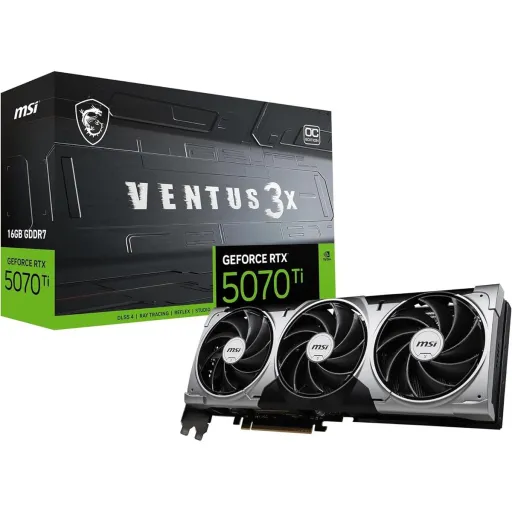
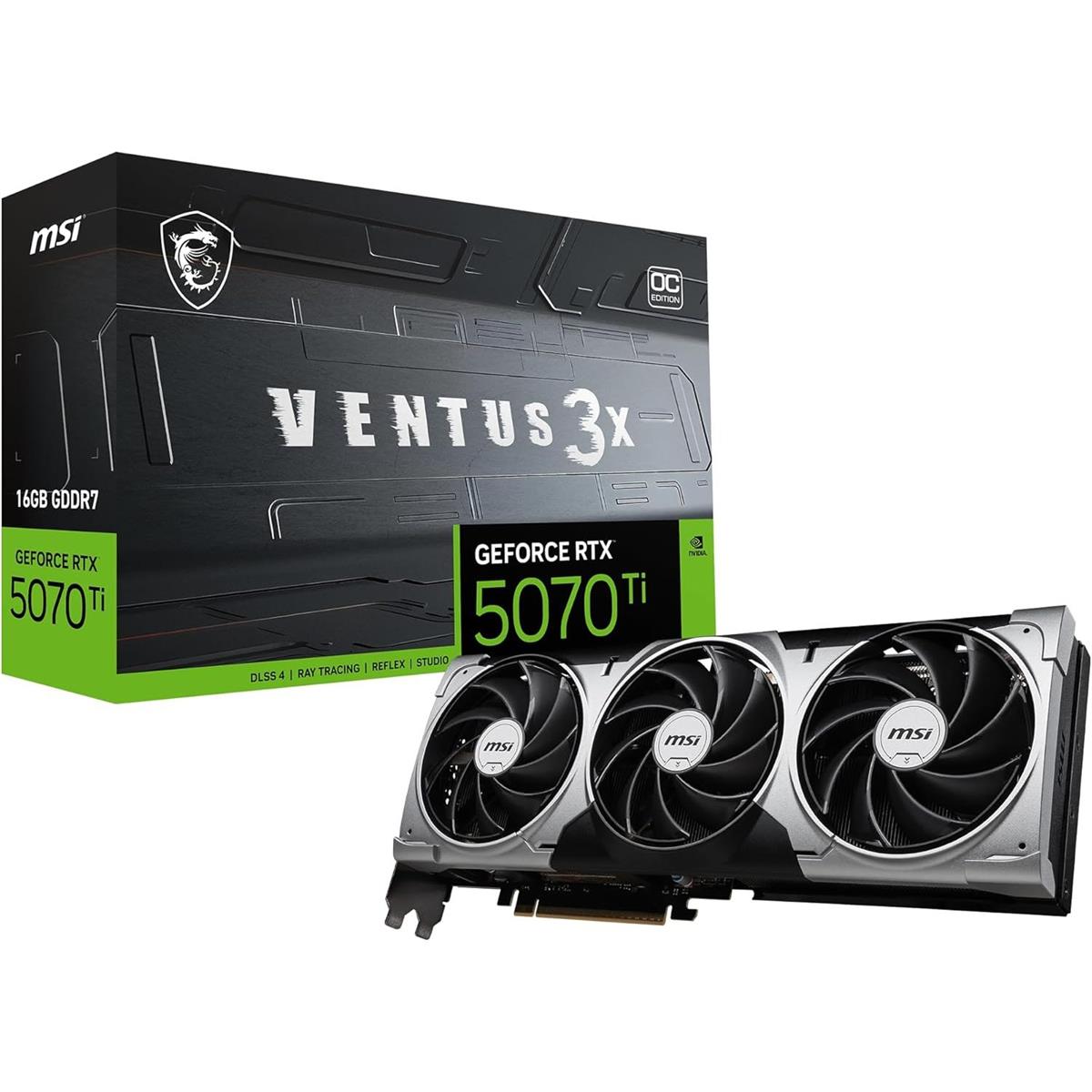
MSI GeForce RTX 5070 Ti Ventus 3X OC


Current Price
-
Lowest (30d)
-
Highest (30d)
-
30-Day Change
-
Showing daily prices
You Might Also Like
The MSI GeForce RTX 5070 Ti Ventus 3X OC is designed for builders who want modern RTX features with a clean, no nonsense cooler, aur daily use mein stable feel chahiye. This GPU sits on NVIDIA’s GeForce RTX 5070 Ti platform with 8,960 CUDA cores, so high FPS gaming and creator timelines don’t feel bottlenecked in the “mid to high” tier. The Ventus 3X OC edition adds an MSI tuned clock profile, including an “Extreme Performance” mode up to 2497 MHz through MSI Center alongside a listed boost clock of 2482 MHz, which is helpful when you want extra headroom without manual tinkering. The core experience focuses on smooth delivery rather than flashy extras, is liye gameplay consistent rehta hai even when sessions run long. The card is also positioned as a Blackwell + DLSS 4 ready choice, so newer AI driven rendering options are part of the everyday toolkit rather than a future promise. The result is a GPU identity that fits high refresh 1440p goals, occasional 4K pushes, and creator acceleration without feeling overcomplicated. This makes the Ventus 3X OC appealing when you want “install, optimize, and play,” bas settings ke sath asaani se
The display connectivity on this card is built for current and upcoming panels, so your upgrade feels future aware from day one. The Ventus 3X OC provides three DisplayPort 2.1b outputs plus one HDMI 2.1b port, which makes multi monitor layouts straightforward for gaming, streaming, and productivity. This setup supports up to four displays and a maximum digital resolution of 7680×4320, so you can drive a sharp 4K workspace or a high resolution creator monitor without awkward adapters. The HDMI 2.1b spec note on MSI’s sheet highlights up to 4K 480Hz or 8K 120Hz with DSC plus VRR and HDR, which matters when you’re pairing with premium TVs or extreme refresh monitors. The DisplayPort 2.1b angle is also about cable practicality, kyun ke higher bandwidth links can get picky with length and quality. VESA’s update work around DisplayPort 2.1b and DP80LL active cables is meant to improve UHBR20 connections over longer runs, which is relevant for desk setups where cables need reach and reliability. In real usage, these ports let you keep a clean “one GPU, many screens” workflow while maintaining crisp motion and reduced clutter. This is the kind of I/O that stays useful as display tech keeps moving forward, bilkul without forcing a premature platform swap
The core performance story starts with scale, and 8,960 CUDA cores gives the RTX 5070 Ti the throughput to keep modern engines fed at high settings. This GPU is built around NVIDIA’s Blackwell generation for the RTX 50 series, so you’re not only buying raw frames but also the platform features that shape frame pacing and image quality. The PCIe 5.0 x16 interface helps keep the card aligned with newer motherboards and fast storage heavy systems, especially when the whole build is tuned for low latency responsiveness. The Ventus 3X OC variant keeps things practical by focusing on stable boost behavior rather than chasing extreme factory clocks, is liye long sessions mein “random dips” kam feel hotay. MSI’s own spec lists the OC profile up to 2497 MHz in MSI Center with a 2482 MHz boost rating, giving a clear baseline for what this edition targets. Independent testing has also highlighted that MSI’s Ventus 3X OC edition can deliver playable performance at both 1440p and 4K with settings pushed high, which matches how many buyers actually use this tier. In everyday gaming, this translates to smoother traversal, more consistent frametimes, aur aim feel better when the GPU isn’t bouncing. The net effect is a GPU that feels “confident” at 1440p high refresh while still being capable when you occasionally push heavier scenes. This is the kind of performance that makes upgrades feel noticeable without turning the PC into a tuning project
The most meaningful upgrade on RTX 50 series is how AI is used to multiply performance, and DLSS 4 is the headline feature for that shift. NVIDIA describes DLSS Multi Frame Generation as generating up to three additional frames per rendered frame on GeForce RTX 50 series GPUs, which is a practical lever for higher FPS when you want to keep visuals premium. NVIDIA’s GeForce news also frames DLSS 4 with Multi Frame Generation as part of a broader suite, with claims of up to 8X performance over traditional brute force rendering in supported scenarios, which matters when ray tracing becomes heavy. This approach can make demanding scenes feel less “stuck,” especially when you prefer quality presets and want motion to stay smooth, bilkul without dropping textures. DLSS is not only about speed, because the same official page emphasizes a new transformer AI model powering Ray Reconstruction, Super Resolution, and DLAA to improve stability and detail in motion. When a game supports these features well, the benefit is clearer pans, reduced shimmer, and smoother camera movement, jo streaming aur cinematic titles dono mein noticeable hota hai. The RTX 5070 Ti family page also positions the 5070 Ti with fifth generation Tensor Cores and fourth generation ray tracing cores, which is part of why these AI workflows are a native strength for the card class. In practical terms, DLSS 4 helps you hold a premium look while keeping frame delivery consistent, especially on high refresh monitors. This is the kind of “smart performance” that reduces the need for endless setting compromises, rozana ke gaming routine mein
The memory configuration is a major reason this card feels comfortable in modern titles, because VRAM is where high resolution textures and ray traced data can pile up fast. The MSI Ventus 3X OC is equipped with 16GB of GDDR7 memory on a 256 bit interface, which is a balanced spec for high settings at 1440p and selective 4K play. TechPowerUp’s database also lists 16GB GDDR7, a 256 bit bus, and 28 Gbps effective memory speed for the RTX 5070 Ti, which indicates the platform level memory design this card is built around. That 28 Gbps memory speed contributes to high bandwidth, and TechPowerUp lists 896.0 GB/s bandwidth for the RTX 5070 Ti, which helps when you’re pushing texture heavy scenes or high resolution assets. In everyday terms, that means fewer moments where the game feels like it’s “waiting” on data, aur open world streaming smooth rehta hai. The extra VRAM capacity also supports creator workloads where large project files, cached frames, and GPU accelerated effects need room to breathe, so timeline scrubbing feels less constrained. MSI also lists the card as supporting DirectX 12 Ultimate and OpenGL 4.6, which aligns with modern game engines and creative tools that lean on current APIs. This memory setup doesn’t just look good on paper; it supports the “high settings, less compromise” goal that most buyers want from an RTX 5070 Ti class GPU. The overall experience is smoother when you keep textures crisp and still maintain stable motion, asaani se
Cooling is where the Ventus identity matters, because sustained clocks depend on keeping heat predictable rather than merely surviving short bursts. The Ventus 3X OC uses a triple fan layout, and MSI describes features like TORX Fan 5.0, a nickel plated copper baseplate, Core Pipes, a metal backplate with airflow vents, and Zero Frozr fan stop behavior for quieter low load operation. TORX Fan 5.0 is described by MSI as using ring arcs linking sets of tilted blades to enhance airflow and pressure, which helps the heatsink do its job without needing aggressive noise to compensate. The copper baseplate and heatpipe approach is also consistent with how reviewers describe MSI’s Ventus 3X OC cooling method, which matters because it’s a proven way to move heat away from the GPU and memory modules. This kind of thermal design supports long gaming nights where temperatures can creep up slowly, aur heat kam rehne se boost behavior stable rehta hai. Zero Frozr style fan stop is especially useful when you’re browsing or working, because the system can stay quiet without sacrificing readiness for a quick game launch. The metal backplate and venting also help exhaust heat instead of trapping it, which is a practical detail in compact cases. The overall cooling package is built for consistent performance, not flashy numbers, and that makes day to day use feel more refined. When your GPU stays cooler, your whole build stays calmer, bilkul
A strong upgrade feels easy when the install path is clear, and this card’s platform requirements are straightforward if you plan them once. The Ventus 3X OC uses a PCI Express Gen 5 interface, so it lines up cleanly with newer boards and keeps bandwidth overhead out of the conversation. MSI lists a 300W power consumption for this model along with a single 16 pin power connector, which is the key detail for cable planning and PSU selection. MSI also recommends a 750W power supply and notes an ATX 3.1 PSU recommendation for the 16 pin connection, which helps reduce adapter clutter and keeps power delivery tidy, especially in clean builds. TechPowerUp lists the RTX 5070 Ti board power at 300 W with a 16 pin connector and PCIe 5.0 x16 bus interface, which corroborates the broader platform characteristics behind this GPU class. Physical fit also matters, and MSI lists the card size as 303 × 121 × 49 mm, so checking case clearance becomes a simple yes/no decision rather than guesswork. In practical builds, a tidy 16 pin route plus stable airflow makes the system look cleaner, cable management asaan hoti hai, and thermals remain predictable. This is the kind of “build friendly” spec profile that reduces surprises after purchase. When the install is smooth, the upgrade feels worth it faster, bilkul without extra hassle
Software control matters because the best hardware still needs a simple way to match your routine, whether that’s silent work hours or gaming heavy weekends. MSI highlights MSI Center for monitoring, tweaking, and optimizing in real time, which gives you an easy path to switch modes and keep an eye on temps, fan behavior, and clocks. MSI also points to MSI Afterburner as the widely used overclocking tool for deeper control, which is helpful when you want custom fan curves or a small undervolt for heat kam and acoustics. The Ventus 3X OC product listing also mentions Dual BIOS options that let you prioritize full performance in GAMING mode or lower noise in SILENT mode, so you can choose the character of the card without complicated tuning. This kind of switchable behavior is valuable in mixed use PCs, kyun ke daytime productivity and nighttime gaming don’t need the same fan profile. The card’s support for DirectX 12 Ultimate and OpenGL 4.6 also keeps compatibility broad across modern games and creative tools, which matters when you don’t want to troubleshoot API limitations. MSI’s broader RTX 50 series messaging also emphasizes NVIDIA Studio drivers and RTX acceleration for creative apps, which aligns with buyers who game and also edit, render, or design on the same machine. In daily use, these tools make the card feel manageable and refined, not intimidating. When control is simple, performance stays consistent, aur experience zyada polished lagta hai
A smart GPU choice is usually about balance, and the RTX 5070 Ti Ventus 3X OC balances modern memory, modern ports, and modern AI features without forcing you into an extreme power or size class. The platform gives you 16GB GDDR7 on a 256 bit bus, which is the kind of headroom that keeps high settings practical as games grow heavier, rozana ke use mein. The outputs are also meaningfully forward looking with DisplayPort 2.1b and HDMI 2.1b, so your next monitor upgrade can be about preference instead of “port limitations.” NVIDIA’s official positioning for the RTX 5070 Ti includes 8,960 CUDA cores alongside fifth generation Tensor Cores and fourth generation ray tracing cores, which supports the blend of raster performance and AI driven rendering that modern games increasingly lean on. DLSS 4 and Multi Frame Generation are part of that story, with NVIDIA describing up to three AI generated frames per rendered frame on RTX 50 series and broader DLSS 4 enhancements, which can help preserve image quality while lifting FPS in supported titles. Independent review coverage has specifically discussed MSI’s RTX 5070 Ti Ventus 3X OC edition and its playable 1440p/4K behavior with settings pushed high, which matches the real goal for this tier. The power target stays in a manageable zone with a listed 300W draw and a recommended 750W PSU, so upgrades remain realistic for many modern builds. When the decision is about a competitive flagship tier experience without unnecessary complexity, this Ventus 3X OC sits in a very sensible lane, bilkul
Here's how current offers compare across retailers.
Review current prices and specifications side by side.