Price Breakdown & Availability
Here's how current offers compare across retailers.
You Might Also Like
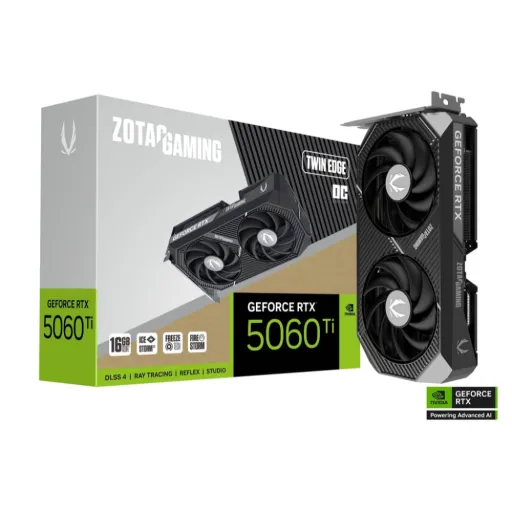
This Twin Edge edition is designed for compact cases, jahan clearance tight hoti hai, and the build still stays clean. The dual fan form factor keeps installation practical, haath mein size manageable lagta hai, and cable routing becomes easier in crowded mid towers. The SFF ready positioning makes sense for modern small rigs, bilkul especially when you want performance without a bulky cooler footprint. The Blackwell based RTX 5060 Ti platform brings a newer feature stack, rozana ke gaming sessions mein smoother feel ke liye, while staying in a balanced efficiency class. The card’s 2 slot approach helps preserve adjacent slots, case ke airflow ko block kiye baghair, which matters for long sessions. The metal backplate adds rigidity during handling, build quality solid lagti hai, and it also helps the card feel “finished” in a windowed PC. The overall design focus feels practical instead of flashy, kaam ki cheez pe emphasis rehta hai, so it fits both gaming and creator builds. The Twin Edge positioning keeps the experience straightforward, asaani se fit hota hai, and it avoids the “oversized GPU” compromise. The intent here is simple: keep performance accessible in smaller spaces, rozana use mein tension kam, while still delivering a modern RTX feature set
DLSS 4 brings AI driven frame uplift for demanding scenes, jab native rendering heavy ho jaye, while keeping image quality more stable across motion. The Multi Frame Generation approach can generate up to three frames per rendered frame on RTX 50 Series, gameplay ko zyada fluid banata hai, especially when you’re pushing higher refresh monitors. The newer transformer based improvements aim for better stability and detail, motion mein ghosting kam feel hoti hai, which helps fast camera pans look cleaner. The RTX 5060 Ti family is positioned with 4th gen ray tracing cores, lighting aur shadows zyada natural lagte hain, and you can dial RT in without instantly breaking smoothness. The 5th gen Tensor Core direction is built for AI workloads and DLSS, rozana ke gaming mein iska faida seedha FPS aur clarity mein nazar aata hai. The practical win is consistency, kyun ke frame delivery smoother ho jati hai, so competitive titles feel more responsive during hectic moments. The visual upgrade shows most in reflections and global lighting, scene depth zyada believable lagti hai, and the “game world” feels less flat. The experience stays flexible because DLSS modes can be tuned, asaani se quality vs performance balance set hota hai, depending on your monitor and the game engine. The card’s role is not just raw rendering, balke smart rendering bhi, which is why DLSS 4 is a core part of the value story
A 4,608 core CUDA layout gives the RTX 5060 Ti strong parallel horsepower, rozana ke titles mein steady frame pacing ke liye, without forcing extreme power draw. The GB206 graphics processor under the hood keeps the platform modern, architecture ka benefit efficiency aur features dono mein aata hai, and it supports DirectX 12 Ultimate for current engines. The 36 RT cores target hardware ray tracing workloads, jab aap RT shadows ya reflections enable karte ho, while keeping the card in a sensible tier for everyday gaming. The 144 Tensor cores are there for AI tasks like DLSS, upscaling asaani se chalti hai, and the card feels more “future aware” for new rendering paths. The 180W board power class keeps thermals manageable, heat kam rehti hai compared to higher tiers, which is helpful for long sessions in smaller cases. The PCIe 5.0 x8 bus support aligns with newer platforms, compatibility tension kam hoti hai, and it can still run backward on older PCIe slots. The main benefit is responsive play with modern features, lag nahi feel hota when settings are tuned intelligently, and you get a smoother experience than brute force rendering alone. The platform also supports modern display standards on partner cards, multi monitor setups asaani se manage ho jate hain, and high refresh gaming becomes more practical. The overall behavior suits players who want quality plus stability, rozana use mein “set it and play” vibe, rather than constant tweaking
A 128 bit memory interface can still feel fast, jab memory tech modern ho, and GDDR7 helps keep bandwidth practical for this tier. The Twin Edge RTX 5060 Ti variants are listed with GDDR7 running at 28 Gbps, loading behavior zyada snappy lagta hai, and texture heavy scenes recover faster after quick turns. The RTX 5060 Ti family is sold in 8GB and 16GB configurations, apni usage ke hisaab se choose karna asaan hota hai, and that decision affects how comfortable ultra textures feel over time. The 16GB option can reduce VRAM pressure in modern games, background apps bhi saath chal jati hain, while the 8GB model can still be a strong match for optimized settings and DLSS. The memory bandwidth figure for the 8GB model is listed at 448 GB/s, streaming assets ko pull karna smoother hota hai, and it supports a steadier feel in open world traversal. The real benefit is fewer “stutter moments” when assets swap, rozana ke gameplay mein flow better rehta hai, especially if the rest of the PC is balanced. The GDDR7 direction also helps creators with timelines and previews, scrubbing zyada responsive lagti hai, when projects aren’t massive cinema grade builds. The key is pairing settings to VRAM reality, asaani se medium to high textures set ho jate hain, while DLSS keeps the picture sharp. This is a memory setup that rewards smart tuning, bilkul like enabling DLSS Quality for crisp visuals without VRAM stress, and it keeps the experience stable in long sessions
A compact cooler still needs consistent airflow, warna boost clocks jaldi dip karte hain, and Twin Edge focuses on sustained stability. The IceStorm 2.0 cooling approach is part of the Twin Edge build, heat kam nikalti rahe to performance bohat stable feel hoti hai, especially across longer matches. The BladeLink fan design is positioned to improve airflow characteristics, noise ko controlled rakhne mein help milti hai, and you can game late without an aggressive “jet fan” vibe. The FREEZE fan stop feature helps reduce idle noise, desktop use mein silence zyada milti hai, so the PC feels calmer during browsing and light tasks. The dual fan layout makes maintenance simpler, safai asaani se ho jati hai, because you can access and clean without fighting a massive shroud. The metal backplate adds structural confidence, GPU sag ka risk kam hota hai, and the card feels more secure once mounted. The overall goal is practical thermals in smaller spaces, case ka airflow compromise na ho, and that matters a lot for SFF oriented builds. The cooling design also supports a consistent day to day experience, rozana ke sessions mein surprises kam, because temperatures stay in a more controlled range. The Twin Edge approach works best when the whole case is balanced, front intake theek ho to, and you get quieter operation under typical loads
A 180W power consumption target keeps builds approachable, rozana ke gaming mein heat aur electricity dono manageable rehte hain, without pushing you into extreme PSU territory. The single 8 pin power input simplifies cable planning, adapters ki tension kam hoti hai, and most mainstream PSUs already have the right connector. The recommended 600W PSU guidance helps with headroom, future upgrades ke liye bhi margin milta hai, while staying realistic for mid range builds. The practical win is cleaner builds and fewer surprises, asaani se install hota hai, and you avoid the “new power standard” confusion on a straightforward card. The power profile also pairs well with compact cases, kyun ke smaller enclosures mein heat quickly build hoti hai, and a controlled TDP keeps airflow requirements sensible. The 180W class can support long sessions without feeling unstable, fan curves zyada aggressive nahi chalti, so acoustics remain more comfortable. The benefit shows during mixed workloads too, gaming ke saath streaming ya recording ho, and the system still feels balanced. The single connector approach also improves troubleshooting, agar kabhi boot issue aaye to, you have fewer points of failure to check. The power story here is about predictability, rozana ke use mein stable behavior, and that makes the Twin Edge edition feel friendly for first time builders
Modern GPUs feel more complete with modern ports, kyun ke monitor upgrades ab common ho gaye hain, and Twin Edge leans into that direction. The listed output stack includes three DisplayPort 2.1b ports with UHBR20 and one HDMI 2.1b port, multi display setup asaani se ban jata hai, and you can run multiple high refresh screens. The card also lists quad display capability, workstation style layouts comfortable lagte hain, whether you’re gaming on one screen and editing on another. The UHBR20 tier is tied to up to 80 Gbps maximum throughput with four lanes in DisplayPort UHBR cable standards, high bandwidth ka faida high res aur high refresh combos mein aata hai, when you want cleaner signal margins. The DisplayPort 2.1b updates around UHBR20 cabling are part of VESA’s direction, future displays ke saath compatibility better rehti hai, and longer active cable possibilities can help desk setups. The HDMI 2.1b mention supports modern TV and monitor use cases, living room gaming asaani se ho jati hai, especially if your display expects HDMI features like VRR. The overall benefit is flexibility without dongles, ports ki kami wali frustration nahi hoti, and cable choices stay simple for everyday setups. The output stack also helps creators, color workflow easy ho jata hai, because multiple displays can be configured cleanly for timelines and tools. The experience feels ready for high refresh life, rozana ke use mein smooth desktop motion, while also keeping the setup tidy
A PCIe 5.0 x8 interface keeps things current, nayi motherboards ke saath pairing straightforward hoti hai, and the card still works in older PCIe slots. The PCIe 5.0 base specification was released in 2019, platform evolution ka context clear ho jata hai, and it signals how mature the ecosystem has become. The PCI SIG announcement around PCIe 5.0 highlights 32 GT/s transfer rates, high lane speed ka matlab less dependency on x16 for every design, especially when board routing and power targets matter. The RTX 5060 Ti Twin Edge listings explicitly show PCI Express 5.0 x8, so you know what the electrical link is, and planning becomes easier for your build sheet. The practical benefit is clean integration in modern systems, BIOS ya compatibility drama usually kam hota hai, and you can focus on games and apps instead of troubleshooting. The x8 link choice also aligns with compact board design, traces short rakhna easy hota hai, while still delivering a high bandwidth connection for typical gaming workloads. The best user experience comes from balanced systems, CPU aur RAM theek ho to, and the GPU gets fed consistently during heavy scenes. The end result feels modern but not demanding, rozana ke builder ke liye friendly, because PCIe remains backward compatible across generations as a standard direction. This is a setup that rewards smart pairing, bilkul like a PCIe 4.0 or 5.0 board for best overall harmony, while still staying flexible for upgrades later
A well chosen GPU upgrade should feel immediate, rozana ke clicks aur camera pans mein farq nazar aata hai, and RTX 5060 Ti aims for that “day one” smoothness. The RTX 5060 Ti family brings Blackwell features plus DLSS 4 support, older cards se jump karte hi benefits zyada clear lagte hain, especially in games that lean on AI upscaling and frame generation. The Twin Edge style focuses on compact practicality, small case builders ke liye bohat relevant, and it avoids forcing a larger chassis just to fit a graphics card. The card’s 4,608 CUDA core positioning sits in a competitive performance tier, 1080p aur 1440p gaming ke liye balanced feel, when you tune settings with common sense. The choice between 8GB and 16GB variants is a real buying decision, textures aur mods heavy hon to 16GB zyada comfortable lagta hai, while 8GB can still shine with optimized presets and DLSS. The 180W power class keeps the whole system approachable, heat kam aur noise controlled, and you can pair it with mainstream cooling and a sensible PSU. The output stack supports modern monitors, high refresh ka maza zyada, and multi display setups stay clean without extra adapters. The overall value is in the blend of efficiency, features, and size, price bracket ki baat kiye baghair bhi, because it hits a sweet spot for everyday gaming and light creator work. The right buyer is someone who wants modern RTX tech in a smaller footprint, asaani se install, and a stable long session experience that doesn’t demand constant tweaking
Here's how current offers compare across retailers.
Review current prices and specifications side by side.
Nvidia
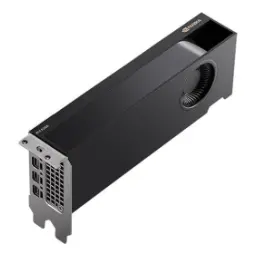
NVIDIA RTX A2000From Rs. 217,000
Local price
Lowest current price2 offers
Updated 2 days ago