

Price Breakdown & Availability
Here's how current offers compare across retailers.

You Might Also Like
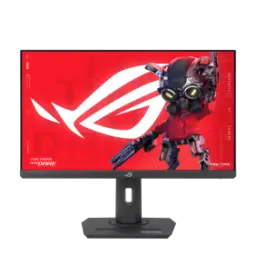
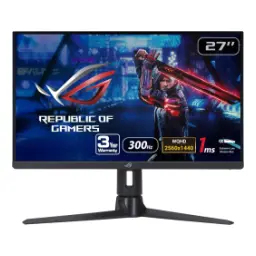
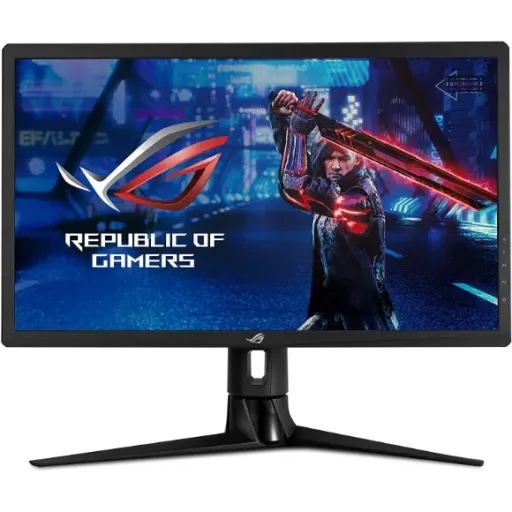
The ASUS ROG Strix XG27UQR targets 4K clarity with speed, so your setup feels premium for both gaming and productivity. The 27 inch 3840x2160 IPS panel keeps fine detail crisp, aur rozana browsing aur documents mein text zyada clean nazar aata hai. The 144Hz refresh rate adds fluid motion to everything, jis se cursor movement aur fast camera pans bilkul smooth feel hotay hain, especially on PC. The overall experience suits competitive sessions and creative tasks, kyun ke 4K workspace bhi milta hai aur motion bhi fast rehta hai, without feeling like a compromise. The IPS viewing angles help when you shift posture, haath mein controller ho ya desk par mouse, picture stable rehti hai. The ROG tuning focuses on gaming friendly controls, lekin overall profile aisa hai ke office ka kaam bhi asaani se handle hota hai. The DisplayHDR 400 and HDR10 support add a modern content layer, so HDR games and streaming look more dynamic than basic SDR. The final result feels like a serious 4K gaming monitor, jahan detail, smoothness, aur color ka balance real world use mein nazar aata hai
The 27 inch 4K resolution delivers dense pixel detail, so small UI elements and sharp textures stay readable at a glance. The IPS panel type keeps colors consistent off center, jis se side seating ya dual person viewing mein bhi colors weird shift nahi karte. The monitor’s sharp text clarity gets highlighted in independent testing, making it a strong choice for spreadsheets, coding, and long reading sessions. The matte finish helps in brighter rooms, aur roshni ke reflections kam hon to focus zyada rehta hai while working. The 16:9 4K canvas gives you usable space, jis mein timelines, multiple windows, aur tool panels asaani se fit ho jate hain. The 144Hz capability also benefits daily navigation, so fast scrolling looks controlled instead of jittery. The IPS viewing angles stay wide, aur agar aap chair thori move karein to color and brightness drop off zyada noticeable nahi hota. The screen can run HDR10 when content supports it, which adds extra highlight range for compatible games and videos. The overall feel is a crisp daily driver, jahan 4K ka benefit sirf gaming nahi balkay productivity mein bhi clearly deliver hota hai
The Display Stream Compression feature solves a real 4K problem, because high refresh at UHD can exceed normal link bandwidth. The monitor supports DSC to reach 4K visuals up to 144Hz over a single DisplayPort 1.4 connection, jis se setup clean rehta hai aur extra cable juggling ki zarurat nahi hoti. The VESA DSC standard is designed as visually lossless and low latency compression, meaning speed bhi rehti hai aur image integrity bhi strong hoti hai for real time use. The monitor includes two DisplayPort 1.4 ports, so you can keep a primary PC and a secondary device ready without constant replugging. The ASUS guidance notes DSC 4K 144Hz needs a compatible GPU class, toh purchase se pehle apni graphics card generation confirm karna smart rehta hai. The NVIDIA support documentation also explains DSC use cases, showing how DSC enables higher resolution and refresh rates over DisplayPort 1.4+ with supported GeForce GPUs. The benefit is straightforward in daily gaming, kyun ke 4K detail aur 144Hz motion ek hi time par available hota hai without chroma compromises. The same DSC approach keeps VRR and HDR pathways practical on DisplayPort, so the feature stack stays usable in real sessions. The overall connection story feels modern, jahan single cable simplicity aur high end output dono saath chalte hain
The 144Hz refresh rate reduces perceived motion steps, so fast turns and quick flicks look more continuous on screen. The 1ms MPRT response time approach is tuned for motion clarity, jis se smearing aur blur trail ka effect reduced feel hota hai in fast scenes. The monitor also includes ASUS Extreme Low Motion Blur support, toh agar aap motion sharpness ko prioritize karein to tracking aur cleaner lag sakti hai. The practical win shows up in shooters and racers, where rapid object movement stays easier to follow without constant refocus. The response behavior at high refresh rates tests as quick and responsive, aur input feel zyada direct lagta hai jab aap consistent high FPS maintain karte hain. The 4K resolution adds fine texture and UI detail, so motion improvements do not come at the cost of sharpness. The best results usually come from pairing DP + DSC, kyun ke yahan 4K par full 144Hz target realistically achievable hota hai with a capable GPU. The overall motion experience feels more controlled, aur long sessions mein eye fatigue ka pressure comparatively kam ho sakta hai because motion looks cleaner. The end result is a smooth and readable picture, especially when your gameplay depends on quick visual confirmation
The G SYNC Compatible label matters when frame rates fluctuate, because VRR can reduce tearing and stutter in real gameplay. The Adaptive Sync behavior is positioned for tear free play, aur agar GPU load kabhi up down ho to motion still zyada stable feel hoti hai. The RTINGS testing notes VRR works without issues over DisplayPort, which is the connection most PC gamers will prioritize for 4K high refresh. The monitor reaches up to 144Hz VRR range in practice, so high FPS titles can stay smooth without forcing fixed refresh behavior. The key benefit shows up in demanding AAA scenes, jahan sudden dips aati hain aur tearing ka distraction bilkul mood kharab kar deta hai. The 144Hz base refresh keeps input feeling responsive, so you get both smoothness and low latency rhythm in competitive play. The practical setup path is simple on PC, kyun ke DP 1.4 + VRR typically plug and play rehta hai once drivers and settings are correct. The headline advantage is fewer visual disruptions, which helps you focus on aim, timing, and movement instead of fighting your display
The DisplayHDR 400 certification sets an entry HDR baseline, so highlights can look brighter than SDR when content is mastered well. The monitor supports HDR10 input, aur yeh compatibility streaming apps aur HDR enabled games ke sath asaani se work kar sakti hai. The 90% DCI P3 color space coverage helps deliver richer hues, jis se cinematic scenes, skies, aur neon signage zyada vibrant feel hota hai without looking cartoonish. The VESA DisplayHDR criteria shows the “400” tier targets 400 nits in key tests, which explains why you should expect improved sparkle but not true high end HDR depth. The monitor’s own spec sheet lists HDR peak brightness around 400 cd/m2, toh bright highlights pop kar sakte hain lekin dark scene contrast ka feel panel tech par depend karega. The official DisplayHDR site notes HDR10 support across tiers, which keeps compatibility predictable even when content pipelines vary. The best use case is balanced HDR for games and video, jahan colors wide hon aur highlights noticeable hon, without chasing extreme brightness numbers. The outcome is more lively color and highlight detail, while still feeling controlled for everyday desktop use
The input layout keeps multi device setups practical, because you get two DisplayPort 1.4 ports and two HDMI 2.0 ports. The dual DisplayPort design helps PC first users, aur agar aap desktop aur laptop ya capture rig shift karte hain to swapping easy ho jati hai. The HDMI 2.0 side supports common consoles and stream devices, but you should expect bandwidth limits compared with HDMI 2.1 for very high refresh at 4K. The RTINGS console notes highlight that 4K at 120Hz is not supported due to HDMI 2.0 bandwidth, toh console buyers ko apni priority pehle clear kar leni chahiye. The ASUS product page positions console friendly modes like 1080p 120Hz on PS5 and 1440p 120Hz VRR output on Xbox Series X/S, which can still feel smooth in supported games. The safest performance path stays DisplayPort for PC, kyun ke yahan DSC ke through 4K 144Hz realistically unlock ho jata hai. The port mix also keeps your upgrade route flexible, so a future GPU swap can immediately benefit from the monitor’s high refresh pipeline. The overall connectivity feels built for everyday switching, jahan PC performance top par ho aur HDMI devices bhi cleanly fit ho jayein
The stand adjustment range supports long sessions, because you can dial in height, tilt, and swivel for a comfortable line of sight. The official mechanical specs list height adjustment up to 100 mm, aur yeh choti si tuning bhi neck strain ko noticeably reduce kar sakti hai in daily work. The VESA 100x100mm mounting support makes arms and wall mounts easy, so you can free desk space and keep cable routing cleaner. The RTINGS ergonomics section confirms wall mount compatibility as VESA 100x100, jis se monitor arm upgrade bilkul straightforward ho jata hai. The swivel range helps shared setups, kyun ke aap screen ko side turn karke teammate ko quick view de sakte hain without moving the whole desk. The anti glare surface supports bright rooms, so an arm mounted position near a window stays usable with fewer reflections. The practical benefit is better posture consistency, aur marathon gaming ya editing sessions mein comfort ka farq time ke sath clearly mehsoos hota hai. The final setup looks cleaner and feels more personal, while keeping the panel at its best viewing angle
This model makes most sense for PC first 4K gamers, because it combines 3840x2160 resolution with a 144Hz ceiling for smooth detail. The DSC support is the hidden upgrade enabler, kyun ke single DP 1.4 connection par 4K 144Hz ka clean path ban jata hai with the right GPU. The G SYNC Compatible positioning helps deliver stable motion, so competitive play feels less distracting when frames fluctuate. The HDR side is best viewed as a modern bonus, kyun ke DisplayHDR 400 offers visible highlights and wider color but remains an entry HDR tier by VESA criteria. The port selection fits most desks today, but HDMI 2.0 means console buyers should not expect 4K 120Hz input on current gen consoles. The VESA 100x100 mount keeps your desk flexible, toh agar aap arm mount plan kar rahe hain to long term setup planning easy ho jati hai. The strongest value comes from balanced priorities, where sharpness, smoothness, and color coverage matter more than chasing the highest HDR tier. The closing takeaway is simple and practical, because XG27UQR is built to deliver a refined 4K high refresh experience without overcomplicating your setup
Here's how current offers compare across retailers.