
Price Breakdown & Availability
Here's how current offers compare across retailers.

You Might Also Like
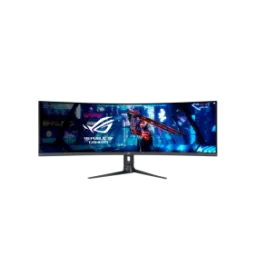
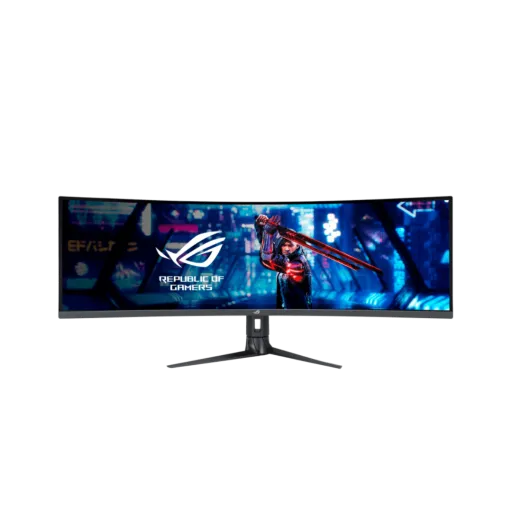
The ASUS ROG Strix XG49WCR is designed to feel like a full battle station, aur desk par double screen wali freedom deta hai, without a distracting center bezel. The 49 inch canvas in a 32:9 aspect ratio gives you a true super ultrawide layout for work plus play. The Double QHD 5120x1440 resolution keeps your timeline, chats, and maps readable, rozana ke kaam mein zoom karne ki need kam hoti hai, while still looking clean in games. The split screen mindset becomes natural because you can run two sources with PIP/PBP support, aur multitasking literally ek nazar mein ho jati hai. The whole experience stays immersive thanks to the curved design, jo peripheral view ko wrap karke zyada comfortable banata hai. The monitor is also pitched as a “work station” style setup with Smart KVM, so gaming hours and office hours can share the same screen. The super ultrawide format helps you keep one side for focus and the other for reference, bilkul efficient workflow banta hai, especially when you hate constant window juggling. The identity here is simple because one monitor can replace two, aur setup clean rehta hai, while still staying in the ROG performance category
The 1800R curvature pulls the edges closer to you, haath aur aankhon ki movement kam hoti hai, so long spreadsheets and wide game HUDs feel easier to scan. The VA panel choice prioritizes strong native contrast for darker scenes, aur raat ke scenes mein blacks zyada depth ke sath feel hotay hain, compared to flatter looking panels. The 3000:1 typical contrast ratio helps menus, shadows, and UI layers separate better, which can reduce that washed out vibe in mixed lighting. The anti glare surface keeps reflections controlled, ghar ki lights ya window glare se distraction kam hota hai, while text still stays sharp. The 178 degree viewing angles support team viewing and couch distance checks, aur side se dekhne par bhi colors ka collapse itna jaldi nahi hota. The pixel pitch is tuned for a big screen to hold detail, so icons and fonts can look refined without forcing aggressive scaling. The overall geometry works especially well for racing, flight, and open world play, kyun ke wide FOV naturally immersive feel deta hai, while still being practical for office layouts
The 165Hz maximum refresh rate keeps motion fluid across the whole 32:9 width, aur fast swipes mein blur ka feel noticeably kam hota hai, whether you are browsing or gaming. The 1ms MPRT response target is aimed at clearer perceived motion, jo fast camera pans mein clarity ko support karta hai, especially when you care about tracking moving objects. The DisplayPort 1.4 DSC connection is built for high bandwidth use, so you can push the panel’s full resolution and high refresh more confidently from a modern GPU. The USB C input also supports display via DP Alt Mode, which makes laptop docking feel simple, aur daily plug in plug out routine asaan ban jati hai. The HDMI 2.0 input is available for consoles or extra devices, but the stated HDMI vertical frequency range tops out lower than DP/USB C, so matching your source settings matters. The GameFast Input feature is included to keep interaction feeling responsive, aur input delay wali frustration se bachata hai, when you are playing competitive titles. The end result is a panel that feels fast in everyday use, and the big screen smoothness stays consistent from edge to edge
The ELMB Sync feature is built to pair blur reduction with variable refresh, aur yahi combo fast games mein zyada sharp movement deliver karta hai, without choosing between the two. The official ASUS explanation describes ELMB Sync as usable alongside Adaptive Sync style VRR modes, which helps reduce tearing, stutter, and afterimages in motion heavy scenes. The monitor explicitly lists VRR technology with Adaptive Sync support, so the refresh can track frame rate changes for smoother pacing. The practical benefit shows up in fast turning and quick strafes, jahan ghosting ka sense annoying lagta hai, and you want the image to stay readable. The same ASUS guidance notes that ELMB Sync is recommended at higher refresh rates, so it fits naturally with a 165Hz class monitor. The tuning also comes with real world constraints because ASUS notes ELMB Sync cannot run at the same time as HDR, so you can swap modes based on content. The brightness can drop when strobing is active, lekin competitive clarity ke liye yeh trade kabhi kabhi worth it hota hai, and it is better to treat it as a performance preset
The DisplayHDR 400 tier means the screen targets certified HDR behavior, aur HDR content mein highlights zyada punchy feel hotay hain, compared to basic SDR only monitors. The VESA performance criteria for DisplayHDR 400 includes 400 cd/m2 class luminance tests, which helps explain why HDR badges can matter beyond marketing. The ASUS specs list 550 cd/m2 peak brightness in HDR and 450 cd/m2 typical brightness, so daytime readability and highlight pop can stay strong on a large panel. The 90% DCI P3 gamut coverage supports richer color volume, aur movies aur modern games mein colors zyada vibrant yet controlled nazar aate hain, when the content is graded wide gamut. The monitor also lists 10 bit color with 1.0737 billion colors, which helps gradients look smoother and reduces banding in skies and shadows. The spec sheet calls out Delta E < 2 calibration, so color accuracy is positioned as dependable for mixed use, bilkul casual editing aur content checks ke liye. The overall HDR approach stays grounded because it is DisplayHDR 400 class, meaning it improves contrast and highlights but is not the same category as high zone mini LED HDR. The value here is balanced visuals that look lively in games and still respectable for creative previews, without turning the monitor into a niche tool
The Smart KVM feature lets one keyboard and mouse control two connected devices, aur extra KVM box ki zarurat nahi rehti, which keeps your desk setup simpler. The ASUS Smart KVM FAQ describes effortless switching and even cross device copy and paste, which is a real productivity win for office plus gaming hybrids. The monitor’s own feature list includes KVM Switch support, so the capability is built into the XG49WCR rather than being an external accessory story. The PIP and PBP modes add flexibility when you want both sources visible, aur meeting ke saath reference screen same time par open rakhna asaan ho jata hai. The ROG write up highlights automatic control handoff behavior when moving the cursor across halves, so the experience can feel more like one seamless workspace. The setup options include specific source pairing modes for Smart KVM, which helps you plan USB C plus DP/HDMI wiring without trial and error. The practical outcome is faster context switching between a work laptop and a gaming PC, aur rozana ke routine mein friction bilkul kam ho jata hai, especially if you hate re plugging peripherals
The connectivity lineup covers DisplayPort 1.4, HDMI 2.0, USB Type C, and RJ 45 Ethernet, so both gaming rigs and laptops can plug in cleanly. The USB C port supports DP Alt Mode plus USB data, aur single cable docking ka real advantage deta hai, when you want display plus peripherals through one connection. The spec sheet lists up to 90W USB C Power Delivery, which can charge many laptops while you work, gaming breaks ke darmiyan bhi battery anxiety kam rehti hai. The official product page notes a specific condition for 90W PD, stating it applies when the USB feature and HDR are disabled, so it helps to choose your priority mode. The built in RJ 45 port can make the monitor behave like a docking point, aur wired internet seedha laptop tak ek hi chain se pohanch sakta hai. The monitor also includes a USB hub with USB 3.2 Gen 1 Type A ports, which keeps mouse, keyboard, and storage handy right at the screen. The audio side stays practical with an earphone jack, and the experience can remain tidy even when you are swapping devices often. The bigger benefit is fewer cables across the desk, aur setup ka look clean rehta hai, while still giving you the ports you actually use
The monitor includes ASUS DisplayWidget support, so common settings can be adjusted faster from your desktop, aur har dafa buttons dabane wali mehnat kam hoti hai. The ASUS DisplayWidget Center page describes a software approach for optimizing and personalizing monitor behavior, including app based tweaks and quick adjustments through an intuitive UI. The hotkey and shortcut concept helps when you frequently jump between work brightness and late night gaming presets, kyun ke small changes bhi workflow ko smooth banate hain, and you stop losing focus. The same ASUS page notes that settings can be saved into the monitor’s OSD memory, so your preferred configuration can persist even after disconnects. The tool also highlights automatic notifications and updates for the software layer, which matters when you want fewer manual checks and a smoother maintenance routine. The availability details list Windows 11 or later and macOS 12 or later for DisplayWidget Center downloads, so it is clearly positioned for modern systems. The day to day advantage is quicker personalization without breaking your flow, aur screen ko apne use case ke hisaab se tune karna asaan ho jata hai, whether you are creating or competing
The stand offers real adjustability with height, tilt, and swivel, so posture stays natural, aur long sessions mein neck strain ka chance kam hota hai. The height adjustment range is listed as 0 to 120 mm, which helps you align eye level properly across such a wide 49 inch panel. The tilt range is specified as +20 degrees to 5 degrees, so you can fine tune viewing comfort for both desk chair and sim rig style seating. The swivel range is listed as +8 degrees to 8 degrees, which is small but useful when you want to center the curve toward your seating position, bilkul quick alignment ho jati hai. The monitor also supports VESA 100x100 mounting, so you can move to an arm or wall mount for a cleaner desk footprint. The built in speaker setup is rated at 5W x 2, which is handy for casual calls, quick clips, and background audio without extra speakers. The overall design focus stays practical for a premium ultrawide, and it supports both gaming intensity and office comfort in one package
This ROG Strix XG49WCR fits best for people who want one screen to do everything, aur dual setup ki wiring aur bezels se bachna chahte hain, while still staying in a high refresh category. The Double QHD 5120x1440 layout paired with 32:9 gives you serious workspace width, and it also makes racing, flight, and open world titles feel naturally immersive. The 165Hz refresh ceiling and VRR support help gameplay feel stable, aur frame pacing zyada smooth rehti hai, when your GPU output fluctuates. The ELMB Sync capability adds an extra motion clarity option, but ASUS notes HDR cannot be used simultaneously, so you can pick clarity mode for esports or HDR mode for cinematic content. The DisplayHDR 400 certification plus 90% DCI P3 gamut coverage delivers a more vibrant, contrasty look for games and media, without pretending to be a top tier local dimming HDR class. The Smart KVM and USB C plus RJ 45 story makes daily switching painless, aur laptop docking wali convenience genuinely practical lagti hai, especially in hybrid work setups. The power profile is listed under 45W typical consumption, so the screen can stay efficient for its size while you keep it on for long workdays. The final takeaway is a single monitor command center that stays fast, wide, and feature rich, aur everyday routine ko genuinely streamlined banata hai, without forcing you into a niche setup
Here's how current offers compare across retailers.
Review current prices and specifications side by side.