







Price Breakdown & Availability
Here's how current offers compare across retailers.
You Might Also Like
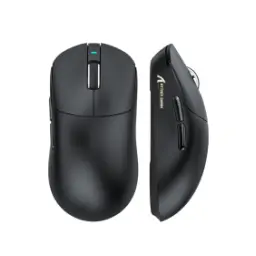
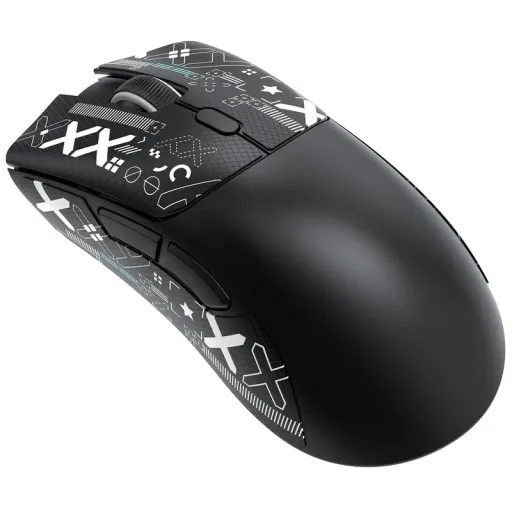
From the first swipe, the Attack Shark R1 feels like a lightweight wireless gaming mouse made for users who want faster hand movement, cleaner desk control, aur kam thakan in long sessions. The official spec set pairs a 59g body with a PixArt PAW3311 sensor, up to 18,000 DPI, and tri mode connectivity, so this is not just a basic shell with a gaming label attached. Across daily use, that combination matters because lower mass helps quick corrections feel easier, while the sensor headroom keeps tracking reliable whether you are editing, browsing, or jumping into a fast match. The design focus also stays refreshingly practical, with 1000Hz polling and up to 65 hours of battery life supporting actual everyday performance instead of flashy spec noise. For buyers who want a balanced upgrade, yeh mouse speed aur comfort ko bilkul seedhay tareeqay se deliver karta hai, and the overall identity stays performance first
Under fast reactions, the PixArt PAW3311 sensor gives the Attack Shark R1 a tracking character that feels dependable rather than nervous, jo competitive play mein bohat important hota hai. The sensor is rated for up to 18,000 DPI, with six adjustable DPI levels listed from 800 to 18,000, so low sensitivity aiming and fast desktop travel both stay easy to tune. During aggressive swipes, the stated 400 IPS tracking speed helps the cursor keep up with rapid movement, is liye flick shots aur sudden turns zyada controlled mehsoos hotay hain. The listed 40G acceleration ceiling also adds reassurance when your hand speed changes sharply and the mouse needs to hold form under pressure. In real use, that translates into steadier crosshair behavior, smoother selection work, and fewer moments where input feels behind your intention. Because the tuning is adjustable, the R1 can stay calm for office work and still open up for faster game profiles
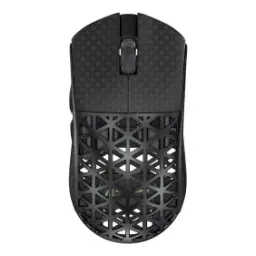
Across long gaming nights, weight is one of the first things your wrist notices, aur Attack Shark R1 ka 59g frame isi point par strong advantage deta hai. The official dimensions sit around 123 x 64 x 41 mm, and that compact ergonomic shell keeps the mouse easy to grip without feeling toy like in the hand. Instead of using a perforated body, the R1 keeps a solid shell design, which the brand highlights for comfort and structural integrity, so the feel stays cleaner under the palm. For people who play with palm, claw, or fingertip variations, shape comfort matters just as much as raw specs, aur yahan grip transition kaafi natural lagti hai. The lighter chassis also makes repeated lift offs less tiring, especially if your playstyle depends on quick repositioning and low sense control. When a mouse feels easier to move, your focus stays on timing and placement rather than fighting unnecessary resistance
During fast engagements, input delay does not need to be dramatic to feel annoying, aur isi liye the R1's adjustable polling behavior matters in real use. The mouse supports polling rates from 125Hz up to 1000Hz, letting you prioritize battery savings for casual work or max responsiveness for competitive sessions. At the top 1000Hz setting, the cursor updates more frequently, so click to cursor response feels tighter and rapid target corrections come across more naturally. The R1 also offers six programmable buttons through its software environment, which helps if you want quick binds, browser shortcuts, ya game specific commands without cluttering your keyboard flow. This kind of tuning is useful because not every user wants one fixed behavior for every task. A mouse that can shift from calm office pacing to sharper gaming response feels more refined over time
With every primary press, the Attack Shark R1 aims for a click feel that stays crisp and direct, jo spam heavy games aur fast menu work dono mein useful hota hai. The official product page confirms HUANO switches, while the detailed manual specifically lists Huano White Dot Micro Switches, giving the mouse a more tactile identity than vague no name button hardware. That matters because a stable switch feel helps timing stay consistent when you are tapping, tracking, or confirming repeated actions under pressure. The product page also highlights a TTC encoder in the scroll wheel, which supports a more defined wheel response for weapon swaps, scrolling, and controlled middle click usage. In everyday use, the result is simple but important: clicks feel more intentional, wheel steps feel clearer, aur overall control zyada trustworthy lagta hai. When input hardware feels predictable, your hand settles faster and the entire mouse starts feeling more polished
Over a normal week, battery anxiety can ruin the convenience of a wireless mouse, lekin Attack Shark R1 yahan kaafi sensible approach leta hai. Multiple source pages list a 300mAh rechargeable battery with up to 65 hours of use, and the manual notes roughly a 2 hour full charge, so the endurance profile suits regular gaming plus routine desktop work well. The official product page also calls out Smart Sleep support, which helps preserve power when the mouse sits idle instead of draining unnecessarily in the background. For real buyers, this means you can spend more time using the mouse and less time watching battery percentage, aur rozana charging ka pressure kam ho jata hai. Short top ups feel practical, longer sessions stay uninterrupted, and wireless freedom starts feeling convenient rather than fragile. That steady battery behavior is exactly what makes a budget conscious performance mouse easier to live with
Across mixed setups, a good mouse should move between devices without drama, aur Attack Shark R1 is designed around that kind of flexibility. The R1 supports wired USB C, 2.4G wireless, and Bluetooth 5.2 connections, giving you three ways to match your desk, laptop, tablet, or charging situation without changing your core mouse feel. That setup is especially useful if you want low latency 2.4G for games, Bluetooth for quieter travel use, and wired mode when charging or sitting at a fixed workstation. The brand and manual material also point to driver software support for DPI adjustment, polling changes, button remapping, and macros, so personalization goes beyond surface level presets. For practical users, this means one mouse can cover several roles asaani se, instead of forcing separate travel and gaming purchases. Broad compatibility across common platforms makes the R1 feel more useful long after the first unboxing
In the crowded lightweight mouse category, many products look sharp on paper but miss the basics that actually shape daily performance. The Attack Shark R1 stays convincing because its main specs line up in a practical way: 59g weight, PAW3311 sensor, 18,000 DPI ceiling, 400 IPS speed, 40G acceleration, 1000Hz polling, and up to 65 hours of battery life. That combination places it comfortably in a competitive 1K wireless tier where smooth control matters more than inflated marketing, aur yeh cheez budget conscious buyers ko direct fayda deti hai. If you do not need bleeding edge 4K or 8K polling, the R1's spec balance feels smarter because the core experience still stays quick, stable, and versatile. The tri mode design and software support also stretch its usefulness beyond gaming, which improves long term value in everyday ownership. For someone choosing carefully, this is the kind of mouse that earns trust through fundamentals rather than gimmicks
From gaming bursts to routine work, the Attack Shark R1 closes the gap between affordability and genuinely satisfying control, aur isi wajah se iska appeal sirf one type user tak limited nahi rehta. The official material sums up the mouse with features like 59g lightweight design, PAW3311 performance, tri mode connectivity, Smart Sleep, driver software, and ergonomic shaping, which together create a setup that feels coherent rather than random. Detailed manual pages also reinforce the essentials with 18,000 DPI, 400 IPS, 40G acceleration, 1000Hz polling, Huano White Dot switches, and battery life up to 65 hours, so the selling points are supported by usable hardware details. If your goal is a lightweight wireless gaming mouse that stays smooth, lag nahi deta, and adapts well across devices, the R1 makes a very sensible pick. It feels quick in motion, confident in clicks, and easy to keep in daily rotation
Here's how current offers compare across retailers.
Review current prices and specifications side by side.
 Current
Attack Shark
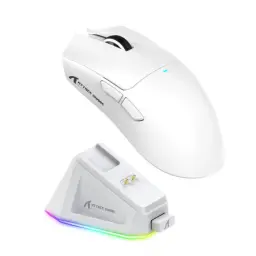
Attack Shark R1From Rs. 5,350
Local price
Lowest current price15 offers
Updated 21 hours ago
Attack Shark
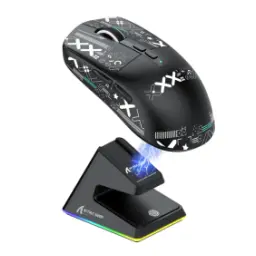
Attack Shark X3 ProFrom Rs. 12,400
Local price
8 offers
Updated 21 hours ago
Attack Shark
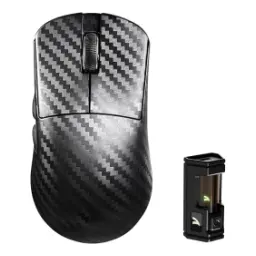
Attack Shark R5 Ultra Carbon FiberFrom Rs. 17,800
Local price
1 offer
Updated 21 hours ago