



Price Breakdown & Availability
Here's how current offers compare across retailers.
You Might Also Like
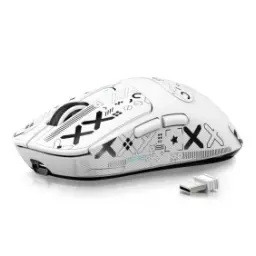
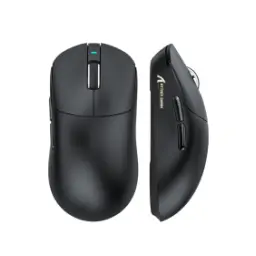
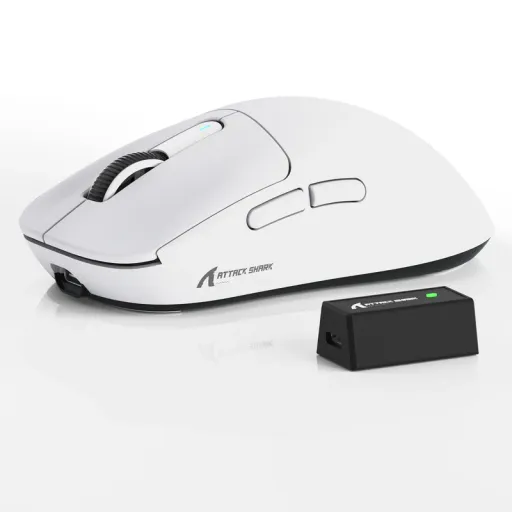
The Attack Shark X3 Pro brings together a 59g body, PixArt PAW3395 sensor, up to 26,000 DPI, and tri mode wired, 2.4G, and Bluetooth 5.2 connectivity, so the spec sheet already signals a fast, modern competitive mouse. That mix feels important because lightweight alone kabhi kaafi nahi hota; the real win comes when control, click consistency, and battery life stay balanced during long sessions. The official product page also pairs that shell with Kailh Black Mamba switches rated for 80 million clicks and a quoted working life of 200 hours, which pushes the X3 Pro beyond entry level lightweight territory. For players moving from heavier office mice, haath ki movement zyada free lagti hai and quick corrections start feeling less forced. For players already using basic gaming gear, the upgrade is less about flashy marketing and more about cleaner tracking, lighter lift offs, and a sharper response profile. In short, this is the kind of mouse that aims to give competitive speed without making daily browsing, editing, or casual play feel overly specialized
The X3 Pro keeps movement easy with a listed size of 118.5 x 61 x 39.7mm and a weight of 59g plus or minus 3g, which gives the shell enough presence for control while still staying very flick friendly. That matters in real use because lower mass means less inertia, aur wrist ko har micro adjustment par itna zor nahi dena parta during tense rounds. The symmetrical ergonomic design is described as suitable for claw, fingertip, or palm grip styles, so grip experimentation stays simple instead of awkward. The 100% virgin grade PTFE feet also help the mouse glide smoothly, jisse fast swipes clean rehte hain while stop control still feels predictable on most pads. A shell like this usually feels more confidence inspiring than bulky shapes, especially when you need to reset quickly and keep your aim line stable. The result is a hand feel that stays nimble for esports, yet relaxed enough for long desktop use
The PixArt PAW3395 sensor is the heart of the X3 Pro, delivering up to 26,000 DPI alongside 650 IPS tracking speed and 50G acceleration, which places it firmly in the high spec performance class. Those numbers are not there sirf show ke liye; they translate into reliable tracking when you flick fast, drag wide, or make tiny corrections near a target. The manual also lists six DPI levels up to 26,000, so you can keep everyday movement practical and still jump to higher sensitivity profiles when a specific game or display setup needs it. High IPS and strong acceleration headroom reduce the chance of the sensor feeling overwhelmed, jo competitive play mein especially important hota hai when hand speed suddenly spikes. For creators and power users, the same precision also helps timeline scrubbing, rapid multi monitor travel, and accurate pointer placement. This is why the X3 Pro feels less like a compromise and more like a sensor first design
The X3 Pro documentation and retailer listings describe up to 8000Hz polling in wired mode and up to 4000Hz over 2.4GHz wireless, cutting the reporting interval to as low as 0.125ms wired or 0.25ms wireless when your setup can take advantage of it. That higher report rate can make cursor updates feel smoother, aur fast sprays ya tracking heavy fights mein the mouse feels more tightly connected to the hand. Attack Shark's own 8K guidance notes that high polling shows its clearest gains on fast systems and high refresh displays, so strong hardware lets the extra data feel more visible rather than theoretical. The useful part is flexibility, because not every game or laptop benefits equally, aur adjustable polling gives you room to tune responsiveness against battery efficiency. For competitive FPS players, that tuning headroom is often more valuable than a single locked number on the box. In everyday terms, the mouse can run extremely fast when needed and sensibly efficient when that makes more sense
The main buttons use Kailh GM8.0 Black Mamba switches rated for over 80 million clicks, and the scroll wheel uses a TTC encoder for defined, tactile stepping. That combination usually creates a firmer, cleaner response, is liye spam clicking, burst firing, and rapid weapon changes feel more deliberate than mushy. The official page emphasizes durable Kailh micro switches and consistent click behavior under heavy use, which is exactly the kind of detail serious players notice after months rather than days. Click feel matters more than many buyers expect, kyun ke timing confidence directly affects peek shots, ability combos, and repeated menu work. A good switch setup keeps the mouse feeling sharp later instead of soft and vague. With the X3 Pro, the click system supports both competitive rhythm and daily desktop comfort
The X3 Pro is rated for up to 200 hours of battery life, and the official product page says that figure pairs with smart sleep and a 2 to 3 hour recharge window for easier upkeep. That kind of endurance is practical because rozana charging ki tension kam ho jati hai, especially if your desk alternates between work, browsing, and late night gaming. Tri mode support includes USB C wired, low latency 2.4GHz wireless, and Bluetooth 5.2, so one mouse can move between a gaming PC, laptop, and portable setup with much less friction. Attack Shark's own 8K analysis also notes that higher polling generally costs more power, which makes the X3 Pro's adjustable modes genuinely useful rather than checkbox features. For many users, the sweet spot will be fast wireless for play and Bluetooth for lighter tasks, jahan efficiency aur convenience dono stay balanced. The result is a mouse that stays ready more often and adapts more easily
The software side adds real depth because Attack Shark lists both downloadable software and a web driver, while the manual notes control over DPI, polling rate, LOD, macros, and button assignments. That matters when you want one profile for esports, ek profile office shortcuts ke liye, and another for slower creative work. The manual also states that the X3 Pro has five programmable buttons, which is enough for meaningful customization without making the shell cluttered. Newegg's listing further mentions onboard memory, so your preferred settings can travel with the mouse instead of staying tied to one machine. Practical customization like this usually improves a mouse more than flashy lighting, kyun ke aap apni grip, sensitivity, and button habits ke mutabiq feel tailor kar sakte hain. When a mouse adapts this easily, it tends to stay relevant longer
The X3 Pro is tuned for more than just raw aim, because its lightweight frame, symmetrical ergonomics, PTFE skates, and tri mode versatility let it move comfortably between ranked games, everyday browsing, and general productivity. That crossover is useful for buyers jo ek hi mouse se sab kuch handle karna chahte hain without switching hardware all day. Newegg specifically frames the shape for claw, fingertip, or palm grip styles and mentions grip tape in the package, which helps users fine tune control and surface feel. The official page also positions the mouse as wide applicability hardware, so the design intent is clearly broader than a niche tournament only device. In use, that usually means the mouse feels light and sharp when gaming, but still settled and manageable when documents, spreadsheets, or long browsing sessions take over. For shared desks or hybrid setups, yeh versatility bohat kaam ki cheez ban jati hai and keeps the experience consistent
The strongest reason to choose the Attack Shark X3 Pro is how neatly its features reinforce each other: 59g weight, PAW3395 tracking, 26,000 DPI, high polling options, Kailh GM8.0 switches, and up to 200 hours of rated battery life all serve the same goal of faster, cleaner control. Instead of chasing one headline number, the mouse builds a balanced performance profile, jahan speed zabardast feel hoti hai but daily usability still remains intact. That makes it especially appealing for players who want competitive lightweight behavior without jumping straight into the most expensive enthusiast tier. The combination of customizable software, tri mode connectivity, and a proven sensor also gives the X3 Pro enough range to stay useful as your setup changes over time. For FPS, MOBA, battle royale, and general fast pointer work, the package looks thoughtfully assembled rather than randomly specced. If the goal is a mouse that feels quicker, lighter, and more deliberate from day one, the X3 Pro makes a strong case in a highly competitive class
Here's how current offers compare across retailers.
Review current prices and specifications side by side.
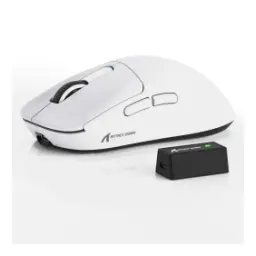 Current
Attack Shark
Attack Shark X3 ProFrom Rs. 12,400
Local price
8 offers
Updated 21 hours ago
Attack Shark
Attack Shark R1From Rs. 5,350
Local price
Lowest current price15 offers
Updated 21 hours ago
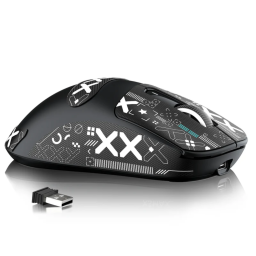
Attack Shark
Attack Shark X3 Max PAW3950From Rs. 9,999
Local price
5 offers
Updated 20 hours ago