

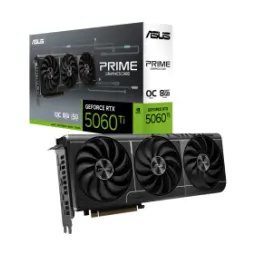
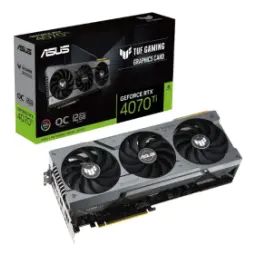
Price Breakdown & Availability
Here's how current offers compare across retailers.
You Might Also Like
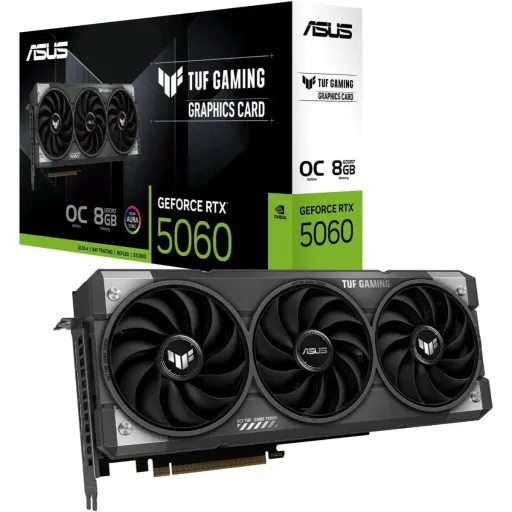
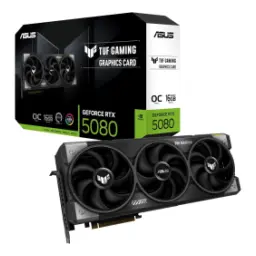
Built for serious daily rigs and weekend raids, the ASUS GeForce RTX 5060 TUF Gaming OC focuses on stability first, phir performance ka clean boost. Designed around the NVIDIA GeForce RTX 5060 engine, yeh TUF edition factory OC tuning ke saath aati hai so demanding scenes feel more controlled. Tuned compute horsepower starts with 3840 CUDA cores, which keeps modern game pipelines smooth at common resolutions. Built on the GeForce RTX 50 Series platform, the card is positioned as a practical 1080p to 1440p class choice for many builds. Reinforced TUF engineering matters when sessions run long, kyun ke real life mein heat, dust, aur constant load aata rehta hai. The OC Edition boost behavior is listed up to 2677 MHz in OC mode, giving you extra headroom when clocks need to hold. A balanced 8GB GDDR7 configuration keeps the experience predictable for mainstream textures and esports driven responsiveness. The TUF branding is not just cosmetic, balkay durability cues like protective PCB coating and rugged design intent are part of the series identity
Modern games punish raw rendering the fastest, is liye Blackwell plus neural features become the real advantage in this tier. NVIDIA positions the RTX 50 Series around Blackwell innovations, including DLSS 4 with Multi Frame Generation for supported titles. DLSS Multi Frame Generation can generate up to three additional frames per rendered frame, jo motion ko silky banata hai when your display refresh is high. The DLSS 4 announcement also describes up to 8X performance scaling in certain showcase scenarios, meaning you can chase smoothness without brute force heat. The ASUS TUF page highlights fifth‑gen Tensor Cores and fourth‑gen RT Cores as part of the GeForce RTX 50 Series stack, jo AI aur ray tracing ko accelerate karta hai. Ray tracing feels more usable when the platform is tuned for it, aur jab DLSS Super Resolution aur Ray Reconstruction support ho, the picture can stay crisp in motion. Game nights benefit from this combo because you can keep lighting realism higher, phir bhi FPS stable rehta hai with less manual compromise. NVIDIA also frames the RTX 5060 family as bringing Blackwell and DLSS 4 down to more accessible builds, which fits users upgrading from older midrange cards
A responsive GPU feels faster than charts, especially when memory behavior stays consistent under texture spikes. The TUF Gaming OC model is listed with 8GB of GDDR7 on a 128 bit interface, which targets quick asset delivery in mainstream workloads. ASUS also lists 28 Gbps memory speed for this card, so bandwidth pressure feels lower during fast pans and rapid scene changes. TechPowerUp’s database reflects the same 8GB GDDR7 and 128 bit layout for the ASUS TUF RTX 5060 OC, and it calculates 448 GB/s bandwidth at 28 Gbps effective. That bandwidth translates into smoother frame pacing in many titles, bilkul especially when you combine smart upscaling modes with sensible texture presets. The 8GB capacity works best when settings are chosen with intent, rozana ke use mein you keep clarity high but avoid the rare ultra texture traps at higher resolutions. NVIDIA’s own RTX 5060 family spec table confirms an 8GB GDDR7 configuration for RTX 5060, so this memory class is clearly part of the segment’s design. A practical approach is pairing high refresh 1080p with quality upscaling, kyun ke fast memory plus DLSS can keep motion clean while staying efficient
Thermals decide real performance in long sessions, aur TUF series ka core idea yahi hai ke boosts stable rahen. ASUS describes Axial tech fan upgrades on the TUF RTX 5060 line, designed to push more air than standard fans for better airflow behavior. Cooling behavior gets smarter during light tasks, because ASUS notes all three fans stop below 50°C and restart above 55°C for quieter operation. Durability also shows up in fan hardware, kyun ke ASUS states dual ball fan bearings can reach up to 80,000 hours lifespan for long term reliability. Contact quality matters for heat transfer, and ASUS claims its MaxContact design expands the heat spreader surface area by 5% and can improve temperatures by up to 2°C compared to traditional designs. Physical sizing should match your case plan, is liye note that the OC model is listed at 302 x 133.5 x 62 mm. Slot thickness can affect clearance, and ASUS lists a 3.1 slot design for the TUF RTX 5060 OC Edition. This cooling footprint is ideal when you want lower heat spikes, taake long matches mein performance bohat stable rahe
Build compatibility starts with the right interface, aur yahan PCI Express 5.0 support gives you modern platform alignment. ASUS lists PCI Express 5.0 as the bus standard on the TUF RTX 5060 OC Edition, which keeps new motherboards fully utilized. TechPowerUp’s database notes a PCIe 5.0 x8 bus interface for the RTX 5060 GPU family, jo typical gaming loads mein usually fine rehta hai while keeping board design efficient. Display flexibility is strong for desks with multiple panels, because ASUS lists one HDMI 2.1b and three DisplayPort 2.1b outputs with support for up to four displays. Resolution headroom is also specified, with a digital maximum resolution of 7680 x 4320 listed by ASUS for this model. High refresh gaming benefits from DisplayPort’s strengths, kyun ke DisplayPort 2.1 is widely framed as the better choice for serious PC gaming bandwidth needs. Living room setups still stay easy, because HDMI 2.1 class ports pair well with modern TVs and AVR chains for clean 4K paths. The result is a setup that scales from one monitor to a full workstation, bilkul asaani se
Competitive play rewards lower latency more than raw fps, aur RTX 50 Series focus yahan visible ho jata hai. NVIDIA explains that Reflex 2 introduces Frame Warp, updating the rendered frame based on the latest mouse input right before display output. NVIDIA also states Reflex 2 can reduce PC latency by up to 75% in supported scenarios, which helps aim feel tighter during fast peeks. The Reflex technology page describes Frame Warp as improving responsiveness by applying the latest mouse input just before sending the frame to the display. ASUS also highlights Reflex 2 with Frame Warp on its TUF RTX 5060 product messaging, so the platform story is consistent for this card line. Smoothness features can sometimes raise latency perception, is liye pairing DLSS Multi Frame Generation with Reflex is a smart competitive habit when the game supports it. In real matches, yeh combination aapko cleaner motion + quicker feel deta hai, without forcing you into endless settings experiments. The practical win is consistency, kyun ke reaction time tabhi matter karta hai jab input feel predictable rahe
A gaming GPU now doubles as a creator tool, aur RTX 5060 class isi dual use ko target karti hai. ASUS lists 614 AI TOPs for the TUF RTX 5060 OC Edition, giving a concrete reference for on GPU AI throughput in this segment. NVIDIA’s RTX 5060 family spec table also shows 614 AI TOPS for RTX 5060, so the headline AI figure aligns across brand messaging. AI driven image quality upgrades are part of daily gaming too, kyun ke DLSS uses transformer AI models for Super Resolution and related features. Streaming and content export feel smoother when the ecosystem is complete, and ASUS highlights NVIDIA Studio tools plus NVIDIA Broadcast and the ninth gen NVIDIA Encoder (NVENC) on its TUF RTX 5060 page. Video viewing can also get an uplift, because ASUS mentions RTX Video Super Resolution and HDR for enhancing video playback in supported browsers. In practical creator life, rozana ke timelines aur previews mein stability matters more than peak numbers, and Studio Driver options help keep that workflow reliable
Smart tuning should feel simple and reversible, aur TUF series ka vibe bhi yehi hai ke set karo aur kaam chalao. ASUS highlights Dual BIOS on the TUF RTX 5060 line, letting you toggle Quiet or Performance mode depending on your noise and temp priorities. Factory OC headroom is already defined, because ASUS lists 2677 MHz OC mode and 2640 MHz default boost clock for the TUF RTX 5060 OC Edition. ASUS bundles the experience with GPU Tweak III availability in its software list for this model, so monitoring and fan curve control stays within the same ecosystem. ASUS’s GPU Tweak III campaign page describes features like OC Scanner, VF Tuner improvements, Profile Connect auto swapping, and the Power Detector+ alert for cable checks. Clean control matters for long term reliability, kyun ke aap sirf clocks nahi balkay thermals, fan noise, aur stability ko bhi tune karte ho. The overall result is a refined daily experience, jahan smooth scrolling, quick alt tab, aur gaming sab ek rhythm mein chalain
Choosing the right GPU is about fit first, phir fps ka chase naturally easy ho jata hai. ASUS lists a recommended 550W PSU for the TUF RTX 5060 OC Edition, which helps you plan a stable build without guessing. Power delivery stays straightforward, because ASUS specifies a single 8 pin power connector on this model for typical midrange PSU compatibility. Case clearance becomes the main planning step, kyun ke 302 mm length and 3.1 slot thickness mean you should check front radiator and side panel space. Core platform specs remain aligned with the RTX 5060 identity, including 3840 CUDA cores and 8GB GDDR7 on a 128 bit bus as shown across NVIDIA and ASUS references. NVIDIA frames the RTX 5060 desktop family around Blackwell plus DLSS 4 availability, so the upgrade path is not only about raw shading but also about modern feature leverage. For gamers who want dependable thermals, refined acoustics, and TUF grade durability, yeh ASUS GeForce RTX 5060 TUF Gaming OC ek sensible, future leaning pick ban jata hai. The closing takeaway is simple: you get modern ports, modern AI features, and a cooling first design that stays composed under pressure
Here's how current offers compare across retailers.