

Price Breakdown & Availability
Here's how current offers compare across retailers.
You Might Also Like
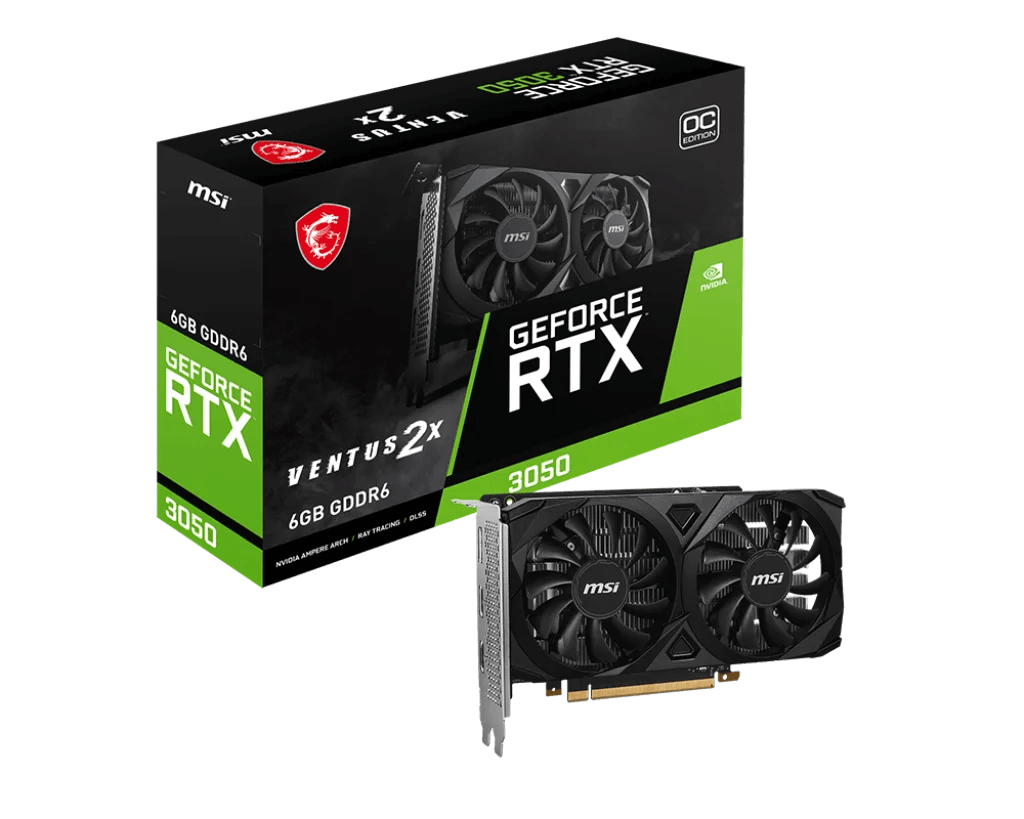
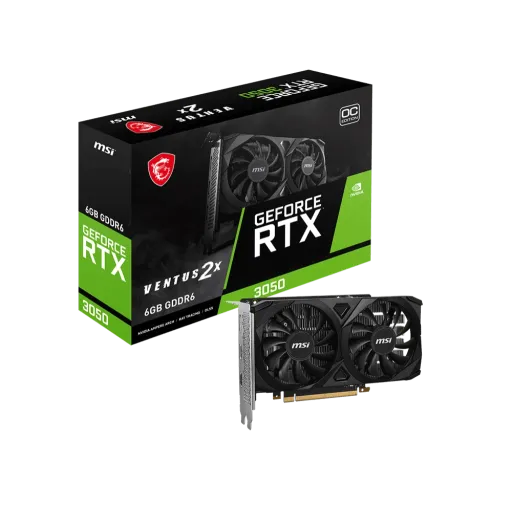
The MSI GeForce RTX 3050 Ventus 2X OC is built for practical gaming upgrades, jahan aapko RTX features chahiye without an oversized card footprint. This specific Ventus 2X OC 6G variant ships with a 1492 MHz boost clock, so everyday gameplay feels responsive and stable. This configuration uses 6GB GDDR6 on a 96 bit memory interface at 14 Gbps, jo 1080p class textures aur competitive titles ke liye ek sensible balance banata hai. The board power is listed at 70 W, is liye heat aur fan noise ko control mein rakhna comparatively asaan hota hai in a well ventilated case. The compact physical size stays friendly for many builds, because MSI lists dimensions of 189 x 109 x 42 mm for this model. The GPU is part of NVIDIA's Ampere generation, meaning ray tracing and Tensor core acceleration sit inside the same everyday gaming card. The output selection supports modern displays with 1x DisplayPort 1.4a and 2x HDMI 2.1 on this SKU, making desk plus TV setups easy to plan. The overall identity feels like a clean RTX on ramp, bilkul un users ke liye jo simple, efficient, and compact performance chahtay hain
Real time ray tracing changes how scenes look in games, kyun ke light, shadows, aur reflections zyada natural depth ke sath render hotay hain when supported. The Ampere RTX 30 family introduced 2nd generation RT Cores and 3rd generation Tensor Cores, so ray traced effects and AI features can run more efficiently than earlier RTX generations. DLSS Super Resolution boosts performance using AI reconstruction, aur yeh lower input resolution se higher resolution frames output karke clarity maintain karta hai. DLSS Super Resolution is listed as available across GeForce RTX GPUs, so the RTX 3050 class can benefit in many DLSS enabled titles without needing premium tier hardware. DirectX 12 Ultimate brings a standardized bundle of modern graphics features, including ray tracing, variable rate shading, mesh shaders, and sampler feedback for next gen rendering pipelines. MSI also lists DirectX 12 Ultimate support for this Ventus 2X OC card, which matters when you want broad compatibility with newer PC game engines. Ray tracing does require smart settings choices, lekin DLSS jaisi tech aapko visual upgrade ke sath smoother frame pacing maintain karne mein help karti hai. This combo is where RTX starts feeling meaningful, because you can chase better lighting while keeping controls and motion feeling crisp in real gameplay
The RTX 3050 6GB desktop GPU is commonly identified as GA107 based, jo Ampere efficiency ko entry RTX tier mein bring karta hai for consistent everyday play. MSI lists 2304 processing units for this Ventus 2X OC edition, which aligns with the cut used on the RTX 3050 6GB configuration. MSI also specifies a 1492 MHz boost clock, meaning short bursts and lighter scenes can feel snappy, aur menu navigation ya esports gameplay mein responsiveness noticeable rehti hai. The platform supports PCI Express Gen 4 on a x16 slot while operating electrically at x8 lanes, which is typically fine for the class and helps keep modern platform compatibility simple. TechPowerUp also lists the RTX 3050 6GB as PCIe 4.0 x8, so you can plan motherboard compatibility with fewer surprises. DirectX 12 Ultimate support is noted on the MSI spec sheet, which helps when newer titles lean into modern rendering paths and feature sets. The day to day benefit feels like fewer hiccups under mixed loads, kyun ke Ampere drivers aur RTX features are designed to keep both visuals and responsiveness balanced. This is a card that rewards smart presets, matlab settings ko thora tune karke you can keep gameplay smooth without chasing unrealistic targets
Memory behavior decides how smooth a game feels, kyun ke textures, shaders, and streaming data all compete for VRAM during fast scene changes. The MSI spec confirms 6GB GDDR6 with a 96 bit interface and 14 Gbps memory speed, which is a very specific configuration buyers should match to their workload. TechPowerUp lists this 14 Gbps effective memory rate as 1750 MHz actual, so the number you see in marketing connects to real clocking behavior. TechPowerUp also calculates 168.0 GB/s of memory bandwidth for the 96 bit bus at 14 Gbps, jo 1080p gaming aur lighter creator timelines mein data flow ko predictable rakhta hai. The 6GB capacity is often best used with sensible texture settings, taake sudden VRAM pressure se stutter ya hitching ki tension kam rahe. This memory setup also pairs well with DLSS Super Resolution in supported games, because AI upscaling can reduce the raw rendering load while keeping visuals clean on a 1080p or 1440p monitor. The result is a GPU that feels organized under typical gaming multitasking, matlab Discord, browser tabs, and a game running together without the system feeling overwhelmed. This is not about maxing every slider blindly, but about keeping frame delivery consistent and the experience refined
Cooling quality decides sustained comfort during long sessions, kyun ke stable temperatures keep boost behavior predictable and reduce annoying fan ramp spikes. MSI describes the Ventus series fan approach as designed for better heat dissipation, using a custom fan curve shape to generate more airflow and air pressure than generic designs. MSI also frames this card as a dual fan thermal design with two fans and a large heatsink, which is exactly the kind of setup that suits compact mid towers and clean airflow paths. The physical thickness stays manageable at 42 mm, so you keep more flexibility for adjacent slots in many mainstream motherboards. MSI lists the card dimensions as 189 x 109 x 42 mm, jo choti cases ya tidy cable management walay builds mein fitting ko easier banata hai. The listed weight of 381 g also signals a lighter, less stressful install for many PCIe slots, especially when you prefer a simple build without extra supports. The practical tip is keeping front to back airflow clean, taake open air cooler ka heat case ke andar trap na ho and the room stays quieter. This is the kind of cooling that feels sensible for daily gaming, because it prioritizes consistency rather than flashy complexity
Power draw affects everything from noise to case temps, aur yeh especially important hota hai when you upgrade an older PC or a compact build. MSI lists a 70 W power consumption figure for this RTX 3050 Ventus 2X OC, which is unusually efficient for an RTX branded desktop GPU tier. TechPowerUp also lists the RTX 3050 6GB at a 70 W TDP rating, so the efficiency story is consistent across common spec references. MSI recommends a 300 W power supply for this model, meaning many mainstream systems can accommodate it without jumping to a high wattage PSU class. Lower board power typically helps keep thermals calmer, is liye long matches mein heat kam mehsoos hoti hai and the fan profile can stay more relaxed. This efficiency also pairs nicely with NVIDIA Reflex in supported competitive games, because responsive gameplay feels better when clocks stay stable and the system avoids unnecessary spikes. The real world payoff is less “upgrade anxiety,” kyun ke you can focus on gameplay and settings instead of worrying about power overhead. This is a smart fit for everyday rigs where stability matters more than chasing extreme wattage
Connectivity decides how painless your setup feels, especially when you run a gaming monitor plus a second screen for chat, streaming controls, ya work dashboards. MSI lists 1x DisplayPort 1.4a and 2x HDMI 2.1 outputs on this Ventus 2X OC model, which keeps compatibility strong for both monitors and living room TVs. MSI also notes HDMI 2.1 support for 4K at 120Hz, so high refresh TV gaming and smooth media playback remain on the table when your display supports it. The maximum digital resolution is listed as 7680 x 4320, which is helpful when you plan large desktop workspaces or high resolution content output. MSI specifies the card fits a PCIe Gen 4 x16 slot while using x8 lanes electrically, jo modern motherboards ke sath straightforward install experience deta hai. TechPowerUp also records the RTX 3050 6GB as PCIe 4.0 x8, so that lane behavior is a known part of the design rather than a surprise. This I/O layout is simple but purposeful, because it focuses on the ports people actually use today. The end result is a clean multi display workflow, aur wiring aur adapter drama usually kam hota hai
Software and platform tools can matter as much, kyun ke they turn raw GPU capability into a smoother daily experience for gamers and creators. NVIDIA Reflex technologies are designed to optimize the rendering pipeline for responsiveness, which helps competitive play feel more immediate when supported by the game. NVIDIA also highlights that GeForce RTX GPUs include a dedicated NVENC hardware encoder, which can reduce reliance on the CPU for video encoding during streaming and recording. NVIDIA Broadcast adds AI powered features like noise removal, virtual background, and auto frame, aur yeh features streaming ya calls mein mic aur webcam quality ko noticeably cleaner bana sakte hain. MSI bundles a practical control layer through MSI Center, allowing monitoring, tweaking, and optimization in real time with a simple interface. MSI also points users toward MSI Afterburner for tuning and monitoring, and it mentions OC Scanner as an automated way to find stable overclock settings. DLSS Super Resolution further supports a smoother gameplay feel in compatible titles, because it uses AI reconstruction to boost performance while preserving clarity. The bigger win is convenience, matlab you get a full stack of tools for gaming, streaming, and maintenance without juggling random utilities. This ecosystem approach is what makes a mid tier GPU feel more premium over time
The best way to judge this card is usage fit, kyun ke RTX 3050 Ventus 2X OC 6G is designed around efficiency, compact sizing, and modern RTX features rather than extreme brute force. TechPowerUp frames the RTX 3050 6GB as a mid range option with typical gaming resolutions including 1080p and 1440p, which matches how many buyers realistically plan their monitor upgrades. MSI confirms the key build traits buyers care about, including 6GB GDDR6, 14 Gbps memory speed, and a 96 bit interface, so you can align expectations with the exact SKU you are purchasing. MSI also lists a 70 W power figure and a 189 mm length, which makes this a strong candidate for smaller cases and low heat daily rigs. NVIDIA highlights that RTX 30 series GPUs bring RT Cores and Tensor Cores to accelerate ray tracing and AI powered features, so you are stepping into modern graphics tooling rather than staying on legacy only rendering paths. DLSS Super Resolution remains a practical advantage in supported titles, kyun ke it uses AI reconstruction to output higher resolution frames from a lower input and can help keep gameplay feeling smoother. The connectivity also stays modern with DisplayPort 1.4a and HDMI 2.1 options, so multi screen setups feel straightforward without adapter juggling. This is a sensible upgrade for players who value stable daily performance, heat kam, and RTX features in a compact build, while keeping expectations aligned with an efficient 6GB configuration
Here's how current offers compare across retailers.
Review current prices and specifications side by side.