Price Breakdown & Availability
Here's how current offers compare across retailers.
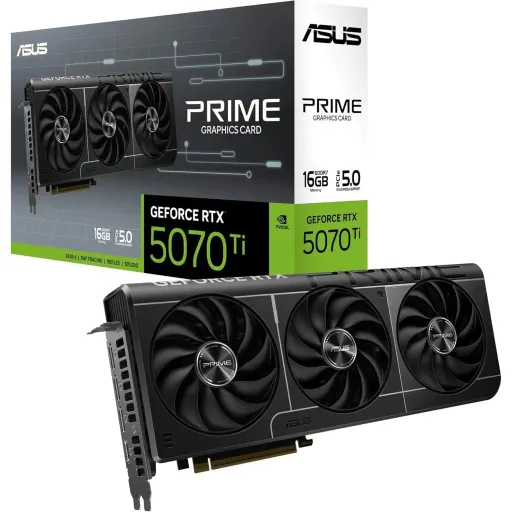
As of , there are 2 offers from 2 stores in Pakistan, priced Rs. 341,990 to Rs. 399,999.

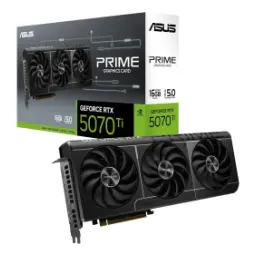
Asus The SFF-Ready Prime GeForce RTX 5070 Ti 16GB GDDR7 Graphics Card (PCIe 5.0, 16GB GDDR7, HDMI®/DP 2.1, 2.5-Slot, Axial-tech Fans, Dual BIOS)
Seller: JunaidTech
Updated
Asus The SFF-Ready Prime GeForce RTX 5070 Ti 16GB GDDR7 Graphics Card (PCIe 5.0, 16GB GDDR7, HDMI®/DP 2.1, 2.5-Slot, Axial-tech Fans, Dual BIOS)
Seller: JunaidTech
Updated
Rs. 399,999
Loading price history…
You Might Also Like
The ASUS GeForce RTX 5070 Ti Prime is built for people who want clean performance, rozana ka reliable output, and a no nonsense look in the case. The GPU is officially positioned as a GeForce RTX 5070 Ti with 8960 NVIDIA CUDA cores, so modern games and creative apps can stay responsive even when scenes get heavy. This Prime model pairs that core with 16GB of GDDR7 memory, which helps keep texture heavy titles and large timelines from feeling cramped during real workflows. The boost behavior is tuned for day to day stability, with ASUS listing a 2452MHz Boost Clock in default mode and a 2482MHz OC mode option, so you can choose calm acoustics or a little extra headroom asaani se. The RTX 5070 Ti platform also carries NVIDIA’s stated 1406 AI TOPS figure, which matters when AI driven upscaling and reconstruction are doing the heavy lifting behind the scenes. The overall silicon line sits under the GeForce Blackwell generation messaging from NVIDIA, keeping the card aligned with the newest RTX software stack rather than last gen compromises. The Prime positioning makes sense for builders who prefer “set it once” practicality, bilkul over RGB drama, and still want a high refresh experience
This Prime card keeps dimensions predictable, so installs feel straightforward even when your build is tight, thora sa space conscious bhi. The card is listed at 304 x 126 x 50 mm and a 2.5 slot design, which is the kind of sizing that helps you plan around front radiators and side intakes without guesswork. The Prime product page explicitly frames it as an SFF Ready Enthusiast GeForce card, so the intent is clear: build small, play big, aur fitment ki tension kam. The 2.5 slot approach also supports airflow balance, because it leaves more room than chunky triple slot designs for cable routing and nearby PCIe slots in many ATX boards. The display support is designed for multi monitor productivity, with ASUS listing up to four displays supported, which helps if your setup includes a gaming panel plus work screens. The Prime cooler layout is described as deliberately arranged to use chassis side panel ventilation, which makes case selection feel less like a gamble and more like a plan. This is the kind of card that suits clean glass builds, rozana ke compact desks, and people who want their GPU to look integrated instead of oversized. The end result is a more “compatible by design” experience, so your upgrade feels like a smooth swap rather than a full rebuild
Cooling design matters most after the novelty fades, kyun ke long sessions mein stability hi real luxury hoti hai. ASUS describes a triple fan Axial tech setup with a smaller hub, longer blades, and a barrier ring to increase downward air pressure, which translates into better airflow focus rather than random turbulence. The Prime shroud, heatsink, and heat pipe layout is presented as intentionally arranged to help those fans leverage side panel ventilation, so the card is built to work with the case instead of fighting it. The standout daily comfort feature is 0dB technology, where ASUS states all three fans stop when GPU temperature is below 50°C, meaning browsing, editing documents, or light creative work can stay noticeably quieter. That fan stop behavior is especially useful in mixed use PCs, jahan kabhi kaam hota hai kabhi gaming, because the system does not feel like it is always “spinning up.” The 2.5 slot physical profile supports this thermal strategy by keeping the cooler wide enough for airflow but not so thick that it blocks the case from breathing. The overall idea is simple: heat kam, noise controlled, and performance more consistent during extended play. This kind of acoustic discipline makes high refresh feel more premium, because the room stays calmer while frames stay smooth
Modern performance is not only raw shaders, balkay smart rendering bhi hoti hai when you want high settings and high refresh together. NVIDIA positions the RTX 5070 Ti inside the Blackwell based RTX 50 family, which is where the newest DLSS generation is meant to feel most natural. NVIDIA states DLSS 4 introduces Multi Frame Generation that can generate up to three frames per rendered frame, so heavy scenes can look fluid without forcing you to abandon higher presets. NVIDIA also highlights transformer based DLSS Ray Reconstruction and Super Resolution models, aiming for reduced ghosting and improved detail stability, which matters when you are sensitive to shimmer, edges, and fast camera pans. That “stability first” approach is exactly what makes a GPU feel premium, kyun ke smooth scrolling se le kar smooth panning tak everything feels controlled. The RTX 5070 Ti is listed with 1406 AI TOPS, giving the AI pipeline room to work while your game still gets the resources it needs. NVIDIA also explains Reflex 2 with Frame Warp as a path to reduce latency, with examples showing up to 75% latency reduction in specific scenarios, which is especially relevant if you use frame generation and still care about responsive aim. The practical win is a more balanced experience: frames zyada, input more controlled, and visuals that hold together under motion
Memory behavior is where many upgrades feel instantly different, kyun ke stutter aksar VRAM pressure se aata hai. ASUS lists this Prime card with a 16GB GDDR7 configuration, which is a comfortable tier for modern games that keep pushing higher res assets and larger worlds. ASUS also specifies a 256 bit memory interface and 28 Gbps memory speed, so bandwidth is positioned for sustained loads rather than short bursts. TechPowerUp’s GPU database echoes 16GB GDDR7 at 28 Gbps on a 256 bit bus and calculates 896.0 GB/s of bandwidth, which helps explain why high refresh 1440p and heavier creative previews can stay smooth. That extra throughput shows up in the “small moments,” rozana ke gameplay mein, like faster asset streaming and fewer frame time spikes when turning quickly. The card’s 8960 shading units are part of the core configuration, so memory and compute are matched in a way that avoids feeling lopsided. The max digital resolution is listed as 7680 x 4320 by ASUS, which is useful context if your workflow includes high res panels or multi monitor desktops. This is the kind of spec balance that makes the GPU feel “easy,” because you spend less time optimizing settings and more time actually playing or creating
A great GPU still needs the right ports, warna aapka monitor upgrade bhi waste feel hota hai. ASUS lists one native HDMI 2.1b and three native DisplayPort 2.1b outputs on the Prime RTX 5070 Ti, giving you a modern mix for gaming monitors and TV style displays. The benefit of multiple DisplayPort connections is simple: high refresh, multi monitor, and cleaner PC first compatibility, asaani se. Tom’s Hardware notes DisplayPort 2.1 is currently the most capable DisplayPort version, emphasizing its higher bandwidth potential versus HDMI 2.1 in many gaming scenarios, which helps when you are chasing high resolution and high refresh without awkward compromises. HDMI 2.1b remains valuable for living room screens and capture workflows, so the single HDMI port keeps your setup flexible for mixed environments. The four display support limit is clearly stated by ASUS, which suits productivity users running a main gaming panel plus extra screens for chat, timelines, and dashboards. The overall output stack matches the RTX 50 series positioning as a high refresh friendly generation, so you are not bottlenecked by older display IO. This port layout keeps the experience clean, because you can plug in, set your refresh rate, and get back to smooth motion
Power planning feels easier when specs are clear, kyun ke GPU upgrade ka sab se bada pain point wiring hota hai. ASUS lists PCI Express 5.0 as the bus standard for this card, which keeps it aligned with modern platforms while staying compatible with typical PCIe x16 slots for practical builds. ASUS also specifies a single 16 pin power connector and recommends a 750W PSU, giving builders a straightforward target for stable power delivery. The included adapter cable is listed by ASUS as “1 to 3”, which helps older PSUs transition without immediate replacement, though clean cable routing still matters for airflow and safety. TechPowerUp lists a 300 W TDP for the RTX 5070 Ti reference level board design, so pairing the card with sensible PSU headroom keeps boost behavior more consistent under load. The physical sizing also supports easier cable management, because the 2.5 slot profile and 304 mm length are explicitly provided, helping you avoid “will it fit” surprises. The end result is a smoother upgrade path, asaani se, especially for builders who want performance without turning the build into a full rewiring project
Performance becomes more personal when profiles are simple, kyun ke har banda same noise level ya temps nahi chahta. ASUS explicitly lists GPU Tweak III as supported software for the Prime RTX 5070 Ti, so you are not forced into third party utilities just to set sane fan curves or a mild OC. ASUS describes preset modes like OC Mode, Silent Mode, and User Mode inside GPU Tweak III, which makes quick switching feel practical for people who game at night and work in the day. The same ASUS write up also highlights Mobile Monitor support, letting you keep overlays off while still watching temps and clocks, bilkul distraction free. ASUS’s GPU Tweak III campaign page mentions features like OC Scanner, profile auto swapping via Profile Connect, and updated tooling for easier manual tuning, which is useful when you want better efficiency instead of maximum watts. The card’s own dual mode clock listing from ASUS, including the 2452MHz default Boost and 2482MHz OC mode, pairs naturally with these software presets for a “one click, done” feel. This kind of control keeps the experience refined, because you can chase heat kam operation or extra FPS without constantly tweaking sliders
This GPU makes the most sense for balanced enthusiasts, jo 1440p high refresh ko priority dete hain and still want strong creator comfort. The RTX 5070 Ti configuration brings 8960 CUDA cores and a Blackwell generation position in NVIDIA’s own lineup, which is a solid foundation for demanding engines, ray traced effects, and AI assisted rendering. The 16GB GDDR7 memory and 256 bit interface are clearly stated by ASUS, making this card feel less “tight” when you stack modern textures, mods, and background apps. NVIDIA’s DLSS 4 messaging focuses on Multi Frame Generation and improved transformer based reconstruction, which is exactly the kind of tech that can keep gameplay smooth when native rendering gets expensive. The Prime cooler approach emphasizes airflow efficiency and 0dB fan stop below 50°C, so light tasks can stay quiet and heavy sessions can stay steadier. The port selection of DisplayPort 2.1b and HDMI 2.1b supports modern monitors and TV connections, helping multi display desks feel clean rather than constrained. The overall value is not about flashy extras, balkay it is about consistent frametimes, practical fitment, and a strong RTX 50 software feature stack that keeps your build feeling current
As of , the lowest ASUS GeForce RTX 5070 Ti Prime price in Pakistan is Rs. 341,990 at PakByte. We found 2 offers from 2 stores, priced from Rs. 341,990 to Rs. 399,999.
Here's how current offers compare across retailers.
Review current prices and specifications side by side.