Price Breakdown & Availability
Here's how current offers compare across retailers.
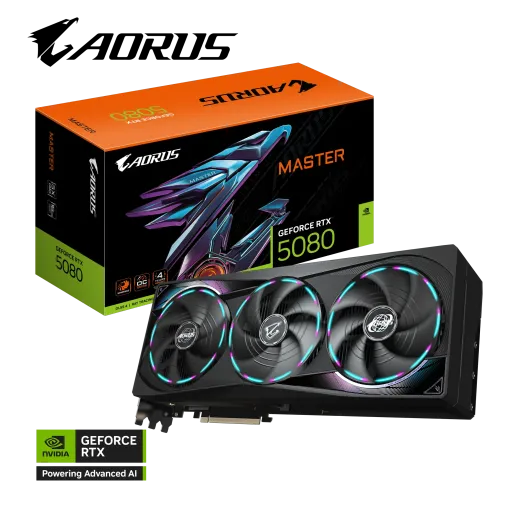
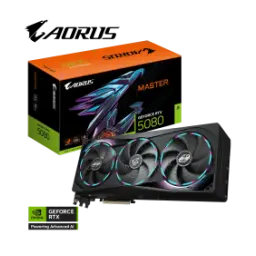
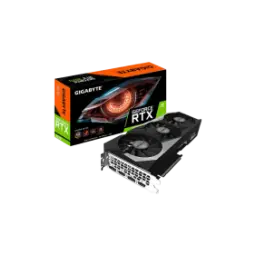
Gigabyte GeForce RTX 5080 Aorus Master


You Might Also Like
The Gigabyte GeForce RTX 5080 AORUS MASTER is designed as a flagship class upgrade that looks intentional in a high end build, aur overall vibe bilkul premium rehti hai. The card is based on NVIDIA’s Blackwell architecture and pairs it with DLSS 4 support, so modern games and creator apps can feel smoother without constant settings compromise. The 16GB GDDR7 VRAM on a 256 bit interface gives you meaningful headroom for higher res textures and heavier scenes, jo 4K ya ultra wide workflows mein kaam aata hai. The factory tuned core clock on this AORUS MASTER variant reaches 2805 MHz, which helps deliver that “snappy” top end feel when boost behavior matters. The GPU configuration lists 10,752 CUDA cores, which translates into strong throughput for raster gaming and GPU accelerated creative tasks. The AORUS MASTER edition adds signature elements like LCD Edge View and RGB Halo, so the card becomes part of the aesthetic instead of a plain black box. The physical sizing is clearly “enthusiast tier” at 360 mm length, meaning planning for case clearance pehle se karna smart hota hai. The overall goal is simple: keep performance high, keep thermals controlled, aur build ko ek refined showpiece banayein
The Blackwell platform is built around AI assisted rendering features that aim to lift real world smoothness, especially jab scenes heavy ho jaati hain. NVIDIA lists DLSS 4 support on RTX 5080, including features like Super Resolution and Frame Generation, which can help you keep image quality high while motion stays fluid. The AORUS MASTER product page also highlights DLSS 4 with Multi Frame Generation, so the card is positioned for the current generation of AI enhanced pipelines. The same platform includes 5th generation Tensor Cores and 4th generation Ray Tracing Cores on RTX 5080, which matters when you want ray traced lighting but still need playable responsiveness. The Reflex 2 feature is also called out for RTX 5080, and that can be meaningful in competitive titles where input timing feels “tight,” yani response tez aur controlled. The practical benefit is less time spent tweaking every new game update, kyun ke base tech stack already future facing hai. The Blackwell positioning is not only for gaming but also for creators, with NVIDIA describing RTX 5080 as part of the GeForce platform for gamers and creators. The combination works best when you want high refresh gameplay at 1440p or a confident 4K experience, rozana ke sessions mein bhi, without turning visuals into a blurry mess. The end result is a more “consistent” feel, jahan frame pacing stable rahe and your settings choices stay flexible
The 16GB GDDR7 memory configuration is a big part of why RTX 5080 class cards stay comfortable at higher settings, especially jab textures high aur assets heavy ho. Gigabyte lists this AORUS MASTER with 16GB GDDR7 and a 256 bit memory bus, which is a balanced setup for high quality assets and modern engines. NVIDIA’s RTX 5080 specs also show a standard 16GB GDDR7 configuration with a 256 bit interface width, so the board lines up with the official platform direction. Gigabyte states a 30 Gbps memory clock for this model, and that kind of bandwidth focus helps reduce those “random” dips when a scene streams a lot of data. TechPowerUp similarly documents RTX 5080 with 16GB GDDR7 on a 256 bit interface and notes the 30 Gbps effective memory speed, reinforcing the idea that the memory subsystem is tuned for modern workloads. The real world advantage shows up when you keep high res texture packs enabled, rozana gaming mein, while background apps still behave normally. The VRAM capacity also helps creator workflows stay smoother when previews and caches grow, so timeline scrubbing can feel more predictable. The overall experience becomes less “fragile,” matlab chhoti chhoti memory limits wali tension kam hoti hai. This is the kind of spec choice that keeps a GPU relevant longer, even as games get heavier
The AORUS MASTER edition leans heavily into cooling because sustained performance depends on temperature discipline, aur heat kam rehna long sessions mein bohat matter karta hai. Gigabyte lists the WINDFORCE cooling system for this card and calls out elements like Hawk fan, composite metal grease for the GPU, and server grade thermal conductive gel, which are all aimed at consistent contact and heat transfer. The AORUS store listing also emphasizes WINDFORCE cooling and a triple fan setup, so airflow is clearly part of the product’s core identity. The Dual BIOS feature offers Performance and Silent modes, which is practical when you want maximum boosts on game night but prefer lower acoustics during work or late sessions. The benefit is simple: fans and curves can align with your environment, yani office vibe ho ya gaming room, instead of one loud profile for everything. The cooling approach also supports the idea of steadier clocks, because boost behavior feels better when thermals don’t spike quickly. The design is meant to reduce that “hot and cold” performance feel, jahan ek match smooth aur next match noisy ho jata hai. For builders who care about long term stability, consistent temperatures can also mean fewer headaches over time. The overall takeaway is controlled thermals, controlled noise, aur performance bohat stable
The output layout is built for serious multi display setups, so you can run high refresh monitors and still keep expansion options open. Gigabyte lists three DisplayPort 2.1b ports and one HDMI 2.1b port on the AORUS GeForce RTX 5080 MASTER 16G, which is a strong mix for modern panels. TechPowerUp also documents RTX 5080 output as 3x DisplayPort 2.1b plus 1x HDMI 2.1b, which supports the same connectivity story from an independent database view. Gigabyte specifies up to four displays (Multi view 4) and a maximum digital resolution of 7680×4320, so multi monitor productivity and big screen gaming both fit naturally. VESA has described DisplayPort 2.1b as an update that includes new active cable specifications aimed at enabling longer UHBR20 connections, which can be helpful when desk layouts get complex, wiring asaani se manage hoti hai. The HDMI Forum has also announced HDMI Specification 2.1b as an official revision, which matters for interoperability and cleaner device to TV behavior in real homes. The practical win is fewer compromises when you mix monitors, TVs, and capture workflows, aur ports ki kami wali tension nahi hoti. This connectivity set is especially useful if you plan a future monitor upgrade and don’t want the GPU to be the limiting factor. The end result is simple flexibility, delivered in a modern standard stack
The physical design focuses on strength because large coolers add weight, aur sag ka masla high end builds mein common hota hai. Gigabyte highlights a reinforced structure on the AORUS MASTER and also includes a versatile VGA holder, which helps keep the card seated cleanly over time. The AORUS store listing similarly calls out a reinforced structure and a versatile VGA holder, reinforcing that installation support is part of the package rather than an afterthought. Gigabyte lists the card dimensions as 360 mm length, 150 mm width, and 75 mm height, so checking case clearance and front radiator space becomes a must for smooth installation. The AORUS store listing notes a 3.7 slot design, which means airflow planning and adjacent slot availability should be considered, warna tight builds mein compromise ho sakta hai. The bus interface is PCIe 5.0 on this model, so it drops into modern boards cleanly while staying backward compatible in typical desktop scenarios. The benefit is a more “set and forget” build where the GPU feels secure, and cable tension doesn’t twist the card over time. This matters for movers and upgraders who open the case often, kyun ke durability ka edge milta hai. The overall installation story feels premium because the accessories and structure support the card’s real world heft
The power setup is straightforward when you plan it early, because high performance GPUs reward clean power delivery and good airflow. Gigabyte recommends an 850W PSU for the AORUS GeForce RTX 5080 MASTER 16G and lists a single 16 pin power connector, so PSU selection should be done with future upgrades in mind. Gigabyte also lists an included 12V 2x6 to 3x PCIe 8 pin adapter in the box, which helps if your current PSU does not natively provide the newer connector, asaani se transition ho jata hai. TechPowerUp notes RTX 5080 using a PCIe 5.0 x16 interface and a 16 pin connector with a 360W rated power draw for the reference level spec, which gives useful context for why strong PSUs and stable cables matter. Tom’s Hardware also reports RTX 5080 boards around a 360W power draw in market coverage, helping validate the class level consumption expectations. The practical benefit is fewer shutdown mysteries and fewer “random” stutters under load, kyun ke power delivery stable rehta hai. The cable management becomes cleaner when you route the connector carefully, and that also improves airflow around the card. The best outcome is predictable performance and lower stress on components, especially during long gaming marathons. The end goal is a build that stays stable today and still feels ready for tomorrow
The AORUS MASTER experience is not only about raw FPS, because daily usability improves when the card communicates status clearly. Gigabyte describes LCD Edge View as a display that can show graphics card information and also supports custom text, images, and GIFs, so your build can be informative and personal at the same time. The RGB Halo lighting is presented as a signature three ring lighting effect that can be synchronized and customized through GIGABYTE Control Center, which keeps the setup centralized instead of juggling multiple tools. The same Gigabyte page notes you can adjust lighting effects via GIGABYTE Control Center for both the RGB and the LCD, so the experience feels integrated, rozana use mein bhi. Gigabyte also mentions Dual BIOS modes that can be switched for Performance or Silent behavior, which pairs nicely with RGB and display customization when you want different “profiles” for work and play. The Ecuador page snippet also references a power indicator that flashes to alert users about power supply abnormalities, adding a small but useful diagnostic cue. The benefit is less guesswork when something feels off, and faster troubleshooting if a cable is loose. The aesthetic win is obvious, but the functional win is equally real, kyun ke status info nazar aa jata hai. This is the kind of detail that makes the GPU feel like a premium component rather than just a performance part
The AORUS MASTER variant is aimed at builders who want top tier features without turning the PC into a constant tuning project. Gigabyte lists a 2805 MHz core clock for this model versus a 2617 MHz reference figure, which signals a factory overclocked approach that can feel more responsive out of the box. The connectivity story stays future facing with 3x DisplayPort 2.1b and 1x HDMI 2.1b, so pairing with next gen monitors and TVs remains flexible for years. The memory setup remains the practical backbone at 16GB GDDR7 on a 256 bit interface, which helps keep high quality textures and creative workloads comfortable, bilkul headache free. The bundle includes the versatile VGA holder and the 12V 2x6 to 3x 8 pin adapter, which reduces hidden setup costs and makes installation smoother in real builds. The official AORUS store listing also references a 4 year warranty with online registration required, which adds a layer of long term confidence for a premium GPU purchase. The overall value lands in the “enthusiast practical” zone, where performance, cooling, and build extras align instead of pulling in different directions. The card fits best for 1440p high refresh and ambitious 4K play, aur creators ko bhi strong acceleration milti hai. The closing decision is simple: choose this when you want flagship features plus daily polish, and want the GPU to look as premium as it performs
Here's how current offers compare across retailers.
Review current prices and specifications side by side.
Gigabyte
Gigabyte GeForce RTX 5060From Rs. 124,990
Local price
23 offers
Updated 3 days ago
Gigabyte
Gigabyte GeForce RTX 5070 TiFrom Rs. 340,000
Local price
10 offers
Updated 3 days ago