

Price Breakdown & Availability
Here's how current offers compare across retailers.
MSI GeForce RTX 5060 Shadow 2X OC


You Might Also Like
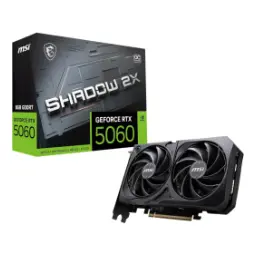
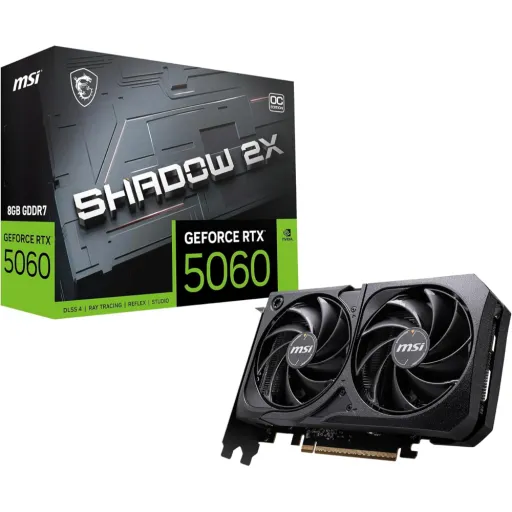
Meet the MSI GeForce RTX 5060 Shadow 2X OC as a practical dual fan option for modern builds that want new gen features without unnecessary bulk. This model is explicitly positioned around NVIDIA’s Blackwell architecture and DLSS 4 support, so frame quality and upscaling features stay current for newer game engines. The GPU configuration includes 3840 CUDA cores, which translates into strong baseline throughput for 1080p high refresh and tuned 1440p sessions when settings are chosen sensibly. The Shadow 2X OC edition also carries MSI’s factory clock profile, with a listed Boost clock of 2527 MHz and an “Extreme Performance” mode rated at 2535 MHz via MSI Center. That extra tuning matters most in short burst loads, rozana ke matches ya quick creator previews mein, where snappy responsiveness feels more consistent even if you never touch manual overclocking. The RTX 5060 family availability is shown as May 19 for the RTX 5060 on NVIDIA’s site, which helps anchor it as a newer generation step for builders moving from earlier RTX 30/40 era cards. The overall promise here is balance, yani stable performance, manageable thermals, and simple compatibility, rather than chasing oversized cooler designs that do not fit many everyday cases
The display output selection supports modern monitors and TVs without adapter drama, making it easier to build a clean desk setup for work and play. The card provides three DisplayPort outputs rated as v2.1b plus one HDMI 2.1b port, which covers common multi monitor layouts and living room HDMI routing equally well. MSI also references HDMI 2.1b capability up to 4K 480Hz or 8K 120Hz with DSC, which is especially relevant if your display upgrade roadmap includes very high refresh or very high resolution panels. That bandwidth headroom becomes practical when you want smooth motion in competitive games, aur screen tearing ke baghair, while still keeping HDR and VRR features in the chain. The specifications list support for up to four displays, which keeps productivity workflows flexible for dual screen streaming, coding, or timeline work. The maximum digital resolution is shown as 7680 x 4320, so even if 8K is not a daily target, the output pipeline is not the limiting factor for high end monitors. For many buyers, the real win is longevity, kyun ke aap monitors upgrade karte rahte hain, and a GPU with DP 2.1 class outputs reduces the chance of early obsolescence. The experience stays straightforward because you can plug modern panels directly, and the setup looks clean without extra dongles
The core performance story starts with its compute layout, which is built around 3840 CUDA cores on the RTX 5060 configuration. MSI’s clock listing puts the Boost frequency at 2527 MHz, giving it the kind of quick, high frequency behavior that helps maintain responsive input feel in real gameplay. The same spec sheet also highlights an “Extreme Performance” clock of 2535 MHz through MSI Center, which is a simple switch when you want a little extra push, bilkul asaani se. NVIDIA’s RTX 5060 family table calls out 5th generation Tensor Cores and 4th generation Ray Tracing Cores, which matters when you want modern RTX features without turning settings into a stutter fest. The AI performance line is listed as 614 AI TOPS for the RTX 5060, which supports the idea of stronger AI assisted features, aur DLSS wali processing mein zyada headroom. Third party listings for this exact MSI model also repeat the 3840 CUDA core count and 614 TOPS figure, reinforcing the same performance framing across sources. In daily use, that combination tends to feel like fewer dips in heavy scenes, smoother camera pans, and more consistent frametimes, especially when upscaling features are used thoughtfully. The practical takeaway is controlled performance, yani speed zabardast but stable, and not the kind of boost that comes with unpredictable heat spikes
The memory setup is designed for modern bandwidth needs, pairing 8GB of GDDR7 with a 128 bit memory bus for a balanced mainstream pipeline. MSI lists the memory speed at 28 Gbps, which is where GDDR7 can help keep texture streaming and high FPS scenarios feeling more composed. TechPowerUp’s database entry for this exact MSI Shadow 2X OC model also shows 8GB GDDR7, a 128 bit bus, and 28 Gbps effective, adding an extra cross check for the same core numbers. The same source calculates memory bandwidth at 448.0 GB/s, which is the kind of throughput that supports stable high refresh gaming when settings are chosen sensibly. A retailer spec block for the card repeats 28 Gb/s, 128 bit, and 448 GB/s bandwidth, so the memory story stays consistent across manufacturer and third party summaries. In real terms, this means fewer moments where the game feels “heavy” during rapid movement, aur loading ke baad texture pop in ka stress generally kam hota hai when the engine is bandwidth hungry. The 8GB capacity is best suited to performance focused settings at 1080p and optimized 1440p, which keeps the experience smooth while staying in a reasonable efficiency class. For creators, this kind of bandwidth also helps with viewport responsiveness and quick GPU accelerated previews, while keeping power draw controlled
The board power target is kept practical for mainstream rigs, with MSI listing 145 W power consumption for this Shadow 2X OC. The power connector requirement is a single 8 pin, which keeps cabling simple and reduces the upgrade friction for many existing power supplies. MSI also lists a recommended 550 W PSU, which is a realistic target for many mid tower builds and helps keep stability predictable under load. The PCIe interface is described as Gen 5 x16 but electrically using x8 lanes, so it fits a standard x16 slot while running at x8 signaling, bilkul common aur hassle free. TechPowerUp also identifies the bus interface as PCIe 5.0 x8 for this model, confirming the same lane configuration from a second source. For everyday gamers, this layout often means the upgrade is straightforward, because the physical slot fit is standard and the power delivery is not overcomplicated. For small to mid builds, yeh cheez bohat important hoti hai, since fewer cables and lower power targets typically translate into cleaner airflow and less heat accumulation. The result is a GPU that feels “drop in” for many systems, while still offering the newer 50 series feature stack and modern display outputs
The cooler design focuses on keeping performance consistent, using MSI’s TORX Fan 5.0 concept that links fan blades with ring arcs to stabilize airflow pressure. MSI also highlights dedicated heat pipes intended to draw thermal energy away from the GPU, which helps sustain boost behavior during longer gaming sessions. The reinforcing backplate includes an airflow vent for pass through exhaust, which is a practical detail for cases where front to back airflow is already tuned. The physical dimensions are listed as 197 x 120 x 40 mm, which helps it fit into many mainstream cases without the clearance stress that comes with oversized triple fan cards. MSI also lists a product weight of 493 g, which supports the idea of a lighter, easier to mount card that still includes a backplate for structure. In day to day use, the benefit is sustained smoothness, kyun ke heat kam ho to boost clocks zyada stable rehte hain, and that stability shows up as consistent frametimes. For creators and multitaskers, quiet stability matters because fan ramps can be distracting during calls or recording sessions, and a well managed thermal profile keeps the PC feeling composed. The Shadow 2X identity here is not about flashy extras, but about dependable cooling behavior that protects performance during the longest parts of your routine
The tuning experience is designed to stay accessible, with MSI Center positioned as the place to monitor, tweak, and optimize MSI products in real time. MSI explicitly lists the card’s “Extreme Performance” clock at 2535 MHz as an MSI Center mode, which gives an easy toggle rather than forcing manual sliders from day one. The default listed Boost clock is 2527 MHz, so you can keep stock behavior and still get a tuned profile out of the box. MSI also calls out Afterburner as a widely used overclocking tool, which matters if you want to create a quiet curve, a cool curve, or a slightly higher sustained clock profile, apni marzi se. This kind of software stack is valuable because it supports practical tuning, like reducing noise by shaping fan behavior, without sacrificing the stable boost that keeps gameplay fluid. For everyday owners, the best “OC” is often a balanced profile, yani performance stable, heat controlled, and no random spikes during long sessions. The card also lists OpenGL 4.6 support, which helps keep older tools and lighter 3D apps compatible while newer games lean on the latest APIs
The smartest buying decision comes from matching tier to usage, and NVIDIA’s own RTX 5060 family table makes the segmentation clear. The GeForce RTX 5060 is listed with 3840 CUDA cores, while the RTX 5060 Ti is shown with 4608 CUDA cores, which frames the Ti as the step up option for higher settings or heavier 1440p demands. NVIDIA also lists the RTX 5060 memory configuration as 8GB GDDR7, while the RTX 5060 Ti appears with 16GB or 8GB GDDR7 variants, which can matter for memory heavy games and creator workloads. For many practical gamers, the RTX 5060 tier hits a comfort zone, kyun ke it keeps power and size manageable while still offering Blackwell era features and modern outputs. The MSI Shadow 2X OC approach strengthens that positioning by emphasizing a compact dual fan cooler, a straightforward 8 pin power plug, and a clear spec sheet that is easy to plan around. If your focus is esports plus single player at optimized settings, yeh tier ka balance bohat munasib lagta hai, and the money you do not spend on the next tier can often go into a better monitor or SSD. If your focus is maximum textures, heavy ray tracing, or longer term headroom at higher resolutions, then the Ti’s extra cores and optional larger memory can make sense, but only when your actual workload demands it
Long term satisfaction comes from the boring details being correct, and MSI’s spec sheet is strong on the compatibility essentials. The card lists DirectX 12 Ultimate support, which helps keep new releases and modern rendering features aligned with the Windows gaming ecosystem. The same page lists OpenGL 4.6, which supports a wide range of tools and lighter 3D workflows, so older apps do not feel left behind. The output stack includes three DisplayPort 2.1b and one HDMI 2.1b, which keeps your setup flexible across monitors and TVs while supporting high refresh and modern feature sets. The physical and power profile stays approachable with 145 W consumption, a single 8 pin connector, and a 550 W recommended PSU, so most builders can upgrade without rebuilding the whole PC, bilkul asaani se. The PCIe interface is described as Gen 5 x16 using x8 lanes, meaning it fits the standard x16 slot while keeping the lane configuration consistent with RTX 5060 listings elsewhere. If your goal is a cleaner everyday experience, yeh card ka focus refined ownership par hai, where setup is simple, cooling is structured, and tuning tools are available only when you actually need them. The result is a GPU that feels modern on day one, and remains practical as your monitor, game library, and workflow evolve
Here's how current offers compare across retailers.
Review current prices and specifications side by side.