

Price Breakdown & Availability
Here's how current offers compare across retailers.
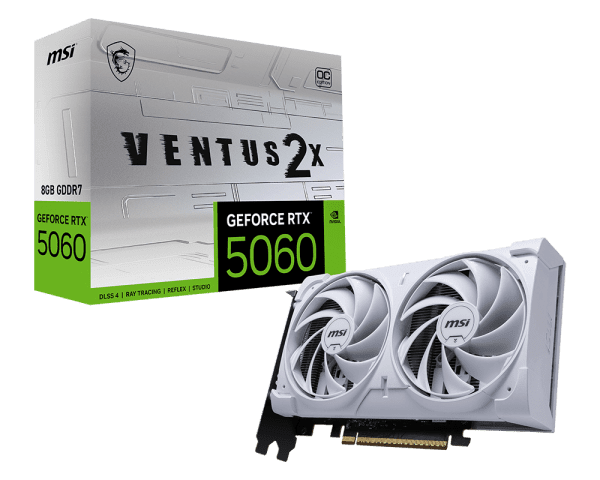
MSI GeForce RTX 5060 Ventus 2X OC


You Might Also Like
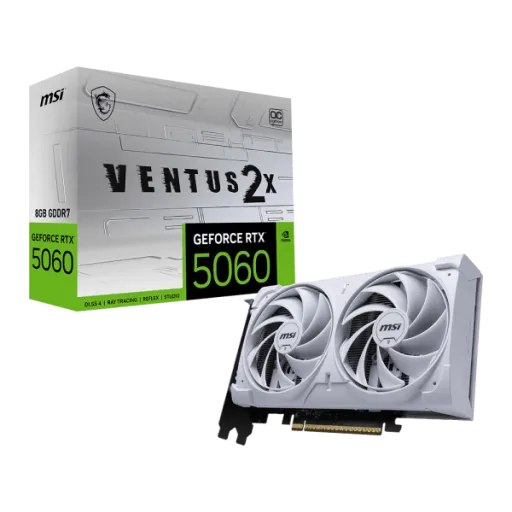
This MSI GeForce RTX 5060 Ventus 2X OC is designed for builders who want modern RTX features without visual clutter, aur overall vibe bilkul clean aur mature rehta hai. In a clean looking build, the neutral aesthetic blends easily with RGB heavy or stealth setups, so the GPU never looks out of place. With a compact 197 x 120 x 41 mm card size, the installation feels straightforward in tighter cases, choti chassis mein clearance manage karna asaan ho jata hai. The physical footprint stays manageable for SFF leaning builds, especially when front radiator space or drive cages are in the way. When daily gaming is the goal, the card aims to keep performance stable and noise reasonable, rozana ke sessions mein fatigue kam hoti hai. Because the board power is listed at 145 W, overall heat output stays easier to tame for mainstream airflow, and fans do not have to panic ramp as often. If your priority is a practical upgrade path into the RTX 50 family, this edition emphasizes fit, finish, and consistency over flashy extras
This GPU leans on NVIDIA Blackwell architecture to keep performance efficient, aur power per frame ka behavior generally zyada disciplined feel hota hai. With 3,840 CUDA cores on the GeForce RTX 5060 spec, modern engines get enough parallel throughput for high refresh 1080p play and tuned 1440p presets. The default boost clock is listed at 2527 MHz on MSI’s spec page, which helps sustain responsive frame pacing when matches get hectic. With MSI Center enabled, the Extreme Performance mode is rated up to 2535 MHz, so you can squeeze a little extra headroom without manual tuning, bilkul simple toggle wali approach. The Blackwell platform also pairs fifth‑gen Tensor Cores with fourth‑gen RT Cores in the RTX 50 Series stack, which matters because AI upscaling and ray tracing are now everyday settings, not just demo features. When power draw stays in a 145 W class, system thermals remain easier to balance, heat kam hoti hai and case fans can run calmer. For builders upgrading from older mid range cards, the real win is a steadier feel across long sessions, where boosts hold longer and stutter spikes become less common
This generation’s headline feature is DLSS 4 support, and it is built to multiply perceived smoothness when native rendering gets heavy. With DLSS 4 Multi Frame Generation, RTX 50 Series GPUs can generate additional frames beyond traditional rendering, jis se motion zyada fluid lagta hai in supported games. The broader DLSS 4 stack also includes Super Resolution, Ray Reconstruction, and DLAA, so you can choose sharpness and stability based on the game’s look. When you aim for a high refresh monitor experience, DLSS settings often matter more than raw shaders, kyun ke practical FPS uplift yahin se nikalta hai. The NVIDIA GeForce announcement highlights DLSS 4’s transformer AI model for Super Resolution and Ray Reconstruction, focusing on improved clarity and temporal stability during motion. The same announcement also describes Multi Frame Generation working alongside the suite of DLSS features to multiply frame rates, which is ideal when you want smooth scrolling camera pans and less jitter. When DLSS is used well, it can also help responsiveness by keeping the GPU from saturating, aur overall gameplay control zyada predictable rehta hai. This card’s value is strongest in games that already love DLSS, where you can keep settings attractive while staying near the monitor’s sweet spot
This card is built for modern RTX pipelines, where ray tracing is no longer a special mode but a normal graphics option. With fourth‑generation Ray Tracing Cores on the RTX 5060 spec, effects like reflections and global illumination can be used more strategically, bilkul har scene mein max karna zaroori nahi hota. The platform also supports NVIDIA Reflex 2, which focuses on lowering latency for faster reactions, especially in competitive shooters and fast arena titles. When your aim depends on consistent timing, lower latency feels like better control rather than higher numbers, aur flick shots zyada on time land karte hain. The NVIDIA page also notes Reflex 2 Frame Warp as a coming soon capability, showing the latency roadmap for the RTX 50 Series ecosystem. With DirectX 12 Ultimate support listed for this MSI model, you are aligned with current feature paths like modern shader and ray tracing standards. The practical approach is to combine selective ray tracing with DLSS, taake visuals bhi premium rahen aur FPS bhi stable rahe. When tuned this way, gameplay looks richer while the mouse and keyboard feel remains crisp and predictable
This model pairs the RTX 5060 GPU with 8GB of GDDR7 memory, which is aimed at strong 1080p settings and carefully chosen 1440p presets. With a 28 Gbps memory speed on MSI’s spec sheet, data moves quickly through the pipeline, jis se texture streaming aur asset loads zyada smooth feel ho sakte hain. The 128 bit memory interface is part of the RTX 5060 reference profile, and it works best when you lean on smart settings like DLSS for heavier scenes. When you see “fast VRAM” in real play, it shows up as fewer micro hitches in busy areas, aur camera turns par motion zyada clean lagta hai. Third party listings also reflect the same 28 Gb/s GDDR7 and 128 bit configuration for RTX 5060 partner boards, helping confirm the platform’s baseline. With an effective bandwidth commonly listed around 448 GB/s for this class of RTX 5060 GDDR7 setup, the card has enough throughput to keep frames consistent when effects stack up. For everyday builders, the key is balance: keep ultra textures for 1080p, be selective at 1440p, and let DLSS handle the heavy lifting
This MSI card uses a PCI Express Gen 5 x16 connector but runs electrically at x8, which is a modern design choice for this performance tier. With PCIe 5.0 running at 32 GT/s per lane as a generation baseline, the available link speed stays very high even with fewer lanes, aur practical bottleneck ka risk generally low rehta hai for gaming workloads. The bandwidth math also shows PCIe 5.0 x8 sits in the same ballpark as older full‑lane links, which is why the experience usually remains smooth in real builds. When builders worry about “x8” on a modern GPU, it helps to look at measured scaling tests rather than guesses, bilkul numbers se clarity aati hai. TechPowerUp’s PCIe scaling conclusion on a closely related RTX 5060 Ti reports only a small performance drop when running PCIe 4.0 x8, suggesting bandwidth headroom remains ample for this generation’s class. When you install this card in a Gen 5 capable system, you are effectively giving it a very fast path to the CPU, so asset streaming and frame delivery stay consistent. The practical advice is simple: keep the card in the primary slot, enable Resizable BAR when supported, aur system stable feel karega
This Ventus 2X OC focuses on cooling fundamentals, because stable temps are what keep boost behavior predictable over long matches. With a dual fan thermal design, MSI positions two fans on a large heatsink for strong cooling with a quieter experience, jis se noise fatigue kam hoti hai in daily use. The same product page calls out TORX Fan 5.0, describing ring arcs that link fan blades to stabilize and maintain high pressure airflow. With the TORX Fan 5.0 airflow claim of increased airflow compared to axial fans, cooling can stay efficient without always resorting to aggressive RPM spikes. The cooling stack also mentions a nickel plated copper baseplate and Core Pipes with a square design to maximize contact, so heat transfer remains direct and efficient. When heat is moved away quickly, the card is more likely to hold its rated clocks under load, aur performance bohat stable feel hoti hai rather than swinging. With a 145 W power consumption rating, the thermal challenge is realistic for mainstream cases, so you can build quiet without overengineering airflow. The end result is confidence: long sessions feel consistent, and the GPU stays composed even when the room gets warm
This GPU is built for modern monitors and TVs, so you can pair it with high refresh panels without awkward adapter compromises. With three DisplayPort 2.1b outputs plus one HDMI 2.1b port, multi monitor desks and streaming setups become simple, aur cable management bhi clean rehta hai. The MSI specification also lists support for up to four displays, which helps if you run a game on one screen and tools or chat on others. With a digital maximum resolution listed as 7680 x 4320, the card supports high resolution output for media work, casual 8K playback scenarios, and future display upgrades. The HDMI 2.1b note on the MSI page also references very high refresh support with DSC, which is useful when you want a living room display to feel responsive. When you combine high refresh with DLSS and Reflex, motion feels cleaner and input feels tighter, bilkul esports wali snappiness aa jati hai. The NVIDIA RTX 5060 family page highlights support features like DLSS 4, Reflex 2, and G SYNC in the platform stack that complements these outputs. This is the kind of connectivity that stays relevant across monitor upgrades, so the GPU does not feel outdated just because your display got better
This card is not only for games, because the RTX 50 platform also targets creators who want faster exports and smoother previews. With NVIDIA Studio Drivers listed as supported for the RTX 5060 family, creative apps can benefit from stability focused optimizations, aur workflow ka random crash risk usually kam hota hai. The same platform table calls out a ninth‑generation NVIDIA Encoder (NVENC), which matters for streamers and editors who want efficient hardware encoding. NVIDIA’s own 5060 family announcement also positions the card family around neural rendering and DLSS improvements, which can help both real time previews and fast iteration loops. With MSI’s ecosystem, the product listing mentions MSI Center modes for performance or low noise, so you can adapt the card’s behavior to your room and schedule, raat ko silent feel zyada practical hota hai. The same listing also references MSI Afterburner for overclocking control, giving you a familiar way to tune fan curves and stability for your exact case airflow. When software and hardware align like this, the experience feels refined: you can run games, record, and edit with fewer compromises, aur system ka overall mood more controlled rehta hai. This is a practical finishing touch that turns a good GPU into a long term daily driver for both play and production
Here's how current offers compare across retailers.
Review current prices and specifications side by side.