






Price Breakdown & Availability
Here's how current offers compare across retailers.
AULA F75 MAX


You Might Also Like
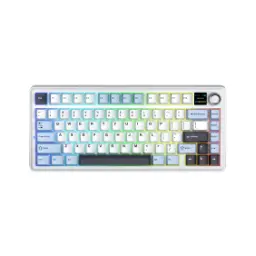
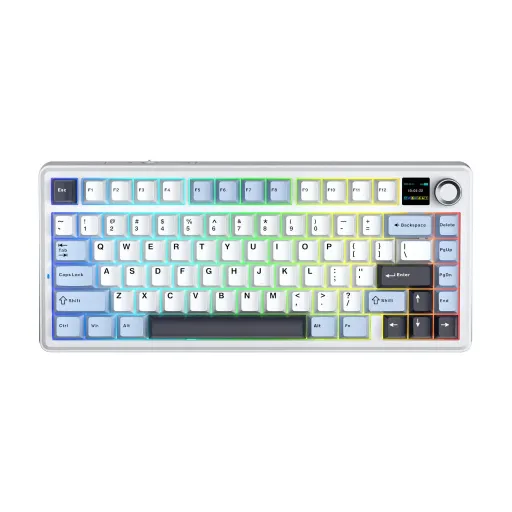
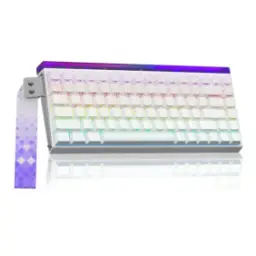
The AULA F75 MAX is designed for modern desks, where clean space matters, and the keyboard still needs to feel feature rich for work and play. The 75% ANSI layout keeps the essentials close, rozana typing aur shortcuts dono fast ho jate hain, while the footprint stays compact on smaller tables. The core identity here is convenience plus personality, because you get a metal knob and a TFT screen for quick control without hunting through menus. The screen is built to show practical info like connection mode and battery status, aur yeh little display desk setup ko zyada “smart” feel deta hai, even before you customize anything. The tri mode connection approach supports wired USB C, 2.4GHz wireless, and Bluetooth 5.0, so switching between a PC and a laptop can stay simple. The overall experience targets people who want a compact wireless mechanical keyboard that feels tidy, responsive, and easy to live with
The 75% ANSI layout hits a sweet spot, because it keeps arrow keys and navigation access without turning your desk into a full size keyboard parking lot. The AULA F75 MAX is presented with 80 programmable keys plus a knob and a TFT screen, so the layout feels complete even in a compact frame. The tighter key clustering helps muscle memory stay consistent, haath ko idhar udhar zyada travel nahi karna parta, which is great for spreadsheets and fast messaging. The non exploded style layout keeps arrow and nav keys integrated, aur yeh design desk footprint chota rakhta hai, which a review also highlights as a reason it takes only the space you actually need. The corner knob gives you a dedicated control point, so quick volume changes or lighting tweaks can happen without breaking focus. The practical win is workflow rhythm, kyunke aap coding, editing, ya casual gaming mein, speed ke saath control bhi feel karte ho. The compact frame also makes it easier to align your mouse closer, which can reduce shoulder reach during long sessions
With three connection modes ready to go, the AULA F75 MAX adapts to your routine instead of forcing you into one setup style. The keyboard supports Bluetooth 5.0, 2.4GHz wireless, and USB C wired, so you can keep one cable for charging and still enjoy wireless flexibility. The 2.4GHz dongle path is ideal when you want stable performance, gaming mein lag nahi chahiye hota, and you also want to avoid Bluetooth pairing steps. The Bluetooth mode is perfect for multi device life, because you can keep a tablet or laptop connected for quick switching during the day. The official listing also mentions connecting up to five devices, which fits a desk that includes both work and personal machines, rozana juggling easy ho jati hai. The wired USB C mode stays valuable for zero interference reliability, especially when you want to use the driver software or just keep battery topped up while typing. The real benefit is choice without compromise, kyunke aap office desk, living room setup, ya travel bag sab mein, same keyboard ko smoothly fit kar sakte ho
For everyday responsiveness, the AULA F75 MAX is specified with a 1000Hz polling rate in USB and 2.4GHz modes, which helps inputs feel crisp during fast movement. The Bluetooth mode is listed at 125Hz polling, so it prioritizes convenience and battery efficiency, aur casual typing mein yeh bilkul fine feel hota hai. The keyboard supports N Key Rollover for anti ghosting, meaning multiple simultaneous presses register cleanly when you are gaming or using layered shortcuts. The same NKRO behavior is documented across modes in user guide sources, so wired, 2.4G, aur Bluetooth teeno mein, multi key combos zyada reliable rehte hain. The detailed spec sheet also lists latency figures like 3ms in USB, 7ms in 2.4GHz, and 18ms in Bluetooth, which helps you choose the right mode for the moment. The practical takeaway is simple control, kyunke competitive titles mein you can lean on 2.4GHz or wired for steadier response, while Bluetooth stays great for couch typing. The typing experience stays predictable when the connection stays stable, and that predictability is what makes a wireless mechanical keyboard feel “wired like” in daily use
A gasket mount structure is included to reduce harshness, because the plate is isolated to soften vibrations and make long sessions feel easier on your hands. The F75 MAX is listed with a gasket mount build and a PC plate, so keystrokes can feel a bit more flexible and less rigid than basic tray mounted boards. The product pages describe multiple sound dampening layers, jisse “thocky” ya mellow sound profile zyada easy milta hai, especially when you type fast on hard desks. The same concept is emphasized as a comfort plus, because a softer, bouncier feel can reduce finger fatigue when you’re writing, coding, or doing repetitive data entry. The five layer dampening stack is called out in official style listings, aur yeh layers case resonance ko control karne mein help karti hain, so your space sounds calmer. The benefit is not just “sound,” because a controlled acoustic profile often signals better internal stability and fewer hollow echoes. The result feels refined, rozana ke use mein, because each press lands with less rattly distraction and more consistent feedback
Hot swappable sockets are built in, so you can change switches later without soldering, which keeps experimentation simple for beginners and enthusiasts alike. The F75 MAX is described as supporting both 3 pin and 5 pin mechanical switches, matlab aap ke paas options bohat wide ho jate hain, from common MX style choices to many enthusiast favorites. The listing also notes compatibility points like a hot swap PCB and south facing lighting, so you can plan keycap and switch upgrades with fewer surprises. The default configuration is often sold with pre lubed LEOBOG Reaper linear switches, jo smooth press aur stable feel detay hain, and that can be a great “start here” baseline before you customize further. The stabilization approach is described as plate mounted stabilizers with compatibility for screw in stabilizers, so you have an upgrade path if you want tighter keys on long presses. The benefit of hot swap is long term ownership, kyunke aap keyboard ko replace karne ki bajaye, sirf feel ko tune karke naya experience le sakte ho
The signature feature set includes a TFT screen and a multifunction knob, giving you tactile control for settings you actually touch every day. The screen is described as showing GIFs or pictures plus useful indicators like battery status and connection mode, aur yeh aapko at a glance clarity deta hai when you swap between Bluetooth and 2.4GHz. The keyboard is listed with per key south facing RGB lighting, which helps avoid interference with many custom keycap profiles while keeping underglow clean. The knob can be used for things like volume or lighting adjustments depending on configuration, so choti choti tweaks asaani se ho jati hain, and your focus stays on the game or the document. The software path exists for deeper customization like macros and screen content, and listings note the driver is available for Windows with the keyboard connected in wired USB mode. The practical benefit is flexible control, kyunke aap quick changes keyboard par hi kar sakte ho, and you can still use software when you want deeper remaps
A 4000mAh battery is specified inside the AULA F75 MAX, which is the kind of capacity that supports a genuinely wireless week for many routines. The same spec sheet lists about 30.5 hours with backlight on and up to 80 hours with backlight off, so aap apni lighting preference ke hisaab se endurance plan kar sakte ho. The user guide style sources also echo that battery life range, which helps set expectations realistically instead of vague “all day” claims. The charging information is documented with a full charge time of roughly four hours in at least one manual style listing, so overnight charging stays an easy habit. The screen can show battery status, which reduces guessing, aur yeh choti si convenience rozana ke workflow mein surprisingly helpful hoti hai. Some reviews mention the keyboard entering a deep sleep after about five minutes of inactivity to conserve power, so you waste less charge when you step away. The net result is calmer wireless living, kyunke battery anxiety kam hoti hai, and you can still plug in USB C whenever you want uninterrupted sessions
The AULA F75 MAX is built with an ABS case and a PC plate in the published specifications, balancing weight, acoustics, and a comfortable typing flex for daily use. The same specs highlight Cherry profile double shot PBT keycaps, so legends and texture are positioned for long sessions, aur shine resistance generally better rehti hai than basic thin caps. The keyboard is listed as compatible with Mac, Windows, Android, and Linux in certain product pages, which matters when you want one board to serve both office and personal devices. The physical size is provided around 32.8 × 14.3 × 4.4 cm with a weight around 0.96 kg, so it stays portable enough for rearranging setups while still feeling planted on the desk. A review notes thoughtful touches like a dedicated slot to store the 2.4GHz dongle, jo travel ya desk cleanup ke time par bohat practical lagta hai, because small parts are easier to lose than you think. The overall value comes from stacking real use features together, because tri mode wireless, hot swap customization, a knob, and a screen usually appear in higher enthusiast tiers. The best match is anyone who wants a compact wireless mechanical keyboard that feels upgrade friendly, rozana smooth typing deta hai, and still looks distinctive on a modern desk
Here's how current offers compare across retailers.
Review current prices and specifications side by side.