

Price Breakdown & Availability
Here's how current offers compare across retailers.
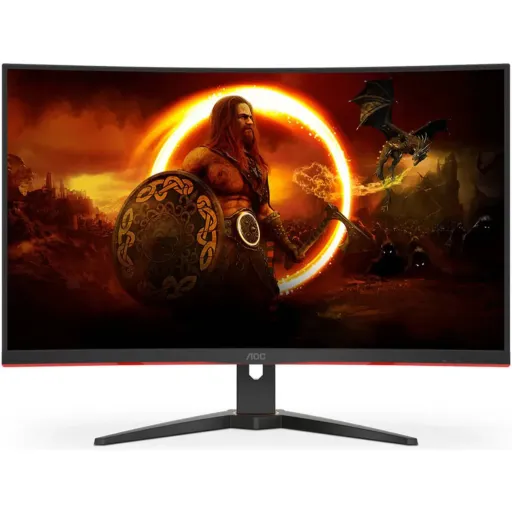

AOC C32G2ZE2


You Might Also Like
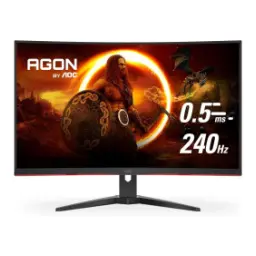
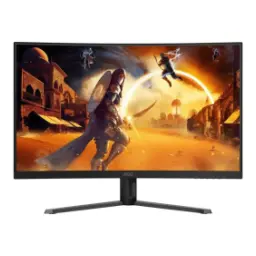
This AOC C32G2ZE2 is built for fast, immersive play. The 31.5 inch curved canvas feels roomy, rozana ke use mein, while still fitting a normal desk setup. The Full HD resolution stays familiar for games, aur GPU pe load manageable, at 1920 x 1080. The VA panel brings stronger native contrast, dark scenes mein depth zyada, so blacks look less washed. The 1500R curve pulls edges toward your view, aankhon ko center mein rakhta hai, making the screen feel more enveloping. A refresh ceiling up to 250Hz (OC) keeps motion cleaner, especially jab flick shots ya fast turns hotay hain. A 0.5ms MPRT rating is tuned for perceived motion clarity, aim tracking asaan hoti hai, during chaotic fights. A three sided narrow bezel design helps focus stay on gameplay, multi monitor feel bhi aata hai, without chunky borders. The overall experience is speed first, lekin daily browsing aur streaming bhi smooth lagti hai, so it works beyond games
This 1500R curvature is designed for wrap around focus. The curved geometry keeps edges visually closer, peripheral view mein distraction kam, which can feel more natural on a large screen. The R rating relates to the radius concept, jahan viewing distance ka idea bhi milta hai, so you can place the monitor sensibly. The VA panel choice is a contrast forward decision, movies mein blacks zyada deep, and dark game scenes carry more separation. The monitor’s listed 3000:1 static contrast supports that look, black crush ka risk manage hota hai, when settings are balanced. The typical brightness is rated around 300 cd/m2, din mein room lighting handle kar leta hai, without always pushing max. The 178/178 viewing angles are claimed for this VA panel, side se thora shift ho sakta hai, yet central seating stays consistent. The practical win is stronger depth perception, especially jab aap dim room mein play karte hain, while keeping an easy 16:9 layout
This monitor’s headline advantage is raw refresh speed. The 250Hz refresh rate (overclocked) means more frequent image updates, reactions ke time par visual feedback zyada tight, in fast shooters. The concept is simple for gameplay clarity, har second zyada frames show hotay hain, and motion looks smoother when your GPU can feed it. A 0.5ms MPRT figure is listed for this model, blur kam mehsoos hota hai, particularly in high speed camera pans. A 4ms GtG spec is also stated, everyday transitions stable rehti hain, so general motion stays controlled. The Low Input Lag feature is positioned for responsive play, button press ka response zyada direct, when you prefer speed over extra processing. The end result is cleaner tracking, flicks aur micro adjustments asaani se, while still keeping a big 31.5 inch target view
This Full HD resolution is tuned for high frame rates. The 1920 x 1080 target makes 240Hz plus gaming more attainable, GPU ko itna struggle nahi karna padta, compared to higher resolutions. The optimum mode is listed as 1920 x 1080 at 250Hz (OC), jo clearly esports style tuning dikhata hai, when you enable the right settings. The connectivity mix includes DisplayPort 1.2 and HDMI 2.0, cable select karna asaan hota hai, for PC and console setups. The broader standards context shows HDMI 2.0 can reach 1080p at 240Hz, isliye proper HDMI 2.0 ports matter, when chasing very high refresh. The DisplayPort 1.2 era is commonly associated with 1080p at 240Hz capability, PC gamers ke liye DP often straightforward hota hai, in high refresh workflows. The practical takeaway is simple to apply, pehle GPU output aur cable check karo, then lock the refresh in OS settings
This screen is built for long, repeat sessions. The Flicker Free feature is highlighted as an eye comfort tool, raat ko sessions mein fatigue kam, so the experience stays easier. The DC backlight approach is how AOC describes flicker reduction, aankhon ko stable light milti hai, instead of PWM style pulsing. The Low Blue Light mode is positioned for reducing harmful wavelengths, rozana office work aur late gaming dono mein, while keeping colors usable. The curved design can also reduce the need to refocus across edges, head movement kam hoti hai, when you stay centered for hours. The panel is listed as antiglare treated, reflections ki tension kam, so bright rooms feel more controllable. The comfort benefit becomes more obvious with a big screen, kyun ke 31.5 inch par aap naturally zyada scan karte hain, across UI and maps. The end goal is steadier focus, bina unnecessary strain, during both workdays and weekend ranked grinds
This 31.5 inch size makes multitasking feel natural. The 16:9 Full HD layout keeps apps predictable, split windows asaani se set ho jati hain, without odd scaling issues. The pixel pitch is listed around 0.36375 mm, isliye a comfortable seating distance matters, for crisp text perception. The VA contrast behavior helps dark UI themes look richer, coding aur night browsing mein, while blacks stay deeper than typical IPS averages. The curved format supports a more centered field of view, spreadsheet columns mein edge hunting kam, when you sit in the sweet spot. The three sided frameless build also looks cleaner on a desk, workspace tidy feel hoti hai, and you can pair a second display later. The overall advantage is balanced utility, gaming ke ilawa bhi kaam chal jata hai, without switching to a separate office monitor
This monitor is straightforward to wire and mount. The inputs include two HDMI 2.0 ports plus one DisplayPort 1.2, console aur PC dono connect ho jate hain, without constant swapping. The stated high refresh mode is tied to these ports, isliye correct cable use karna zaroori hai, to actually unlock 250Hz (OC). The VESA mount pattern is listed as 100 x 100, arm setup asaani se ho jata hai, for cleaner desk space. The stand tilt range is rated from minus 5 to 23 degrees, posture adjust karna easy hota hai, for long sessions. The audio out is a 3.5mm headphone jack, late night gaming mein simple solution, without routing through speakers. The practical setup feels clean, cables organize ho jate hain, and the screen stays stable once positioned
This monitor focuses on smoothness without visual tearing. The Adaptive Sync support is marketed for tear free play, frames ka flow zyada stable, especially when FPS fluctuates. The HDR10 mention targets brighter highlights and richer contrast mapping, movies aur supported games mein, while keeping SDR content easy. The Low Input Lag mode is presented as a responsiveness switch, competitive rounds mein reaction window tight, when you prefer raw response. The six game modes are designed for quick tuning, FPS ya racing ke liye presets mil jate hain, so settings changes take seconds. The frameless design supports a wider field impression, side bezels kam nazar aate hain, if you ever run dual screens. The combined effect is smoother motion delivery, tearing kam aur tracking clean, while still keeping the contrast rich VA look
This monitor makes the most sense for high FPS players. The 1920 x 1080 at up to 250Hz (OC) design favors competitive titles, jahan consistent frames matter more, than sheer pixel count. The VA contrast advantage is widely recognized across LCD types, dark scenes zyada punchy, which helps immersion for story games too. The honest tradeoff is VA can have slower dark transitions, kabhi kabhi smearing feel ho sakti hai, compared to some IPS options. The listed 0.5ms MPRT and 4ms GtG aim to keep motion disciplined, normal use mein lag nahi, while still being a contrast first panel. The curved 1500R shape works best from a centered seat, thora off axis par gamma shift aa sakta hai, so positioning matters. The final value is a clear purpose built combo, big curve plus very high refresh, for players who want speed and immersion in one screen
Here's how current offers compare across retailers.
Review current prices and specifications side by side.
AOC
AOC C27G4ZERs. 58,990
Local price
Lowest current price13 offers
Updated 21 hours ago
