


Price Breakdown & Availability
Here's how current offers compare across retailers.
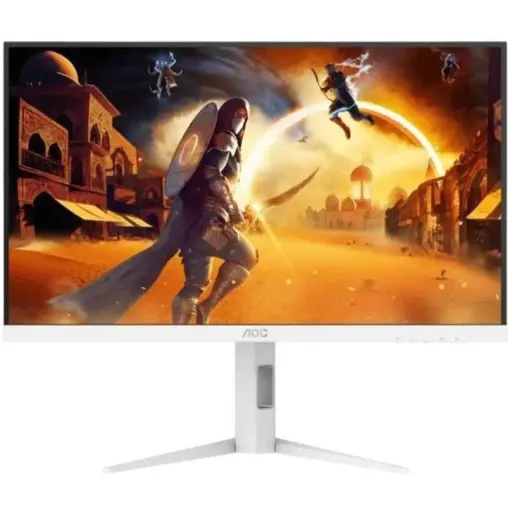

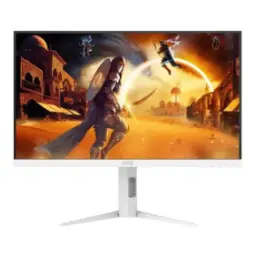
AOC Q27G4/WS


You Might Also Like
Step into a sharper 1440p battlefield with the AOC Q27G4/WS, built to feel quick the moment you move your mouse. This 27 inch QHD panel runs at 2560x1440, so text stays crisp and game HUD details look clean without scaling drama. This Fast IPS class screen is tuned for speed, colors zyada natural lagtay hain, and viewing angles stay stable when you lean back. This model targets high frame gameplay with a 200Hz refresh rate, meaning fast flicks feel more connected and motion looks smoother. This white edition identity looks clean in a modern desk setup, bilkul minimal vibe ke saath, while still being a serious gaming display. This resolution and refresh combo sits in a sweet spot for esports and everyday productivity, because 27 inch at QHD keeps pixels tight and workspace wide. This is the kind of monitor that makes your PC feel upgraded without changing any parts, rozana use mein bhi farq nazar aata hai
Enjoy a cleaner, more detailed picture at QHD, where 2560x1440 gives you sharper edges and less jaggy distraction in games. Keep your workspace readable on a 27 inch canvas, kyun ke icons, timelines, aur documents comfortably spread ho jatay hain. See consistent color and contrast from side angles with IPS behavior, so co op couch viewing or dual screen alignment stays reliable. Get the speed leaning feel of a Fast IPS panel, jahan motion handling zyada disciplined hoti hai compared to older IPS generations. Hold on to that 1440p clarity during rapid camera turns, because higher refresh works best when the base image is already crisp. Make streaming and cinematic games look cleaner at native QHD, aur compression artifacts thoday kam noticeable hotay hain at normal viewing distance. Feel less visual fatigue in long sessions thanks to stable angles and sharper text, jo rozaana browsing aur editing ko asaan banata hai
Chase smoother frame delivery with a 200Hz refresh rate, which makes fast strafes and quick peeks look more continuous on screen. Feel the difference in everyday scrolling too, kyun ke web pages aur long chats mein smooth scrolling bilkul obvious hoti hai. Reduce the perception of blur during high speed movement, because higher refresh can show more temporal steps between positions. Pair the panel with a capable GPU and you get that snappy input feel, jahan mouse movement zyada direct lagta hai. Maintain clarity in quick camera pans at QHD, since 2560x1440 keeps the image defined while refresh keeps it fluid. Build confidence in aim heavy titles where micro corrections matter, aur tracking ke time par smear kam feel hota hai. Keep your gameplay looking composed even when the lobby gets chaotic, because the display is designed around speed first behavior
Connect via DisplayPort 1.4 to reach 2560x1440 at up to 200Hz, which is the mode competitive players typically want. Connect via HDMI 2.0 for 2560x1440 up to 144Hz, jo consoles aur laptops ke liye practical high refresh option ban jata hai. Choose the cable based on your device outputs, because DP is the straightforward path for maximum refresh on many PCs. Keep your setup simple with one HDMI 2.0 and one DisplayPort 1.4 input, asaani se PC plus secondary device dono connect ho jatay hain. Avoid confusion when configuring Windows or GPU control panels, because the peak refresh depends on the connector and the active resolution. Match the monitor to a high FPS esports rig today and still keep HDMI for a console later, bilkul future friendly connectivity mindset
Rely on a rated 0.3ms MPRT and 1ms GtG response time to reduce visible trailing during fast movement. Feel more confident in close range fights where flick shots happen instantly, kyun ke motion clarity better ho to target read karna asaan hota hai. Keep fast UI animations looking controlled at 200Hz, because refresh and response work together for that “clean glide” effect. Avoid the muddy look older panels can show in dark scenes, jab camera turn hota hai aur textures smear jaisay lagtay hain. Maintain readability of small moving elements like crosshair outlines and enemy silhouettes, especially at QHD where the base detail is already sharp. Choose this response profile if you prefer clarity and control over flashy gimmicks, bilkul practical competitive edge ke liye
Dial in your posture with a height adjustable stand, so your eyes align naturally with the top third of the screen. Rotate and reposition with pivot and swivel support, jahan multi tasking ya vertical chat layout bohat asaan ho jata hai. Reduce neck strain on long grind nights by setting the tilt correctly, because comfort directly improves focus and reaction time. Mount the display on a 100x100mm VESA arm to free desk space, aur cable management bhi clean ho jati hai. Keep the setup looking minimal with the white model styling, because a clean desk environment makes long sessions feel less cluttered. Set the monitor once and forget constant readjustments, kyun ke ergonomic flexibility aapke routine ke sath adapt ho jati hai
Handle workday multitasking on a 27 inch QHD screen, where 2560x1440 gives room for side by side documents and clear small text. Switch into gaming mode after hours with 200Hz motion, aur wohi panel aapko competitive feel de deta hai without changing anything. Keep UI and timelines smooth during creative tasks, because higher refresh also makes cursor movement and scrubbing feel more immediate. Enjoy the Fast IPS behavior for mixed content, jahan colors stable rehtay hain and the screen stays readable from different seating angles. Plug in headphones through the monitor’s earphone jack for a cleaner desk, asaani se audio routing manage ho jati hai. Keep your setup cohesive with the white styling, because it pairs nicely with light themed keyboards, controllers, and minimal PC builds
Balance visual sharpness and high refresh in one screen, because 27 inch QHD delivers detail without the heavy GPU load of 4K. Choose 200Hz if you care about competitive smoothness, kyun ke fast tracking aur quick peeks mein motion advantage zyada meaningful hota hai. Stay flexible with 144Hz over HDMI 2.0, which keeps the monitor practical for consoles and secondary devices. Prefer a Fast IPS panel when you want speed plus consistent viewing angles, warna some ultra fast panels can feel visually harsher in daily use. Keep your upgrade path simple by using DisplayPort 1.4 for max refresh, because it aligns with how most gaming GPUs expose high refresh output. Treat this monitor as an “all rounder” choice in the performance class, bilkul for people who game hard but still live in browsers and spreadsheets
Pick this monitor if you want 27 inch QHD clarity with a speed first refresh rate, because 2560x1440 at up to 200Hz is built for fast play. Choose DisplayPort 1.4 when your goal is maximum fluidity, aur HDMI 2.0 ko 144Hz option samajh kar secondary device ke liye use karein. Favor it for shooters, racing, and any title where motion clarity matters, because the rated 0.3ms MPRT and 1ms GtG are tuned to keep motion cleaner. Set it up for comfort if you play or work for hours, kyun ke height, swivel, pivot, aur VESA 100x100 support makes placement genuinely flexible. Prefer it if you like a clean, modern aesthetic, because the white model identity looks polished without screaming for attention. Commit to the right cable and refresh setting on day one, phir aapko har session mein smoothness ka benefit consistently milta rahega
Here's how current offers compare across retailers.
Review current prices and specifications side by side.
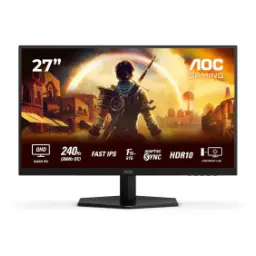
AOC
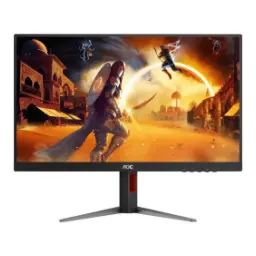
AOC Q27G42ZERs. 64,999
Local price
Lowest current price2 offers
Updated 21 hours ago