


Price Breakdown & Availability
Here's how current offers compare across retailers.

You Might Also Like
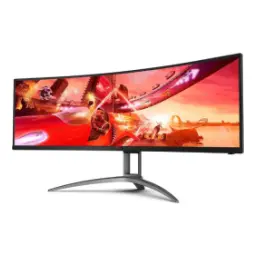
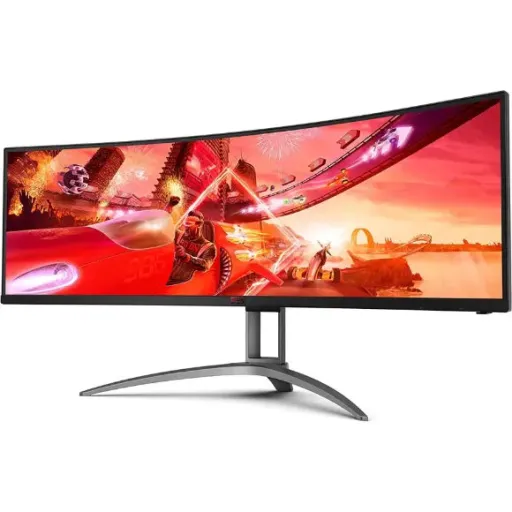
The AOC AGON AG493UCX2 is designed for people who want one huge canvas, jahan gaming aur serious kaam dono ek flow mein ho jate hain. The 48.8 inch curved panel delivers a true 32:9 ultrawide layout that instantly replaces the feeling of juggling two separate monitors. The Dual QHD 5120x1440 resolution keeps text, UI elements, and long spreadsheets readable without aggressive scaling, rozana ki productivity bohat stable rehti hai. The 1800R curvature pulls the edges closer to your natural viewing arc, so you scan side to side with less head turning. The VA panel and 3000:1 static contrast help darker scenes look richer, aur blacks zyada disciplined feel hotay hain for movies and games. The three sided frameless bezel style keeps the giant surface looking clean and modern on a wide desk. The 165 Hz maximum refresh rate makes motion feel more continuous across the full width, which is exactly what fast tracking needs. The size is commonly called a 49 inch class display, but the listed diagonal is 48.8 inches for accuracy
The Dual QHD pixel grid is built to keep details intact, aur zooming ki zarurat kam par jati hai when your work stretches wide. The native 5120x1440 resolution gives you a lot of horizontal room for timelines, charts, and multiple app columns at once. The 109 pixels per inch density balances sharpness with practical scaling, so icons and fonts stay comfortable at typical desk distance. The 0.2331 mm pixel pitch supports fine linework in UI and text rendering, jo coding ya trading layouts mein bohat clean lagta hai. The anti glare panel treatment helps reduce reflections from overhead lights, keeping contrast more consistent during daytime use. The 3H surface hardness adds a little extra confidence for daily cleaning, especially if your desk setup stays busy. The VA LCD panel type is tuned for contrast and cinematic depth, aur content zyada punchy feel hota hai at night. The display supports 16.7 million colors for everyday creation and entertainment, which helps gradients look smoother in typical workflows
The 1800R curve is meant to keep the edges feeling closer, taa ke nazar naturally center se corners tak travel kare without strain. The curvature radius is specified at 1800R, creating a wraparound posture that suits a centered seating position. The actual viewing area is listed as 1193.472 mm by 335.664 mm, which explains why it feels like a long continuous dashboard. The height adjustment range is 100 mm, so you can align the horizon line to your eye level, rozana ke long sessions mein comfort better rehta hai. The stand supports swivel of about 15.5 degrees in each direction, making it easier to re center the curve if your chair position shifts. The tilt range is specified from negative 3.5 degrees up to positive 13.5 degrees, which helps reduce neck angle during extended use. The monitor includes a VESA 100x100 mounting pattern for arm setups, aur desk space asaani se free ho jati hai when you want a floating look. The chassis also includes a Kensington lock point for shared spaces or studios where security matters
The high refresh experience is where this ultrawide feels most alive, kyun ke movement poori width par silky lagta hai. The maximum refresh rate is rated at 165 Hz, which keeps scrolling and camera pans visibly cleaner than standard 60 Hz panels. The response time is listed as 1 ms MPRT, supporting clearer motion perception when you are flicking and tracking fast targets. The gray to gray response is specified at 4 ms, which helps set realistic expectations for typical pixel transitions in mixed content. The combination of 165 Hz and fast MPRT makes mouse movement feel more direct, aur micro corrections zyada controlled feel hoti hain in competitive play. The panel is also positioned as an esports style immersive screen with the 32:9 layout, meaning peripheral awareness becomes a real advantage in supported titles. The wide timeline space is equally valuable outside gaming, because video scrubbing and long spreadsheet sweeps look noticeably smoother. The monitor’s gaming oriented design includes dedicated modes in its feature set, jo quick switching ko simple banata hai when your use changes from work to play
The variable refresh pipeline is the difference between fast and truly fluid, aur yahan stutter ki tension kaafi had tak kam ho jati hai. The AG493UCX2 is sold with AMD FreeSync Premium Pro support, pairing high refresh with adaptive behavior to reduce tearing and judder. The AMD FreeSync technology goal is to reduce tearing and stuttering for smoother gameplay and playback across supported connections. The Premium Pro tier specifically targets HDR gaming experiences, adding HDR focused requirements while keeping low latency intent in the certification story. The AMD tier table notes Premium Pro includes AMD FreeSync HDR and low framerate compensation, which helps keep motion consistent when FPS drops. The ultrawide resolution class fits Premium tiers that require at least 120 Hz refresh at higher horizontal resolutions, so the spec alignment makes practical sense. The overall benefit is more stable frame pacing, jis se aim aur camera control zyada natural lagta hai for long sessions. The monitor is also listed as G Sync compatible by some retailers, which can be helpful if your GPU ecosystem changes later
The HDR story matters most when standards are clear, warna HDR sirf label ban kar reh jata hai on many displays. The AG493UCX2 is listed as VESA Certified DisplayHDR 400, which indicates it targets the entry HDR performance tier defined by VESA. The DisplayHDR 400 tier is described as the first genuine entry point for HDR, focusing on higher peak luminance and baseline requirements beyond SDR. The VESA performance criteria table shows a minimum 400 cd per square meter requirement for key luminance tests in the 400 tier, giving real context to what the badge should represent. The AOC spec listing also shows brightness in nits as 400 cd per square meter, aligning the monitor’s stated output with the HDR tier naming. The advantage in daily use is more visible highlight separation in HDR movies and supported games, aur scenes zyada dimensional feel hotay hain even before you tweak settings. The VESA overview also frames DisplayHDR 400 as a significant step up from SDR baseline, which is the most honest way to position this tier. The result is not magic level HDR, but it is a standardized improvement that can be easier to tune and trust
The single cable workflow is a real quality of life upgrade, kyun ke laptop dock karna bilkul hassle free ho jata hai. The monitor includes a USB C port with DisplayPort Alt Mode, letting one cable carry video while also acting as an upstream data path. The USB C power delivery is specified at 65W, which can keep many laptops topped up during work sessions without a separate charger. The input selection supports HDMI 2.0 x3 and DisplayPort 1.4 x1, so consoles, a desktop GPU, and a laptop can all stay connected. The USB hub functionality is built in with three USB A downstream ports, making it easy to park a keyboard, mouse, and headset dongle in one place. The fast charge USB port adds extra convenience for phones and accessories, rozana ke small top ups kaam aate hain. The practical win is fewer desk cables and faster laptop plug in routines, which keeps your setup looking intentional. The overall concept is also described by AOC as USB C docking for simplified connections, reinforcing the one cable intent
The KVM feature is made for dual device life, jahan office laptop aur personal PC dono same desk par hotay hain. The monitor includes KVM switch hardware so one keyboard, one mouse, and one screen can be shared between multiple computers. The benefit is instant context switching without moving peripherals, which feels especially smooth when your USB devices stay connected to the monitor’s hub. The connectivity design supports multiple host inputs including USB C with DP Alt Mode, so a laptop can be one “side” of your setup while a desktop uses HDMI or DisplayPort. The USB hub provides three USB A downstream ports, meaning your core accessories can stay plugged in even when you swap active machines, kaam ka flow break nahi hota. The KVM concept is also presented by AOC as a way to share one keyboard, mouse, and monitor between multiple computers, which matches the real world use case for hybrid workers. The ultrawide canvas makes KVM switching feel even more valuable, because both work and play layouts can keep their ideal window arrangements. The end result is a cleaner desk rhythm where switching devices feels like changing modes, not changing hardware
The Picture by Picture approach is perfect for parallel focus, kyun ke dono sources ek hi time par nazar aate hain without constant Alt Tab. The monitor is described as offering PBP functionality for multitasking scenarios, supporting a true split layout when you want two devices visible at once. The multiview spec is also commonly listed as PbP for this model, reinforcing that it is intended as a real dual input productivity tool. The 32:9 aspect ratio gives enough width that two side by side views feel practical, rather than cramped like on smaller ultrawides. The available inputs include HDMI 2.0 x3 and DisplayPort 1.4 x1 plus USB C DP Alt Mode, so you can realistically split a console with a PC, or a work laptop with a personal desktop. The DQHD 5120x1440 resolution helps each side retain usable detail, is liye documents aur dashboards readable rehte hain even when divided. The best use cases are monitoring, streaming dashboards, coding plus documentation, or editing plus reference playback, all without losing the “one continuous screen” feel. The wide curve keeps both sides within a comfortable viewing arc, so the split still feels cohesive
The small practical details decide long term satisfaction, aur yahan kaafi cheezen daily use ko easy banati hain. The built in speakers are rated at 5W x2, which works well for casual audio, calls, and quick videos when you do not want headphones. The power consumption is listed at 68W typical with 0.5W in standby, giving a reasonable efficiency profile for a super ultrawide class panel. The external power supply design can help keep the monitor body thinner, aur cable routing clean rakhna asaan ho jata hai behind the desk. The VESA 100x100 mount support keeps upgrade paths open if you want an arm for more space and better posture. The core value is how the 48.8 inch 32:9 DQHD surface behaves like two displays with one bezel line, while staying unified for gaming immersion. The most sensible buyers are hybrid workers, creators, and sim or competitive players who want a wide, fast panel with modern USB C docking, bilkul ek hi setup mein sab manage ho jata hai. The closing takeaway is simple: if you want a premium ultrawide experience anchored in 165Hz smoothness, DisplayHDR 400 certification, and a real KVM workflow, this model aligns the features in a coherent way
Here's how current offers compare across retailers.
Review current prices and specifications side by side.
AOC
AOC CQ32G3SERs. 87,500
Local price
Lowest current price3 offers
Updated 3 days ago