Price Breakdown & Availability
Here's how current offers compare across retailers.
You Might Also Like
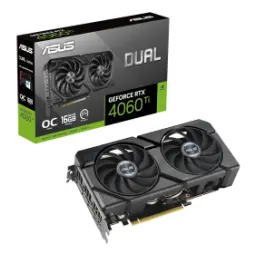
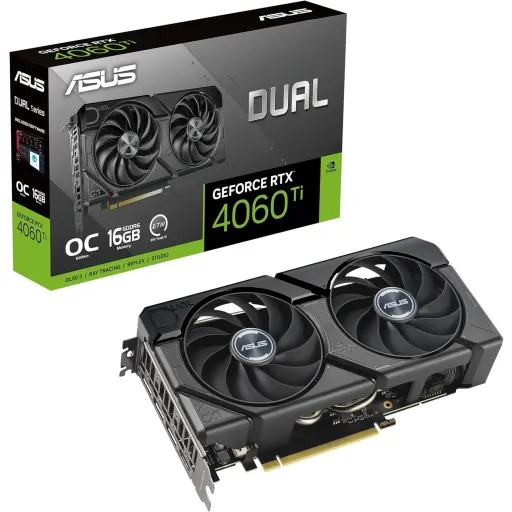
This ASUS Dual GeForce RTX 4060 Ti Dual EVO OC is tuned for broad compatibility, choti aur medium cases mein bhi build simple rehta hai, while keeping the RTX feature set front and center. The 2.5 slot design and practical overall dimensions help installation feel predictable, haath mein size manageable lagta hai, and cable routing stays cleaner around the GPU area. The graphics engine is listed as NVIDIA GeForce RTX 4060 Ti, is liye aap modern games aur creator apps dono ka upgrade ek hi step mein karte ho, without jumping into oversized hardware. The EVO OC positioning signals a factory overclocked style option, aur ASUS GPU Tweak III se quick profiles set ho jate hain, without forcing manual tuning on day one. The design language stays clean for most setups, jab aap minimal look prefer karte ho, and the card still feels like a premium upgrade. The PCI Express 4.0 bus standard keeps the platform modern, purane systems par bhi generally compatible rehta hai, as long as the motherboard has a standard PCIe x16 slot. The OpenGL 4.6 support broadens software coverage, creative tools mein bhi stability ka benefit milta hai, and it helps reduce compatibility surprises. The overall experience feels balanced for daily use, rozana gaming se le kar editing tak flow smooth rehta hai, and the upgrade lands like a practical step forward
At the core sits NVIDIA Ada Lovelace architecture, jis se efficiency better hoti hai, so longer sessions feel less demanding on thermals and power. The RTX 4060 Ti family supports DLSS 3.5 features, AI based uplift se frame delivery zyada smooth lagti hai, and motion clarity improves when settings get heavier. The Dual EVO OC lineup is marketed with DLSS 3 support, is ka matlab aap upscaling aur frame generation style features ko leverage kar sakte ho, while keeping image quality more consistent at higher presets. The 3rd Generation RT Cores enable real time ray tracing, reflections aur shadows zyada natural feel dete hain, and you can choose where to spend performance for a cleaner look. The 4th Generation Tensor Cores are positioned for strong AI throughput, rozana gaming mein DLSS ka benefit zyada obvious hota hai, and creator workflows can also gain when supported by apps. The platform feature list includes NVIDIA Reflex support, competitive play mein input response tight lagta hai, and it helps reduce the disconnect between mouse movement and on screen action. The same RTX stack also includes NVIDIA Broadcast support, meetings aur streaming ke time par background effects zyada refined lagte hain, and it can make a small setup feel more professional. The result is a modern RTX experience that stays approachable, performance stable rehti hai, and the feature set remains relevant across both games and content creation
The 4352 CUDA cores provide dense parallel compute, heavy scenes mein bhi responsiveness better rehti hai, and modern engines have room for effects without instantly dropping smoothness. The same 4352 CUDA core figure is also listed by NVIDIA for RTX 4060 Ti, is se spec alignment clear hota hai, and buyers can compare models confidently across brands. The PCI Express 4.0 interface keeps data movement modern, rozana gaming mein bottlenecks usually noticeable nahi hotay, and it pairs well with current gen CPUs for balanced frame pacing. The OpenGL 4.6 listing helps with broad application coverage, CAD aur visualization tools mein compatibility asaani se milti hai, and older OpenGL based titles still behave predictably. The EVO OC Edition is specced with OC and default boost modes, thori si extra headroom milti hai, and it supports a smoother feel in bursty moments like heavy fights or fast camera pans. The card supports both Game Ready and Studio driver options, aap apne use case ke mutabiq driver choose kar sakte ho, and that choice can improve stability in either gaming or creative apps. The everyday benefit is smooth multitasking on the GPU side, background apps bhi manageable rehte hain, and the system feels less like it is constantly catching up
The 18 Gbps memory speed helps feed textures fast, high settings par bhi streaming zyada stable rehti hai, and quick camera turns feel cleaner when assets load smoothly. The 128 bit memory interface keeps the design efficient, power draw controlled rehta hai, and it matches the RTX 4060 Ti spec positioning for mainstream builds. The RTX 4060 Ti reference overview also lists a 128 bit interface width, is se buyers ko clarity milti hai, and it confirms the bandwidth class across 8GB and 16GB configurations. TechPowerUp highlights that NVIDIA uses 18 Gbps memory with a 128 bit bus and leans on a redesigned memory subsystem, cache reliance ka concept samajh aata hai, which helps compensate in real workloads. For high refresh 1080p play, this approach generally feels balanced, esports mein hitching ka chance kam hota hai, and you can keep textures high while still chasing smooth delivery. For 1440p texture heavy libraries, VRAM capacity becomes a real decision point, is liye SKU confirm karna zaroori hai, because NVIDIA lists RTX 4060 Ti in both 8GB and 16GB standard memory configurations. ASUS also offers an EVO OC Edition 16GB model in the same Dual family, agar aapko extra headroom chahiye, and it helps align the purchase with longer term game sizes and creator caches. The best experience comes from matching settings to memory reality, rozana ke use mein aapko fewer compromises feel hotay hain, and the card stays consistent rather than unpredictable
Two Axial tech fans focus airflow onto the heatsink, fan blades ka pressure zyada effective hota hai, and the card can hold clocks more comfortably under sustained load. ASUS describes the Axial tech design with a smaller hub and barrier ring, downward air pressure increase hota hai, and that detail matters when you want cooler temps without extreme fan noise. The 0dB technology pauses the fans during light use, idle par bilkul calm environment milta hai, and casual browsing or office work stays distraction free. Dual ball fan bearings are positioned for longer lifespan, rozana usage mein reliability ka confidence barhta hai, and it reduces the worry of early fan wear compared to sleeve bearing designs. The 2.5 slot layout balances fit and cooling mass, small chassis mein bhi clearance manageable rehti hai, while giving the cooler enough depth to avoid instant heat saturation. TechPowerUp notes the Dual OC cooling approach uses Axial Tech fans and an aluminum fin stack heatsink, heat kam feel hoti hai, and it supports a stable experience in longer gaming sessions. The practical benefit is less time spent tweaking curves, fans ko overwork nahi karna parta, and the GPU stays more comfortable in everyday workloads
The listed digital max resolution reaches 7680 x 4320, yani 8K output possible hota hai, for creators who preview large canvases or users planning future display upgrades. ASUS includes one native HDMI 2.1a and three native DisplayPort 1.4a outputs, multi monitor wiring asaani se plan ho jati hai, and you can mix a TV plus multiple monitors without adapters. The maximum display support is listed as four screens, productivity ke liye wide desktop mil jata hai, and it helps creators keep timeline, preview, chat, and tools visible at once. NVIDIA documents 8K and high refresh behavior via DP 1.4a and HDMI 2.1a with DSC, advanced display modes bhi cover ho jate hain, when your monitor and cable chain supports the required bandwidth. HDCP support is listed as 2.3 on this card, protected streaming content mein playback issues kam hotay hain, and it keeps the setup compliant across common services. NVIDIA also lists HDCP 2.3 for the RTX 4060 Ti family, is se compatibility ka picture aur clear hota hai, and it reduces the guesswork for living room PC builds. The end result is flexible connectivity for work and play, desk setup tidy rehta hai, and switching between gaming and creation feels seamless
ASUS highlights Auto Extreme Technology as a precision automated manufacturing process, single pass soldering se thermal strain reduce hota hai, and the goal is stronger long term reliability with fewer manufacturing variables. A protective backplate reinforces the PCB during installation and transport, move karte waqt flex ka risk kam hota hai, and it keeps the card feeling sturdy inside the case. ASUS also mentions a stainless steel bracket upgrade on the Dual line, mounting side par rigidity better milti hai, and it helps when you regularly open the case for upgrades or cleaning. ASUS GPU Tweak III is listed as supported software, fan curves aur OC tuning asaani se set hoti hai, and you can keep behavior quiet for work or aggressive for gaming nights. Game Ready and Studio driver options are also referenced by ASUS, gaming aur creative workflow ke liye right driver select karna simple hota hai, and stability can improve when you match drivers to your workload. NVIDIA positions GeForce Experience as part of the RTX platform feature set, recordings aur driver updates ka flow smooth rehta hai, and it helps keep optimization quick for popular games. The overall ownership experience feels refined and low friction, rozana maintenance simple rehti hai, and the card stays easy to live with
The card uses a single 8 pin power connector, PSU wiring mein clutter kam hota hai, and upgrading from older midrange GPUs feels straightforward in most builds. ASUS lists a 650W recommended PSU for this model, headroom aram se mil jata hai, especially if your CPU, drives, and case fans also draw meaningful power. NVIDIA lists a 550W required system power figure for RTX 4060 Ti reference configurations, system ke overall parts par depend karta hai, so the safest approach is following the exact ASUS model guidance. NVIDIA also lists Total Graphics Power around 160W or 165W depending on the configuration, gaming power average bhi modest rehti hai, and that supports quieter cooling goals in everyday play. The PCI Express Gen 4 support is clearly documented by NVIDIA, motherboard upgrade ka pressure kam hota hai, and the card remains a clean match for modern platforms with Resizable BAR support. TechPowerUp also notes the Dual OC card draws power from a single 8 pin connector, swap karte waqt compatibility easy rehti hai, and it helps keep the build simple for first time upgraders. The 2.5 slot thickness deserves a quick clearance check, case mein space confirm kar lena, and that small planning step prevents surprises near adjacent PCIe slots. The final setup feels neat and predictable, rozana cleaning aur airflow tuning asaan rehta hai, and you spend more time using the PC than adjusting it
This Dual EVO OC edition suits balanced gamers and creators, jinko RTX features chahiye lekin oversized power draw nahi chahiye, and it keeps the build practical for everyday rooms and desks. The RTX 4060 Ti spec includes 4352 CUDA cores and Ada Lovelace architecture, performance ka base strong rehta hai, and features like Reflex and DLSS remain available for modern engines. ASUS positions the Dual series around broad compatibility and dual Axial tech fans, compact cases mein bhi cooling ka scene theek rehta hai, and the 0dB mode helps keep light workloads quiet. Before checkout, memory capacity is worth confirming carefully, 8GB aur 16GB dono options market mein milte hain, and NVIDIA explicitly lists both as standard memory configurations for RTX 4060 Ti. ASUS also offers a Dual EVO OC Edition 16GB model, agar aap texture heavy games ya creator caches run karte ho, and that version can reduce the need for aggressive texture compromises later. The port selection supports modern setups with HDMI 2.1a and DP 1.4a, multi monitor productivity asaani se scale hoti hai, and four display support keeps work and play organized. The build focused extras like Auto Extreme and the protective backplate add reassurance, transport aur long term use mein peace milti hai, and the card feels engineered for daily ownership rather than occasional showpieces. The best value shows up when you want smooth, stable upgrades, rozana ke use mein frustration low rehti hai, and the card stays aligned with the current RTX ecosystem
Here's how current offers compare across retailers.
Review current prices and specifications side by side.