







Price Breakdown & Availability
Here's how current offers compare across retailers.
Transcend JetRam DDR5

You Might Also Like
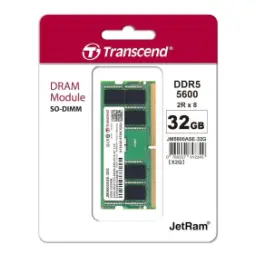
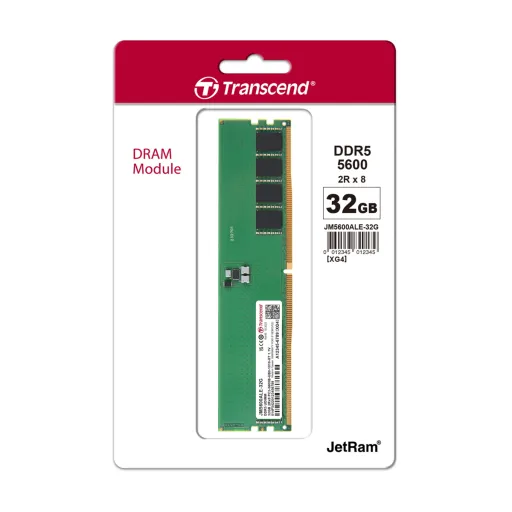
Transcend JetRam DDR5 is built for dependable daily computing, jab aapko simple upgrade chahiye without the drama. The JetRam DDR5 lineup is presented as JEDEC compliant desktop memory, which helps keep compatibility straightforward on supported platforms. This UDIMM form factor targets standard desktop DIMM slots, is liye installation routine rehti hai for most builders. The module design uses a 288 pin DDR5 DIMM layout, so it physically matches DDR5 desktop sockets rather than older DDR4 boards. The low working voltage is listed at 1.1V, meaning heat aur power waste dono typically control mein rehte hain during long sessions. The product positioning also highlights on die ECC for data integrity, jo everyday stability ko support karta hai at the chip level. The DDR5 architecture itself is designed around better efficiency and bandwidth handling, so background apps ka load zyada smooth feel hota hai in real use. The goal here is not flashy tuning but consistent behavior, bilkul woh feel jo office work, browsing, and general multitasking demand. JetRam modules are described as using screened brand name DRAM chips and environmental testing, which is practical when you want reliability instead of experimentation. This kind of memory upgrade fits best when the priority is stable performance, less troubleshooting, and a clean DDR5 baseline
DDR5 improves how data moves across the module, jis se system responsiveness better feel hoti hai under mixed workloads. Each DDR5 DIMM is commonly explained as using two independent 32 bit subchannels, which increases efficiency versus the older single 64 bit channel approach. That dual subchannel layout helps the memory controller handle more concurrent operations, so heavy tab switching aur multiple apps ki switching zyada composed lagti hai. Many DDR5 kits start at higher baseline transfer rates than DDR4 era defaults, and the platform trend favors bandwidth heavy tasks like compression, large file work, and modern game engines. This matters when your PC is doing multiple things at once, rozana ka scenario like streaming plus browser plus a few productivity apps. Crucial describes DDR5 as engineered for efficiency and reduced lag during loads and transfers, which maps directly to fewer “micro pauses” in daily usage. Kingston also frames the subchannel split as a way to increase overall performance and improve access efficiency, which can show up as smoother responsiveness rather than only higher benchmark numbers. The JetRam DDR5 line specifically references the dual 32 bit channel concept as part of DDR5’s generational shift, so the feature is not a niche tweak but a core behavior. When workloads spike briefly, such as app launching and asset loading, yeh architecture better scheduling enable karti hai for the controller. The result is a platform that feels more composed under pressure, while keeping everyday interactions crisp and predictable
The UDIMM form factor keeps upgrades simple, jab aap DIY build ya office desktop refresh kar rahe hote hain. Transcend lists JetRam DDR5 desktop modules as Unbuffered Long DIMM, which is the typical desktop UDIMM category rather than server buffered types. The pin count is specified as 288 pin for these DDR5 long DIMMs, so the physical interface aligns with DDR5 desktop sockets. Tom’s Hardware notes DDR5 retains the 288 pin arrangement but uses different pinouts and notch position than DDR4, which helps prevent accidental cross generation installs. Kingston similarly highlights the DDR5 module key concept and explains that DDR5 keys differ by module type, so alignment matters and the slot won’t accept the wrong DIMM. This physical clarity is useful when you want a clean install experience, asaani se seat ho jata hai once you line up the notch properly. The practical takeaway is that motherboard generation selection is non negotiable, because DDR5 UDIMMs require a DDR5 compatible board and CPU memory support. Tom’s Hardware frames DDR5 adoption as increasingly common, but still tied to platform choices rather than a drop in swap for older DDR4 systems. Once the platform matches, UDIMM memory is generally plug and play at JEDEC defaults, meaning fewer knobs and less tuning tension for mainstream users. Transcend positions JetRam DDR5 as JEDEC compliant, which reinforces that “standard behavior” expectation. For builders who value clean upgrades, the UDIMM + 288 pin DDR5 standard keeps the process familiar and controlled
Lower operating voltage is a meaningful everyday advantage, kyun ke heat aur fan noise ka chain reaction kam hota hai. Transcend lists JetRam DDR5 modules with a 1.1V working voltage, which supports the idea of reduced power draw versus older DDR4 norms. Crucial also states DDR5 memory has an operating voltage of 1.1V compared to DDR4 at 1.2V, framing it as an efficiency step forward. Kingston describes DDR5 as consuming about 20% less power at 1.1V versus DDR4 at 1.2V for equivalent components, which matters for long running PCs and always on workloads. DDR5 also shifts power management onto the module via a PMIC, so power regulation is closer to the memory components and tends to be cleaner. Transcend explicitly mentions PMIC in its JetRam DDR5 description and ties it to reduced signal interruption and lower power consumption, which is practical for stable daily performance. Crucial similarly explains that PMIC moves power management from motherboard to module, supporting improved signaling and cleaner power delivery. In real usage, that combination translates into fewer “random” hiccups, aur sustained tasks like long downloads, background sync, and extended gaming sessions feel more steady. The benefit is not only battery talk for laptops; desktops also gain from lower waste heat, because case airflow can focus on CPU/GPU rather than fighting extra warmth. When a system runs cooler overall, it tends to sustain consistent behavior for longer periods, which is the kind of refinement that makes a DDR5 upgrade feel mature and hassle free
On die ECC is one of DDR5’s quiet reliability upgrades, jo background mein kaam karta rehta hai while you simply use the PC. Transcend describes JetRam DDR5 as using on die ECC that automatically spots and corrects data errors, improving data integrity and system stability. Kingston explains on die ECC as a feature designed to correct bit errors within the DRAM chip, and it clarifies that it cannot correct errors outside the chip on the bus to the CPU. That distinction matters because many buyers confuse on die ECC with full ECC UDIMMs, so expectations ko realistic rakhna smart hota hai for typical consumer platforms. Wikipedia’s DDR5 overview similarly notes DDR5 chips include on die ECC and emphasizes it is not the same as true ECC memory that adds extra bits and reporting mechanisms. For everyday users, the practical benefit is fewer silent edge case errors inside DRAM arrays as densities scale, which supports stable sessions over time. Kingston ties the motivation to increased reliability as DRAM density rises, making it a sensible generational safeguard rather than a marketing sticker. Transcend’s wording focuses on stability and integrity, which aligns with how most users experience memory quality: fewer odd crashes, fewer corrupted loads, and more consistent uptime. In a work from home routine, rozana ka pressure like many browser tabs, meetings, and documents benefits from this kind of behind the scenes error handling. The key is understanding the lane: on die ECC boosts chip level robustness, while full ECC configurations remain a separate category for platforms that explicitly support them. This clarity helps you choose JetRam DDR5 for the right reasons, namely stable mainstream DDR5 operation with modern reliability features
Long term reliability usually comes from boring details done well, bilkul like strict screening and consistent standards adherence. Transcend states its JetRam DDR5 modules are compliant with JEDEC international standards, which points to mainstream timings and predictable baseline behavior. Transcend also highlights the use of true ETT grade, brand name DRAM chips that pass strict screening and rigorous environmental testing, framing quality as process driven rather than cosmetic. When a memory module is built around standard profiles, system boot and training tend to be smoother, aur BIOS mein unnecessary tweaking ki need kam hoti hai for everyday setups. Transcend’s product pages show modules specified with JEDEC aligned speeds and latencies for particular part numbers, reinforcing that “standard first” approach. Transcend lists an operating temperature range of 0°C to 85°C on module pages, which matters for stability in warm cases or summer room temps. Kingston’s DDR5 overview also emphasizes improved signal integrity and reduced noise through DDR5’s power management approach, which complements the idea of stable daily operation. In practical terms, this combination supports the kind of PC experience people actually want: consistent wake from sleep, fewer unexplained freezes, and reliable file handling. The JetRam positioning is especially suitable for users who prefer a refined baseline rather than a showpiece build, kyun ke focus performance se zyada stability aur predictability par hota hai. When the memory subsystem is calm and consistent, the whole machine feels more premium, even if no one can “see” the upgrade
RAM capacity shapes everyday smoothness more than people expect, kyun ke background apps quietly memory consume karti rehti hain. Transcend’s JetRam DDR5 5600 U DIMM page lists multiple desktop module options across capacities, including 8GB, 16GB, 24GB, 32GB, and 48GB variants depending on part number. The existence of these different capacities lets buyers match use case needs, whether it is a lighter office PC or a creator workstation that keeps big projects open. Transcend’s individual product pages also show capacity specific modules like an 8GB DDR5 4800 UDIMM and a 24GB DDR5 5600 UDIMM, which reinforces that JetRam DDR5 is not a single one size SKU. Crucial describes DDR5 as enabling smoother multitasking and reduced lag in practical scenarios like many browser tabs alongside media and edits, which is exactly where extra capacity helps the most. A balanced approach is choosing enough headroom so Windows updates, browsers, and creative apps don’t fight each other, warna system “busy” feel karne lagta hai even on a fast CPU. Tom’s Hardware notes real world performance gains can vary by workload, so matching memory to what you actually run is smarter than chasing numbers alone. If your routine includes heavy Chrome usage, multiple monitors, and large files, then higher capacity often delivers the most noticeable stability uplift. If your routine is lighter, a standard capacity can still modernize the platform, asaani se, while keeping the rest of the build budget flexible. The key is buying the headroom that protects your workflow, because smooth multitasking is usually a capacity story first and a speed story second
A DDR5 upgrade makes the most sense on new platforms, jab motherboard and CPU already support DDR5 natively. Tom’s Hardware explains DDR5 adoption has increased and highlights the generational changes like dual 32 bit channels and on module power management, which are baked into DDR5 rather than optional extras. That means if you are building fresh, choosing DDR5 memory keeps the system aligned with the current ecosystem and future upgrade paths. Kingston’s overview points to DDR5’s PMIC based power regulation and subchannel design as core efficiency and performance features, which supports the logic of selecting DDR5 when the platform is ready. Transcend positions JetRam DDR5 as JEDEC compliant and focused on stable operation, so it suits buyers who want mainstream behavior rather than aggressive overclock tuning. Tom’s Hardware also notes that gaming gains between high end DDR4 and DDR5 can be modest in some cases, which is why it is better to treat DDR5 as a platform alignment decision, not a magic FPS button. For productivity and bandwidth heavy tasks, DDR5’s architecture can matter more, aur overall system feel zyada responsive ho jata hai as workloads scale. Crucial emphasizes DDR5’s efficiency and multi tasking comfort, which maps to everyday creators and office power users. The most practical buyer profile is someone upgrading to a DDR5 motherboard anyway, or replacing an older system where stability and modern standards matter. The least practical scenario is trying to reuse a DDR4 board, because the physical and electrical standards are different even if pin counts look similar in marketing photos. When you match platform and expectations, JetRam DDR5 becomes a clean, low hassle way to modernize the memory foundation
A good memory upgrade should feel invisible in the best way, kyun ke crashes aur slowdowns ka drama quietly disappear ho jata hai. Transcend JetRam DDR5 focuses on standard DDR5 UDIMM behavior with a 288 pin design and 1.1V operating voltage, which supports mainstream compatibility and efficiency goals. The JetRam description highlights on die ECC for error spotting and correction, which contributes to stability at the DRAM chip level during long sessions. Kingston’s DDR5 overview reinforces that on die ECC is designed to correct bit errors within the chip and clarifies its scope, helping buyers understand the real benefit without confusion. Crucial also frames DDR5 as engineered for efficiency and reduced lag, which is exactly what people notice when multitasking goes from “fine” to consistently smooth. If your system already supports DDR5, this module class gives you a modern baseline that handles busy desktops with less friction, rozana ke use mein. If your priority is stability first memory rather than extreme tuning, a JEDEC aligned DDR5 UDIMM approach stays closer to plug and play expectations. The result is a PC that boots predictably, stays responsive under mixed workloads, and feels refined without requiring constant tweaking. For anyone building a current generation desktop, JetRam DDR5 fits as a practical, standards based memory choice that supports today’s multitasking and tomorrow’s platform longevity
Here's how current offers compare across retailers.