








Price Breakdown & Availability
Here's how current offers compare across retailers.
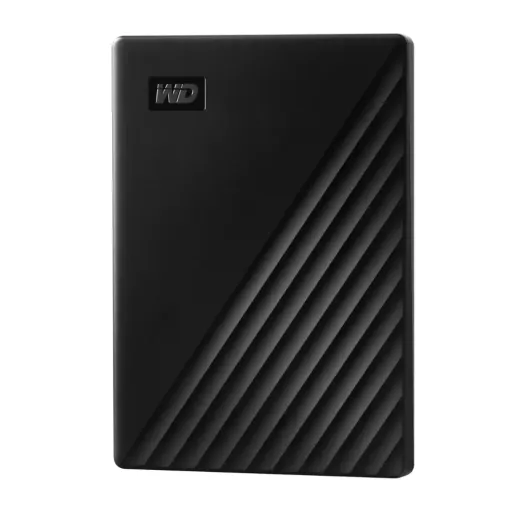
WD My Passport



You Might Also Like
The WD My Passport is built for people who want their files close, aur haath mein asaani se carry ho jaye, because WD describes it as portable, stylish, and ready for photos, videos, music, and documents. The documented package for this version includes the drive, a USB 3.0 cable, and WD software such as WD Backup, WD Security, and WD Drive Utilities, so box kholte hi workflow clear lagta hai. That matters in real life when office files, family media, and personal archives need one dependable place instead of random folders spread across old laptops. The reimagined design language and color focused finish also make the device feel more personal, jo desk setup ya travel pouch mein plain accessory se zyada polished lagta hai. Because the body is meant for on the go use, slipping it into a backpack pocket or laptop sleeve feels natural and compact. Instead of turning storage into a complicated project, this drive keeps the idea simple, file transfer seedha rehta hai, and organization starts faster. For buyers who want a familiar external HDD with built in software support around it, yeh identity bohat clear rehti hai and the product feels purposeful
The USB 3.0 interface gives this My Passport transfer rates up to 5 Gb/s, and the official manual also notes backward compatibility with USB 2.0, so purane systems ke sath bhi usability khatam nahi hoti. The box documentation specifically lists a USB 3.0 cable, which keeps setup direct and avoids that annoying feeling of buying extra accessories before you can even start. That combination works well for movie folders, DSLR imports, office backups, aur semester projects jo ek jagah se doosri jagah move karne hotay hain. Because a wired external drive stays predictable, large copies feel more stable than juggling uploads, downloads, and cloud sync delays. The practical benefit is not just headline speed; rozana use mein farq yeh hota hai ke copy jobs calmly finish and your machine stays organized. If your routine includes moving archive folders after editing, billing, or travel, this interface keeps the experience straightforward. For everyday users who value reliable cable based transfer over flashy complexity, the USB side of My Passport feels mature and useful
The included WD Backup software is designed as a scheduled backup application, and WD says you can choose the backup target, source, and schedule so selected files copy automatically. That is a genuine everyday advantage, kyun ke manual yaad rakhna aksar mushkil ho jata hai when work, study, or family tasks start piling up. Once a plan is created, the manual explains that WD Backup automatically copies new files and changed protected files on the schedule you set, which turns the drive from passive space into active protection. The product overview also highlights auto backup with included WD Backup software, reinforcing that this version is meant to reduce repetitive copy paste habits from the start. For students, office users, and home media collectors, yeh bohat kaam ki cheez hai because recent work gets a second home without extra mental load. Because your backup schedule can match your own routine, the drive adapts easily whether you save daily, weekly, or around project deadlines. In practical terms, that means less time managing folders and more confidence that important files are already protected
The My Passport drive includes 256 bit AES hardware encryption through WD Security, and WD describes it as a built in way to keep your content private and safe. Because the protection works at the hardware level, sensitive folders like IDs, invoices, tax files, aur personal photos ko extra peace milti hai without changing your normal file habits. WD also notes that you can activate password protection, create a personalized password, and even add a return if found prompt message, jo travel use ke liye thoughtful detail ban jata hai. The manual further explains that locked drives can be unlocked through WD Security, WD Drive Utilities, or the WD Drive Unlock utility, which helps when the drive moves between systems. That balance feels practical rather than decorative, because security yahan sirf marketing line nahi balkay real travel aur shared space benefit hai. If the drive sits in a family room, office desk drawer, or backpack, password protection gives your storage a more controlled feel. For anyone keeping personal or work data outside the laptop, this feature adds meaningful reassurance
WD Drive Utilities adds real day to day management, because the My Passport manual lists diagnostics, sleep timer control, drive erase, software details, and registration features inside the utility experience. The sleep timer is especially practical, kyun ke WD says it reduces power during extended inactivity to conserve power and extend the life of the drive. The same manual also describes three diagnostic options, including a drive status check, a quick drive test, and a complete drive test, so drive health ko andazay se judge karna zaroori nahi rehta. Another useful touch is LED control, since WD documents the option to turn the drive light off through the utility when you want a cleaner desk or a darker room. There is also a drive erase function, jo reset ya ownership handoff ke waqt kaafi helpful ban jata hai. Because these tools are tied to everyday maintenance rather than hidden complexity, the drive feels easier to keep tidy over time. For buyers who want practical control after purchase, this software layer adds real ownership value
This My Passport version is factory formatted as a single NTFS partition, and WD documents it for updated Windows systems while also noting that reformatting may be required for other operating systems, including Mac use. That means Windows users can plug in and start saving files quickly, jab ke cross platform users thori setup ke baad apna workflow comfortably bana saktay hain. WD Discovery is documented as the software launcher that installs WD Backup, WD Security, and WD Drive Utilities from the drive itself, so the management side feels centralized instead of scattered. The manual even mentions offline installers for certain WD apps when internet access is unavailable, jo restricted office network ya travel situation mein unexpectedly useful hota hai. Because setup friction stays low, the drive suits buyers who want external storage without a long learning curve. It also helps that the software bundle is clearly documented, so you know where backup, security, and utilities live. For straightforward file protection and familiar wired storage, this setup path feels organized
The shape and styling are tuned for mobility, with WD describing a palm sized form, a bold reimagined look, and a slim durable design meant to travel with your important files. That portability matters more than it first sounds, kyun ke jo drive bag mein easily fit ho jaye wohi rozana saath nikalta hai and actually becomes useful. WD also advises sensible handling precautions such as not dropping or jolting the drive and not moving it during activity, which is exactly the kind of practical guidance portable HDD users should respect. Used properly, the drive becomes a neat companion for lectures, office transfers, media backups, and home archiving, aur laptop ki internal storage par pressure bhi kam hota hai. Because the drive is ready to use out of the box, your first session can be about moving files instead of troubleshooting hardware. The small footprint also helps shared desks stay cleaner, especially when you want storage nearby without turning your setup into cable clutter. For daily carry users, My Passport feels practical in exactly the way portable storage should
Registering the drive through WD Discovery helps establish the warranty period and provides notification of software or firmware updates, according to the My Passport manual. WD documentation also lists a 3 year limited warranty for this My Passport family, jo long term storage ownership mein extra reassurance deta hai when the drive starts holding years of valuable files. That support window matters because dependable storage is not only about saving files today; baat yeh bhi hoti hai ke kal issue aaye to documented path maujood ho. The utility tools also let you view software details and reach registration functions from within the WD ecosystem, so ownership stays more organized. For home users, students, and freelancers, that combination of known software and warranty structure makes the product feel less disposable. It also reduces the guesswork that often comes with generic bare drives sold without a strong software layer. If you want portable storage that feels supported as well as useful, this is a meaningful advantage
WD My Passport makes the most sense for buyers who want simple wired storage plus backup and security tools, rather than a bare external drive with no management layer around it. Its USB 3.0 connection, included WD Backup, WD Security, WD Drive Utilities, and 256 bit AES hardware encryption create a balanced package, jo casual users aur organized professionals dono ko comfortably suit karta hai. You are not dealing with overcomplicated enterprise features here; instead, you get portable capacity, scheduled protection, and a cleaner way to handle important folders. That makes the drive a strong fit for photo collections, school projects, office records, downloaded media, aur personal backups jo laptop space ko jaldi fill kar dete hain. Because the software helps with backup, security, and basic drive care, the overall experience feels more complete than a simple plug in and forget device. The portable shell keeps the hardware easy to carry, while the utilities keep ownership easy to manage. If your goal is reliable external storage with practical safeguards and a familiar setup flow, yeh WD My Passport bilkul strong candidate ban jata hai
Here's how current offers compare across retailers.