





Price Breakdown & Availability
Here's how current offers compare across retailers.
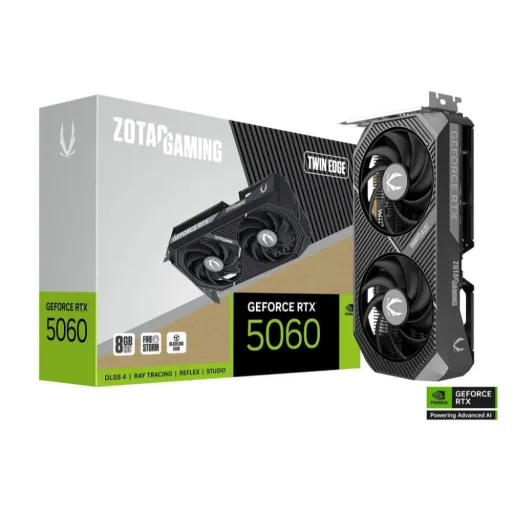
As of , there are 13 offers from 8 stores in Pakistan, priced Rs. 129,999 to Rs. 159,999.

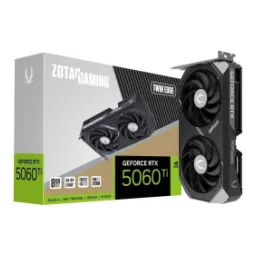
Zotac Gaming GeForce RTX 5060 Twin Edge OC White Edition DLSS 4 8GB GDDR7 128-bit 28 Gbps PCIE 5.0 Gaming Graphics Card, SFF-Ready Compact Card
Seller: JunaidTech
Updated
Zotac Gaming GeForce RTX 5060 Twin Edge OC White Edition DLSS 4 8GB GDDR7 128-bit 28 Gbps PCIE 5.0 Gaming Graphics Card, SFF-Ready Compact Card
Seller: JunaidTech
Updated
Rs. 129,999
Zotac Gaming GeForce RTX 5060 AMP DLSS 4 8GB GDDR7 128-bit 28 Gbps PCIE 5.0 Gaming Graphics Card, IceStorm 2.0 Cooling
Seller: JunaidTech
Updated
Zotac Gaming GeForce RTX 5060 AMP DLSS 4 8GB GDDR7 128-bit 28 Gbps PCIE 5.0 Gaming Graphics Card, IceStorm 2.0 Cooling
Seller: JunaidTech
Updated
Rs. 129,999
Zotac Gaming GeForce RTX 5060 Twin Edge Plus DLSS 4.5 8GB GDDR7 128-bit 28 Gbps PCIE 5.0 Gaming Graphics Card, SFF-Ready Compact Card
Seller: JunaidTech
Updated
Zotac Gaming GeForce RTX 5060 Twin Edge Plus DLSS 4.5 8GB GDDR7 128-bit 28 Gbps PCIE 5.0 Gaming Graphics Card, SFF-Ready Compact Card
Seller: JunaidTech
Updated
Rs. 139,999

ZOTAC GAMING GeForce RTX 5060 Twin Edge OC White Edition Video Graphics Card, 8GB GDDR7, PCI Express 5.0 x8, ZT-B50600Q-10M, White
Seller: CZone
Updated
ZOTAC GAMING GeForce RTX 5060 Twin Edge OC White Edition Video Graphics Card, 8GB GDDR7, PCI Express 5.0 x8, ZT-B50600Q-10M, White
Seller: CZone
Updated
Rs. 157,000

ZOTAC Gaming GeForce RTX 5060 Twin Edge OC DLSS 4 Gaming Graphics Card, 8GB GDDR7, 128-Bit, PCI Express 5.0, ZT-B50600H-10M
Seller: Consumer Express Laptops
Updated
ZOTAC Gaming GeForce RTX 5060 Twin Edge OC DLSS 4 Gaming Graphics Card, 8GB GDDR7, 128-Bit, PCI Express 5.0, ZT-B50600H-10M
Seller: Consumer Express Laptops
Updated
Rs. 159,999
ZOTAC GeForce RTX 5060


You Might Also Like
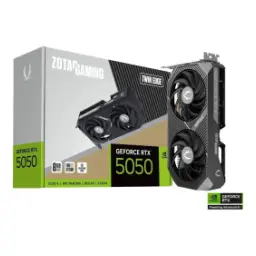
This ZOTAC GeForce RTX 5060 targets modern gaming builds with confidence, giving you a clean path into NVIDIA Blackwell features without going overboard on power. Built on NVIDIA Blackwell architecture for RTX 50, yeh GPU AI driven rendering ko daily gameplay mein naturally introduce karta hai. The 3840 CUDA cores provide a strong baseline for high FPS esports and smooth single player visuals, especially when you want stable frame pacing over brag numbers. The boost clock is listed around 2497 MHz on ZOTAC’s standard models, so quick bursts in modern engines feel responsive, bilkul sluggish nahi lagta. The 8GB GDDR7 configuration keeps the card aligned with newer memory standards, meaning texture loads and asset streaming stay more disciplined in typical 1080p to 1440p use. The 145W power consumption rating makes the overall platform easier to plan, kyun ke heat aur PSU demands dono manageable rehte hain. The PCIe 5.0 x8 interface modern motherboards ke saath neatly sync hota hai, and you still get a straightforward drop in upgrade experience. The overall identity feels purpose built for everyday gamers and hybrid creators who want new gen features, but also want a setup that stays simple
Modern monitor setups feel effortless here because ZOTAC equips the RTX 5060 with three DisplayPort 2.1b ports and one HDMI 2.1b port for flexible connectivity. Three DisplayPort 2.1b outputs support UHBR20 on the ZOTAC spec sheet, which is ideal if you are chasing very high refresh panels, rozana competitive play mein. The same ZOTAC listing calls out up to 4K 480Hz or 8K 165Hz with DSC over DisplayPort, so high end display plans stay open even if you upgrade monitors later. The HDMI 2.1b port is positioned for high refresh HDR and VRR use, meaning living room style gaming ya desk par single cable simplicity dono workable hain. Quad display capability is listed for this card, which helps when you run a main high refresh monitor plus side screens for Discord, OBS, timelines, ya research tabs. HDCP 2.3 support is also noted, so mainstream streaming and protected playback is less likely to become a random headache. Clean port selection matters because it reduces adapter clutter, and your setup looks and feels more intentional. Multi monitor productivity stays smoother when the outputs match your real use, bilkul simple
Daily performance feels snappy when the GPU can boost confidently, and the RTX 5060 is commonly listed with a 2497 MHz boost clock that keeps bursts quick in modern titles. The base and boost clock range is clearly documented by TechPowerUp, so you can set expectations around how the card behaves under load rather than guessing. The 3840 shading units listed for RTX 5060 translate into solid raster throughput, jis se 1080p high settings aur tuned 1440p presets zyada stable feel hotay hain. The PCIe 5.0 x8 bus interface keeps bandwidth modern for current platforms, so you do not feel like the card is stuck in a previous gen lane. The process size is commonly listed as 5 nm in the database entry, which supports the broader goal of delivering performance while keeping watts under control, heat kam rehti hai. The 145W TDP class also signals a balanced tuning approach, meaning long sessions can stay consistent without turning your case into a mini heater. This kind of balance is valuable because minimum FPS and frametime stability often matter more than peaks. Practical performance is what keeps aim steady and camera pans smooth, bilkul natural
AI features matter most when they feel invisible in use, and NVIDIA positions RTX 50 Series Blackwell around neural rendering advances and DLSS 4 capabilities for gamers and creators. DLSS 4 is explicitly highlighted for RTX 50 Series by NVIDIA, which can help you maintain smoother motion at higher settings, rozana ke gameplay mein. The RTX 5060 is listed with 120 Tensor Cores in the GPU database, giving the card the hardware foundation for AI upscaling and reconstruction workflows. NVIDIA’s RTX 5060 family page also frames the series around 5th generation Tensor Cores, which aligns with the idea of better AI quality at practical frame rates. For real world play, yeh approach aapko options deta hai to push image quality without instantly sacrificing responsiveness. Transformer based improvements are part of NVIDIA’s stated DLSS 4 direction, and that typically shows up as fewer artifacts and more stable detail. The point is not just higher FPS, but cleaner motion and fewer distracting shimmer moments during fast camera turns. When AI helps the image stay stable, you spend less time tweaking settings and more time actually playing. That convenience is a real upgrade, bilkul
Next gen memory can change how games feel, and ZOTAC lists the RTX 5060 with 8GB of GDDR7 on a 128 bit memory bus for modern bandwidth behavior. The same ZOTAC listing shows a 28 Gbps memory clock, which helps explain why texture streaming and rapid scene transitions can feel smoother in supported titles. TechPowerUp calculates bandwidth at 448 GB/s for the RTX 5060 configuration, and that number matters because it influences how well the card feeds the GPU during heavy asset movement. The 128 bit interface is a conscious balance choice in this class, aur is ka faida yeh hai ke overall efficiency and board simplicity stay strong. The Newegg listing also reinforces 8GB GDDR7, 128 bit, and 28 Gbps for a ZOTAC RTX 5060 model, giving extra confidence that the memory story is consistent across retail descriptions. For 1080p competitive and many 1440p balanced presets, this memory setup usually supports fast loads and fewer sudden dips when the game streams new areas. Your experience becomes more predictable, which is exactly what most players want, rozana. Memory is not just capacity, it is also the speed at which the whole scene stays fed
Power planning stays straightforward because ZOTAC rates the RTX 5060 at 145W power consumption, which fits nicely into many mainstream builds without aggressive PSU upgrades. TechPowerUp also lists a 145W TDP alongside a single 8 pin connector, so the power story looks consistent across reference databases, bilkul clear. ZOTAC specifies one 8 pin power input for these cards, keeping cable management cleaner and reducing the sense of build complexity in compact cases. ZOTAC’s recommended power supply figure is shown as 550W for the Twin Edge model, which helps you map the upgrade realistically with your current PSU class. The Newegg product listing similarly calls out 145W TDP and a 550W recommended PSU, which is useful when you want retail confirmation before ordering parts. For long gaming nights, yeh efficiency class usually means fans do not have to work as hard to keep temps under control. Lower power draw can also reduce the chance of thermal throttling in smaller airflow builds. The result is stable performance that feels consistent, not just fast on day one. Efficient power is comfort, asaani se
Small form factor builds need smart design choices, and ZOTAC explicitly positions RTX 5060 models as SFF Ready compact cards with practical features like a metal backplate and BladeLink fans. The ZOTAC RTX 5060 SOLO variant is even described as ITX Ready and ultra compact, so space planning becomes easier for tight cases, bilkul hassle free. The SOLO card length is listed around 164.5mm, which is the kind of number that can decide whether your build stays clean or turns into a fitment puzzle. Tom’s Hardware also highlights ZOTAC’s low profile RTX 5060 concept for compact builds, reinforcing the idea that ZOTAC is actively serving the SFF audience rather than treating it as an afterthought. BladeLink fan branding matters because it signals a focused airflow approach, and that typically translates into steadier boosts during long sessions, heat kam feel hoti hai. The metal backplate adds physical confidence during installation, especially when you move the PC often or run a compact case where everything feels tighter. When cooling and size are balanced, the GPU feels like it belongs in the build. That everyday comfort is a real quality feature, asaani se noticeable
Platform compatibility remains modern because the card uses PCI Express 5.0 x8, so it pairs cleanly with current gen motherboards while keeping the board design efficient. DirectX 12 Ultimate support is listed in ZOTAC’s specification table, which is relevant if you want newer rendering paths and feature support in updated engines. OpenGL 4.6 is also stated by ZOTAC, which helps for legacy applications, emulators, and a variety of creator tools that still lean on OpenGL behavior. The operating system support is listed as Windows 11 and Windows 10 64 bit, so typical gaming and creator rigs stay within the intended driver path, bilkul straightforward. Quad display capability is part of the ZOTAC spec, which pairs nicely with the 3x DP plus 1x HDMI port layout for multitasking and streaming. HDCP 2.3 is included as well, helping keep protected content playback less annoying in mixed monitor setups. For builders, yeh sab ka matlab hai ke you spend less time troubleshooting and more time enjoying the upgrade. Compatibility is a feature when it removes friction
Ray tracing feels more usable when the GPU has dedicated hardware, and the RTX 5060 is listed with 30 RT cores alongside 120 Tensor cores for AI assisted rendering support. NVIDIA describes RTX 50 Series Blackwell as a leap in AI driven rendering with advances to ray tracing and Tensor core technology, which frames the RTX 5060 as a modern foundation rather than a legacy compromise. The RTX 5060 family page also positions the stack with 4th generation ray tracing cores and 5th generation Tensor cores, so your feature set stays aligned with newer game engines and effects. The real benefit shows up in how you can mix settings, using selective ray traced effects while leaning on DLSS where it makes sense, rozana ke scenes mein. The Verge also notes the RTX 5060’s positioning with 3,840 CUDA cores plus GDDR7 memory and DLSS 4 support, reinforcing that this is a feature complete entry into the Blackwell generation. For creators, the modern display outputs and AI acceleration can support smoother timelines and cleaner previews, especially when your workflow is hybrid and time matters. For gamers, yeh card is about controlled smoothness, not just max settings screenshots. When a GPU stays stable, the whole PC feels upgraded, bilkul
As of , the lowest ZOTAC GeForce RTX 5060 price in Pakistan is Rs. 129,999 at JunaidTech. We found 13 offers from 8 stores, priced from Rs. 129,999 to Rs. 159,999.
Here's how current offers compare across retailers.
Review current prices and specifications side by side.
 Current
ZOTAC
ZOTAC GeForce RTX 5060From Rs. 129,999
Local price
13 offers
Updated 13 hours ago
ZOTAC
ZOTAC GeForce RTX 4060From Rs. 103,000
Local price
Lowest current price2 offers
Updated 14 hours ago