

Price Breakdown & Availability
Here's how current offers compare across retailers.
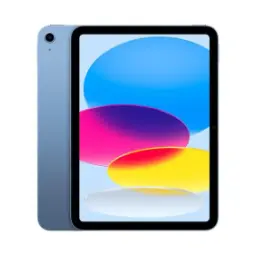
Apple iPad 11-inch (A16) 128GB Pink


You Might Also Like
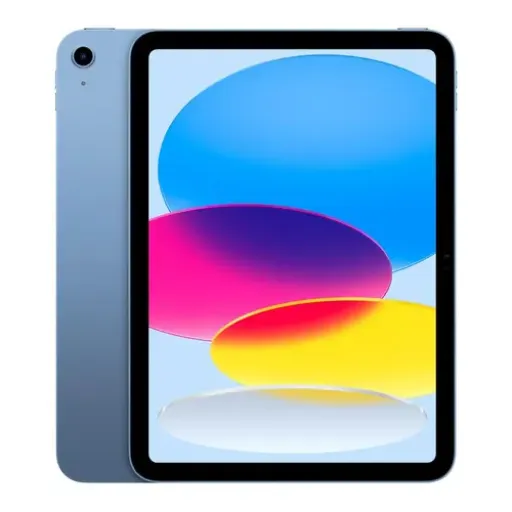
This 11 inch iPad (A16) in Pink stands out with a clean, all screen look that feels fun yet premium for daily carry. The finish options officially include Pink alongside Silver, Blue, and Yellow, so color choice can match your vibe without changing the performance. The 11th‑gen refresh was announced in March 2025, bringing the A16 chip and a higher base storage tier, which makes the entry iPad line feel more future friendly. The lightweight body stays easy to hold for reading, Zoom calls, and casual sketching, haath mein fatigue kam hoti hai even during longer sessions. The official size stays compact at 9.79 inches tall and 7.07 inches wide, so a small bag mein asaani se fit ho jata hai. The USB‑C era design keeps accessories simple, aur cable sharing easy ho jati hai with other modern devices. The included in‑box 20W USB‑C power adapter helps you start using it right away without hunting for a charger. The overall identity is simple: a colorful, capable iPad for the things you do every day, without jumping into the Pro only complexity
The Liquid Retina display keeps reading and study sessions comfortable, because text looks sharp and spacing feels natural at normal viewing distance. The panel is officially an 11 inch class screen with rounded corners, and the measured diagonal is 10.86 inches in a rectangle, which helps explain why it feels roomy without being bulky. The 2360 by 1640 resolution at 264 ppi makes PDFs, notes, and subtitles look clean, rozana scrolling mein edges jagged nahi lagtay. The 500 nits brightness gives you better visibility near windows or outdoors, so glare se fight karna comparatively easy rehta hai. The True Tone feature adapts white balance to your environment, which can reduce harshness during late night reading and keep colors more consistent. The IPS based LED backlit design stays consistent across angles, so family viewing mein colors wash out kam hotay. The screen is still described by reviewers as not laminated, meaning a small air gap exists; note taking bilkul doable hai, but artists may notice a slight separation compared to higher tiers. The final benefit is simple: visuals stay crisp, comfortable, and bright enough for real life, without turning the iPad into a fragile showpiece
The A16 chip brings a confident speed boost for everyday iPad tasks, so apps open quickly and switching feels snappy. Apple lists the A16 configuration as a 5 core CPU, 4 core GPU, and a 16 core Neural Engine, which is a practical mix for both productivity and casual creative work. The graphics side feels strong for common games and editing, aur frame pacing generally smooth rehti hai when you stick to realistic settings. Apple’s announcement messaging highlighted nearly 30 percent faster performance versus the prior generation, which translates into less waiting for routine actions like exporting or rendering lightweight edits. The iPadOS experience stays fluid for Split View style workflows, kyun ke A16 background handling ko disciplined rakhta hai in daily use. The device is also positioned as an entry iPad that does not support Apple Intelligence, so buyers get speed and polish without paying for AI first features they may not need. The overall performance story is balanced: it’s not a Pro replacement, lekin everyday performance bohat stable feel hoti hai. Reviewers generally describe it as one of the best entry level tablets even without Apple Intelligence features, especially for students and families
The built in battery is designed for long, predictable days, so streaming, browsing, and class notes don’t feel like a constant charging race. Apple specifies a 28.93‑watt‑hour battery and rates it for up to 10 hours of web surfing on Wi‑Fi or video watching, jo rozana ke routine mein practical confidence deta hai. The USB‑C port keeps charging and accessories straightforward, and it supports charging plus DisplayPort, which matters if you like plugging into adapters or monitors. The same USB‑C connection also supports USB 2.0 speeds up to 480Mb/s, so casual file transfers are fine, though heavy pro workflows should plan accordingly. The iPad can drive one external display up to 4K at 60Hz, giving you a clean desk setup for documents and web work, kaam ka space barh jata hai. The wireless stack stays current with Wi‑Fi 6 and Bluetooth 5.3, which helps keep connections stable with headphones, keyboards, and controllers. The chassis remains easy to carry at 1.05 pounds for Wi‑Fi models, so commuting mein bag heavy nahi hota. The result is a tablet that lasts, charges simply, and fits modern setups without turning portability into a compromise
The 12MP Wide rear camera makes the iPad genuinely useful beyond entertainment, because scanning documents and capturing whiteboards becomes quick and reliable. Apple lists the rear camera as a 12MP Wide with an ƒ/1.8 aperture and autofocus with Focus Pixels, which helps keep text and close up details clearer for receipts and homework. The Smart HDR 4 processing adds balanced highlights and shadows, so indoor shots look more natural, colors overcooked nahi lagtay in normal lighting. The camera also supports panorama up to 63MP, which can be handy for capturing a wide classroom board or a full room layout in one sweep. The video side goes up to 4K recording at multiple frame rates including 60 fps, so quick product clips or family moments can look surprisingly polished. The stabilization tools and continuous autofocus improve usability in real movement, chalti phirti video mein wobble kam feel hota hai. The practical advantage is simple: you can shoot, scan, mark up, and share from one device, without needing a separate scanner or laptop in the loop
The landscape front camera placement makes calls feel more natural, because your eye line matches the screen when the iPad sits on a stand or keyboard. Apple specifies a Landscape 12MP Center Stage camera with an ƒ/2.4 aperture, which is designed to keep you framed during FaceTime or meeting calls. The front camera records 1080p HD video, so online classes and work calls look clear without needing extra gear, and lighting remains respectable in normal rooms. The Smart HDR 4 processing is listed for the front camera too, which helps faces look more balanced, skin tones zyada natural feel hotay. The dual microphones improve voice capture for calls and quick recordings, so audio thin nahi lagti when you’re speaking at a normal distance. The landscape stereo speakers add a wider soundstage for movies and lectures, jis se dialogue clearer feel hota hai in landscape viewing. The Center Stage feature helps when you move around a little, so a casual presentation or kitchen call looks less awkward. The net benefit is a more confident communication setup that feels ready for study, work, and everyday catch ups
Apple Pencil support turns this iPad into a serious learning tool, because handwritten notes and PDF markups feel faster than typing for many workflows. Apple lists support for Apple Pencil (USB‑C) and also Apple Pencil (1st generation), giving you flexibility based on what you already own. Apple’s official compatibility guide confirms iPad (A16) works with Apple Pencil (USB‑C) and Apple Pencil (1st generation), which helps avoid the common mistake of buying a newer Pencil model that won’t pair. The first‑gen Pencil requires a USB‑C to Apple Pencil Adapter for pairing and charging, so purana Pencil bhi asaani se use ho jata hai with the right small accessory. The display supports True Tone and stays bright at 500 nits, which keeps writing legible under different lighting, aur aankhon par pressure kam hota hai in long sessions. Reviewers still note the screen is not laminated, so pencil tip feel thora different ho sakta hai compared to premium iPads, but everyday note taking remains practical. The real win is speed: you can capture ideas instantly, organize in apps, and keep everything synced without carrying notebooks everywhere
A keyboard case can dramatically change how this iPad feels, because documents, email, and web research become faster with real keys and a trackpad. Apple sells a Magic Keyboard Folio specifically for iPad (A16), and its two piece design includes a detachable keyboard plus a protective back panel with an adjustable stand, jo desk aur bed dono par stable viewing deta hai. The same Magic Keyboard Folio description notes a 14 key function row and trackpad support for iPadOS cursor control, which makes multitasking feel more laptop like without pairing hassles. Apple’s support guidance explains how Smart Connector keyboards get power and data without Bluetooth pairing, so setup bilkul simple rehta hai when you attach it correctly. For a tougher everyday option, Apple also lists the Logitech Rugged Folio Keyboard for iPad (A16), highlighting Smart Connector use and multiple modes like Type and View, jo student use mein kaafi practical hotay. On the software side, iPadOS 26 highlights new multitasking ideas like a new windowing system and folders in the Dock, which can make project work feel more organized. The overall experience becomes a portable workstation that still keeps tablet simplicity when you detach the keyboard
The 128GB storage tier is a practical baseline for modern apps, because downloads, class files, and photos can grow quickly over time. Apple lists 128GB as an official capacity option for iPad 11 inch (A16), with higher options available if your workflow needs more room. Third party testing and reviews commonly cite 6GB memory for this iPad, which helps explain why everyday multitasking feels smooth but ultra pro features remain reserved for higher tiers. Wired specifically notes the device lacks Stage Manager and Apple Intelligence features in this configuration, so pro style multi window desktops and AI first tools are not the focus here. The practical usage story still stays strong, kyun ke browsing, streaming, note taking, and light creation tasks are exactly what this iPad is built for. Tech reviewers describe it as one of the best entry level tablets for most people, especially when you prioritize reliability and long support life. The Liquid Retina resolution keeps text crisp for documents, so storage heavy PDF libraries bhi comfortably read ho jati hain without eye strain. The best fit is clear: students, families, and casual creators who want smooth performance and sufficient space, without paying for Pro only extras
PTA approval only matters for devices that use SIM or eSIM, because Pakistan’s DIRBS system checks IMEI based devices for local network compliance. Official guidance explains that mobile devices with SIM/IMEI functionality intended for use on Pakistani networks may need IMEI registration through PTA’s DIRBS portal, is liye PTA Approved tag ka matlab real convenience ho sakta hai for travelers and local buyers. Federal Board of Revenue information also describes DIRBS as a system to identify non compliant devices on local networks and eventually block non compliant ones, so approval status reduces connectivity risk in practical terms. Apple’s tech specs show that Wi‑Fi + Cellular models use eSIM and support 5G (sub‑6 GHz) and Gigabit LTE, which is relevant if your listing is the cellular variant rather than Wi‑Fi only. The final buying checklist stays simple: confirm storage is 128GB, confirm the exact model is Wi‑Fi or Wi‑Fi + Cellular, and choose accessories like Pencil or keyboard based on your routine, rozana ke kaam ko match kar ke. The Pink finish adds personality without compromising capability, so it feels like a device you actually want to carry and use every day. The overall result is a modern, dependable iPad that stays easy to live with, whether your priority is study, entertainment, or light productivity
Here's how current offers compare across retailers.
Review current prices and specifications side by side.