
Price Breakdown & Availability
Here's how current offers compare across retailers.

You Might Also Like
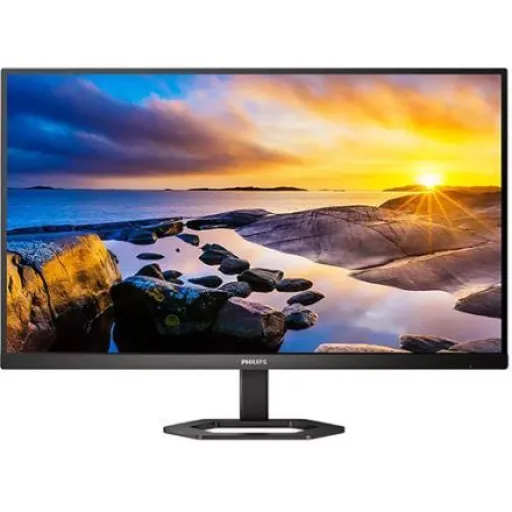
This Philips 5000 Series monitor upgrades everyday desk time with a cleaner, more expansive view. With a 27 inch Quad HD screen, rozana emails, documents, and tabs feel less cramped, so you stop juggling windows. The IPS panel is built for wide angle consistency, which matters when your viewing position changes throughout the day. A slim frame and cable managed layout keeps your setup looking intentional, aur desk par clutter kam nazar aata hai. SmartImage game profiles make it easier to shift between genres, taake settings bar bar change na karni paray. Adaptive Sync support is designed to reduce tearing and stutter on compatible systems, which helps motion feel more continuous. The overall identity stays balanced, so it fits home office focus and after hours entertainment without forcing a single use personality
A Quad HD workspace instantly feels more organized on busy days, because you can see more content at once. With 2560 x 1440 resolution on 27 inches, text aur icons crisp rehte hain, so you rely less on zooming. The 16:9 aspect ratio stays familiar for streaming, presentations, and most productivity layouts. A typical 300 cd/m2 brightness keeps content readable in many rooms, roshni zyada ho tab bhi. The anti glare coating helps reduce distracting reflections, so your eyes stay on the task. The stated pixel density is 108.79 PPI, which supports cleaner small fonts at normal desk distance. The W LED backlight and IPS structure aim for even luminance, taake screen patchy na lage. This resolution tier is especially helpful for spreadsheets and timelines, because extra columns and layers remain visible without constant panning
Cleaner motion makes fast scenes easier to follow, especially when you play twitch sensitive games or scroll dense feeds. With 1 ms MPRT available, quick camera pans look less blurred, aur tracking zyada clear hoti hai. The maximum listed mode is 2560 x 1440 at 75 Hz, which adds visible smoothness over standard 60 Hz. The user manual notes that 75Hz or higher is required for MPRT operation. The same manual explains MPRT strobes the backlight, so brightness changes can be noticeable during blur reduction. Adaptive Sync and MPRT cannot be enabled together, is liye aap apni priority choose karte hain per session. For everyday use, the monitor also lists a typical 4 ms gray to gray response, which is a more standard measurement than MPRT. SmartImage game modes add quick tuning for FPS, Racing, or RTS style content, taake contrast aur visibility game ke mutabiq set ho jaye
Better posture becomes easier when the display moves with you, because comfort is a setup feature, not an afterthought. With 130 mm height adjustment, aap screen ko eye level par laa kar neck strain kam kar sakte hain. The tilt range is listed as 5 to +20 degrees, so glare and viewing angle can be tuned quickly. The pivot range reaches 90 to +90 degrees, aur portrait mode long pages ko naturally fit kar deta hai. The manual also warns against tilting downward beyond 5 degrees to help avoid potential screen damage. A portrait setup feels great for PDFs and chat apps, kyun ke lines zyada nazar aati hain. A properly adjusted screen reduces shoulder hunching, which helps long meetings feel less tiring. This flexibility also supports shared viewing, because you can reposition smoothly without moving the whole base
A flexible input layout saves time when you switch between devices, because the ports are already waiting for your workflow. With two HDMI 1.4 ports, laptop aur secondary device dono connected reh sakte hain, so replugging stays minimal. A DisplayPort 1.2 input is included for many desktops, which often makes QHD output feel straightforward and stable. The specs also list an audio out connection, so headphones or external speakers can be routed cleanly. Separate Sync is noted in the connectivity section, which can matter for compatibility with certain signal behaviors. The EasySelect menu toggle helps quick OSD access, asaani se input change aur settings adjust ho jati hain. Cable management then keeps those HDMI and DP runs organized, so the desk looks calmer and more professional. This combination works well for a work PC plus a personal device, without turning your setup into a cable mess
Eye comfort becomes a real advantage when you spend hours on screen, because strain sneaks up during focused work. With LowBlue Mode available, blue light reduction helps late night reading feel gentler, aankhon ko aaram milta hai. Flicker free operation is listed in the specs, which targets reduced fatigue during extended viewing. EasyRead mode is included for a paper like reading experience, so PDFs and articles feel less harsh. These options are practical for students and remote workers, kyun ke roozana screen time rarely stays short. The on screen controls remain accessible through the quick menu system, making small tweaks feel like part of the routine. When you pair eye modes with anti glare coating, reflections are less distracting across different lighting conditions. This comfort stack keeps the monitor usable across long work blocks, without forcing you to compromise on resolution
Consistent color matters when your screen is used for both work and entertainment, because shifting tones can mislead your decisions. With IPS technology and 178/178 viewing angles, colors side se bhi stable rehte hain, so collaboration feels more accurate. The panel supports 16.7 million colors, which helps gradients look smoother in photos and videos. Typical gamut figures are listed as sRGB 114.18% and NTSC 102.02%, giving a vivid range for everyday creative use. A 1000:1 typical contrast supports clearer separation in UI elements, aur dark scenes mein depth better lagti hai. SmartContrast and SmartImage controls adapt the look based on content, so you can tune for office clarity or game visibility. Wide angle stability also helps when you stand up or lean back, because the image stays consistent without a narrow sweet spot. For casual editing and content viewing, this IPS behavior keeps results more predictable from day to day
A monitor upgrade feels smarter when it fits your space cleanly, because daily comfort depends on layout as much as specs. With VESA 100 x 100 mm support, arms and wall mounts become simple options, aur aap desk space free kar sakte hain. The listed size with stand is 614 x 510 x 212 mm at maximum height, which helps you plan keyboard and speaker placement. The panel depth without the stand is 52 mm, so an arm mounted setup can look sleek, bilkul modern. The weight with stand is listed as 5.92 kg, which is manageable for most desks and mounting hardware rated appropriately. A textured black finish keeps the look subtle, so your setup feels professional instead of flashy. Cable management then helps everything stay tidy, so the screen remains the centerpiece rather than the wiring. This placement freedom supports both minimalist desks and multi device stations, without forcing compromises on ergonomics
This Philips 27E1N5500E is built for people who want one screen that handles office work and casual gaming with minimal fuss. With a 27 inch IPS Quad HD panel, roozana productivity feels faster because you can see more while keeping text sharp. The ergonomic stand adds 130mm height adjustment with pivot and tilt, so comfort is not dependent on books or risers. Two HDMI 1.4 ports plus DisplayPort 1.2 cover the most common daily connections, aur switching easy rehti hai. LowBlue Mode and Flicker free support longer sessions with fewer comfort compromises, especially for reading and documents. Gamers can choose Adaptive Sync for tear control or MPRT for blur reduction, lekin dono ek saath enable nahi hotay. The anti glare screen and 300 cd/m2 brightness keep the display readable across everyday lighting changes. If you want a clean, modern QHD monitor that stays practical, this model delivers a well rounded experience without feature overload
Here's how current offers compare across retailers.
Review current prices and specifications side by side.
 Current
Philips
Philips 5000 Series 27E1N5500ERs. 64,899
Local price
2 offers
Updated 22 hours ago
Philips
Philips 5000 Series 27E1N5800ERs. 58,500
Local price
Lowest current price14 offers
Updated 21 hours ago
Philips
Philips 5000 Series 27E1N5600HERs. 91,990
Local price
12 offers
Updated 22 hours ago