

Price Breakdown & Availability
Here's how current offers compare across retailers.
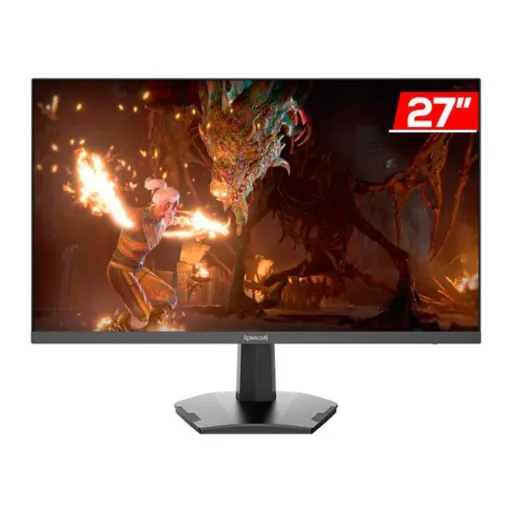

Redragon GM27X5IPS



You Might Also Like
This 27 inch Redragon GM27X5IPS gaming monitor is built for speed first setups, so your desk feels clean and your matches feel responsive, game ka flow smooth rehta hai. The Full HD 1920 x 1080 resolution keeps your system load reasonable, which helps you hold higher FPS without constantly tweaking settings. The IPS panel choice is made for consistent viewing and color stability, aur side angle se bhi image wash out nahi hoti. The headline refresh rate is widely listed at 180Hz for GM27X5IPS listings, making quick turns look cleaner and aim tracking feel more controlled. Some regional pages show different refresh figures for the same model name, is liye purchase se pehle box label ya monitor OSD check karna smart rehta hai. The rated 1ms MPRT target is meant to reduce perceived blur in motion, so fast strafes and flick shots look tighter when you’re locked in. The 27 inch size gives you practical workspace for tabs and timelines, rozana ke kaam mein window tiling asaani se ho jati hai. Many sellers also market it under the “Mirror” naming, so searching “Redragon Mirror GM27X5IPS” can help you match the exact variant you want. The overall promise stays simple: high refresh smoothness, IPS consistency, and a practical 1080p target that doesn’t demand a high end GPU to feel great
This 27 inch Full HD panel aims for clarity without complexity, so you get a big canvas for games and apps while keeping setup straightforward, bilkul tension free. The native 1920 x 1080 resolution is a familiar sweet spot for esports titles, because you can chase high frame rates without pushing extreme GPU power. The screen size is listed as 27 inches on multiple product pages, which makes HUD elements readable and gives you more room for map awareness. The IPS panel helps keep text and UI looking consistent across the screen, aur jab aap chair move karte ho to colors zyada shift nahi karte. The widescreen 16:9 format is the default target for most games and streams, so you avoid odd scaling and black bar surprises. The benefit of staying at 1080p is practical stability, kyun ke frame pacing zyada control mein rehti hai and the system stays cooler under load. The larger panel also makes split screen productivity easier, so Discord, browser, and a guide can sit side by side without feeling cramped. For long nights of gaming and browsing, this size and resolution combo feels familiar and efficient, which is why it remains popular in the high refresh category
This high refresh tuning is meant for fast reactions, so quick peeks and flicks look more continuous, aur micro stutter ka feel kam hota hai. The GM27X5IPS is commonly listed with a 180Hz refresh rate, which helps motion look fluid when your PC can feed the frames. The real win of 180Hz is readability in motion, because enemy silhouettes and crosshair travel remain easier to follow during fast strafes. Competitive shooters benefit from the smoother cadence, aur aim correction zyada natural lagti hai when you’re building muscle memory. Some stores list the same model name at 165Hz, while other listings mention higher numbers like 200Hz, so confirming your unit’s maximum refresh in Windows or the OSD is a smart final check. The IPS panel keeps the fast refresh from feeling “TN like” in color, so you don’t trade visual comfort for speed in everyday use. For streaming and scrolling, the higher refresh can still feel premium, rozana ke use mein bhi cursor movement aur page glide smooth rehta hai. When you pair 1080p with a high refresh ceiling, the result is a practical esports style setup that prioritizes responsiveness over heavy resolution demands
This IPS panel behavior is about consistency, so colors don’t swing wildly when you lean back, aur side se bhi picture stable nazar aati hai. Several listings describe wide viewing angles around 178° horizontally and vertically, which is the classic IPS advantage for shared screens and multi seat rooms. The 27 inch flat format keeps geometry predictable, so crosshair placement and UI alignment stay natural for competitive play. Some sellers also quote a 99% sRGB color coverage figure for the GM27X5IPS, which supports more accurate everyday color for content and casual editing, kaam bhi ho jata hai aur play bhi. Contrast is often listed around 1000:1 on product pages, which is typical for IPS and helps darker scenes stay readable without crushing detail. Brightness figures vary by listing, with some sources quoting 300 cd/m² and others closer to 250 cd/m², is liye real world room lighting ko mind mein rakhna better hota hai. For movies and YouTube, the IPS look keeps skin tones more natural from different angles, and subtitles remain crisp on the larger canvas. For gaming plus daily productivity, this “fast IPS at 1080p” formula aims to feel balanced rather than extreme
This response time marketing focuses on motion clarity, so fast movement looks sharper during flicks, aur ghosting ka feel kam hota hai. Product listings for the GM27X5IPS commonly state a 1ms MPRT response time figure, positioning it for competitive play where clarity matters. MPRT is generally described as “Moving Picture Response Time,” and it’s often achieved through techniques like backlight control that reduce perceived motion blur. The important practical detail is that MPRT and pixel GtG are different measurements, is liye real tuning OSD mein aapke use case par depend karti hai. Tech explanations note that MPRT focused modes can involve strobing or similar methods, which may introduce trade offs like reduced vibrancy or limitations with variable refresh features. The good news is that 180Hz class refresh already lowers persistence, so even without aggressive blur reduction, motion can still feel clean when FPS stays high. When you want maximum clarity for an FPS grind, aap blur reduction/MPRT mode try karke dekh sakte ho, then keep the setting that feels easiest on your eyes. The IPS panel helps preserve color consistency while chasing speed, so the image doesn’t turn dull just because you’re playing fast. The end goal is simple: less smear on quick pans, more readable targets, and a steadier sense of control in close fights
This monitor is often paired with adaptive sync, so frame delivery feels smoother when your FPS fluctuates, aur tearing wali lines distract nahi karti. Multiple GM27X5IPS listings explicitly mention AMD FreeSync support, which is designed to synchronize refresh behavior with frame output. AMD describes FreeSync as using industry standard variable refresh protocols to reduce tearing and stuttering for fluid, artifact free visuals across HDMI and DisplayPort connections. The real life benefit is calmer motion during heavy scenes, because your screen updates match the game more closely instead of fighting it. For story games and open world travel, yeh feature camera pans ko zyada natural bana deta hai and keeps movement looking cohesive. For competitive play, the goal is fewer distractions, so you stay focused on tracking rather than noticing micro tears at the edges. Some builds also use AMD’s sync stack alongside other settings, but the core idea remains straightforward: keep motion stable when FPS isn’t perfectly flat. Because VRR behavior can vary by monitor range and game, aap best results ke liye in game frame cap aur monitor OSD settings ko match karke dekh sakte ho. The 1080p target helps here too, since it’s easier to keep frame rates inside a smooth operating window on mainstream GPUs
This display is designed for easy hookups, so swapping between devices stays quick, aur cable management bhi clean rehti hai. Listings commonly include HDMI and DisplayPort connectivity for the GM27X5IPS family, which covers PC gaming and console style inputs without adapters. Port versions and counts can vary by region or listing, with some pages describing dual HDMI plus DisplayPort, so checking the exact seller sheet helps avoid surprises. Several sellers also mention VESA 100 x 100 mm mounting compatibility, which makes it easy to move the screen onto an arm for better posture, desk space zyada mil jati hai. VESA 100x100 generally refers to four mounting holes spaced 100mm apart, and it’s the most common pattern used on gaming monitors and monitor arms today. If you plan a high refresh setup, using the right cable and port matters, kyun ke higher refresh typically behaves best over modern DisplayPort or HDMI implementations. Many users keep a simple routine: PC on DisplayPort for max refresh, console on HDMI for convenience, and one arm mount to keep the viewing distance consistent. The result is a setup that feels purpose built, not improvised, and it stays ready for both play and work
This monitor’s day to night usability matters, so you can grind longer without constantly adjusting your room, aur aankhon par load kam feel hota hai. Some GM27X5IPS product descriptions mention an anti glare surface treatment, which helps reduce reflections when a lamp or window sits off to the side. Several listings also describe tilt adjustment on the included stand, letting you set a comfortable angle for long sessions at a consistent eye line. Some sellers list flicker free and blue light filter features, which are commonly used to make extended viewing feel less harsh, especially late at night jab lights dim hoti hain. Because “1ms MPRT” modes can use backlight tricks, it’s worth testing comfort first, so you keep clarity without introducing flicker sensitivity. The IPS viewing stability supports comfort too, because you’re not fighting color shifts when you lean or reposition during a long match. For practical ergonomics, aap 60 80cm distance, slight downward tilt, and moderate brightness rakh kar eyes ko relax de sakte ho. The bigger 27 inch screen is especially pleasant when you set your chair height right, because you can keep your neck neutral and still see the full frame. Over time, these small adjustments matter more than flashy extras, and they help the GM27X5IPS feel “easy” to live with
This model fits players who chase responsiveness, so you get a fast, modern feel without overcomplicating your build, aur upgrade ka impact instantly nazar aata hai. The core identity is a 27 inch IPS monitor at 1920 x 1080, which keeps the experience accessible for mid range GPUs and still feels roomy on a desk. If your goal is smoother competitive motion, the commonly listed 180Hz refresh target makes scrolling, aiming, and camera sweeps feel more continuous. If you value blur reduction for fast titles, the 1ms MPRT spec is positioned for that purpose, although real comfort depends on your preferred settings and brightness tolerance. If you want cleaner gameplay when FPS swings, FreeSync support appears on multiple listings, and AMD frames it as a way to reduce tearing and stuttering through variable refresh behavior. If you’re comparing variants, some markets list 165Hz while others show higher numbers like 200Hz, is liye exact listing ko match karna best practice rehta hai. For mixed use, the IPS panel makes the screen feel dependable for browsing, study, and media, so it doesn’t become a “gaming only” purchase. The best match is simple: players who want a big, fast, consistent 1080p display that feels smooth every day, aur jis par settings ko baar baar change na karna pade. When you want an upgrade that’s noticeable on day one, this GM27X5IPS category delivers that high refresh difference without forcing a full PC overhaul
Here's how current offers compare across retailers.
Review current prices and specifications side by side.
 Current
Redragon
Redragon GM27X5IPSRs. 38,900
Local price
Lowest current price7 offers
Updated 1 day ago