

Price Breakdown & Availability
Here's how current offers compare across retailers.
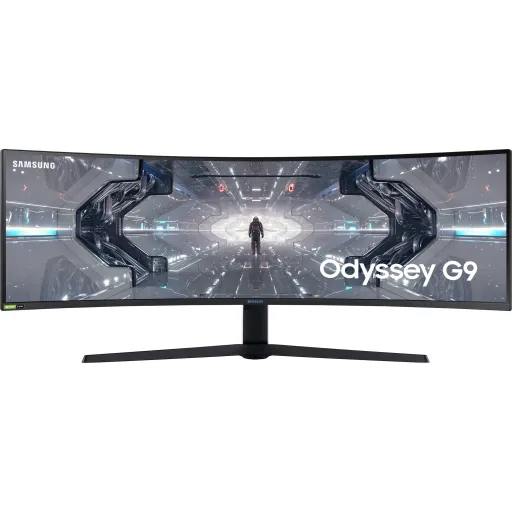

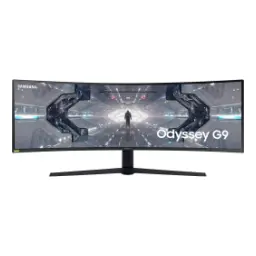
Samsung Odyssey G9 49"


You Might Also Like
This Samsung Odyssey G9 49 inch canvas is built for full immersion, aur desk par ek hi screen se setup clean ho jata hai. The 32:9 super ultrawide shape gives you a true dual monitor feel without a center bezel breaking focus. This kind of width makes racing cockpits, flight sims, and big world RPGs feel naturally panoramic, bilkul aise jaise peripheral vision active ho. The massive panel size also supports serious productivity, because timelines, spreadsheets, and multi window layouts stay visible together. The 1000R curvature pulls the edges toward you, nazar ko stretch nahi karna parta, so the screen feels more “wrapped” than “wide.” This identity is about replacing compromises, kyun ke aap ek hi panel par game bhi karte ho aur kaam bhi. The overall concept stays simple: one continuous horizon for play, and one continuous workspace for work. RTINGS notes the screen real estate is similar to two 27 inch 16:9 displays side by side, which explains why it can transform both gaming and multitasking setups. This is the kind of monitor that suits a “centerpiece build,” jahan desk aesthetics bhi matter karti hain and performance expectations stay high
The Dual QHD resolution keeps details crisp across the whole width, so text stays readable even when windows are spread out. Samsung lists this DQHD panel as 5,120 x 1,440, which gives you a wide editing timeline plus a tall enough view for chats, tools, and side panels. This pixel layout feels like a productivity upgrade because you can dock a browser, a document, and a dashboard together, aur phir bhi squint wali feeling nahi aati. The 49 inch size also means UI elements don’t need oversized scaling, so your workspace can stay dense yet comfortable. RTINGS reports the native resolution as 5120 x 1440 on the Odyssey G9, reinforcing that you’re buying a true super ultrawide format instead of a stretched 1440p screen. The wide resolution also helps in competitive titles where side vision matters, kyun ke minimap aur periphery dono ek nazar mein aa jate hain. This is especially useful for streamers who want OBS, chat, and game all visible at once. The end result is a layout that feels organized rather than chaotic, even when you push multiple apps simultaneously
The 1000R curve is designed to pull the far edges closer, so your eyes track less distance during fast gameplay and long work sessions. Samsung highlights the 49 inch 1000R curved screen as a core part of the Odyssey G9 experience, and that matters because super ultrawide panels can otherwise feel flat and distant at the corners. This curvature makes the center feel like a cockpit view, jahan immersion zyada aur distraction kam hota hai. The curve also supports comfort by reducing head turning, rozana ke use mein, especially when you keep multiple windows pinned to the sides. B&H lists the Odyssey G9 with tilt and swivel adjustments plus height adjustment, which helps you dial in posture and viewing height for your desk and chair. This adjustability becomes important on a 49 inch display because small angle changes affect the whole viewing arc. The overall feel is more “surround” than “wide,” aur yahi cheez isko normal ultrawides se different banati hai. Once aligned, the curve encourages centered seating and consistent ergonomics, which can reduce fatigue over time
The 240Hz refresh rate keeps motion clean during rapid camera turns, so crosshair tracking looks stable and micro blur feels reduced. Samsung lists a maximum 240Hz refresh rate and 1ms (GtG) response time on Odyssey G9 configurations, which is the combo competitive players chase for clarity and responsiveness. This high refresh behavior also makes everyday scrolling feel premium, rozana browsing mein, because the cursor and text movement look more continuous. RTINGS measures very low input lag at 240Hz in their Odyssey G9 testing, which helps explain why the monitor feels “instant” when you flick aim or snap between targets. This matters most in esports titles where milliseconds decide fights, lekin casual games mein bhi responsiveness ka fun alag hota hai. The wide view plus fast refresh can also reduce the need to “overcorrect” aim because motion is easier to read. Samsung also positions the 240Hz and 1ms pair as a precision advantage, which aligns with how high refresh displays translate speed into control. The result is motion that looks confident and feels predictable, even when you play at high sensitivity
The QLED approach aims for vibrant color while keeping strong contrast, so games look punchy without turning shadows into gray haze. Samsung’s Global Newsroom describes the Odyssey G9 as delivering “crystal clear QLED picture quality,” which is important when you want saturated worlds but still care about detail separation. This panel family is also based on VA technology, so blacks can look deeper than typical IPS style glow in darker rooms, raat ko gaming mein especially. Samsung’s US listing for the 49 inch Odyssey G9 G95C identifies the panel type as VA, matching that contrast first tuning for immersive scenes. Flixcar’s spec page for the 49 inch G95T variant also lists a VA panel alongside the curved DQHD format and 240Hz focus, supporting the same core display identity. This means you can enjoy cinematic single player visuals, aur phir competitive matches mein clarity bhi maintain rehti hai. The wide panel becomes especially satisfying in open world titles because skies, foliage, and lighting gradients look more layered. The overall look leans “rich and contrasted” rather than “flat and bright,” which many buyers prefer for both gaming and media
The HDR capability is meant to lift highlight detail without crushing shadows, so explosions, sunlight, and neon signage show stronger depth. Samsung lists VESA DisplayHDR 1000 on the Odyssey G9 G95C page, which signals high peak brightness targets for HDR scenes. Samsung’s Global Newsroom also references HDR 1000 and a max brightness figure of 1000 cd/㎡ for Odyssey G9 messaging, reinforcing that HDR performance is a headline feature on this line. This kind of brightness headroom helps in HDR games where you need to spot shape and motion inside bright fog or sun glare, aur phir bhi dark corners readable rahen. The screen is also listed with support for 1.07B colors on Samsung’s US spec table, which helps gradients look smoother when HDR content pushes tonal transitions. This color depth becomes noticeable in skies, skin tones, and shadow roll off, especially on a large 49 inch canvas. The practical benefit is stronger scene separation, jahan foreground aur background ka difference zyada natural lagta hai. When HDR is used well by the game, the monitor’s wide field and contrast can feel more “3D” even in 2D content
The ultra wide width makes multitasking feel native, because two full size app zones can sit side by side without cramped scaling. RTINGS describes the Odyssey G9 screen as equivalent to two 27 inch 16:9 screens placed side by side, which explains why it can replace a dual monitor arrangement so smoothly. This layout is ideal for creators who keep a timeline on one side and preview or assets on the other, editing workflow mein bohat asaani ho jati hai. Samsung’s US listing includes Picture by Picture (PBP) support, which helps you split the panel between two sources when you want a work machine and a gaming machine connected together. Windows Central also highlights the Odyssey G9’s ability to act like a wall to wall workspace and mentions Picture by picture mode for multitasking across devices. This is especially useful for hybrid desks, jahan laptop aur desktop dono use hotay hain. The curve keeps both halves within comfortable viewing angles, so you don’t feel like you’re reading off a far corner. The final benefit is fewer compromises: you keep a clean desk and still gain the “two screen brain” that boosts speed and focus
The Odyssey G9 line is built to stay smooth when frame rates fluctuate, so camera pans feel cleaner even when your GPU output isn’t perfectly locked. Samsung’s Global Newsroom notes NVIDIA G SYNC Compatibility and Adaptive Sync support on DP 1.4 for the Odyssey G9, which targets reduced tearing and stutter in real play. This matters because 5120 x 1440 is a lot of pixels to push, aur kabhi kabhi FPS wave hota rehta hai depending on the scene. Micro Center’s listing for a 49 inch Odyssey G9 variant references both FreeSync and G Sync compatibility along with the 5120 x 1440 resolution, supporting that VRR is part of the core appeal. This variable refresh behavior can also make high refresh gaming feel more consistent, especially in open world titles where frame pacing changes fast. The practical win is less distraction, kyun ke tearing lines aur judder ka notice hona kam ho jata hai. When you combine 240Hz headroom with VRR, the monitor can feel more forgiving across a wider performance range. That blend supports both competitive sessions and cinematic games, without forcing constant settings tweaks
This 49 inch Odyssey G9 profile fits gamers who want maximum peripheral coverage, and creators who want a single panel command center. Samsung positions the Odyssey G9 around a 49 inch 32:9 screen with DQHD 5120 x 1440 resolution, a 1000R curve, and a 240Hz refresh target, which defines the monitor’s flagship style purpose. This combination works best when you enjoy immersive genres, lekin productivity ka benefit bhi daily basis par milta rehta hai. RTINGS emphasizes the monitor’s massive screen area and notes that not all games support 32:9, so it’s smartest for buyers who play modern titles that properly support ultrawide. This is also a strong pick when you prefer one clean centerpiece over two mismatched screens, desk aesthetics ke liye bhi. The 240Hz motion focus suits competitive play, while the wide DQHD layout suits editing and multitasking in parallel. The 1000R curve keeps the experience cohesive, so the width feels intentional rather than excessive. If the goal is an immersive “wraparound” view plus serious workspace, this monitor delivers that identity clearly with specs that align to real use
Here's how current offers compare across retailers.
Review current prices and specifications side by side.
Samsung
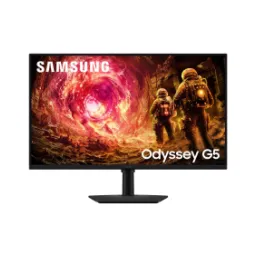
Samsung Odyssey G5 34"Rs. 117,180
Local price
Lowest current price4 offers
Updated 1 day ago