





Price Breakdown & Availability
Here's how current offers compare across retailers.
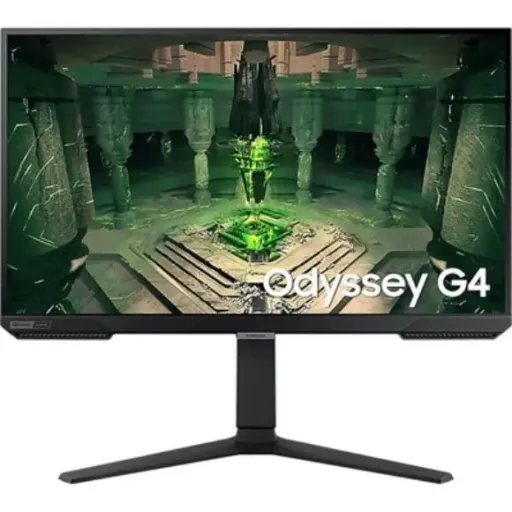

Samsung Odyssey G4 G40B


You Might Also Like
Competitive gamers need speed, clarity, and comfort every day. The Samsung Odyssey G4 G40B is tuned for that purpose, jahan 240Hz motion aur IPS color stability aik saath milti hai for cleaner play. Samsung positions the 25 inch class model as an FHD 1920 x 1080 monitor with up to 240Hz and 1ms GTG response time, so flick shots feel more immediate in real matches. Samsung also offers a 27 inch class G40B variant, jis se desk setup aur viewing distance ke hisaab se pick karna simple ho jata hai. The IPS panel choice supports wide viewing stability, to side angle se bhi colors zyada shift nahi karte during team play. HDR10 support is included for compatible content, while everyday SDR gaming remains easy to calibrate and keep consistent. Adaptive sync support covers both FreeSync Premium and G Sync Compatible, so tearing control stays flexible across AMD and NVIDIA builds, bilkul hassle nahi hota. An ergonomic stand and VESA 100 x 100 mounting option help you place the screen exactly where your posture stays natural, neck strain kam hoti hai. This monitor is designed to feel like an esports tool first, but it still stays practical for school, office, and nightly entertainment on one desk
Clear readability matters when maps get busy fast. The G40B delivers FHD 1920 x 1080 resolution, so UI text and crosshair edges stay defined without forcing scaling tricks. Wide 178 degree horizontal and 178 degree vertical viewing angles help keep the picture stable, side seating par bhi color aur contrast zyada break nahi hota. The IPS panel type supports consistent color behavior for team callouts and shared screens, doston ko quick angle par dikhana easy rehta hai. A typical 400 cd/m2 brightness target helps maintain visibility in brighter rooms, so daytime play stays comfortable without crushing detail. The 99% sRGB coverage is a practical advantage for creators, kyun ke thumbnails aur social content ke colors zyada predictable nikalte hain. HDR10 support adds a broader range for compatible games and media, while SDR tuning still remains straightforward for competitive settings. Color support is listed as up to 16.7 million colors, so gradients in skies and shadows look smoother in normal use. This visual foundation keeps the monitor versatile, gaming ke saath browsing aur spreadsheets bhi clean lagte hain, and eye focus stays relaxed
Fast motion clarity changes how you play shooters. A max 240Hz refresh rate reduces perceived judder during rapid turns, so tracking feels more controlled in close fights. A 1ms GTG response time is specified for the panel, jis se motion blur kam hota hai and small target corrections feel easier to read. Faster refresh can also make desktop scrolling feel more immediate, so work tabs and long timelines move with less smear in daily use. Competitive titles benefit most when frames stay consistent, aur yahan FHD resolution ka plus yeh hai ke GPUs ko 240Hz target karna relatively asaan hota hai. Samsung lists the refresh as up to 240Hz at 1920 x 1080, so the intended experience aligns with high FPS esports settings. Real world responsiveness also depends on your PC and settings, lekin panel ka high refresh headroom input ko zyada direct feel karwata hai for practiced aim. The result is a cleaner visual rhythm that supports quick decisions, and it stays pleasant even outside gaming sessions
Smooth gameplay requires stable frame pacing and sync. The G40B supports AMD FreeSync Premium and is also listed as G Sync Compatible, so VRR can reduce tearing across mainstream GPU ecosystems. Variable refresh matters most when FPS fluctuates, kyun ke mid fight dips par tearing aur stutter ka chance zyada hota hai in many games. Samsung includes a Low Input Lag Mode feature, so timing sensitive plays feel more direct when you want a snappier response profile. Review data also notes the monitor supports VESA 100 x 100 mounting and strong adjustability, which helps you keep consistent posture during long sessions, posture set ho jati hai. The refresh rate spec is listed up to 240Hz, so VRR has a wide operating space to work with in high FPS titles. This combination reduces the need for constant tweaking, kyun ke sync support + fast refresh mil kar ek stable base bana dete hain. When your game and GPU are dialed in, the screen simply stays out of the way and lets mechanics shine
Better color helps you spot detail without exaggeration. Samsung lists 99% sRGB coverage, so web content, thumbnails, and casual editing look closer to expected standards, colors natural rehte hain. HDR10 support is included for high dynamic range playback, which can improve highlight nuance in supported games and streaming content. An IPS panel foundation keeps colors more consistent off center, so co op watching angles feel less washed out at the edges. Typical brightness is listed at 400 cd/m2 on Samsung spec pages, which helps HDR content avoid looking dull in brighter rooms, dhoop wali light mein bhi screen readable rehti hai. A built in sRGB mode is also referenced in the spec ecosystem, which helps tame oversaturation when you want accurate looking photos and UI colors. Competitive players can still prioritize clarity, kyun ke HDR ko aap apne style ke mutabiq on ya off rakh sakte hain depending on title and preference. This balanced color profile makes the monitor a smart pick for hybrid users who game hard but also create and study on the same display
Comfortable posture keeps reaction time consistent longer. Samsung specifies a Height Adjustable Stand of about 120 mm, so you can align the top bezel with your eye line, gardan par pressure kam rehta hai. Samsung also lists tilt from roughly 3 degrees to +22 degrees, so glare control and wrist angle feel easier to manage during long sessions. Samsung lists swivel around 15 degrees to +15 degrees, which helps quick sharing and micro adjustments without moving your whole base, desk par space bhi bacha rehta hai. Samsung lists pivot around 92 degrees to +92 degrees, so portrait layout becomes practical for coding, chat, or long docs. VESA 100 x 100 wall mount support is included, so you can go arm mounted for cleaner cable routing and a floating setup, bilkul clean look aata hai. Independent review coverage also confirms VESA 100x100 and strong ergonomics, which reinforces the monitor’s flexible placement story for real desks. This level of adjustability is not just comfort marketing, because consistent viewing angles and stable posture can reduce fatigue in ranked sessions and late night grinding
A fast monitor still needs easy hookups. Samsung lists two HDMI inputs and one DisplayPort input, so switching between a PC and a console stays simple without constant cable swaps, rozana ki convenience barh jati hai. Samsung specifies HDMI version 2.0 and DisplayPort version 1.2 for this model family, which aligns with the intended high refresh FHD use case on modern hardware. A headphone output is listed, so you can route audio conveniently when your setup is minimal or your speakers are off, late night sessions mein yeh bohat kaam aata hai. Auto Source Switch+ is included in Samsung’s feature list, so the monitor can detect an activated device and swap sources faster, time waste kam hota hai. Many box listings note both HDMI and DisplayPort cables are included, so first day setup is smoother and you can test both inputs right away. This connectivity set keeps the G40B realistic for mixed households, because one screen can handle work laptop, gaming tower, and a console rotation with less friction
Small competitive features often decide close rounds. Samsung lists Black Equalizer and a Virtual AIM Point, so shadow heavy scenes become easier to read and crosshair guidance stays consistent, game mein confidence barhta hai. Samsung lists Ultrawide Game View and Super Arena Gaming UX, which are aimed at giving you more control over visibility and quick settings access. Low Input Lag Mode appears in the feature set, so when you want the most immediate feel you can prioritize responsiveness over extra processing. Eye Saver Mode and Flicker Free are also listed, so extended study or work blocks feel less harsh, aankhon ki thakan dheere hoti hai. Eco Saving Plus and Eco Light Sensor are mentioned as well, which can help keep brightness behavior more comfortable across day and night use. These tools matter because they remove small annoyances, and the overall experience stays refined when you bounce between ranked games, YouTube, and productivity without changing your whole setup
Choosing the right monitor starts with your habits. If you play esports titles and value high FPS consistency, the FHD 240Hz positioning makes sense because it targets speed without demanding extreme GPU power, performance stable rehti hai. If you want balanced visuals for daily work too, the IPS panel and 99% sRGB coverage support cleaner color for web design, study notes, and casual content creation. If desk comfort is a priority, the height, tilt, swivel, and pivot adjustments let you dial in posture and viewing angle, lambi sessions mein yeh difference real hota hai. If you prefer a clean arm setup, the VESA 100 x 100 mount option keeps cable management easier and frees desk space for mouse movement. If your setup includes different GPUs, FreeSync Premium and G Sync Compatible support help reduce tearing across systems without overthinking compatibility. This monitor fits buyers who want a competitive feeling panel with real ergonomics, aur jo chahte hain ke aik hi screen work aur play dono ko smoothly handle kare. The Odyssey G4 G40B stays grounded in useful specs, and it delivers the kind of daily confidence that comes from smooth motion, solid adjustability, and predictable image behavior
Here's how current offers compare across retailers.