Price Breakdown & Availability
Here's how current offers compare across retailers.
You Might Also Like
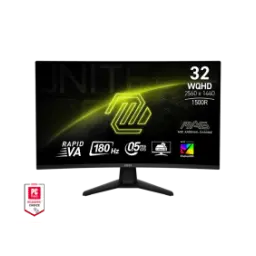
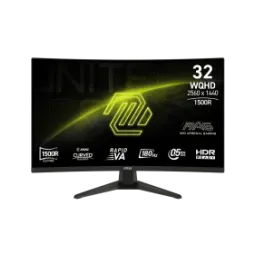
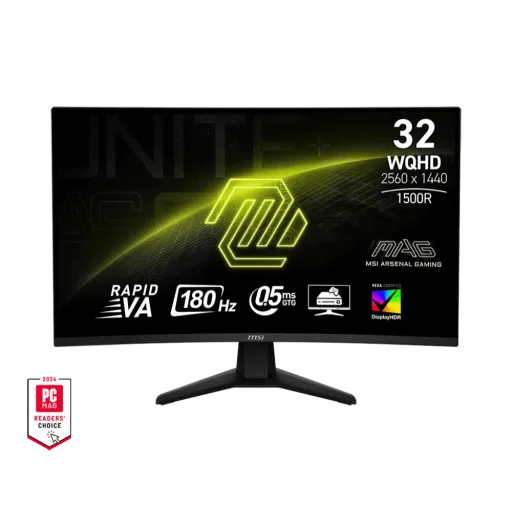
The MSI MAG 32CQ6F is designed for competitive rhythm and daily clarity, so your desk setup feels purposeful, kaam bhi aur game bhi asaani se handle hotay hain. With a 31.5 inch curved panel and WQHD resolution, the screen gives you breathing room for maps, timelines, and multitasking while keeping text sharp at a sensible scale. The Rapid VA panel choice leans into deeper contrast, is liye dark scenes mein blacks zyada convincing lagte hain, and your UI stays readable. The 180Hz refresh rate targets smoother tracking in fast genres, jahan flick shots aur quick turns mein clarity matter karti hai, and motion looks cleaner frame to frame. The 0.5ms (GtG, Min.) response time is positioned to reduce perceived blur, so quick pans feel less smeary, bilkul especially jab aap high FPS push kar rahe hon. The overall MAG identity keeps things practical for battle station builds, rugged look milta hai without distracting gimmicks, and the monitor stays centered on performance
A curved 1500R screen pulls the edges closer to your eyes, so large scenes feel more cohesive, aur focus naturally center mein rehta hai. With a 31.5 inch viewable area, you get that “big monitor” presence for shooters, RPG HUDs, and spreadsheets, magar desk distance par it still feels manageable for everyday posture. The Rapid VA panel is built for strong contrast and punchy depth, to horror ya night maps mein shadow separation zyada natural lagti hai, and blacks don’t wash out as quickly as many IPS type looks. The anti glare surface keeps reflections from stealing detail, so room lighting feels less annoying, roshni ka glare kam hota hai, and you keep your eyes on the target. The wide 178° viewing angles help when you lean back or shift positions, so colors stay relatively consistent for shared viewing, side pe baith kar bhi scene samajh aata hai. The curvature and VA pairing works best when you sit centered, meaning best immersion tab milti hai jab aap apni chair align kar lein, and the screen wraps your peripheral vision neatly
A WQHD 2560 x 1440 panel gives noticeably more detail than basic Full HD, so small targets, UI icons, and minimaps look cleaner, rozana browsing bhi crisp lagti hai. With a 16:9 aspect ratio, games and video content fit naturally without odd scaling, aur workspace layouts bhi familiar rehte hain, so switching between tasks feels frictionless. The bigger resolution also helps productivity, because you can keep chat, a guide, and your main window visible, multitasking asaan ho jati hai, while still reading comfortably. The 31.5 inch size at WQHD is a practical middle ground, meaning you get “more screen” without the heavier GPU demand of 4K, performance ka load comparatively balanced rehta hai, and high refresh gaming stays realistic. The screen’s pixel pitch is tuned for this panel size, so edges look tidy at typical desk distance, nazdeek se bhi jaggies kam feel hotay hain, and text remains legible for longer sessions. The result is a monitor that supports both precision play and real work, is liye yeh sirf “gaming look” nahi balkay practical daily driver bhi ban sakta hai, and your desktop feels more organized
A 180Hz refresh rate makes motion updates more frequent, so tracking feels more continuous, aim follow through zyada stable lagta hai, and micro adjustments become easier to read. With a stated 0.5ms (GtG, Min.) response time on Rapid VA, transitions are tuned to reduce visible blur, is liye fast camera turns mein image relatively crisp rehti hai, and targets don’t smear as much. The key advantage shows up in fast genres, where clean motion helps you read animations earlier, reaction time ka benefit mil sakta hai, and your eyes don’t have to fight the panel. The Rapid VA approach also aims to keep contrast strong while pushing speed, to you’re not forced to choose between deep blacks and responsive gameplay in one package. The best experience usually comes from pairing high refresh with high FPS, meaning settings smartly tune karna padta hai, and your GPU can then feed the panel consistently. The monitor’s supported vertical frequency range aligns with its max refresh, so variable refresh behavior can feel natural across many frame rates, jitna stable frame pacing hoga utna smooth scrolling bhi mehsoos hogi, and the screen keeps up
Adaptive Sync is built in to match the display and GPU refresh behavior, so tearing and stutter feel reduced, gameplay zyada fluid lagta hai, and camera pans look cleaner. With an activated range listed as 48~180Hz, the monitor can keep VRR engaged across a wide slice of real world FPS, low to high swings mein bhi smoothness better rehti hai, and sudden judder feels less harsh. The most reliable way to hit full 180Hz at 2560x1440 is using DisplayPort, so your PC pipeline stays maximized, DP cable laga kar peace of mind milta hai, and you avoid leaving performance on the table. The HDMI inputs are specified for WQHD up to 144Hz, which is still very smooth for many setups, console ya laptop ke sath bhi kaafi responsive feel hoti hai, and it keeps compatibility simple. The monitor supports AMD FreeSync branding alongside Adaptive Sync messaging, so AMD GPU users can target tear free play more directly, aur overall VRR experience predictable rehta hai, while settings remain straightforward in drivers. The practical takeaway is simple: when your FPS is not perfectly locked, VRR helps the screen feel less “jumpy,” jitna consistent output hoga utna control better mehsoos hota hai, and long sessions stay comfortable
VESA DisplayHDR 400 certification signals an entry HDR tier, so you can expect brighter highlights than SDR baselines, HDR mein sparkle aata hai, and compatible content looks more dimensional. With a typical brightness listed at 400 nits, daytime scenes and UI whites can stay punchy, dhoop ya bright room mein readability improve hoti hai, and the screen doesn’t feel dull. The DisplayHDR 400 performance tier targets 400 cd/m2 peak luminance in key tests, so this class is meant to deliver visible HDR uplift rather than “HDR in name only,” real difference tab nazar aata hai jab highlights clip na hon, and contrast feels more layered. The VA native contrast ratio is rated at 3500:1 typical, so dark scenes get a deeper base, blacks zyada grounded lagte hain, and bright elements stand out more clearly. The panel supports 1.07B colors through 10 bit processing (8 bits + FRC), which helps gradients look smoother, banding kam hoti hai, and skies or fog effects appear more refined. The wide gamut coverage includes 101% sRGB plus listed Adobe RGB and DCI P3 percentages, so creators and gamers both get richer color capability, lekin calibration se results aur bhi better ho sakte hain, and skin tones can stay natural
MSI includes Anti Flicker to reduce flicker related fatigue, so marathon sessions feel less harsh on your eyes, aankhon ka strain usually kam mehsoos hota hai, and focus holds longer. The product page explains that generic displays can flicker around 200 times per second, and MSI positions its Anti Flicker approach to cut that down for comfort, rozana ke use mein yeh choti cheez bhi difference ban jati hai, while the image remains steady. TÜV Rheinland certification is referenced for blue light reduction, so the monitor is tuned to output less blue light for longer viewing, raat ko browsing ya late night gaming mein relief mil sakta hai, and you can manage fatigue more easily. AI Vision is highlighted as a feature that can enhance dark area detail and overall brightness, so shadowy corners become more readable, enemies “blend in” kam karte hain, and the scene stays balanced. The comfort story matters even more on a 31.5 inch screen, because a larger surface holds your attention longer, is liye eye care toggles practical ban jate hain, and you can tailor the feel for work versus play. The best habit is pairing these tools with sensible brightness, so you keep color consistency while staying comfortable, thori si setting tuning se experience refined ho jata hai, and the monitor feels easier to live with
The connectivity is straightforward with DisplayPort 1.4 and two HDMI 2.0b inputs, so you can keep a PC and console connected, cables ka jhanjhat kam hota hai, and switching sources stays simple. The spec notes HDMI supports WQHD up to 144Hz while DisplayPort reaches WQHD up to 180Hz, so you can choose the right port for your priority, DP pe full speed milti hai, and HDMI remains a strong secondary. A headphone out is included for quick audio routing, so late night sessions stay private, headset plug karo aur kaam done, and desk audio stays tidy. The stand focuses on tilt adjustment from about 5° to 20°, so you can dial in a comfortable angle, neck posture better rehta hai, and glare lines can be minimized. The monitor supports a 100 x 100mm VESA pattern, so arms and wall mounts are easy options, clean setup ban jata hai, and you reclaim desk space for keyboard and mouse movement. The product listing also notes there are no built in speakers and no USB hub, so planning external audio and peripherals keeps expectations clear, pehle se setup decide kar lo, and the experience stays hassle free
This monitor makes the most sense for gamers who want WQHD detail and high refresh in one balanced package, 1440p ka sweet spot bohat logon ke liye practical hota hai, and GPU upgrades feel meaningful. The 180Hz plus 0.5ms (GtG, Min.) positioning fits esports style motion where clarity matters, flicks aur fast peeks mein readability improve hoti hai, and the screen feels more responsive to your inputs. The curved 1500R design works especially well for single monitor immersion, is liye story games, racing, aur open world exploration zyada enveloping lagta hai, while still keeping UI comfortable. Console players also get practical support because MSI lists HDMI 2.0b and mentions 120Hz mode on latest consoles with HDR, so couch to desk gaming stays smooth, console mode ka benefit milta hai, and motion stays fluid. MSI also mentions VRR support through console mode at 1440p optimization, so you can aim for reduced tearing even when frame rate fluctuates, choppy feel kam hoti hai, and gameplay looks steadier. The final reason to pick it is simple: you get a large 31.5 inch WQHD canvas with rapid motion tools and HDR certification, jitni cheezen ek sath align hoti hain utna decision easy hota hai, and the setup feels ready for long term use
Here's how current offers compare across retailers.
Review current prices and specifications side by side.