Price Breakdown & Availability
Here's how current offers compare across retailers.
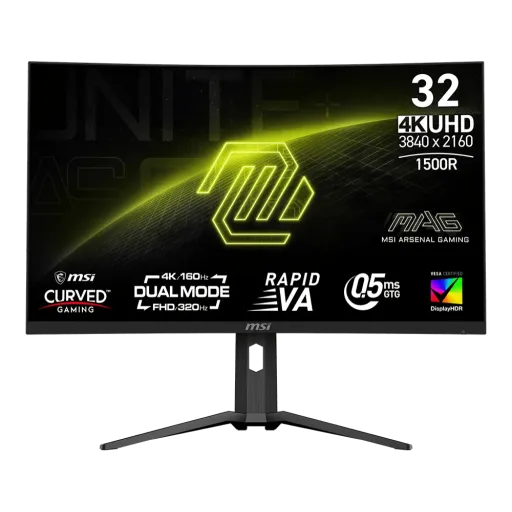
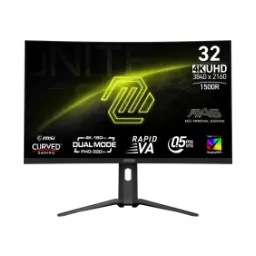
MSI MAG 321CUPDF


You Might Also Like
MSI MAG 321CUPDF is designed for gamers who multitask, jo kabhi cinematic visuals chahte hain aur kabhi pure speed. This 31.5 inch curved Rapid VA panel brings a 1500R wraparound feel that pulls you into the scene without forcing an ultra wide setup. Dual Mode is the headline experience because it lets you choose UHD at 160Hz or switch to FHD at 320Hz, so one monitor can cover story games and esports tempo. MSI also highlights AI Dual Mode as a smart helper that detects resolution and refresh rate changes and adjusts automatically, matlab settings ke chakkar kam ho jate hain. The curved 16:9 screen keeps the layout familiar for Windows work and console style content, while still feeling more immersive than flat panels at similar size. The Rapid VA tuning focuses on faster transitions plus VA contrast characteristics, jisse dark scenes zyada weighty feel hotay hain in everyday gaming. When you want a single “main” monitor that can switch personalities, this model targets that exact use case with purpose built tools
A 1500R curve helps the screen feel more surrounding at normal desk distance, aur peripheral vision mein edges zyada natural lagte hain. MSI lists the curvature as 1500R on the MAG 321CUPDF, which is a strong middle ground between gentle and aggressive curves. The UHD resolution lands at 3840 x 2160 in Normal mode, so small UI text, mini maps, and high detail textures remain crisp for both gaming and productivity. This 16:9 panel format keeps streaming content and most games perfectly framed, and it avoids the compatibility headaches that some ultra wide setups can bring. The anti glare surface treatment helps manage reflections in bright rooms, warna daytime mein glare ka masla distract kar deta hai. VA contrast is supported by the listed 3000:1 typical contrast ratio, which can make darker game areas look richer when HDR is not active. MSI positions the UHD panel as a way to see larger game scenes compared to traditional FHD panels, and that extra clarity can genuinely help with spotting movement at distance. For players who want immersion but still care about competitive readability, this curved 4K approach stays balanced
Dual Mode is built for real gaming habits where one day you want visuals, aur next day you want pure reaction advantage. MSI specifies the two operating targets as UHD up to 160Hz and FHD up to 320Hz, giving you a clear choice based on the title you are playing. AI Dual Mode is described by MSI as an AI powered feature that detects current resolution and refresh rate, then automatically adjusts to the optimal refresh rate when switching, which reduces the “Windows settings” friction. The practical benefit is simple: your 4K sessions can stay smooth at high refresh, while your competitive shooters can run at 320Hz in FHD, bilkul straightforward without needing a second monitor. MSI also mentions a 5 way Joystick Navigator and a one click switch button to toggle Dual Mode settings, so menu navigation feels quick instead of annoying. Aspect Ratio Options add another layer because MSI notes you can select between 24.5 inch and 27 inch imagery, jo esports style “smaller screen” focus ke liye kaafi useful hota hai. If you like to tune the experience per game rather than forcing one preset for everything, this design gives you the flexibility in a clean workflow
Fast motion feels more controlled when pixel transitions keep up with your inputs, aur yahi jagah response time ka role clear hota hai. MSI lists a 0.5ms (GtG, Min.) response time for the MAG 321CUPDF, aiming to reduce blur in rapid camera turns and fast crosshair tracking. The monitor is also specified with AMD FreeSync Premium, which targets a smoother variable refresh experience to reduce tearing and stutter during gameplay. MSI’s own range listing shows UHD VRR operation from 60 160Hz and FHD from 60 320Hz, so the panel can stay in sync across both modes instead of limiting VRR to only one setting. AMD notes that FreeSync Premium tier displays must meet mandatory Low Framerate Compensation (LFC) requirements, jo low FPS moments mein sync ko zinda rakhta hai. AMD also explains that LFC can duplicate frames when framerate drops below the minimum refresh rate boundary, which helps keep motion looking consistent instead of jittery. When competitive matches get messy and FPS swings happen, this VRR plus fast response combo is built to keep the experience stable
HDR feels more rewarding when the panel can actually push brighter highlights, aur baseline certification ka matlab predictable behavior hota hai. MSI lists VESA DisplayHDR 400 support on this monitor, which is a recognized entry HDR tier for PC displays. MSI also lists SDR brightness at 350 nits and HDR peak brightness at 400 nits, so daytime viewing and specular highlights have measurable headroom. VESA’s DisplayHDR performance criteria show DisplayHDR 400 targets 400 cd/m2 peak luminance as part of the tier definition, helping you understand what the certification is trying to guarantee. Color coverage matters for games, movies, and creator previews, and MSI specifies 93% Adobe RGB, 97% DCI P3, and 136% sRGB (CIE1976), jo colors ko zinda aur layered bana deta hai. The panel also supports 1.07B colors with 10 bit (8 bit + FRC), which helps gradients look smoother in skies, shadows, and HDR scenes. If you want HDR that improves contrast perception and highlight detail without going into premium mini LED budgets, this tier stays practical and performance focused
Game clarity improves when dark areas stop hiding information, aur competitive mein yeh choti cheezen badi ban jati hain. MSI describes AI Vision as a feature that can reveal details in dark areas while enhancing overall brightness and saturating colors, which can help visibility in shadow heavy scenes. Menu control feels faster when you are not hunting settings mid session, and MSI highlights a 5 way Joystick Navigator plus a one click switch button for seamless Dual Mode toggling. MSI also references gaming assistance features like Smart Crosshair and Optix Scope on the product page, so your aim aids and visibility helpers are accessible without extra software layers. Comfort matters when sessions stretch longer, and MSI states Anti Flicker and Less Blue Light technologies are included to reduce flicker and lower blue light levels for reduced eye fatigue. Multitasking becomes easier when inputs can share the canvas, and MSI lists PIP/PBP support so you can keep a second device visible while staying in your main workflow. For players who want a cleaner, more controlled experience, these tools act like small upgrades that add up daily
A modern monitor setup works best when ports match real devices, aur cable juggling kam se kam ho. MSI specifies 1x DisplayPort 1.4a (HBR3), 2x HDMI 2.1 (listed as 4K@160Hz), and 1x USB Type C with DisplayPort Alt Mode plus 15W Power Delivery, which covers PC, console style sources, and laptops in one layout. MSI also explains that the USB C connection can both display via DP Alt Mode and power devices up to 15W, so a lightweight laptop can stay topped up for light work while outputting video. VESA notes key features of DisplayPort 1.4a including up to 8.1 Gbps per lane (32.4 Gbps over four lanes), which helps explain why DP is widely used for high refresh high resolution PC monitors. HDMI 2.1b is positioned by HDMI Licensing Administrator as supporting higher resolutions and refresh rates like 8K60 and 4K120 with bandwidth capability up to 48Gbps, making it a solid baseline for next gen sources. VESA also notes that DisplayPort capabilities can extend over USB Type C connectors, jo single cable desk setups ko aur practical banata hai. When you are switching between desktop, laptop, and multiple consoles, this port mix keeps the setup tidy and flexible
Long sessions feel better when the screen meets your posture, aur neck strain ka masla naturally kam hota hai. MSI lists tilt adjustment from 5 degrees to 20 degrees and height adjustment from 0 to 130 mm, so you can dial in viewing angle for gaming posture or work posture. MSI also lists 100 x 100 mm VESA mounting support, which makes it easy to move the display to an arm for cleaner desk space and smoother positioning. The MSI US store detail block repeats the tilt and height ranges, which helps confirm the ergonomic range is meant to be a core part of the product experience. A frameless design is also listed in the official specification table, so multi monitor side pairing looks more continuous and less boxed in. Eye comfort features matter for everyday use, and MSI states Anti Flicker and Less Blue Light are included to reduce flicker and lower blue light levels during long play or work. If your desk is shared between gaming, study, and creative tasks, this adjustability keeps the monitor feeling “right” in each mode
A smart upgrade is one that fits more than one routine, aur MAG 321CUPDF ka core idea yahi hai. MSI’s Dual Mode targets both UHD 3840 x 2160 up to 160Hz and FHD 1920 x 1080 up to 320Hz, letting you prioritize detail or raw speed depending on the game and your GPU headroom. MSI’s AI Dual Mode description focuses on auto detecting resolution and refresh rate changes, which helps keep transitions smooth when you switch modes instead of making it a manual chore. Multitasking becomes more practical when you can resize the experience, and MSI’s Aspect Ratio Options mention selectable 24.5 inch and 27 inch imagery for a more focused competitive window when needed. MSI also lists PIP/PBP support, so a second device can stay visible for chat, monitoring, or a console feed, jo workflow ko smooth banata hai. The HDR story stays grounded with VESA DisplayHDR 400 certification and a listed 400 nit HDR peak, giving movies and HDR capable games more highlight pop than SDR only panels. The motion story stays equally grounded with AMD FreeSync Premium certification and AMD’s stated requirement for LFC in the Premium tier, which supports smoother play when frame rates dip. If you want one main display that can pivot between cinematic 4K and high refresh esports, this model is built to deliver that range cleanly
Here's how current offers compare across retailers.
Review current prices and specifications side by side.