Price Breakdown & Availability
Here's how current offers compare across retailers.

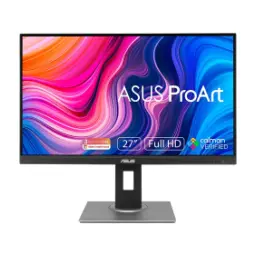
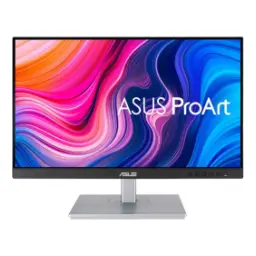
ASUS ProArt Display PA278QV

You Might Also Like
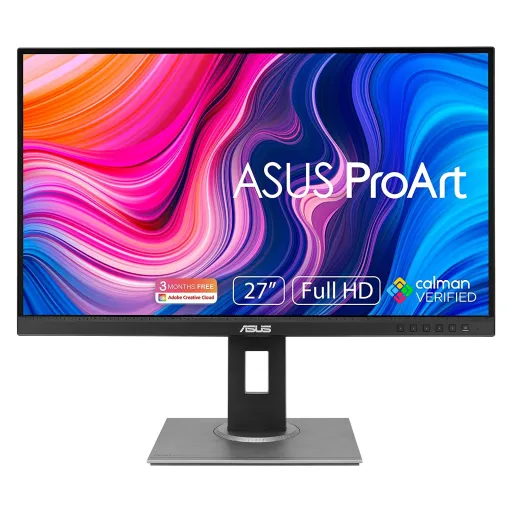
For color critical work, consistency matters more than gimmicks. The ASUS ProArt Display PA278QV is positioned as a professional monitor built around factory calibration and creator focused tuning, so edits look predictable across long projects. With Calman Verified factory calibration included, colors come out disciplined, rang match karna rozana asaan ho jata hai. With Delta E < 2 accuracy specified, skin tones and brand colors stay closer to intent, bilkul over saturated feel nahi aata. For designers juggling client feedback, that tighter accuracy reduces rework and second guessing on export. With built in ProArt tuning tools available, small corrections feel controlled rather than “eyeballed,” aur workflow zyada professional lagta hai. For content that must look right everywhere, this approach keeps your monitor from becoming the weak link in the chain
For daily creative tasks, screen space saves real time. This display uses a 27 inch IPS panel at 2560 x 1440 (WQHD), so timelines, layers, and palettes fit comfortably, kaam ek hi view mein zyada cover ho jata hai. With an IPS panel type specified, viewing angles stay wide, so colors don’t shift badly when you lean back or collaborate. For shared reviews at a desk, that stability keeps everyone seeing roughly the same frame. With an anti glare surface listed, reflections stay more controlled, roshni wali room mein bhi focus maintain rehta hai. With typical brightness noted around 350 cd/m2, the panel can stay readable in brighter spaces without constantly maxing sliders. For long editing sessions, that balanced clarity helps reduce the “squint and zoom” routine
For modern workflows, two color worlds appear constantly. This monitor targets full coverage of 100% sRGB and 100% Rec.709, so web graphics and standard video color sit in a familiar, controlled space. With that gamut focus, UI assets and social content look less “surprising” on phones later, aur export ke baad shock kam hota hai. For editors delivering to Rec.709 pipelines, the monitor’s intent matches common broadcast and streaming targets more directly. With 16.7 million colors listed, gradients in skies or soft shadows feel smoother in day to day content work. For photographers, this means less time compensating for a display that pushes tones too warm or too neon. With factory accuracy emphasized, quick proofing becomes more dependable, color ko baar baar chase nahi karna parta. For teams aiming at consistent brand identity, that predictability is the real productivity upgrade
For creators, calibration tools must be easy to reach. ASUS includes ProArt Preset modes like sRGB and Rec.709, letting you switch profiles quickly when tasks change, editing se review mode mein jump asaani se ho jata hai. With ProArt Palette available, fine tuning becomes more granular through adjustments like gamma options and multi axis color control, so you can correct without guesswork. With gamma settings spanning multiple targets, contrast and midtone behavior can be aligned to your workflow rather than forcing one look. For print prep previews or video grading checks, that flexibility helps you keep intent consistent. With QuickFit support listed, on screen alignment and scaling checks feel faster, choti cheezein like margins bhi quickly verify ho jati hain. For anyone iterating multiple versions, these tools reduce the friction between “looks good” and “is correct.”
For creative work, motion clarity still matters daily. The panel supports up to a 75Hz refresh rate, which makes scrolling and UI motion feel cleaner, especially when you are jumping between large documents. With Adaptive Sync (variable refresh) included, animated content can look less torn, aur fast movement mein line breaks wali feel kam hoti hai. With an Adaptive Sync operating range often listed around 48 to 75Hz, casual gaming or timeline scrubbing can feel steadier without demanding a “gaming only” display. With a 5ms gray to gray response time specified, typical motion looks controlled for general use, aur everyday playback smooth rehta hai. For creators who also unwind with games, this balance supports both worlds without pushing flashy compromises
For multi device desks, ports decide daily convenience. The PA278QV includes DisplayPort 1.2, Mini DisplayPort, HDMI 1.4, and a dual link DVI connection, so switching between a workstation and a secondary machine stays practical. With a built in USB hub that provides multiple USB A ports, a keyboard, mouse, or card reader can stay closer to the monitor, cable mess kum ho jata hai. With audio connections included alongside the video inputs, simple desk audio routing becomes easier for meetings or quick previews. For creators who dock laptops often, having both DisplayPort options can help match whatever cable is already in your bag. With WQHD resolution supported through these standard inputs, you can stay in sharp 1440p without hunting adapters. For a work monitor, this kind of “just connect it” flexibility is a quiet but real upgrade
For long edits, comfort protects both speed and focus. ASUS lists full ergonomic adjustments including tilt, swivel, pivot, and height adjustment, so the screen can sit where your neck and shoulders feel natural, rozana posture theek rehta hai. With height adjustment specified up to 150 mm, small desk differences become easy to solve without stacking books under the stand. With pivot support available, portrait orientation can be practical for coding, page layouts, or vertical photo reviewing. With VESA 100 x 100 mm mounting listed, you can move it to an arm later, aur desk space bhi open ho jata hai. For studios that evolve over time, this flexibility helps the monitor grow with your setup rather than locking you into one posture. With a 27 inch panel size, the ergonomic range matters even more because small angle changes affect viewing comfort over hours. For anyone doing daily production, comfort is not a luxury feature, it is throughput
For late sessions, eye comfort can shape your output. ASUS lists Flicker free support and Low Blue Light on the PA278QV, which helps reduce visual fatigue when brightness drops and deadlines keep going, aankhen zyada relax feel karti hain. With ASUS Eye Care guidance, the brand frames its Flicker Free and Blue Light Filter features as TUV Rheinland certified technologies designed to lower eyestrain during long viewing. With official ASUS support explaining what TUV Rheinland certification covers for Flicker Free and Low Blue Light, the idea is grounded in third party testing rather than vague marketing. With some product listings explicitly noting TUV Rheinland Flicker Free and Low Blue Light certification for this model, buyers who prioritize eye comfort can treat it as a serious feature, sirf nice to have nahi. For students, editors, and remote workers, this matters because comfort keeps attention stable across hours. With better comfort settings, you spend less time fighting glare and fatigue, and more time finishing the work in front of you
For a clean desk, built in basics are useful. The monitor includes two built in 2W speakers, which handle quick previews or meeting audio when you do not want external speakers cluttering the workspace. With HDR support listed as not included, expectations stay realistic for creators who want accurate SDR color rather than HDR headline chasing. With WQHD 2560 x 1440 resolution on a 27 inch canvas, text and UI feel sharp while still staying comfortable at normal scaling. With a 75Hz ceiling and Adaptive Sync support, the experience stays smooth for daily movement, aur casual play bhi decent lagta hai. For photographers, editors, and designers who live in sRGB and Rec.709, the 100% coverage target keeps delivery aligned with common standards. For buyers choosing one monitor to do many jobs, this model fits as a disciplined, creator first display that stays practical in real setups
Here's how current offers compare across retailers.
Review current prices and specifications side by side.
ASUS
ASUS ProArt PA247CVRs. 86,800
Local price
Lowest current price3 offers
Updated 7 hours ago