Price Breakdown & Availability
Here's how current offers compare across retailers.

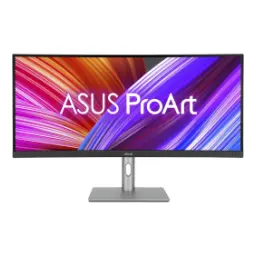
ASUS ProArt Display PA34VCNV

You Might Also Like
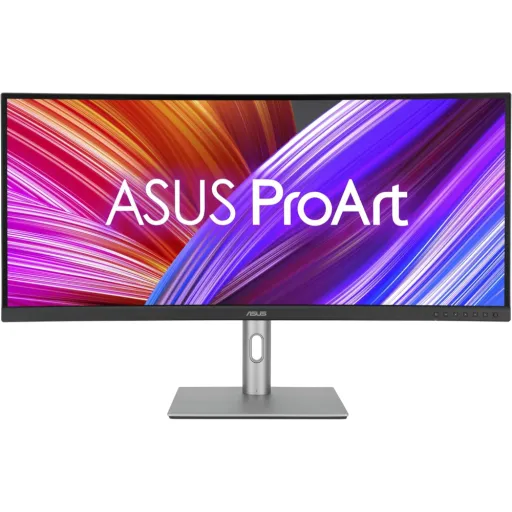
The ASUS ProArt Display PA34VCNV targets creators who value accuracy. This 34.1 inch ultrawide canvas feels purpose built, kyun ke timeline, scopes, aur layers ek saath nazar aate hain, without constant window juggling . The UWQHD 3440 x 1440 resolution keeps UI elements sharp. This extra width makes editing and grading flow faster, rozana ke pro workflow mein, because your tools stay visible while content stays large . The IPS panel helps maintain consistent color across angles. This matters when you lean in for detail, ya thora sa side par shift hotay ho, and the image still looks stable . The 3800R curvature adds comfort without feeling aggressive. This gentle curve helps keep the edges within a natural glance zone, neck movement kam hoti hai, during long sessions . The 60Hz refresh rate stays focused on creative steadiness. This is the kind of monitor that prioritizes dependable visuals, rather than gaming first tuning
The 3800R curve is tuned for gentle immersion. This shape keeps the far left and far right edges feeling closer, nazar naturally track karti hai, instead of forcing repeated head turns . The 21:9 aspect ratio opens up real workspace. This is especially useful when your NLE timeline stretches wide, aur tracks ki layering easily manage hoti hai, with fewer zoom adjustments . The 34.1 inch size balances scale and desk fit. This footprint gives you a big preview area, lekin screen itni massive nahi lagti, that it dominates a normal workstation . The curved layout also helps when comparing panels side by side. This makes split views and reference frames feel more cohesive, warna corners par attention thora mushkil hota hai, on flat ultrawides . The design stays aligned with pro aesthetics. This matters in studios where gear looks clean, aur client facing setup more polished feel deta hai, during review sessions . The curvature choice also keeps reflections more manageable. This works together with the matte surface, roshni ka glare kam hota hai, so your focus stays on the grade
The UWQHD 3440 x 1440 resolution gives practical clarity daily. This pixel grid makes text in panels and menus look crisp, reading fatigue kam hoti hai, when you are labeling assets or organizing bins . The ultrawide format keeps your preview and tools balanced. This means you can keep a larger viewer open, aur still scopes open rehte hain, without stacking windows on top of each other . The 34.1 inch diagonal makes that resolution feel usable. This sizing helps UI scaling stay comfortable, choti choti cheezein readable rehti hain, while still fitting more content on screen . The 21:9 workspace suits side by side comparisons. This is great for before/after grading views, ya reference stills ko saath rakhna, and making quick creative decisions . The panel also supports HDR10 for broader checks. This helps you evaluate highlight handling in compatible content, aur exposure decisions more confident lagti hain, in review . The overall effect is a cleaner, calmer workspace. This kind of visual order reduces micro friction, rozana ka editing flow zyada smooth rehta hai, and deadlines feel less chaotic
The IPS type panel is chosen for consistent visuals. This technology helps keep colors and brightness stable, jab aap chair adjust karte ho, or collaborate with someone standing nearby . The wide 178 degree viewing angles support team reviews. This matters when clients lean over for feedback, aur image wash out nahi hoti, during quick approvals . The anti glare, matte surface improves everyday readability. This helps you work under office lights, glare se bachao hota hai, and your eyes stay more relaxed . The typical brightness is listed around 300 nits. This level suits most indoor studios, roshni theek rahe to, while keeping the image controlled instead of overly punchy . The contrast ratio is in the 1000:1 IPS class. This gives solid separation for UI and midtones, black levels IPS jaisay hi rehte hain, so expectations stay realistic . The result is a monitor that stays predictable. This predictability is exactly what pros want, because surprises during export checks waste time
The display targets widely used creative standards from day one. This monitor is specified for 100% sRGB and 100% Rec.709 coverage, jo web, broadcast, aur standard content workflows mein seedha fit ho jata hai . The factory calibration is designed to reduce guesswork. This includes a stated color accuracy of Delta E < 2, jis se skin tones aur brand colors more consistent nazar aate hain, across projects . The Calman Verified positioning reinforces calibration intent. This matters when your workflow depends on repeatable results, warna har project par manual tweaks time le leti hain, during delivery crunch . The ProArt approach fits real editing behavior. This means you can grade confidently for Rec.709 deliverables, aur reference monitor ke baghair bhi ek stable baseline milta hai, in many setups . The 10 bit color support helps smooth gradients. This reduces banding in skies and soft backgrounds, especially jab compression aur subtle gradients involved hon, in client content . The end benefit is faster approvals and fewer revisions. This saves time because what you see stays closer to what you deliver
The monitor supports HDR10 for expanded content checks. This gives you a practical way to preview HDR tagged material, kaam ke dauran, without treating the screen like a full mastering reference . The 10 bit color capability increases tonal smoothness. This is commonly described as 1.07 billion colors, jis se subtle transitions zyada clean lagti hain, in gradients and shadow roll offs . The HDR mode also helps you spot clipping earlier. This reduces the risk of blown highlights in bright scenes, especially jab aap mixed lighting shots handle kar rahe hon, for social and web exports . The wide sRGB and Rec.709 coverage keeps SDR work grounded. This matters because most deliverables still live in SDR, aur aapko stable color baseline chahiye hoti hai, for consistent output . The practical win is fewer surprises on other screens. This improves confidence when switching between laptop, client display, and the studio monitor
The 60Hz refresh rate is built for stable creation. This pace keeps UI motion clean for scrolling timelines and scrubbing, rozana ke kaam mein, without chasing gaming class refresh targets . The response time is commonly listed at 5ms GtG. This helps reduce obvious smearing in typical desktop motion, jab aap fast pan footage preview karte ho, or move between panels quickly . The monitor also lists Adaptive Sync style VRR support. This can help minimize tearing in certain use cases, lekin focus still editing par rehta hai, rather than competitive gaming . The curved 3800R profile keeps motion more comfortable. This reduces the need to refocus at edges, aankhon ka strain kam hota hai, during long UI navigation . The payoff is a predictable feel in daily work. This predictability makes editing sessions calmer, especially when deadlines are tight
The USB C connection is designed as a one cable hub. This single port can carry DisplayPort video over USB C, data transfers, aur laptop ko charge bhi karta hai, which keeps your desk less cluttered . The power delivery is specified up to 96W. This level can comfortably support many creator laptops, battery backup aram se maintain hota hai, while you run edits and exports . The built in USB hub expands your everyday ports. This makes it easier to plug in drives, dongles, ya keyboard mouse directly, reducing cable reach to your PC tower . The docking style helps hot desk and studio swaps. This means you can disconnect quickly after a session, aur next time wapas plug karo, and you are ready faster . The real benefit is less friction before creativity starts. This keeps your workspace focused on work, not cable management
The port selection is built for multi device workflows. This model is commonly listed with dual DisplayPort 1.4 inputs that support daisy chaining, jo multi monitor desk setups ko asaan banata hai, for editors and producers . The dual HDMI 2.0 ports add flexible switching. This helps when you keep a second machine or a streaming box connected, aur inputs change karna simple rehta hai, during review . The RJ45 Ethernet port supports stable wired networking. This is valuable for large uploads and NAS workflows, jab Wi Fi unreliable feel ho, and your transfer stays consistent . The monitor also includes built in speakers in many listings. This is typically noted as 2x2W, jo quick preview aur basic audio checks ke liye kaafi hota hai, without extra desk speakers . The USB hub layout supports real accessory needs. This includes Type A and Type C downstream ports in common spec sheets, rozana ke peripherals ke liye, so cable runs stay short . The outcome is a cleaner, more reliable workstation. This kind of connectivity keeps production moving when time matters
The stand is built for real posture adjustments. This monitor supports tilt, swivel, and height changes, jis se aap apni chair aur desk ke hisaab se perfect position set kar sakte ho, for long edits . The VESA mount option adds flexibility for arms. This is commonly listed as 100x100mm, jo studio rigs aur multi screen arms ke liye convenient hota hai, when you want a floating setup . The TÜV eye care positioning targets long session comfort. This includes flicker free behavior and low blue light support, aankhon ka strain kam hota hai, when you are pushing late night deadlines . The curved IPS layout keeps viewing more natural. This helps you stay focused across the 34.1 inch width, rozana ke repetitive tasks mein, without feeling visually stretched . The sustainability notes add a practical modern touch. This includes mentions like paper packaging and energy efficient environmental standards, jo studio procurement mein plus point ban jata hai, without changing your workflow . The final takeaway feels simple and professional. This is a color focused ultrawide for creators who want predictable output, cleaner docking, and a comfortable daily setup
Here's how current offers compare across retailers.
Review current prices and specifications side by side.