


Price Breakdown & Availability
Here's how current offers compare across retailers.
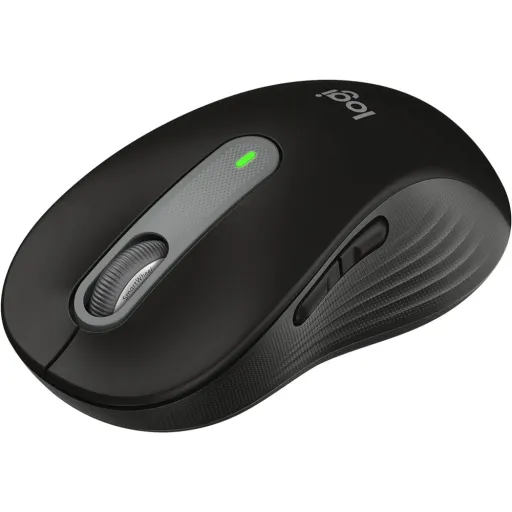

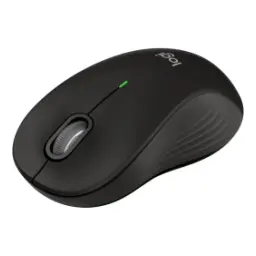
Logitech Signature M650M Mouse Graphite 910-006262
Seller: ZAHComputers
Updated 7 hours ago
Logitech Signature M650M Mouse Graphite 910-006262
Seller: ZAHComputers
Updated 7 hours ago
Rs. 7,500
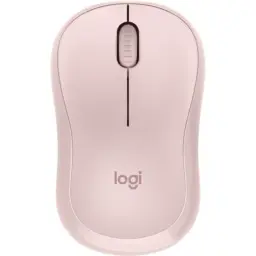
Logitech Signature M650 Wireless Mouse Rose 910-006263
Seller: ZAHComputers
Updated 7 hours ago
Logitech Signature M650 Wireless Mouse Rose 910-006263
Seller: ZAHComputers
Updated 7 hours ago
Rs. 7,500

Logitech Signature M650 Wireless Mouse | Off White, Size: Signature M650
Seller: Techroid
Updated 1 day ago
Logitech Signature M650 Wireless Mouse | Off White, Size: Signature M650
Seller: Techroid
Updated 1 day ago
Rs. 7,659
Logitech Signature M650 Wireless Mouse | Graphit, Size: Signature M650
Seller: Techroid
Updated 1 day ago
Logitech Signature M650 Wireless Mouse | Graphit, Size: Signature M650
Seller: Techroid
Updated 1 day ago
Rs. 7,659

Logitech Signature M650 Wireless Mouse | Rose
Seller: XcessoriesHub
Updated 1 day ago
Logitech Signature M650 Wireless Mouse | Rose
Seller: XcessoriesHub
Updated 1 day ago
Rs. 7,799
Logitech Signature M650 Wireless Mouse | Graphite
Seller: XcessoriesHub
Updated 1 day ago
Logitech Signature M650 Wireless Mouse | Graphite
Seller: XcessoriesHub
Updated 1 day ago
Rs. 7,799

Logitech M650 Signature Wireless & Bluetooth Mouse [White]
Seller: Shophive
Updated 1 day ago
Logitech M650 Signature Wireless & Bluetooth Mouse [White]
Seller: Shophive
Updated 1 day ago
Rs. 8,199
Logitech M650 Signature Wireless & Bluetooth Mouse [Gray]
Seller: Shophive
Updated 1 day ago
Logitech M650 Signature Wireless & Bluetooth Mouse [Gray]
Seller: Shophive
Updated 1 day ago
Rs. 8,199
Logitech M650 Signature Wireless & Bluetooth Mouse [Pink]
Seller: Shophive
Updated 1 day ago
Logitech M650 Signature Wireless & Bluetooth Mouse [Pink]
Seller: Shophive
Updated 1 day ago
Rs. 8,199
Logitech Signature M650


You Might Also Like
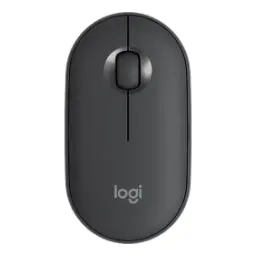
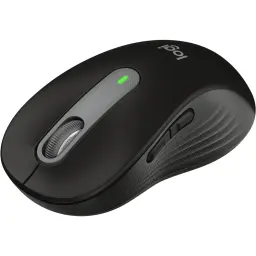
The Logitech Signature M650 is designed to upgrade daily navigation without feeling complicated. This mouse focuses on comfort plus productivity, haath mein natural grip aata hai, and the overall shape is meant for longer desk sessions. Logitech positions the Signature M650 around smarter scrolling and better comfort, so routine browsing and documents feel more effortless. The contoured body with a soft thumb area and rubber side grip supports steadier control, rozana ke kaam mein, so your hand doesn’t feel tense after hours. The design is also offered in multiple fits, including left handed options, which matters when comfort is a real requirement, sirf marketing line nahi. The core layout keeps it practical with five buttons, so navigation and quick actions stay one click away. The SmartWheel concept is made for switching between precision and speed, which means scrolling stays efficient whether you read carefully or skim quickly. The clicks are engineered to be quieter through SilentTouch, kaafi focus friendly feel hota hai, which supports shared spaces and late night work. The power setup stays simple with one AA battery, so you avoid charging routines and keep using it asaani se
SmartWheel scrolling is the headline feature that changes how long pages feel. This wheel can deliver line by line precision when you scroll slowly, aur control bilkul step by step rehta hai, so lists and reading feel accurate. This same wheel can shift into a faster inertia style scroll when you flick it, making long documents less tiring. Logitech describes SmartWheel as automatically switching modes with a flick, which keeps the experience smooth without a manual toggle. This is especially useful in research tabs and long PDFs, jahan aap ko kabhi slow scan chahiye aur kabhi fast jump, and you don’t want to fight the wheel. The Getting Started guide also explains horizontal scrolling using a simple combo, so wide spreadsheets can move sideways with less hassle. This horizontal scroll behavior is described as holding a side button while scrolling, which feels natural after a day of use. Reviews note the wheel can scroll line by line or spin freely for rapid scrolling, which matches the SmartWheel idea in practical use. This kind of adaptive scrolling supports both detail work and skimming, multitasking asaan hoti hai, and it keeps your wrist movement smaller across the day
The sensor system is built around Logitech Advanced Optical Tracking for consistent everyday control. This model supports a software adjustable resolution range of 400 4,000 DPI, which helps you match sensitivity to your screen size and desk space. This maximum value is also listed as up to 4000, so faster pointer travel is available when you prefer quick movement. This matters when you move between laptop use and a bigger monitor, kyun ke choti movement se cursor door chala jata hai, and the workflow stays snappy. The same specs page lists Logitech Advanced Optical Tracking as the sensor technology, which is a practical fit for office surfaces and routine navigation. RTINGS describes the sensor as very consistent in its review, which supports the idea of stable day to day tracking rather than unpredictable drift. This mouse is not positioned as a competitive gaming tool, lekin productivity aur browsing ke liye pointer behavior stable rehna bohat important hota hai, and that’s the focus here. The adjustable DPI range also helps reduce fatigue, because you can tune movement so you are not constantly lifting and re centering. This kind of tracking works best when it feels invisible, bilkul “set and forget” wali feel, and you spend attention on the task instead of the cursor
The button layout keeps the Signature M650 simple while still being genuinely useful. This mouse includes five main buttons, covering left/right click, back/forward, and a middle click on the scroll wheel. This setup speeds up web navigation and document work, back button se browsing bohat tez ho jati hai, and you stop relying on keyboard only habits. Logitech’s Getting Started guide explains how back and forward buttons enhance navigation, which is exactly where these two buttons shine. Logitech Options+ is supported for customization on Windows and macOS, so you can assign actions like undo/redo or other workflow functions. The manual guidance also highlights that Logitech software can reassign useful functions, which makes the mouse feel personalized rather than generic. This kind of customization helps when your routine includes spreadsheets, browsers, and meetings, rozana ka flow smooth ho jata hai, and your hands stay on the mouse more naturally. The idea is not to add endless buttons, but to make five buttons feel high impact through smart mapping. This balance keeps the mouse approachable for new users, while still giving power users shortcuts that save time
SilentTouch is one of the most practical upgrades for shared environments. Logitech states the Silent Touch Technology delivers 90% less distracting click noise, which supports focus during calls and quiet rooms. Logitech’s blog also frames SilentTouch as reducing click noise by 90% compared to the Logitech M185, so the benefit is measurable, sirf “quiet” kehne wali baat nahi. This quieter click profile helps in offices and home setups, especially when you work late, awaaz kam aur focus zyada, and the people around you feel it too. Ars Technica’s hands on notes the left and right clicks are quiet, describing a softer sound rather than a sharp click. This matters for repetitive tasks like editing or customer support work, jahan click count bohat zyada hota hai, and small annoyances add up quickly. The spec sheet even lists durability metrics for silent left/right buttons at 5 million clicks, which supports long term daily use expectations. This combination of quiet plus durability creates a calmer workflow, bilkul clean feel, without giving up the tactile confirmation you need for accurate clicking
The power approach is intentionally simple for everyday reliability. This mouse uses a single AA battery, so replacements are easy to find and you avoid cable clutter. Logitech’s specs list battery life up to 24 months with a Logi Bolt USB receiver and up to 20 months with Bluetooth, which reduces charging anxiety in real work weeks. This longer life is also described on a Signature M650 spec listing, reinforcing the “up to two years” use case for typical routines. This matters for travel and hybrid work, kyun ke bag mein charger dhoondna annoying hota hai, and a spare AA is a quick fix. The same support specification states the battery is user replaceable and the mouse is not rechargeable, keeping ownership straightforward. This also pairs well with SilentTouch, because you can keep a quiet setup without adding charging docks or extra cables. The goal here is less downtime, rozana ka kaam rukta nahi, and your mouse stays ready when you open your laptop. Battery life can vary by conditions, but the stated targets show this is built for long stretches between changes
Wireless flexibility matters when you switch devices and locations. Logitech’s specification lists connection types as Logi BOLT and Bluetooth Low Energy Direct, which gives you options depending on your setup. The same page also lists a wireless range up to 10 meters, which supports desk setups and meeting room use without constant dropouts. Logitech also describes connecting via Bluetooth Low Energy or a Logi Bolt receiver and working across multiple platforms, which helps mixed households and office fleets. This mouse is described as working with Windows, macOS, Linux, Chrome OS, iPadOS, and Android, so switching devices feels less stressful, asaani se pair ho jata hai, and you keep the same mouse feel everywhere. The business product page similarly lists broad compatibility and highlights Logi Bolt plus Bluetooth Low Energy support, which is useful for corporate laptops and personal devices. Logitech Options+ support is called out for Windows and macOS, so deeper customization stays available where most work happens. This combination keeps the mouse practical for both home and office, bilkul hassle free pairing, while staying focused on productivity rather than gimmicks
The Signature M650 series is built around fit choices, not one size compromises. Logitech highlights multiple size options, including a left handed version, so more users get a natural grip and less wrist strain. The official specification lists detailed dimensions and weights, including the Signature M650 at 108.2 mm height and 101.4 g weight, and the Signature M650 L at 118.7 mm height and 115.4 g weight. This kind of size clarity helps you pick properly, kyun ke haath ke size ke hisaab se comfort bohat change hota hai, and it prevents buyer regret. The spec sheet also notes PTFE feet rated for a 100 km range, which supports smooth glide and long wear. RTINGS mentions a built in storage compartment for the USB receiver, which is a small detail but reduces the chance of losing it in a bag. Logitech also positions this mouse as made with recycled plastic and provides a listed carbon footprint value on the product page, supporting a more responsible hardware choice without changing your workflow. This all adds up to a mouse that feels refined, grip secure rehta hai, and daily carry stays easy
The best reason to choose Signature M650 is how consistently it improves everyday tasks. SmartWheel gives you precision or speed instantly, to long pages par effort kam lagta hai, and scrolling stops being a minor daily irritation. SilentTouch reduces click noise by over 90% in Logitech’s positioning, which helps keep your workspace calmer and more professional. The sensor range up to 4,000 DPI adds flexibility, so you can tune pointer speed for your screen and desk, bilkul apni aadat ke mutabiq. The five button setup plus Options+ customization helps speed up routine actions, especially when you map back/forward or copy/paste intelligently. Battery life targets up to 24 months with a single AA on supported connection modes, which reduces maintenance compared to frequent charging cycles. RTINGS also notes limitations like higher click latency and a fixed 125Hz polling rate, so the honest fit is productivity and comfort rather than competitive gaming. This positioning makes the decision clearer, agar aap ka focus office, study, browsing, ya light creative work hai, and you want a quieter, smoother daily feel. The M650 lands as a practical, refined upgrade, with comfort, quiet clicks, and smart scrolling working together for real world use
Here's how current offers compare across retailers.
Review current prices and specifications side by side.
 Current
Logitech
Logitech Signature M650From Rs. 6,890
Local price
37 offers
Updated 1 day ago
Logitech
Logitech M235 Wireless MouseFrom Rs. 3,358
Local price
Lowest current price20 offers
Updated 1 day ago