

Price Breakdown & Availability
Here's how current offers compare across retailers.

You Might Also Like
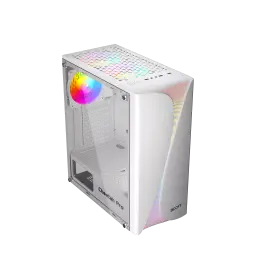
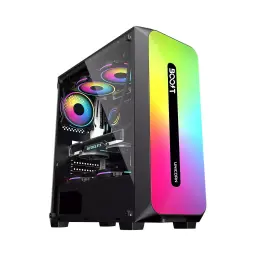
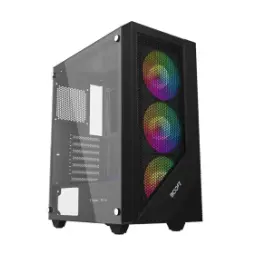
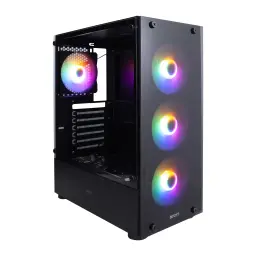
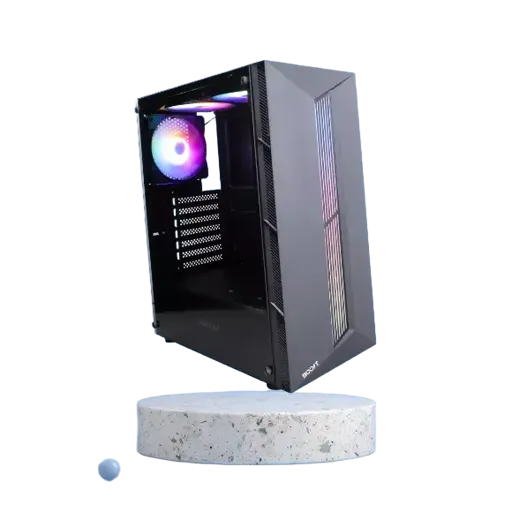
The Boost Cheetah PC Case is designed for builders who want a clean mid‑tower foundation, aur phir apni parts selection se personality add karna chahte hain. The chassis supports ATX, Micro‑ATX, and Mini‑ITX motherboards, so first time builds bhi asaani se plan ho jati hain and upgrades stay flexible. The side tempered glass panel creates a clear showcase window, jahan cable routing aur RGB theme nazar aati rehti hai without needing a flashy exterior. The included cooling setup starts strong with three RGB fans pre installed, which means you can boot up fast and tune later, bilkul builder friendly approach. The overall layout targets everyday practicality, kyun ke storage mounts, fan slots, aur front I/O sab daily use ko easy banate hain. The best part for most setups is the balanced compatibility, jahan gaming, study, editing, aur office workload sab ek hi case mein fit ho jate hain without over complicating the build
The tempered glass side panel turns internal components into part of the room’s look, aur aapki GPU, cooler, aur lighting properly visible rehti hai. The Boost Cheetah comes with a tempered glass side panel and three RGB fans included, so out of box presentation already feels complete. The front lighting and fan glow helps highlight clean cable runs, warna messy wires bohat jaldi nazar aa jate hain and the build looks unfinished. The glass choice also stays visually crisp over time, kyun ke tempered glass typically scratches less easily than acrylic and cleaning simple rehti hai with a microfiber wipe. The RGB fans are not just for looks, kyun ke initial airflow start milta hai and heat build up quickly settle ho jata hai. The end result is a case that can suit a dark stealth theme or a bright RGB vibe, bas aap apne components aur fan curves ko tune kar lein. The visual identity stays modern because tempered glass gives that premium window effect, aur aapka setup desk par more “finished” feel deta hai
The Boost Cheetah supports up to six fans, which gives you headroom to scale cooling as your CPU and GPU get hotter. The case already includes three RGB fans, so basic intake/exhaust coverage mil jati hai and you can add more only if temps demand it. The smartest approach is controlled airflow direction, jahan front intake aur rear exhaust se ek clear “air path” ban jata hai for daily stability. Noctua’s airflow foundation suggests a simple baseline like two front intakes and one rear exhaust, jo beginners ke liye bilkul straightforward start hai. The fan slots also help you target case pressure, kyun ke positive pressure setups dust management mein helpful ho sakti hain when more air enters than exits. The practical win is quieter cooling at lower RPM, kyun ke more fan positions let you spread airflow instead of forcing one fan to spin too fast. Tom’s Hardware also explains how intake and exhaust placement builds an airflow channel across CPU and GPU, which improves real world thermals in most towers. The outcome feels smooth in long sessions, heat kam rehti hai, and the PC stays consistent under gaming or rendering loads
The front radiator support makes this case ready for modern AIO cooling, especially when you want stable boost clocks under load. The Boost Cheetah supports 240mm or 280mm liquid cooling in the front, plus a 120mm mount in the rear, so layouts stay flexible for different CPU choices. The same radiator sizing is also listed by multiple retailers, which helps confirm planning for common AIO sizes without guessing. The 280mm option can be especially attractive, kyun ke larger 140mm fans often achieve similar cooling with lower noise compared to smaller 120mm designs. Corsair also notes that larger radiator surface area and 140mm fans can improve cooling and reduce noise versus smaller 120mm based designs, which matters in long gaming nights. The rear 120mm position can act as a clean exhaust anchor, jahan warm air quickly bahar nikal jati hai and case airflow stays predictable. The final benefit is practical thermal headroom, jahan aap fan noise ko control kar sakte hain and performance bohat stable feel hoti hai
The bottom mounted PSU position keeps the build’s weight balanced, aur wiring naturally neeche side par hide ho jati hai for a cleaner look. The Boost Cheetah uses a bottom PSU mount with a shroud, which helps you cover extra cable slack and keep the main chamber visually tidy. The same PSU shroud detail is also highlighted in retailer descriptions, so cable hiding and a more organized interior are part of the intended design. The shroud does more than aesthetics, kyun ke it can reduce cable clutter that blocks airflow and it makes maintenance less annoying when upgrades happen. MakeUseOf explains that PSU shrouds help with cable management and can reduce dust accumulation around the PSU area, which supports smoother long term upkeep. The airflow benefit becomes noticeable when front intakes feed the GPU area, warna loose PSU cables turbulence create kar dete hain and temps jump quickly. The build also feels more premium because the “show side” stays focused on components, aur messy stuff neatly out of sight rehta hai. The overall experience is less stressful during assembly, kyun ke routing space logically separated rehta hai and troubleshooting becomes faster
The storage layout is tuned for modern mixed use builds, jahan OS aur games SSD par and bulk files HDD par rakhna easy hota hai. The Boost Cheetah provides one 3.5 inch HDD bay and two 2.5 inch SSD mounts, which covers a common “fast + large” setup without crowding the interior. The same drive bay count is also listed on product pages, which helps builders plan storage without last minute mounting surprises. The benefit is faster daily responsiveness, kyun ke SSD on boot and apps makes everything feel snappy while HDD stays perfect for recordings, backups, and archives. darkFlash’s case buying guide highlights that checking 3.5 inch and 2.5 inch bay counts matters for future expansion planning, especially when your media library grows. The mounts also keep storage secured properly, warna loose drives vibration se noise create kar sakte hain and the build feels less refined. The result is a practical storage plan that suits students, creators, and gamers, aur aapko “space khatam ho gayi” wali tension jaldi nahi hoti. The case stays upgrade friendly because adding a second SSD later still feels straightforward, which keeps the platform relevant
The top/front I/O area matters most in daily use, kyun ke controllers, flash drives, and headsets baar baar plug in hote rehte hain. The Boost Cheetah includes one USB 3.0 port, two USB 2.0 ports, and HD Audio on the front panel, so common accessories connect without reaching behind the PC. The same front I/O set is also stated on retailer listings, which helps confirm compatibility planning with motherboard headers. The USB 3.0 port is the practical “fast lane” for external SSDs and large file transfers, aur everyday backups noticeably quicker feel hotay hain compared to older ports. USB 3.0 is commonly associated with up to 5 Gbps SuperSpeed while USB 2.0 is up to 480 Mbps, which explains why big transfers on USB 3.0 feel dramatically faster. The USB 2.0 ports still remain useful for keyboards, mice, and dongles, jahan speed se zyada stability aur convenience matter karti hai. The HD Audio jack supports clean headset routing for calls and gaming, aur desk par cable mess kam ho jata hai because the connection stays close. The end result is simple plug and play comfort that suits workdays and game nights equally
The motherboard compatibility makes this case a safe long term pick, kyun ke aap ATX se start karke later smaller boards par shift bhi kar sakte hain. The Boost Cheetah supports ATX, Micro‑ATX, and Mini‑ITX motherboards, which covers most mainstream Intel and AMD platforms for gaming and productivity. The case also offers seven expansion slots, so full size ATX builds can install large GPUs plus add in cards without feeling cramped. The seven slot layout is especially useful when a GPU takes extra thickness, warna Wi‑Fi card, capture card, ya sound card ke liye space tight ho jati hai and upgrades become annoying. darkFlash notes that PCIe expansion slot count is an important buying check, because too few slots can restrict upgrades or airflow around wider components. The practical advantage is smoother upgrade planning, kyun ke aap streaming add ons or extra controllers later install kar sakte hain without changing the case. The build also stays neat because ATX layout gives more room for header access, aur cable routing thori zyada comfortable feel hoti hai for first time builders. The overall platform feels adaptable, which keeps the case relevant through multiple hardware cycles
The real value of a PC case shows up on day one, jab build assemble hota hai and you realize what was easy versus what was frustrating. The Boost Cheetah starts with three RGB fans included, so airflow and aesthetics begin immediately without extra fan shopping. Some enthusiast cases ship with no fans at all, which can add cost and delay before the system runs cool and stable. The option to scale up to six fans keeps the ceiling high, aur aap apne GPU upgrade ke sath cooling ko match kar sakte hain instead of replacing the whole chassis. Extra fans can improve temperatures when configured well, and testing focused guides show that more fans generally help lower CPU and GPU temps across common layouts. The front 240/280mm radiator support plus rear 120mm option keeps liquid cooling realistic, aur future CPU upgrades ke liye margin mil jata hai without rethinking the case. The tempered glass and PSU shroud combination helps you build something you can display proudly, aur maintenance bhi easy rehti hai because the interior stays organized. The final takeaway is straightforward usability, jahan looks, airflow, and compatibility ek balanced package mein aa jate hain for everyday builders
Here's how current offers compare across retailers.
Review current prices and specifications side by side.
 Current
Boost
Boost Cheetah PC CaseFrom Rs. 10,999
Local price
3 offers
Updated 1 hour ago

Boost
Boost Tiger ProFrom Rs. 10,499
Local price
Lowest current price2 offers
Updated 1 hour ago