Price Breakdown & Availability
Here's how current offers compare across retailers.

You Might Also Like
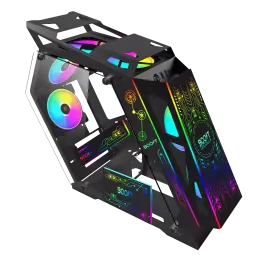
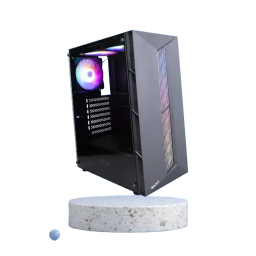
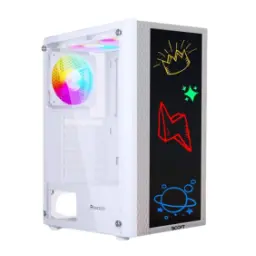
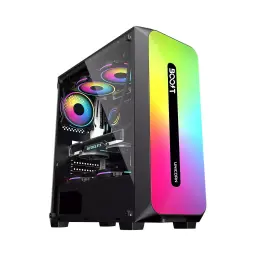
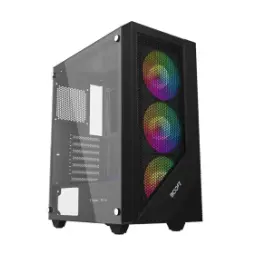
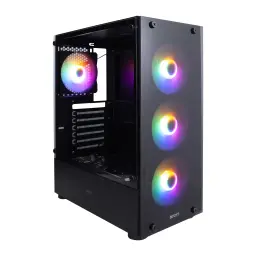
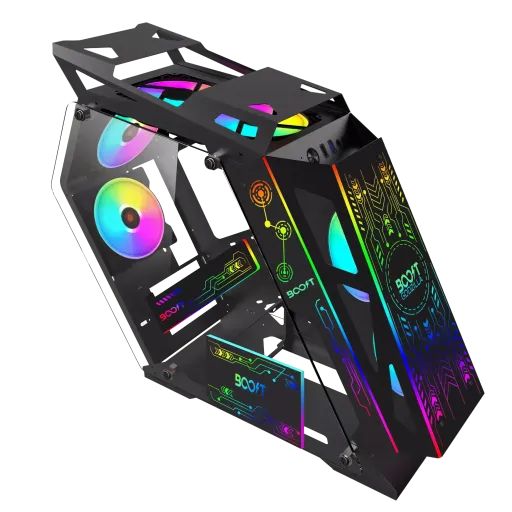
This Boost Godzilla Gaming PC Case brings a clean, gamer forward identity for builders who want a black chassis that looks organized even before the RGB turns on. The mid tower footprint balances desk space and upgrade freedom, so aap setup ko compact rakhtay huay bhi proper airflow planning kar saktay ho. The tempered glass side presentation makes your GPU, cooler, and cable routing visible, andar ki theme lighting bhi clean nazar aati hai without hiding your parts behind metal. The all black exterior stays versatile with almost any component color, chahe aap stealth build chahen ya RGB heavy look, and the chassis still looks cohesive. The case is commonly sold without pre installed fans, which means you choose your own cooling style; yeh approach un logon ko suit karta hai jo noise aur airflow apni marzi se set karna chahtay hain. The published dimensions land it firmly in the mainstream mid tower zone, making placement easy on most desks, aur side view ke liye space plan karna simple rehta hai. The overall vibe stays practical rather than flashy only, because the core layout focuses on the essentials: cooling mounts, storage spots, and front connectivity that keeps daily use smooth
The tempered glass panels turn the interior into a display zone, so your components look intentional, aur lighting spill se room vibe bhi upgrade hoti hai without extra accessories. The dual side glass listing on multiple sellers helps if you like symmetry in a setup, kyun ke left/right visibility se build ka overall look zyada “complete” lagta hai. The chassis material is described as SPCC steel, which is widely used in PC cases for strength and durability, is liye transport ya desk bumps mein tension kam hoti hai. The steel structure matters in real builds because heavy GPUs and tower coolers need a rigid frame, warna long term mein panel flex aur vibration annoy kar sakti hai. The visible layout also encourages cleaner cable routing, kyun ke glass ke peeche messy wiring instantly nazar aa jati hai, and that naturally pushes you to build neater. The front facing RGB panel and onboard lighting control are commonly mentioned in listings, so you can change the vibe quickly without opening software; yeh un logon ke liye useful hai jo simple controls pasand kartay hain. The end result is a case that supports both aesthetic and functional priorities, with glass giving the show and steel giving the stability that keeps the build feeling “settled” on the desk
The case supports up to six 120mm fans, which is a strong ceiling for a mainstream mid tower and gives you room to balance intake and exhaust properly. The biggest advantage of no pre installed fans is choice, kyun ke aap apni priority ke hisaab se quiet fans, high airflow fans, ya RGB fans pick kar saktay ho. The 120mm format is the most common size to buy and replace, and many 120mm case fans follow the standard 120 x 120 x 25 mm footprint for easy mounting. The airflow planning feels straightforward because most mid tower layouts are designed around 120mm fan positions, is liye future upgrades mein bhi compatibility ka masla usually nahi hota. The practical sweet spot for many gaming builds is a front to back airflow path, jahan front intake thandi hawa andar lata hai and rear/top exhaust heat bahar nikal deta hai. The fan ecosystem in 2025 is mature and competitive, so you can choose premium silence or budget efficiency without sacrificing stability; bas aapko apna noise tolerance set karna hota hai. The main takeaway is simple: the case gives mounting headroom, aur actual performance aapke fan selection aur placement se “make or break” hoti hai, which is exactly what experienced builders prefer
The bottom mounted PSU layout helps keep the build visually clean, because power cables can route from below and stay out of the main showcase area, haath se manage karna bhi asaan rehta hai. The practical benefit is thermal separation, kyun ke bottom mounted PSUs often pull cooler air from below instead of recycling warmer GPU/CPU air. The airflow advantage becomes more noticeable in long gaming sessions, jab GPU heat zyada ho jati hai and a separated PSU zone keeps overall temperatures more stable. The cable management outcome also improves build confidence, because fewer cables crossing the center means fewer accidental snags when upgrading RAM, storage, or GPU later on. The mid tower category is designed to balance space and usability, so a bottom PSU mount usually pairs well with modern builds that prioritize a clean main chamber. The overall result is a layout that feels easier for first time builders too, kyun ke wiring ko “hide” karne ke liye natural routes mil jate hain without complicated mods. The small habit that pays off is adding a bottom dust filter check into your routine, taake PSU intake clean rahe and performance consistent stays over months of use
The drive bay layout supports one 3.5 inch HDD plus two 2.5 inch SSDs, which is a practical mix for a fast OS drive and a larger game or media library. The real world benefit is flexibility, kyun ke aap SSD par Windows aur favorite games rakh kar load times smooth bana saktay ho, and HDD ko bulk storage ke liye use kar sakte ho. The 2.5 inch form factor is extremely common for SSD deployments, so sourcing and swapping drives stays simple when you upgrade. The 3.5 inch bay fits the desktop class HDD standard, which remains the go to choice when you need high capacity per drive for recordings, backups, and large installs. The combo also keeps cable clutter manageable, kyun ke two SSDs plus one HDD is enough for most gamers without turning the case into a wiring maze. The everyday convenience shows up when you separate “speed” and “space,” is liye system responsive feel karta hai while your storage headroom stays comfortable. The best part is upgrade pacing, because you can start with one SSD now and add the second later, aur HDD ko last mein add karke archival storage expand kar saktay ho without reinstalling everything
The case is widely listed as supporting Micro ATX and Mini ITX motherboards, which suits compact gaming builds where airflow and cable management stay easier to control. The Micro ATX and Mini ITX sizes are well defined standards, so you can plan standoffs and expansion needs ahead of time, bilkul guesswork ke baghair. Some retailer listings also mention ATX support, so agar aap full size ATX board consider kar rahe ho to standoff positions and internal clearance ko order se pehle confirm karna smart rahega. The practical difference is physical size, because ATX is larger than Micro ATX and Mini ITX, and that affects cable routing space and GPU clearance planning. The case is also listed with up to three PCI slots, which aligns more naturally with smaller boards and single GPU builds, is liye esports ya mainstream gaming rigs mein yeh layout neat rehta hai. The upgrade path still stays healthy for most users, because a single graphics card plus one add in card is a realistic target for many modern builds, aur baqi features motherboard par hi cover ho jate hain. The best buyer mindset is “fit first,” kyun ke case choice ka sab se bada win tab hota hai jab aapka board, PSU cables, and cooling mounts without compromise align ho jayein
The front I/O includes USB 3.0, USB 2.0, and HD Audio, so plugging in controllers, flash drives, or headsets stays quick during daily use. The practical advantage of a front USB 3.0 port is higher theoretical bandwidth than USB 2.0, is liye large game clips ya files copy karna less painful feel hota hai. Some listings show more than one USB 2.0 port on the panel, so you can run older peripherals easily, aur keyboard/mouse dongles ko rear ports se free rakh saktay ho. The HD Audio support matters for clean front headphone and mic routing, because many motherboards provide a standardized header for front panel audio connections. The quality of life benefit is simple, kyun ke aapko PC ke peeche haath daal kar cable dhoondhna nahi padta, and your setup stays neat for streaming or calls. The best build practice is matching the case’s front connectors with the motherboard headers you actually have, taake installation ke time pe koi surprise adapter situation create na ho. The overall front panel setup feels tuned for real routines, where quick access beats fancy extras, aur basics strong hon to daily workflow smooth rehta hai
The front RGB panel and built in lighting mode control are highlighted in product listings, which helps you set a theme quickly without relying on extra software. The visual impact gets stronger with tempered glass, kyun ke even a simple two color lighting plan looks intentional when the interior is visible from the side. The case is commonly sold without fans, so you can choose airflow first or RGB first depending on your priorities, aur yeh approach “custom build” ko genuinely custom banata hai. The reality is that even many enthusiast cases ship with limited or no fans, so adding your own fans is normal and not a drawback by default. The listing also mentions easy cable management, which matters more in glass builds because messy wiring breaks the clean look immediately, is liye thoda extra time routing par dena worth it hota hai. Some sellers mention liquid cooling support, so you can plan for an AIO later if your CPU upgrade needs it, magar compatibility ko cooler size ke saath verify karna always smart rahega. The mid tower size generally stays builder friendly, giving you enough hand space for connectors while still keeping the setup manageable, aur first build walon ko bhi overwhelm feel nahi hoti
This case fits gamers who want a show build look without going oversized, because the mid tower class is designed to balance expandability, airflow planning, and desk efficiency. The published chassis dimensions support practical placement, so aap apne monitor arm, speakers, aur cable runs ko easily plan kar saktay ho without a cramped feeling. The cooling ceiling of up to six 120mm fans gives you headroom for upgrades, kyun ke stronger GPUs and CPUs usually demand more consistent airflow as your build grows. The storage layout is simple but effective, letting you combine one 3.5 inch drive with two 2.5 inch drives for a balanced “speed plus capacity” setup. The motherboard compatibility is most consistently stated as Micro ATX and Mini ITX, with some listings also calling out ATX, is liye best practice yahi hai ke order se pehle board size confirm kar lo. The closing decision comes down to control: you get the glass and RGB aesthetic plus the freedom to choose fans, aur yeh combo typically “value per build” ko strong banata hai for builders who like doing it right the first time
Here's how current offers compare across retailers.
Review current prices and specifications side by side.

Boost
Boost Tiger ProFrom Rs. 10,499
Local price
Lowest current price2 offers
Updated 3 hours ago