



Price Breakdown & Availability
Here's how current offers compare across retailers.

You Might Also Like
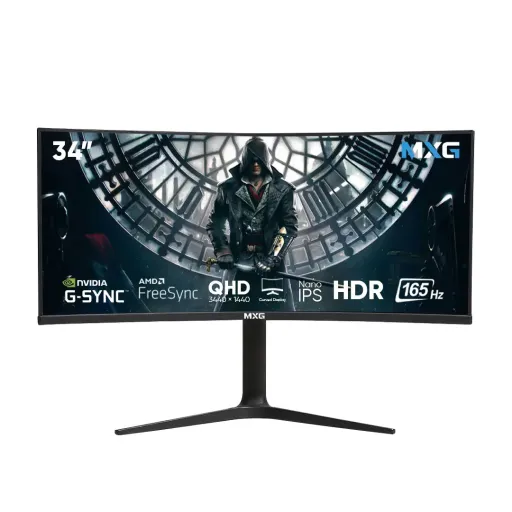
The MXG G34WIC immediately gives a more serious visual presence, and its 34 inch curved ultrawide format is clearly built to feel larger than a standard screen. The R1900 curve keeps the outer edges visually closer, is liye center se side panels tak nazar ka flow zyada natural feel hota hai during long sessions. The 3440 x 1440 resolution places it firmly in UWQHD territory, so the screen does not just look wide, it feels properly usable for serious work and immersive play. That overall shape suits racing games, cinematic content, and editing timelines especially well, kyun ke screen aap ko seedha scene ke andar pull karti hai instead of feeling flat and disconnected. The single panel layout also reduces bezels and center gaps, jo dual screen users ke liye ek cleaner visual transition create karta hai. The result is a monitor that feels expansive without feeling awkward, and that balance matters in everyday use. For buyers who want one display to look modern and work hard, this model starts with the right kind of identity
The 34 inch panel size and 3440 x 1440 resolution create a visibly roomier canvas, which means more columns, longer timelines, and broader in game environments on one screen. The wider pixel spread helps everyday multitasking feel less cramped, aur browser, chat, spreadsheet, ya editing tools ko side by side rakhna zyada practical ho jata hai. The added horizontal space also supports better visual continuity in video playback and open world titles, jahan frame ka left aur right area bilkul cut down ya boxed in nahi lagta. The panel does not rely on raw size alone, because UWQHD at this width still keeps fine text and interface detail looking controlled rather than oversized. That means routine office tasks stay comfortable while entertainment still feels big and cinematic. The curve adds to that benefit by reducing the sense that the far edges are drifting away, jo extra width ko zyada manageable banata hai. For users upgrading from a regular 27 inch or 32 inch panel, the daily difference is not subtle. This is the kind of screen space that lets your workflow breathe
The Nano IPS panel gives the MXG G34WIC a clear visual advantage, especially for buyers who want better color discipline than typical budget first gaming displays. The listings also specify 10 bit support with 1.07 billion colors, 99% DCI P3, and 100% sRGB coverage, jo content consumption aur creator facing tasks dono ko zyada convincing banata hai. That wider color handling helps gradients look smoother, skin tones stay more believable, and game worlds carry better atmosphere without looking oversaturated for no reason. The monitor is also listed at 178 degree viewing angles and up to 400 cd/m2 brightness, so off center viewing remains more consistent and the image keeps decent punch in bright rooms. That combination matters when you move around the desk, share content with someone nearby, or spend hours switching between media and productivity. Colors feel lively, lekin uncontrolled nahi. Detail looks crisp, lekin harsh bhi nahi. This is the kind of panel behavior that keeps the screen enjoyable long after the first setup
The 165Hz refresh rate is one of the strongest reasons to choose this display, because higher refresh changes how scrolling, camera movement, and cursor travel feel from the first hour. The product pages also mention 1ms MPRT with a typical 4ms response time and OD 2ms, jo fast movement ko tighter aur blur ko kam rakhne mein help karta hai. That means shooters feel more readable, racing lines stay easier to track, and even general desktop use gets a smoother, lighter character. The benefit is not only about competitive play, kyun ke fast refresh everyday animations ko bhi refined bana deta hai. Window dragging looks cleaner. Long webpage movement feels more controlled. Timeline scrubbing in media work can also feel more direct when the panel keeps up with quick hand input. If your current display feels a little smeared or sluggish, this class of refresh is a noticeable step forward. The monitor turns motion into something easier to follow, and that directly improves comfort as well as speed
The MXG G34WIC is listed with both G Sync and FreeSync support from 48Hz to 165Hz, which is important because real gameplay rarely stays locked to one perfect number. That variable sync window helps reduce tearing and visible stutter, aur frame pacing zyada composed feel hoti hai jab GPU load scene to scene change karta rehta hai. The monitor is also listed with Over Drive and HDR support, giving users extra tuning headroom for faster motion behavior and more dynamic looking content where supported. In practice, that means the screen is not built only for peak case benchmark moments. It is designed for the messy middle where actual games live, jahan FPS kabhi upar kabhi neeche hota hai. Fast titles benefit from cleaner response, while story games benefit from steadier motion and wider visual immersion. This combination makes the monitor feel more balanced than a basic high Hz panel. Smoothness stays more believable. Distraction stays lower. The experience feels stable instead of merely fast
The port selection is practical for mixed setups, with dual DisplayPort 1.4, dual HDMI 2.0, and an audio out connection listed across multiple product pages. That makes it easier to keep a desktop, console, or secondary source attached at the same time, aur cables bar bar swap karne ki zarurat kam padti hai. The monitor is also listed with PIP and PBP support, which adds genuine productivity value when you want two sources visible without fully changing your workflow. That is useful for comparing documents, monitoring a second system, or keeping reference material on screen while your main workspace stays active. The included cable management support also helps the setup stay visually cleaner, jo wide monitors ke saath especially important hota hai because loose wiring jaldi noticeable ho jati hai. Nothing here feels gimmicky. The connections are the kind you actually use. The extras support a cleaner, more flexible desk
The stand is one of the more practical strengths here, because the product pages list 150mm height adjustment, plus tilt from +5 to 15 degrees and swivel from +30 to 30 degrees. That range gives you real freedom to dial the panel into eye level, aur neck aur shoulder strain ko routine use mein kam rakhna bohat asaan ho jata hai. The monitor is also listed with VESA 100 x 100 support, so arm mount users can push the setup even further toward a cleaner or more ergonomic layout. The comfort story continues with Flicker Free and Low Blue Light support in the listings, features that matter when your screen time stretches from office work into late night gaming or media sessions. A big monitor only feels premium when it is easy to live with. This one is built to adjust around you. That makes the daily experience more sustainable, not just more impressive
The MXG G34WIC keeps its feature set broad without becoming messy, and that balance helps it feel polished in ordinary day to day use. The listings mention typical power consumption of 50W and standby power below 0.5W, jo long desk hours mein reasonable efficiency ka signal deta hai rather than unnecessary excess. The box contents are also noted to include a DP cable, power supply, and user manual, so initial setup can be more straightforward with fewer extra purchases right away. The sleek black cabinet and cable management support further help the monitor sit neatly in gaming and work spaces alike. That means the screen does not demand a dramatic room makeover to look right. It settles in cleanly. It stays practical. Even the feature mix feels intentional, kyun ke focus screen performance par rehta hai instead of distracting add ons you may never use
The strongest case for the MXG G34WIC is how well its main specifications work together, because 34 inches, UWQHD 3440 x 1440, Nano IPS, and 165Hz form a very sensible upper mid ultrawide package. The support list goes beyond the basics with 10 bit color, 99% DCI P3, adaptive sync from 48 to 165Hz, ergonomic adjustment, HDR, and multitasking tools like PIP and PBP, jo is monitor ko sirf gaming screen nahi rehne dete. That broader utility matters for buyers who game at night, work during the day, and still want color quality that looks composed on streaming, editing, and general media. The product listings also note a 2 year warranty, which adds useful peace of mind for a display intended to become the center of your desk. If you want one monitor that feels immersive, stays smooth, and still behaves like a practical daily tool, yeh combination bohat well judged lagti hai. The MXG G34WIC lands as a monitor with real range, and that is exactly what makes it worth serious attention
Here's how current offers compare across retailers.