Price Breakdown & Availability
Here's how current offers compare across retailers.

You Might Also Like
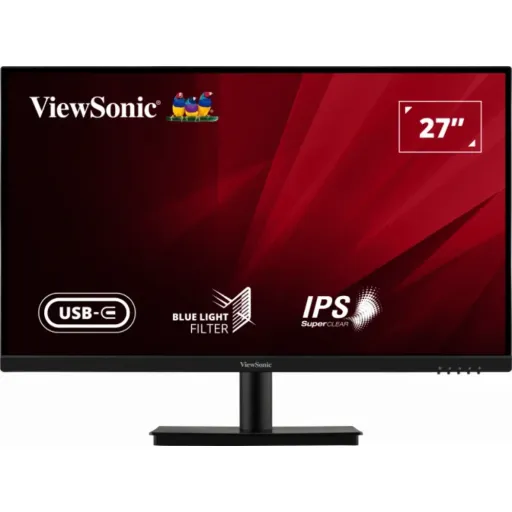
The ViewSonic VA2709U 4K is built for sharp, modern productivity in a simple package. A 27 inch IPS panel delivers 3840 x 2160 UHD detail, so small text stays crisp and spreadsheets feel less cramped. The familiar 16:9 shape keeps movies and documents naturally framed, rozana ke kaam mein layout samajh aata rehta hai, and window snapping feels intuitive. The recommended 3840 x 2160 at 60Hz keeps motion consistent for office work, timelines, and casual browsing without odd judder. The screen surface uses an anti glare finish with haze and a 3H hard coating, so reflections kam hotay hain and the panel feels more resilient in daily handling. The input set includes HDMI, DisplayPort, and USB Type C so you can switch between a laptop and desktop without hassle. The internal speakers add quick audio for calls and videos, jab external speakers ka mood na ho, while the overall footprint stays tidy. The experience is meant to feel straightforward, with practical features that support long sessions and mixed content. The result is a 4K screen that suits home office, study, and light creative routines with minimal friction
The 3840 x 2160 resolution packs detail tightly, so documents look cleaner and UI elements stay defined. The VA2709U 4K uses an IPS active matrix panel and is specified with a 0.1554 mm pixel pitch, which helps fine lines look more precise at normal desk distance. The 27 inch size hits a balanced sweet spot, kyun ke screen bara bhi lagta hai and desk space overtake nahi karta. The anti glare surface with haze and a 3H hard coating reduces distracting reflections and handles everyday cleaning more confidently. The panel also supports typical 60Hz usage at its recommended native resolution, so mouse movement and window transitions feel stable for general work. The 4K pixel count is often described as over 8 million pixels, which translates into seeing more content at once and zooming less in dashboards and editing tools. The IPS viewing behavior keeps colors and brightness more consistent, side se dekho to bhi image shift kam hota hai, which is helpful during collaborative viewing. The end benefit is simple: fewer jagged edges, clearer typography, and a more composed workspace view. This is the kind of sharpness that improves daily comfort without needing constant scaling tweaks
The HDR10 feature is designed to show more visible detail in bright and dark areas, especially when HDR capable content is used. The VA2709U 4K user guide defines HDR10 as reducing overall contrast so detail in highlights and shadows can be seen, jo scenes ko zyada readable banata hai in tricky lighting. The on screen display includes an HDR control with Auto and Off options, which makes switching simple when you move between SDR work and HDR playback. The VA2709U 4K is also commonly listed with HDR10 support alongside its UHD resolution, helping movies and modern platform UI look more dimensional. The broader HDR10 idea is that colors can appear more vivid while contrast feels richer, lekin source content HDR hona zaroori hota hai, so the experience depends on your device and apps. The practical win is cleaner highlight roll off in bright scenes and better separation in darker shots, which can help when previewing edits or watching content after work. The monitor keeps the control in your hands, so you can prioritize accuracy for documents or extra punch for entertainment. This makes HDR10 a useful option rather than a forced mode, bilkul aap ke workflow ke mutabiq
The connection options are built for modern multi device setups, so switching feels quick and predictable. The specs list HDMI 2.0, DisplayPort 1.4, and USB Type C (3.1 Gen 1) support, which covers laptops, desktops, and docking style workflows. The on screen menu shows multiple inputs including HDMI 1, HDMI 2, DisplayPort, and Type C, is liye two sources rakhna asaan ho jata hai. The rear I/O layout also includes HDMI, DisplayPort, USB Type C, and an audio out port, so your cable routing stays straightforward. The USB C link is often listed as DisplayPort Alt Mode with up to 65W power delivery, meaning one cable can carry video while charging a compatible laptop. The ViewSonic specifications note up to 65W maximum via USB Type C, which helps keep battery anxiety low during long sessions. The monitor is also specified for PC and Mac compatibility up to 3840 x 2160, so a mixed ecosystem setup stays practical. The real benefit is fewer adapters and fewer compromises, especially for USB C laptop users who want a cleaner desk
The 3 sided borderless look is meant to keep your attention on content, not bezels. The VA2709U 4K is promoted with a 3 sided borderless screen for a clean aesthetic and better multi monitor continuity, jahan seams kam nazar aati hain. The frameless concept is widely positioned as nearly seamless for dual screen setups, because thinner borders reduce the visual break between displays. The physical footprint stays manageable for a 27 inch class monitor, with listed dimensions of 613.8 x 455.9 x 203 mm for the unit with stand. The weight is specified at 4.9 kg, which makes arm mounting and repositioning more convenient than heavier, bulkier panels. The VESA mount pattern is 100 x 100 mm, so you can shift to an arm for a floating setup and better cable hiding, bilkul neat look ke liye. The anti glare surface supports this design goal by keeping reflections under control in open rooms and bright desks. The overall result is a screen that looks modern even when turned off, and feels more immersive once you start stacking windows across space
Long screen hours feel easier when comfort features are practical and adjustable. The VA2709U 4K OSD includes a Blue Light Filter slider (0 to 100), so you can tune warmth for late night reading without over yellowing the whole picture. The monitor is also commonly listed as Flicker Free with low blue light support, jo extended browsing aur documents ke liye helpful hota hai. The Eye ProTech positioning is typically described as combining flicker free and blue light filter technologies to alleviate digital eye strain, which matches the kind of comfort stack people want for daily use. The flicker free approach is explained as avoiding backlight on/off pulsing by using DC modulation backlights, which can reduce eye strain and fatigue during long sessions. The broader eye care framing also includes using anti flicker plus blue light filtering as part of a holistic comfort strategy, rozana ke routine mein headaches ki tension kam hoti hai. The monitor also provides preset viewing modes like Text and Web, so you can quickly shift to a softer profile when the day becomes screen heavy. The practical takeaway is controlled comfort, not forced warmth, which helps you stay consistent across work, study, and entertainment
Built in audio matters when you want fewer devices on the desk. The VA2709U 4K includes two integrated 2.5W speakers, which work well for meeting audio, quick YouTube checks, and casual playback. The on screen audio controls include Volume and Mute settings, so adjusting sound is simple without hunting inside OS menus, asaani se control ho jata hai. The rear I/O also lists an Audio Out port, which lets you upgrade to headphones or external speakers when you want deeper sound. The advantage is speed and cleanliness, because a basic sound option is always available even if your laptop is docked closed. The speakers are best treated as a convenience layer, bilkul everyday use ke liye, while serious music or cinematic bass still belongs to dedicated speakers. The monitor keeps the setup flexible by letting you choose the audio path depending on the moment. This is especially useful in small rooms where cables and accessories quickly become visual clutter. The result is a more streamlined workstation that still handles mixed media without extra purchases
A VESA mount option changes how your desk feels day to day. The VA2709U 4K supports a 100 x 100 mm wall mount pattern, so monitor arms can lift the screen to eye level and free space for notebooks and accessories. The user guide includes steps around removing the stand and mounting the display, which helps keep installation predictable even for first time arm users. The guide also references tilt angle adjustment, so you can fine tune viewing comfort once the screen is positioned, posture theek rehti hai and glare angles manage ho jate hain. The listed chassis weight of 4.9 kg supports practical arm pairing, especially if you choose a mount rated comfortably above that number. The rear also includes a security slot, which can matter in shared spaces where hardware walks away easily. The everyday benefit is a setup that feels more ergonomic and intentional, with cables routed down an arm rather than across the desk. This kind of physical flexibility is often what turns a normal workspace into a calm, repeatable routine
The best experience starts with using the native resolution. The recommended setting is 3840 x 2160 at 60Hz, which keeps text sharp and motion consistent for typical productivity and streaming use. The monitor is specified for PC and Macintosh compatibility up to 3840 x 2160, so pairing with modern Windows systems and Macs stays straightforward, bas sahi cable choose karna hota hai. The input list includes HDMI, DisplayPort, and USB Type C, and the OSD input menu shows HDMI 1, HDMI 2, DisplayPort, and Type C for fast switching. The USB C path is commonly listed with DisplayPort Alt Mode and up to 65W laptop charging, which supports a one cable desk for compatible notebooks. The HDR10 option is available in the monitor controls and is described as revealing detail in highlights and shadows, so enabling it can make compatible video look richer after work. The power profile is listed at 32W typical without audio and up to 0.3W off, which helps keep daily running costs sensible for always on desks. The closing logic is simple: if you want a 27 inch 4K IPS screen with USB C convenience, eye comfort controls, and VESA flexibility, this model sits in a practical performance tier without adding unnecessary complexity
Here's how current offers compare across retailers.