
Price Breakdown & Availability
Here's how current offers compare across retailers.
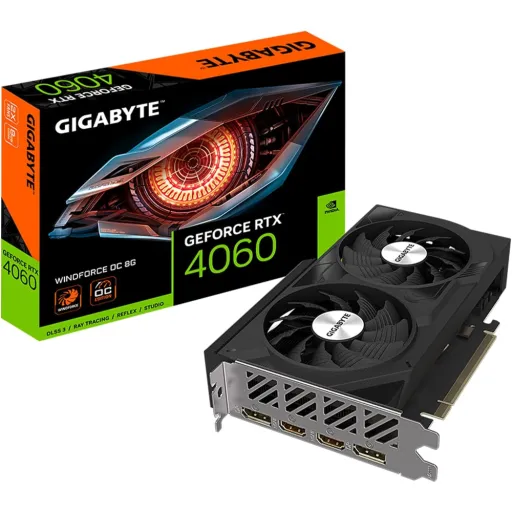

Gigabyte GeForce RTX 4060


You Might Also Like
This Gigabyte GeForce RTX 4060 is designed for efficient, modern gaming that feels smooth in real rooms, rozana ke sessions mein bhi. The GPU leans on NVIDIA’s Ada Lovelace architecture, so you get new gen features without turning your PC into a space heater. The core configuration includes 3072 CUDA cores, which is a practical sweet spot for high FPS 1080p and balanced 1440p presets when settings are tuned smartly. The official boost clock for RTX 4060 is 2.46 GHz, meaning quick bursts stay snappy during fights, transitions, and heavy scene changes. An 8GB GDDR6 memory pool keeps popular titles and daily apps comfortable, aur textures reasonable rakh ke gameplay tension free hota hai. A 128 bit memory interface signals a focused mainstream design, jo efficiency ko prioritize karta hai while still keeping visuals clean. A Gigabyte example like the RTX 4060 GAMING 8G also lists 8GB GDDR6 on a 128 bit interface and a 2460 MHz core clock, so the “Gigabyte RTX 4060” experience aligns with the reference goals
Modern games feel better when motion stays consistent, aur yahan DLSS 3 wali approach practical advantage deti hai. NVIDIA explains DLSS 3 as AI powered frame generation built on GeForce RTX 40 Series hardware, which can massively boost performance in supported titles. The fourth generation Tensor Cores inside Ada Lovelace are positioned to accelerate AI workloads and DLSS, so you can push visuals while keeping input feel responsive. Gigabyte’s RTX 4060 GAMING 8G page highlights DLSS 3 and calls out “up to 4x performance” messaging versus brute force rendering, which signals what the platform is built to leverage. Real world results depend on the game engine and settings, lekin DLSS modes ka benefit yeh hota hai ke aap FPS ko stabilize karte ho without making everything look blurry. Smart players often pair DLSS with sensible texture and shadow settings, taa ke image crisp rahe and frametimes smooth stay. Competitive moments feel more controllable when frame delivery is steady, aur aim tracking mein woh “micro stutter” wali feeling kam hoti hai. Everyday PC use also feels refined because the card’s AI acceleration focus supports modern pipelines, not just raw raster output
Ray traced lighting looks impressive when it stays playable, aur RTX 4060 ka goal bhi yahi balanced experience hai. NVIDIA positions Ada as a ray tracing and neural graphics focused architecture, which is why RTX 40 Series is commonly paired with DLSS and RT together. The same architecture page describes third generation RT Cores with higher ray triangle intersection throughput and over 2x RT TFLOP performance claims, which matters when reflections and shadows get heavy. Gigabyte’s RTX 4060 GAMING 8G listing also emphasizes full ray tracing support and third gen RT cores, so the card is clearly aimed at modern effects rather than only classic rendering. Practical tuning helps most in real use, kyun ke ultra RT settings sometimes demand compromises in resolution or effects. DLSS 3 can help you keep the “cinematic” vibe while maintaining a comfortable FPS target, especially in titles that support frame generation. Visual immersion improves when shadows are softer and reflections behave naturally, aur game world zyada real lagta hai without constant performance dips. The best outcome comes from pairing ray tracing with the right preset choices, so your gameplay stays smooth and your visuals stay modern
An 8GB GDDR6 frame buffer is a practical baseline for modern 1080p play, aur 1440p par bhi kaafi games handle ho jati hain with smart settings. The official RTX 4060 spec table shows 8GB GDDR6 and a 128 bit memory interface width, which tells you exactly where this GPU is positioned. TechPowerUp lists the RTX 4060 memory bus at 128 bit with 8GB GDDR6 and notes a 2460 MHz boost clock, matching the core identity you are buying into. TechPowerUp also reports 17 Gbps effective memory speed and about 272 GB/s bandwidth, which is enough for clean texture streaming at mainstream targets when you avoid unnecessary ultra packs. This memory design rewards sensible graphics choices, matlab aap high textures enjoy karte ho but you keep an eye on VRAM heavy extras. Open world titles can feel smoother when VRAM stays under control, warna sudden stutters aa sakte hain during fast travel or city scenes. Good settings discipline makes the card feel more premium than its class suggests, and the experience stays consistent
Thermal stability matters because consistent clocks feel smoother, aur long sessions mein fan noise aur heat dono noticeable hotay hain. Gigabyte’s RTX 4060 GAMING 8G product page lists the WINDFORCE cooling system, positioning it as part of the everyday reliability story. Gigabyte describes WINDFORCE with three 80mm fans, alternate spinning, composite copper heat pipes touching the GPU, and screen cooling for heat dissipation, which aims to keep boost behavior stable. Gigabyte also mentions semi passive behavior where fans can remain off at low load, so idle browsing and light work stays quieter, bilkul relax feel. Gigabyte further claims graphene nano lubricant can extend sleeve bearing fan life by 2.1 times, which supports long term “set it and forget it” ownership. Different Gigabyte RTX 4060 variants can have different clocks and cooler layouts, is liye purchase se pehle exact model page check karna smart hota hai. Gigabyte’s RTX 4060 WINDFORCE OC 8G page shows a 2475 MHz core clock with reference noted as 2460 MHz, so some models add a small factory uplift for extra headroom. Better cooling and modest OC together typically translate into steadier frametimes, which keeps gameplay feeling controlled
Efficient power draw is one of RTX 4060’s biggest wins, kyun ke daily gaming mein heat kam ho to comfort barhta hai. NVIDIA lists RTX 4060 Total Graphics Power at 115W, which helps the card fit into many existing builds without PSU panic. NVIDIA also shows an average gaming power figure of 110W for RTX 4060, which matches the “mainstream efficiency” identity in real usage. Tom’s Hardware similarly notes the RTX 4060 “only needs 115W of power,” reinforcing why it is popular for practical upgrades. NVIDIA’s specs table lists a 550W required system power guideline, which is a safe planning number for many mainstream rigs with modern CPUs. NVIDIA also notes supplementary power connectors can vary by manufacturer model, so some boards may use 8 pin or even 6 pin depending on the design. Lower power usually means fans do not need to ramp aggressively, aur room ka temperature bhi itna spike nahi hota. Overall efficiency keeps the experience calmer, and your gaming sessions stay comfortable
Content creation feels faster when encoding is modern, aur RTX 4060 ki platform features yahan genuinely useful ban jati hain. NVIDIA’s Ada architecture page states RTX 40 series cards include eighth generation NVENC with AV1 encoding, which targets better efficiency than older H.264 workflows. NVIDIA’s Studio focused blog also discusses AV1 coming with RTX 40 Series NVENC and highlights the encoder efficiency benefits for livestreamers, so streams can look cleaner at the same bitrate. Gigabyte’s RTX 4060 GAMING 8G page directly frames the card as “built for live streaming” with NVIDIA Encoder support, which aligns with the creator friendly positioning. NVIDIA also lists AV1 encode support as “Yes” for RTX 4060 in the technology support area, which is a practical checkbox for modern OBS and creator pipelines. Creative apps benefit when exports are quicker and previews stay smoother, aur workflow ka flow break nahi hota during edits. Voice and video enhancement stacks also become more accessible when the GPU supports modern acceleration features, so calls and recordings feel cleaner. This makes the RTX 4060 a strong “hybrid” pick for gaming plus creation, without needing a high watt card
A smooth upgrade starts with easy compatibility, aur RTX 4060 ka platform support generally simple integration offer karta hai. NVIDIA lists PCI Express Gen 4 support for RTX 4060, which fits into most modern motherboards without special tuning. TechPowerUp specifies the RTX 4060 interface as PCIe 4.0 x8, which is important to know if you are planning older boards or bandwidth sensitive setups. TechPowerUp also lists display outputs as HDMI 2.1 and DisplayPort 1.4a, giving you practical options for high refresh 1080p or sharp 1440p monitors. NVIDIA notes multi display support scenarios and modern HDMI 2.1a behavior in the footnotes, which helps if you want a desk setup with multiple panels, asaani se productivity bhi ho jati hai. Cable planning becomes easier when ports match current monitors, so you avoid adapters that can introduce weird issues. Everyday usability improves when your main display and a second screen both run comfortably, and the setup stays stable
A smart GPU buy is about matching expectations, aur RTX 4060 ka strongest case mainstream 1080p smoothness hai. Tom’s Hardware calls the RTX 4060 “built for mainstream 1080p gaming,” which is the most honest way to frame what you should expect day one. TechPowerUp also labels recommended gaming resolutions including 1920x1080 and 2560x1440, which suggests the card can stretch upward when settings are chosen wisely. NVIDIA’s official specs confirm 3072 CUDA cores and a 2.46 GHz boost clock, so baseline responsiveness remains strong even when games get busy. The 8GB GDDR6 and 128 bit interface are also officially stated, meaning very heavy texture packs might need adjustment, warna VRAM pressure se hitching aa sakti hai. DLSS 3 support can be a meaningful advantage in supported games, kyun ke it helps keep FPS high without dropping detail too aggressively. The overall package makes sense for gamers who want efficient performance, creators who want AV1, and builders who want an upgrade that stays cool and stable
Here's how current offers compare across retailers.
Review current prices and specifications side by side.
 Current
Gigabyte
Gigabyte GeForce RTX 4060From Rs. 93,999
Local price
Lowest current price1 offer
Updated 23 hours ago
Gigabyte
Gigabyte GeForce RTX 5090From Rs. 1,539,999
Local price
3 offers
Updated 22 hours ago
Gigabyte
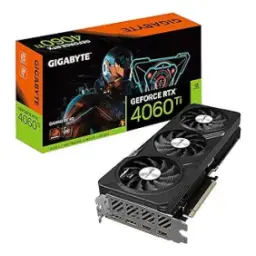
GIGABYTE GeForce RTX 4060 TiFrom Rs. 110,990
Local price
1 offer
Updated 23 hours ago