Price Breakdown & Availability
Here's how current offers compare across retailers.

You Might Also Like
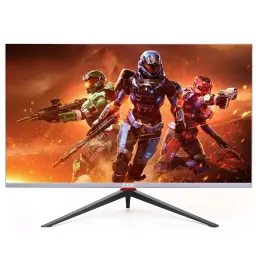
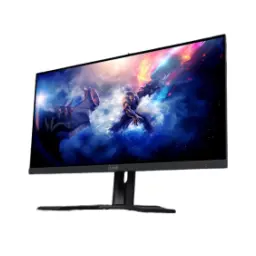
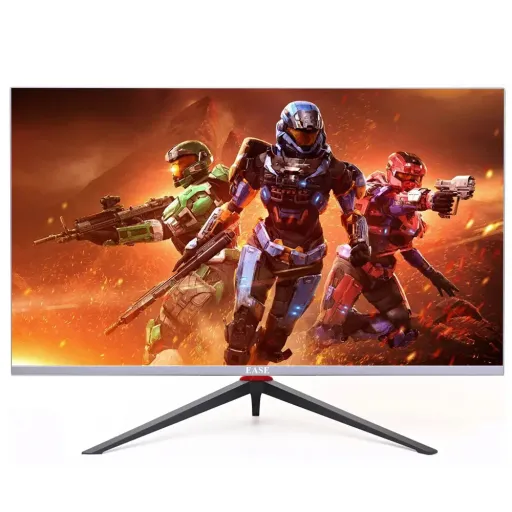
This 32 inch gaming monitor is built for immersion, giving you a wide canvas that feels instantly more “in the game” while still staying sharp for daily work. The EASE G32I16 uses a 32 inch IPS panel, so colors stay consistent when you lean back or shift your chair, aur side angles se bhi image stable rehti hai. This screen targets the sweet spot of WQHD detail with a 2560 x 1440 resolution, which keeps text cleaner than 1080p and makes maps, HUDs, and timelines easier to read. This fast refresh setup pushes up to 165Hz, so camera pans and quick swipes feel responsive, bilkul “smooth scrolling” wali feel aati hai in menus and browsers too. This model also highlights an adjustable and moveable stand option, which matters more than people expect once long sessions start, posture set hoti hai and fatigue kam hoti hai. This monitor adds a light effect vibe for a cleaner battle station mood, so your setup looks intentional without forcing loud styling. This overall identity fits players who want competitive smoothness plus a bigger 2K workspace, rozana ke kaam aur gaming dono ek screen par asaani se ho jate hain
This WQHD resolution delivers a noticeable jump in clarity, making small UI icons, subtitles, and spreadsheets feel more readable at normal viewing distance. The panel runs at 2560 x 1440 and is paired with the 32 inch size, so you get a broad desktop that supports real multitasking, aik saath do teen windows rakhna easy ho jata hai. This IPS panel design also leans into wide viewing angles, listed up to 178 degrees horizontal and vertical, which helps when friends watch from the side or when you pivot the screen. This monitor’s listed brightness reaches 300 cd/m2, giving you solid headroom for typical indoor rooms where curtains are not always perfect. This contrast level is listed at 1000:1, which is a familiar IPS profile that keeps scenes balanced without crushing mid tones, blacks deep nahi hotay lekin detail readable rehti hai. This model is also listed with HDR support, which can help compatible content look more dynamic, especially when highlights need extra punch. This color support is presented as 1.07B / 100% sRGB (10 bit) on the spec sheet, which suits creators who want consistent web color work along with gaming, colors natural aur controlled feel hotay hain. This visual foundation matters because smooth motion is only half the story, while crisp pixel detail keeps everything looking premium in everyday use
This 165Hz refresh rate is the feature you notice first, because high speed movement stops looking smeared and starts looking controlled during flick shots and fast turns. The EASE G32I16 is listed at 2560x1440 at 165Hz, which gives you both detail and speed in one profile, gameplay mein motion blur kam feel hota hai. This kind of high refresh is also described by gaming monitor makers as a way to reduce lag and motion blur perception, so reactions feel more direct when scenes move quickly. This monitor includes an Over Drive support listing, which typically helps tighten pixel transitions for clearer motion edges in fast content, setting the feel closer to “clean” rather than “ghosty.” This matters for esports titles where micro adjustments decide fights, aur screen par moving targets zyada readable rehte hain. This 32 inch size also changes how motion feels, because your peripheral vision gets more involved without forcing a multi monitor setup. This refresh headroom helps in daily scrolling too, so long documents and timelines glide more naturally, rozana ke use mein bhi farq nazar aata hai. This is the kind of upgrade that improves “feel” even when your brain stops thinking about specs, because the motion pipeline stays consistently fluid
This monitor supports Adaptive Sync with FreeSync Premium, which is designed to align the display refresh with your GPU’s frame output so movement stays consistent instead of tearing. The EASE G32I16P product description explicitly mentions Adaptive Sync (FreeSync Premium) for smoother gameplay without tearing and stuttering, aur yeh competitive titles mein bohat practical benefit ban jata hai. This FreeSync behavior is described by AMD as synchronizing refresh rate with framerate to reduce artifacts like screen tearing and stuttering, which is exactly what makes variable refresh feel “natural” in motion. This Premium tier is also associated with Low Framerate Compensation (LFC) requirements in AMD’s guidance, which helps when frame rates dip and you still want smoother motion continuity. This matters most in heavy scenes where FPS fluctuates, kyun ke sudden drops par bhi experience zyada stable rehta hai instead of looking choppy. This kind of adaptive sync is also framed by major monitor brands as reducing tearing and stutter while maintaining smoother flow, which matches the real world goal for shooters and racers. This feature is especially valuable at 165Hz, because high refresh makes inconsistencies more obvious when frames are not paced well. This means your upgrades stay flexible, since you can tune settings for stable frame pacing rather than chasing a single locked FPS number, aur tearing ki tension kam ho jati hai
This adjustable stand design helps you dial in posture, because a 32 inch panel feels best when the top edge and viewing distance are set correctly for your chair and desk. The light effect variant lists an adjustable stand with light effect, so your setup gets a subtle visual identity without needing extra RGB accessories, aur desk ka look more premium lagta hai. This stand is detailed with around 13cm height adjustment along with 45 degree horizontal rotation and 90 degree vertical rotation, which gives real flexibility for different seating positions or shared spaces. This kind of pivot capability is useful for coding, reading, and vertical feeds, kyun ke portrait mode mein lines aur chats zyada comfortably read hotay hain. This monitor also lists tilt support from 0 to +20 degrees, making it easier to reduce reflections and align the panel to eye level. This ergonomic adjustability is not just “nice to have,” because long sessions can quietly build neck strain when the screen is too high or too low. The flexible stand approach becomes even more important on 32 inches, jahan slight angle changes se comfort noticeably improve hoti hai. This overall build direction supports both gaming and productivity habits, so the screen adapts to your routine instead of forcing you to adapt
This port selection makes daily switching easier, because you can keep a PC and console connected without constantly moving cables. The connectivity list includes DisplayPort (v1.2), HDMI (v2.0), and an earphone jack, so audio routing and source switching stay straightforward, asaani se headset laga kar late night sessions ho jate hain. This model is also listed with two DisplayPort inputs and two HDMI 2.0 inputs plus an audio out port, which is helpful for multi device households and shared desks. This matters for 165Hz workflows, because DisplayPort connections are commonly used to unlock higher refresh profiles on many setups, aur settings mein options zyada clear nazar aate hain. This DisplayPort 1.2 generation is widely noted for increased bandwidth versus earlier revisions, enabling higher resolutions and refresh rates in general display use cases. This monitor’s “rich connectivity” positioning is repeated in listings that call out DP v1.2 and HDMI v2.0 explicitly, reinforcing that it is meant to plug into modern devices with minimal friction. This kind of connectivity flexibility keeps your setup clean, because one monitor can handle a work laptop dock style and a gaming tower without drama. This is the practical layer of ownership that feels good after the first week, jab aapko cables aur adapters ki tension kam ho jati hai
This monitor is built for longer sessions, because comfort features matter when you are grinding ranked matches or finishing deadlines late at night. The spec listing includes Flicker Free support, which aims to reduce visible flicker fatigue so you can stay focused longer, aankhon par strain kam hota hai over time. This model also lists a Low Blue Light mode, which is useful when you want a warmer tone for reading, editing, and evening browsing without feeling harsh. This combination is commonly positioned by major monitor brands as enabling extended play with less distraction and eye strain, which aligns with how people actually use high refresh monitors daily. This is especially relevant on a 32 inch screen, because you tend to sit a bit farther back and keep it on for longer, rozana ke use mein screen time easily add up ho jata hai. This flicker free and low blue approach pairs well with IPS viewing stability, since your eyes do not have to fight sudden color shifts when you move around. This means the screen can be an all day display, not just a “gaming only” panel for weekends. The result is a more sustainable setup where performance and comfort stay balanced, bilkul practical long term use ke liye
This 32 inch 2K format supports multitasking naturally, because you can place two full size windows side by side without feeling cramped. The screen runs at 2560 x 1440, which gives more workspace than 1080p for editing panels, dashboards, and chat overlays, aur content creation mein bhi layout zyada roomy lagta hai. This refresh rate can reach 165Hz, so even non gaming tasks like timeline scrubbing and scrolling feel more immediate when you are moving through content quickly. This panel type is IPS, which keeps colors and contrast stable across angles, helping when you are collaborating or when your seating position changes during the day. This monitor also lists VESA mount support at 100 x 100mm, which opens up clean arm mount setups for better desk space and better posture. This stand and mount flexibility matters when you build a dual screen station, kyun ke alignment aur symmetry setup ko next level par le jati hai. This package positioning includes essentials like DP and HDMI connectivity plus audio out, which keeps the monitor ready for mixed device lifestyles without extra adapters. This is why the G32I16 fits a competitive and productive routine, because it blends high refresh smoothness with a big, sharp workspace that stays practical every day
Here's how current offers compare across retailers.
Review current prices and specifications side by side.
EASE
EASE O19I10Rs. 21,590
Local price
Lowest current price6 offers
Updated 9 hours ago